• Skip to primary navigation
  • Skip to main content
  • Skip to primary sidebar

Yellow Bricks

by Duncan Epping

  • Home
  • Unexplored Territory Podcast
  • HA Deepdive
  • ESXTOP
  • Stickers/Shirts
  • Privacy Policy
  • About
  • Show Search
Hide Search

5.0

ESXi Quiz (#VSP1956) – The Teams! (#vmworld / #epic)

Duncan Epping · Aug 16, 2011 ·

I guess most of you have been waiting for this moment… the moment for the three teams to be announced. I can assure you that you will not be disappointed. All of the people on these three have an excellent reputation and are eager to have their shot at the title of all titles. Who will take back that championship trophy home? First let me announce the teams:

vExpert Team – The Raging vBulls

  • Chad “Warrior-Monk” Sakac
  • Jason “vTerminator” Boche
  • Maish “vBeliever” Saidel-Keesing
  • Eric “Link Master” Siebert

vExpert Team – vPredators

  • Vaughn “Sgt NFS” Stewart
  • Tom “VDI Warrior” Howarth
  • Mike “Axel” Foley
  • Scott “VMGuru” Herold

VMware Team – vRaminators

  • Frank “distributed” Denneman
  • John “VCDX 001” Arrasjid
  • Kit “VC Ops” Colbert
  • Massimo “Hybrid Cloud” Re Ferre

The vExpert Teams will battle each other in the first round… The team who wins will take on the VMware Employee Rockstar team and believe that will be a tough challenge, but I count on the vExpert team to win! I cannot say often enough how excited I am about this show, I guarantee that it will be epic. The show will be hosted by no one less than Mr John “the quiz master” Troyer himself and will have a judges panel with Eric Sloof, Duncan Epping and a special guest!
Partitioned Cluster with HA vSphere 5, who owns what?

Duncan Epping · Aug 12, 2011 ·

I received a question today about a partitioned clusters (in vSphere 5.0) with HA. The question was which Master would own which VMs when a partition exists and how is determined which master can own which VM? I have already briefly explained the difference between an isolation and a partition. Now it is good to realize that when a partition exists the new master may take responsibility for VMs. I used “may” intentionally as there is no guarantee it will own any VMs at that point, so why is this and how does it take ownership of VMs?

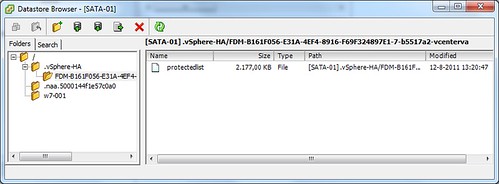
A master takes ownership of VMs by locking a file on the datastores it is connected to. As soon as the master has an exclusive lock it owns the virtual machines that have their config file on the datastore. (Note that HA cares about the .vmx file and not the VMDK of the VMs.) The file is called “protectedlist” and is stored on each of the datastores under the .vSphere-HA folder as shown in the screenshot below.

Now a master will only release the lock on that file when it is placed in to maintenance mode, removed from the cluster, loses access to the datastore, is rebooted etc. If and when that would happen the other master(s) would take ownership of the VMs which are located on that datastore by locking that file. So what does that mean?  That does indeed mean that in a “normal” situation even though you have two or more masters in a cluster, due to the fact the cluster is partitioned, you would still only have 1 master being responsible for all VMs in that cluster. Unless… unless that master is indeed placed in maintenance mode, loses access to the datastore etc.

Hope that clarifies things,

** edit: changed the wording to clarify the behavior of the master with regards to owning VMs **

vSphere 5.0 HA: Application Monitoring intro

Duncan Epping · Aug 11, 2011 ·

I don’t think anyone has blogged about App Monitoring yet so I figured I would do a “what’s new / intro” to App Monitoring in vSphere 5.0. Prior to vSphere 5 App Monitoring could only be leveraged by partners which had access to the SDK/APIs. A handful of partners leveraged those of which probably Symantec’s ApplicationHA is the best example. The “problem” with that though is that you would still need to buy a piece of software while you might have in-house development who could easily bake this into their application… well with vSphere 5 you can. I grabbed one of the latest code drops and started playing around. Note that I am not going to do an extensive article on this. Just showing what you have after installing the package. In my case I installed it on a Windows VM.

Now first of all after installing the package you will have new executable. This executable allows you to control App Monitoring offers without the need to compile a full binary yourself. This new command, vmware-appmonitoring.exe, takes the following arguments, which are not coincidentally similar to the functions I will show in a second:

  • Enable
  • Disable
  • markActive
  • isEnabled
  • getAppStatus

When running the command the following output is presented:

C:\VMware-GuestAppMonitorSDK\bin\win32>vmware-appmonitor.exe
Usage: vmware-appmonitor.exe {enable | disable | markActive | isEnabled | getApp Status}

Now I guess most parameters speak for itself. “Enable” will allow you to switch on App Monitoring and “Disable” turns it off again. “IsEnabled” will give you the current status, is it on or off? The “getAppStatus” tells what the status is of your app, is it healthy and has it been sending heartbeats regularly, well than the result will be green if there is a real issue than it will be red. (There’s also gray which means HA just picked up on the VM it’s status needs to be cleared and monitoring should be started soon) Now the one that is most important is “markActive”. This parameter needs to be called at least every 30 seconds. This is the heartbeat parameter. In other words “markActive” is what informs HA that the application is still alive!

I am sure that as soon as William Lam gets his hands on the package he will go wild and release a bunch of scripts which will allow you to enhance resiliency for application/service. These parameters can also be used by your development team, but in the form of a function. The Application Awareness API allows for anyone to talk to it using different types of languages like C++ and Java for instance. Currently there are 6 functions defined:

  • VMGuestAppMonitor_Enable()
    Enables Monitoring
  • VMGuestAppMonitor_MarkActive()
    Mark application as active, recommend to call this at least every 30 seconds
  • VMGuestAppMonitor_Disable()
    Disable Monitoring
  • VMGuestAppMonitor_IsEnabled()
    Returns status of Monitoring
  • VMGuestAppMonitor_GetAppStatus()
    Returns the current application status recorded for the application
  • VMGuestAppMonitor_Free()
    Frees the result of the VMGuestAppMonitor_GetAppStatus() call

These functions could be used by your development team to enhance resiliency in a simple way. This is just the start however, I personally would like to see some sort of rolling patch process added on top and for instance the ability to restart service or have a partial VM failure. Or even the hint the hypervisor that there is a partial failure and request a vMotion to a different host to validate if that solves the problem… If you feel there’s something that needs to be added to App Monitoring let me know and I’ll make sure the PM/Dev Team reads this thread.

** disclaimer: some of this info was taken from the vSphere 5.0 Technical Deepdive book **

vSphere License Advisor – the official tool – finally available

Duncan Epping · Aug 11, 2011 ·

I know many of you have been waiting on this so I figured I would report it is available. You can find the official vSphere License Advisor on here. I know many have used Alan’s script, and some couldn’t use it because it didn’t support VI3. The vSphere License Advisor will work in environments with Virtual Infrastructure 3.5, vSphere 4.0 and vSphere 4.1 so pick it up and run it.

vCenter Appliance

Duncan Epping · Aug 10, 2011 ·

I was playing around in my lab and figured I would give the vCenter Appliance (VCVA)  a try. I realize that today there are limitations when it comes to the vCenter Appliance and I wanted to list those to get them out in the open:

  • No Update Manager
  • No Linked-Mode
  • No support for the VSA (vSphere Storage Appliance)
  • Only support for Oracle as the external database
  • With the embedded database it supports 5 hosts and 50 VMs
    • vSphere 5.0 embedded database uses DB2
    • vSphere 5.0 Update 1 and higher uses vPostgres
  • No support for vCenter Heartbeat

Now that you’ve seen the limitations why would you even bother testing it? You will still need Windows if you are running VUM and you can only use Oracle for large environments… Those are probably the two biggest constraints for 80% of you reading this and I agree they are huge constraints. But I am not saying that you should go ahead and deploy this in production straight away, I do feel that the VCVA deserves to be tested as it is the way forward in my opinion! Why? Most importantly, it is very simple to implement… Seriously setting it up takes a couple of minutes. You just import the OVF, accept the EULA, select the correct database type and start the vCenter service. Without any hassle it also includes the following services:

  • vSphere Web Client
  • vCenter Single Sign On (SSO)
  • vSphere Auto Deploy Server
  • ESXi Dump Collector
  • Inventory Service
  • Syslog Collector

But that’s not all… If you look at it from a strategic perspective this is the first step. A first step towards a possible distributed vCenter solution, and I know some of you have been waiting on that for a while, so why not get your hands dirty straight away and start testing it.

If you want to know how to deploy the vCenter 5.1 Appliance I highly recommend reading this article.

**info updated – 1st of february 2013**

  • « Go to Previous Page
  • Page 1
  • Interim pages omitted …
  • Page 24
  • Page 25
  • Page 26
  • Page 27
  • Page 28
  • Interim pages omitted …
  • Page 33
  • Go to Next Page »

Primary Sidebar

About the Author

Duncan Epping is a Chief Technologist and Distinguished Engineering Architect at Broadcom. Besides writing on Yellow-Bricks, Duncan is the co-author of the vSAN Deep Dive and the vSphere Clustering Deep Dive book series. Duncan is also the host of the Unexplored Territory Podcast.

Follow Us

  • X
  • Spotify
  • RSS Feed
  • LinkedIn

Recommended Book(s)

Also visit!

For the Dutch-speaking audience, make sure to visit RunNerd.nl to follow my running adventure, read shoe/gear/race reviews, and more!

Do you like Hardcore-Punk music? Follow my Spotify Playlist!

Do you like 80s music? I got you covered!

Copyright Yellow-Bricks.com © 2026 · Log in