I was playing in my lab this morning and figured I would record a demo of a new feature which is part of vSAN 6.6.1. The Performance Diagnostics feature is aimed to help those running benchmarks to optimize their benchmarks, or optimize their vSAN configuration to reach their expected goals. Note that it is a “cloud connected” feature, and in order to use this you need to participate in the Customer Experience Improvement Program. This however is enabled by default in the latest releases of vSphere. This means that data is send up to the VMware cloud, anonymous, then analyzed and the results are send back to the Web Client. Anyway, enough said, just watch the demo.
Can you use the management IPs as the isolation address for HA?
There was a question on VMTN this week about the use of the management IP’s in a “smaller” cluster as the isolation address for vSphere HA. The plan was to disable the default isolation address (default gateway) and then add every management IP as an isolation address. In this case 5 or 6 IP’s would be added. I had to think this through and went through the steps of what happens in the case of an isolation event:
- no traffic between secondary and primary or primary and secondary hosts (depending on whether the primary is isolated or one of the secondary hosts)
- if it was a secondary which is potentially isolated then the secondary will start a “primary election process”
- if it was the primary which is potentially isolated then the primary will try to ping the isolation addresses
- if it was a secondary and there’s no response to the election process then the secondary host will ping the isolation address after it has elected itself as primary host
- if there’s no response to any of the pings (happen in parallel) then the isolation is declared and the isolation response is triggered
Now the question is: will there be a response when the host tries to ping itself while it is isolated, as you need to add all ip-addresses to “isolation address” options for it to make sense… And that is what I tested. It will ping all isolation addresses. All but one will fail, the one that will be successful is the management IP address of the host which is isolated. (You can still ping your own IP when the NICs are disconnected even.) Leaving the VMs running as one of the isolation addresses responded.
In other words, don’t do this. The isolation address should be a reliable address outside of the ESXi host, preferably on the same network as the management.
Unbalanced Stretched vSAN Cluster
I had this question a couple of times the past month so I figured I would write a quick post. The question that was asked is: Can I have an unbalanced stretched cluster? In other words: Can I have 6 hosts in Site A and 4 hosts in site B when using vSAN Stretched Cluster functionality? Some may refer to this as asymmetric or uneven. Either way, the number of hosts in the two locations differ.
Is this supported? In short: Yes.
The longer answer: Yes you can do this, this is fully supported but you will need to keep your selected PFTT (Primary Failures To Tolerate), SFTT (Secondary Failures To Tolerate) and FTM (Failure Tolerance Method) in to account. If PFTT=1 and SFTT=2 and FTM=Erasure Coding (RAID5/6) then the minimum number of hosts per site is 6. You could however have 10 hosts in Site A while having 6 hosts in Site B.
Some may wonder why anyone would want this, well you can imagine you are running workloads which do not need to be recovered in the case of a full site failure. If that is the case you could stick these to 1 site. (You can set PFTT=0 and SFTT=1, which would result in this scenario for that particular VM.)
That is the power of Policy Based Management and vSAN, extremely flexibility and on a per VM/VMDK basis!
vSphere 6.5 U1 is out… and it comes with vSAN 6.6.1
vSphere 6.5 U1 was released last night. It has some cool new functionality in there as part of vSAN 6.6.1 (I can’t wait for vSAN 6.6.6 to ship ;-)). There are a lot of fixes of course in 6.6.1 and U1, but as stated, there’s also new functionality:
- VMware vSphere Update Manager (VUM) integration
- Storage Device Serviceability enhancement
- Performance Diagnostics in vSAN
So those using vSAN 6.2 who upgraded to vSphere 6.0 U3, here’s your chance to upgrade to get all vSAN 6.5 functionality, and more!
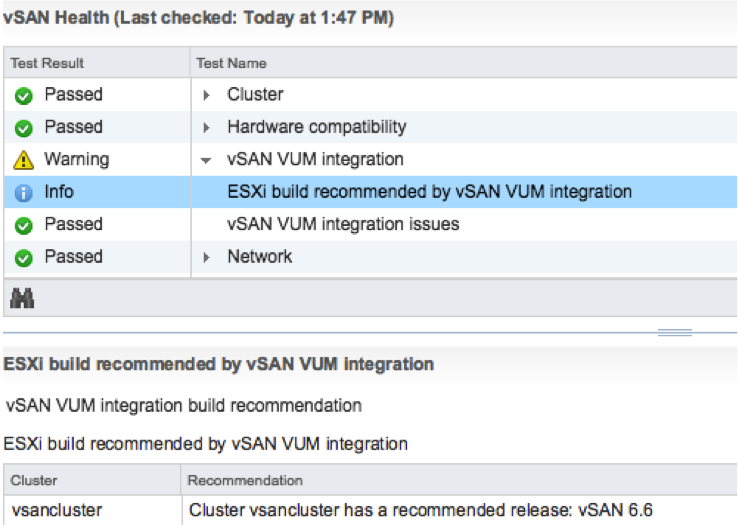
The VUM integration is pretty cool if you ask me. First of all, when there’s a new release the Health Check will call it out from now on. And on top of that, when you go to VUM then also things like async drivers will be taken in to consideration. Where you would normally have to slipstream drivers in to the image and make that image available through VUM, we now ensure that the image used is vSAN Ready! In other words, as of vSphere 6.5 U1 Update Manager is fully aware of vSAN and integrated as well. We are working hard to bring all vSAN Ready Node vendors on-board. (With Dell, Supermicro, Fujitsu and Lenovo leading the pack.)
Then there’s this feature called “Storage Device Serviceability enhancement”. Well this is the ability to blink the LEDs on specific devices. As far as I know, in this release we added support for HP Gen 9 controllers.
And last but not least: Performance Diagnostics in vSAN. I really like this feature. Note that this is all about analyzing benchmarks. It is not (yet?) about analyzing steady state. So in this case you run your benchmark, preferably using HCIBench, and then analyze it by selecting a specific goal. Performance will be analyzed using “cloud analytics”, and at the end you will get various recommendations and/or explanations for the results you’ve witnessed. These will point back to KBs, which in certain cases will give you hints how to solve your (if there is) bottleneck.
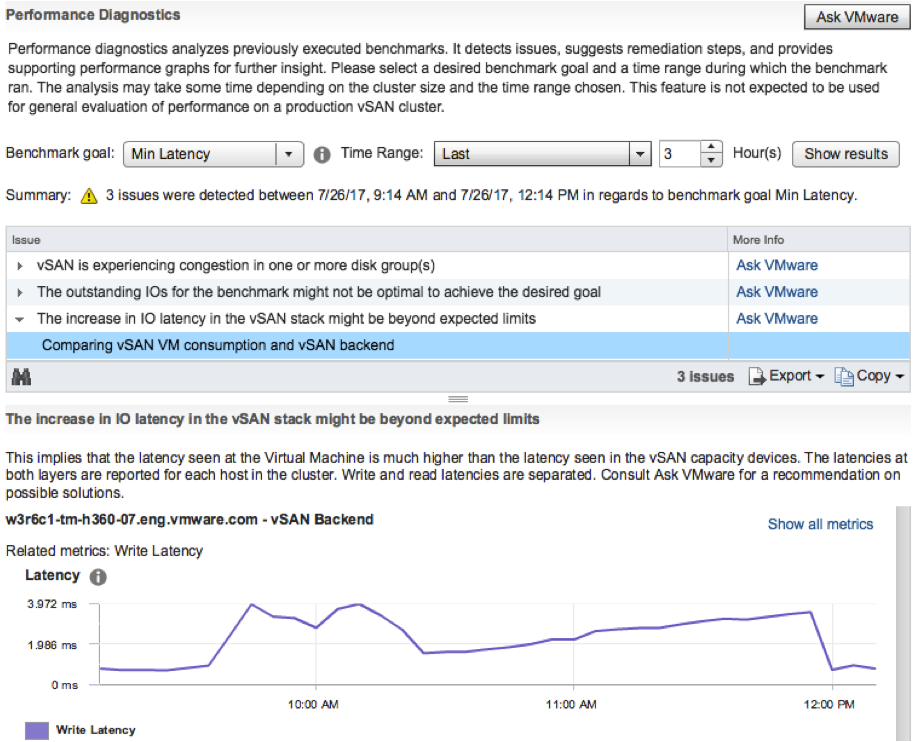
Note that in order to use this functionality you need to join CEIP (Customer Experience Improvement Program), which means that you will upload info in to VMware. But this by itself is very valuable as it allows our developers to solve bugs / user experience issues and getting a better understanding of how you use vSAN. I spoke with Christian Dickmann on this topic yesterday as he tweeted the below, and he was really excited, he said he had various fixes going in the next vSAN release based on the current data set. So join the program!
A huge THANK YOU to anyone participating in Customer Experience Improvement Program (CEIP)! Eye-opening data that we are acting on.
— Christian Dickmann (@cdickmann) July 27, 2017
For those how can’t wait, here’s the release notes and downloads links:
- vCenter Server 6.5 u1 release notes: https://docs.vmware.com/en/VMware-vSphere/6.5/rn/vsphere-vcenter-server-651-release-notes.html
- vCenter Server 6.5 u1 downloads: https://my.vmware.com/web/vmware/details?downloadGroup=VC65U1&productId=614&rPId=17343
- ESXi 6.5 release notes: https://docs.vmware.com/en/VMware-vSphere/6.5/rn/vsphere-esxi-651-release-notes.html
- ESXi 6.5 download: https://my.vmware.com/web/vmware/details?downloadGroup=ESXI65U1&productId=614&rPId=17342
- vSAN 6.6.1 release notes: https://docs.vmware.com/en/VMware-vSphere/6.5/rn/vmware-vsan-661-release-notes.html
Oh and before I forget, there’s new functionality in the H5 Client for vCenter in 6.5 U1. As mentioned on this vSphere blog: “Virtual Distributed Switch (VDS) management, datastore management, and host configuration are areas that have seen a big increase in functionality”. And then some of the “max config” items had a big jump. 50k powered on VMs for instance is huge:
- Maximum vCenter Servers per vSphere Domain: 15 (increased from 10)
- Maximum ESXi Hosts per vSphere Domain: 5000 (increased from 4000)
- Maximum Powered On VMs per vSphere Domain: 50,000 (increased from 30,000)
- Maximum Registered VMs per vSphere Domain: 70,000 (increased from 50,000)
That was it for now!
New fling: DRS Lens
A cool new fling was just released: DRS Lens. As stated on the flings website:
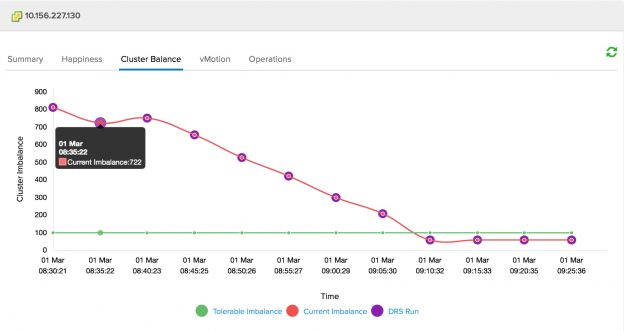
DRS Lens provides a simple, yet powerful interface to highlight the value proposition of vSphere DRS. Providing answers to simple questions about DRS will help quell many of the common concerns that users may have. DRS Lens provides different dashboards in the form of tabs for each cluster being monitored.
It tracks things like VM Happiness, balance of the cluster itself, User and System initiated vMotions etc. It truly allow you to dig in to your cluster and it could be very useful during cross cluster rebalancing, or trying to figure out where an imbalance is coming from by correlating different vCenter tasks/events to resource contention / VM unhappiness situations. I hope to see this info in the HTML-5 UI at some point! If you are interested, download the fling, give it a try and provide feedback through the comments, the developers will read those and follow up! https://labs.vmware.com/flings/drs-lens