• Skip to primary navigation
  • Skip to main content
  • Skip to primary sidebar

Yellow Bricks

by Duncan Epping

  • Home
  • Unexplored Territory Podcast
  • HA Deepdive
  • ESXTOP
  • Stickers/Shirts
  • Privacy Policy
  • About
  • Show Search
Hide Search

New whitepaper available: vSphere Metro Storage Cluster Recommended Practices (6.5 update)

Duncan Epping · Oct 24, 2017 ·

I had many requests for an updated version of this paper, so the past couple of weeks I have been working hard. The paper was outdated as it was last updated around the vSphere 6.0 timeframe, and it was only a minor update. I looked at every single section and added in new statements and guidance around vSphere HA Restart Priority for instance. So for those running a vSphere Metro Storage Cluster / Stretched Cluster of some kind, please read the brand new vSphere Metro Storage Cluster Recommended Practices (6.5 update) white paper.

It is available on storagehub.vmware.com in PDF and for reading within your browser. Any questions and comments, please do not hesitate to leave them here.

  • vSphere Metro Storage Cluster Recommended Practices online
  • vSphere Metro Storage Cluster Recommended Practices PDF
 

New white paper available: vSphere APIs for I/O Filtering (VAIO)

Duncan Epping · Oct 13, 2017 ·

Over the past couple of weeks Cormac Hogan and I have been updating various Core Storage white papers which had not been touched in a while for different reasons. We were starting to see more and more requests come in for update content and as both of used to be responsible for this at some point in the past we figured we would update the papers and then hand them over to technical marketing for “maintenance” updates in the future.

You can expect a whole series of papers in the upcoming weeks on storagehub.vmware.com and the first one was just published. It is on the topic of the vSphere APIs for I/O Filtering and provides an overview of what it is, where it sits in the I/O path and how you can benefit from it. I would suggest downloading the paper, or reading it online on storagehub:

  • vSphere APIs for I/O Filtering White Paper online
  • vSphere APIs for I/O Filtering White Paper download

What is the overhead for Swap in a stretched cluster?

Duncan Epping · Oct 10, 2017 ·

Last week internally we had a debate about the overhead of a swap file in a stretched cluster. With the ability to have a double protection (across site and within a site) the question was what the overhead for a swap file would be. You can imagine that for a stretched cluster you set your VMs to have RAID-1 across site and RAID-1 within or RAID-5 within the site. (Depending on whether you have all-flash or not.) So the question is, how many copies of the swap file would you end up with?

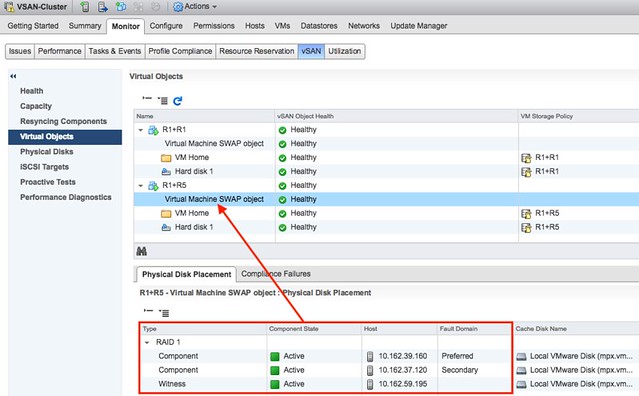
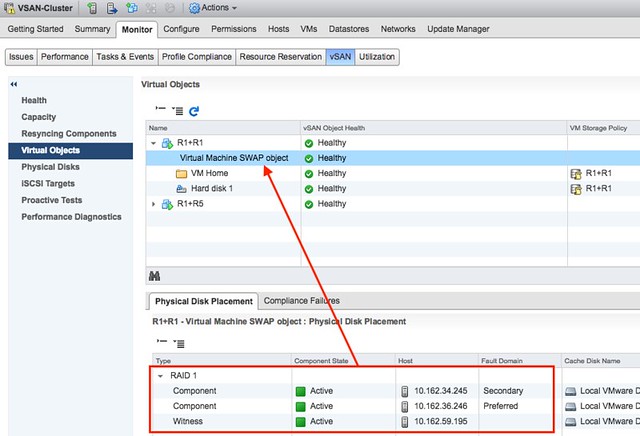
The swap file with vSAN is a special object. Regardless of how the policy you associate with the VM, it is always created as a RAID-1 object. This goes for a normal cluster as well as a stretched cluster. That means that the Swap object will always consist of 3 components. Two of those are data components and one of them is a witness.

In the first screenshot you see a VM which is called R1+R1. This VM has Primary Failures To Tolerate (PFTT) set to 1 and Secondary Failures To Tolerate (SFTT) set to 1. The swap however, as it is a special object, is created with PFTT=1 and SFTT=0 as the screenshot shows. It has 1 data component in each site, and a witness in the witness site.

Same applies for the situation when PFTT=1 and SFTT=1 but the failure tolerance method selected is RAID-5. In that case the swap file is also PFTT=1 and SFTT=0 as shown in the screenshot below.

And of course I also double checked through RVC:

vsan.object_info . bf7fdc59-dd62-2983-ee34-02002304a139

DOM Object: bf7fdc59-dd62-2983-ee34-02002304a139 
(v5, owner: 10.162.39.160, proxy owner: None, policy: hostFailuresToTolerate = 1, 
forceProvisioning = 1, proportionalCapacity = 100, CSN = 2)
  RAID_1
    Component: bf7fdc59-86bc-4884-d236-02002304a139 
      (state: ACTIVE (5), host: 10.162.39.160, md: mpx.vmhba1:C0:T1:L0, ssd: mpx.vmhba1:C0:T4:L0,
      votes: 1, usage: 4.1 GB, proxy component: false)
    Component: bf7fdc59-1830-4b84-5138-02002304a139 
      (state: ACTIVE (5), host: 10.162.37.120, md: mpx.vmhba1:C0:T2:L0, ssd: mpx.vmhba1:C0:T4:L0,
      votes: 1, usage: 4.1 GB, proxy component: false)
    Witness: bf7fdc59-6f4a-4d84-725b-02002304a139 
      (state: ACTIVE (5), host: 10.162.59.195, md: mpx.vmhba1:C0:T1:L0, ssd: mpx.vmhba1:C0:T4:L0,
      votes: 1, usage: 0.0 GB, proxy component: false)

So this means the overhead of swap is always “only” 100%. However, you can of course create “thin swapfiles” when you are not over-provisioning on memory and avoid that cost completely!

The difference between an isolation and a partition with vSphere

Duncan Epping · Oct 10, 2017 ·

I have a lot of discussions with customers on the topic of stretched clusters, but also regular vSphere clusters. Something that often comes up is the discussion around what happens in an isolation or partition scenario. Fairly often customers (but also VMware employees) use those words interchangeably. However, a partition is not the same as an isolation. They are 2 different scenarios, and also as a result they have a different type of response associated with it. Before I explain the difference in the two responses to a situation like this, what is a partition and what is an isolation?

  • An isolation event is a situation where a single host cannot communicate with the rest of the cluster. Note: single host!
  • A partition is a situation where two (or more) hosts can communicate with each other, but no longer can communicate with the remaining two (or more) hosts in the cluster. Note: two or more!

Why is that such a big deal? Well the response in the case of these two scenarios are different. And the response/result is also determined by what types of configuration you have. Lets break down the scenarios one by one, including the type of infrastructure used (when it is relevant).

Isolation Event

When a host is isolated it will:

  • start an election process
    • declare itself primary
  • ping the isolation address
  • declare itself isolated
  • power off / shut down VMs (when this is configured)
  • communicate through the connected datastores that it is isolated
  • the VMs will be restarted on the remaining hosts in the cluster

And then of course vSphere HA will be able to restart the VMs. Note that in the case of vSAN, it isn’t possible to write to the datastore when a host is isolated, so it won’t do that. Yet the workloads will still have been powered off / shutdown so it is safe for vSphere HA to restart them

Partition (traditional storage)

When two or more hosts are partitioned (they can communicate with each other) and the vSphere HA primary is not part of the partition it will:

  • start an election process
  • declare a primary in the partition
  • figure out what has happened to the hosts and VMs in the other partition
    • restart any VMs that somehow were impacted, or appeared now to be powered off while the last known state was powered on
  • if all VMs are running, vSphere HA won’t try to restart any, this is the expected result!

Partition (vSAN stretched)

When the partition scenario happens in a stretched vSAN environment there’s an extra (potential) step. Along the way, vSAN will identify all VMs which have no accessible components and kill those VMs so they can be restarted in the partition which has quorum. In this scenario, you have 3 locations, two for data and 1 for the witness. If a data site loses access to the other locations then the data site is partitioned (the hosts can still communicate with each other within the site), as such the isolation response is not triggered. However, vSAN will still kill these VMs as they are rendered useless (lost access to disk).

I know it is just semantics, but nevertheless, I do feel it is important to understand the difference between an isolation and a partition, especially as the response (and who responds) is different in these situations. Hope it helps,

Extract embedded video file from Powerpoint on OSX

Duncan Epping · Oct 2, 2017 · 38 Comments

I received a couple of presentations over the past weeks which had an embedded video file in it, but needless to say this article will handle all types of embedded files. I needed the source file but unfortunately the person who developed the demo video did not have it any longer. Latest versions of Powerpoint for Mac OSX don’t have the option to copy/paste the file somewhere else, there’s also no “right click save as” option unfortunately. So how do you grab this file?

Well according to the sources found on google it is simple, you rename the Powerpoint .PPTX file to zip and simply unzip it. I tried that, but my zip file then got unzipped to a zip.cpgz file. Which I then would try to unzip but again would lead to a zip file. Going around in circles. But there’s a solution for it. If simply double clicking after renaming doesn’t work, try the following procedure:

Open a terminal window:

  • To open Terminal, go to Applications > Utilities > Terminal
  • Go to the folder where the file is located, in my case Desktop/test
    cd ~/Desktop/test
  • Unzip the file (my filename is presentation.pptx)
    unzip presentation.pptx

If that doesn’t work, rename the presentation.pptx to presentation.zip and try the above procedure, of course with the correct file name!

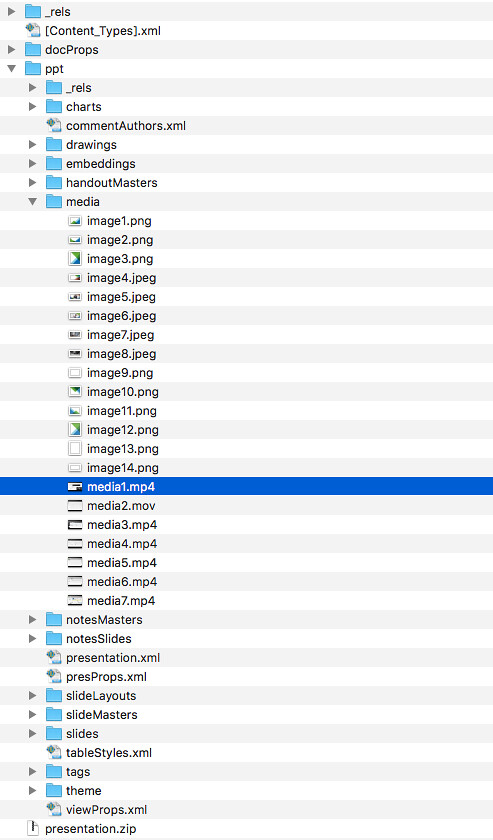
Now you should see 3 folders in finder (docProps, _rels and ppt) and an additional file (.xml). If you go in to the folder “ppt” you will find a folder “media”. That folder will contain all media files, which includes pictures/photos/soundbites and your videos!


  • « Go to Previous Page
  • Page 1
  • Interim pages omitted …
  • Page 82
  • Page 83
  • Page 84
  • Page 85
  • Page 86
  • Interim pages omitted …
  • Page 497
  • Go to Next Page »

Primary Sidebar

About the Author

Duncan Epping is a Chief Technologist and Distinguished Engineering Architect at Broadcom. Besides writing on Yellow-Bricks, Duncan is the co-author of the vSAN Deep Dive and the vSphere Clustering Deep Dive book series. Duncan is also the host of the Unexplored Territory Podcast.

Follow Us

  • X
  • Spotify
  • RSS Feed
  • LinkedIn

Recommended Book(s)

Also visit!

For the Dutch-speaking audience, make sure to visit RunNerd.nl to follow my running adventure, read shoe/gear/race reviews, and more!

Do you like Hardcore-Punk music? Follow my Spotify Playlist!

Do you like 80s music? I got you covered!

Copyright Yellow-Bricks.com © 2026 · Log in