VMware Virtual SAN, or I should say VMware vSAN, has been around since August 2013. Back then it was indeed called Virtual SAN, today is it is officially known as vSAN, but that is what most people used anyway. As this article keeps popping up on google search I figured I would rewrite it and provide a better more generic introduction to vSAN which is up to date and covers all that VMware vSAN is about up to the current version of writing, which is VMware vSAN 6.6.
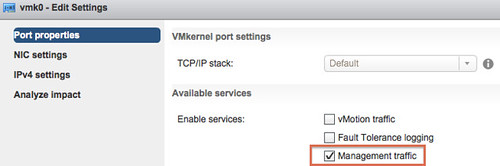
VMware vSAN is a software based distributed storage solution. Some will refer to it as hyper-converged, others will call it software defined storage and some even referred to is as hypervisor converged at some point. The reason for this is simple, VMware vSAN is fully integrated with VMware vSphere. Those of you who are vSphere administrators who are reading this will have no problem configuring vSAN. If you know how to enable HA and DRS, then you know how to configure vSAN. Of course you will need to have a vSAN Network, and you achieve this by creating a VMkernel interface and enabling vSAN on it. vSAN works with L2 and L3 networks, and as of vSAN 6.6 no longer requires multicast to be enabled on the network. (If you want to know what changed with vSAN 6.6 read this article.)
Before we will get a bit more in to the weeds, what are the benefits of a solution like vSAN? What are the key selling points?
- Software defined – Use industry standard hardware, as long as it is on the HCL you are good to go!
- Flexible – Scale as needed and when needed. Just add more disks or add more hosts, yes both scale-up and scale-out are possible.
- Simplicity – Ridiculously easy to manage! Ever tried implementing or managing some of the storage solutions out there? If you did, you know what I am getting at.
- Automated – Per virtual machine and per virtual disk policy based management. Yes, even VMDK level granularity. No more policies defined on a per LUN/Datastore level, but at the level where you need it!
- Hyper-Converged – It allows you to create dense / building block style solutions!
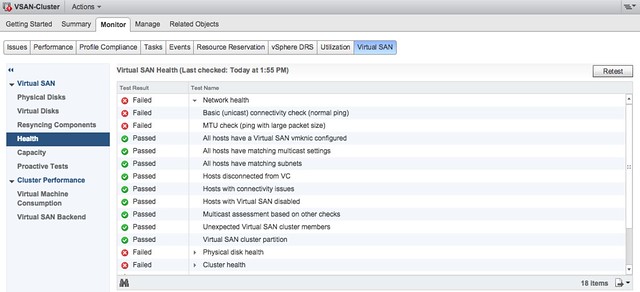
To me “simplicity” is the key reason customers buy vSAN. Not just simplicity in configuring or installing, but even more so simplicity in management. Features like the vSAN Health Check provide a lot of value to the admin. With one glance you can see what the status is of your vSAN. Is it healthy or not? If not, what is wrong?
Okay that sounds great right, but where does that fit in? What are the use-cases for vSAN, how are our 7000+ customers using it today?
- Production / Business Critical Workloads
- Exchange, Oracle, SQL, anything basically…. This is what the majority of customers use vSAN for.
- Management Clusters
- Isolate their management workloads completely, and remove the dependency on your storage systems to be available. Even when your enterprise storage system is down you have access to your management tools
- DMZ
- Where NSX helps isolating a DMZ from the world from a networking/security point of view, vSAN can do the same from a storage point of view. Create a separate cluster and avoid having your production storage go down during a denial of service attack, and avoid complex isolated SAN segments!
- Virtual desktops
- Scale out model, using predictive (performance etc) repeatable infrastructure blocks lowers costs and simplifies operations. Note that vSAN is included with Horizon Advanced and Enterprise!
- Test & Dev
- Avoids acquisition of expensive storage (lowers TCO), fast time to provision, easy scale out and up when required!
- Big Data
- Scale out model with high bandwidth capabilities, Hadoop workloads are not uncommon on vSAN!
- Disaster recovery target
- Cheap DR solution, enabled through a feature like vSphere Replication that allows you to replicate to any storage platform. Other options are of course VAIO based replication mechanisms like Dell/EMC Recover Point.
Yes that is a long list of use cases, I guess it it fair to say that vSAN fit everywhere and anywhere! Now, lets get a bit more technical, just a bit as this is an introduction and for those who want to know more about specific features and settings I have hundreds of vSAN articles on my blog. Also a vSAN book available, and then there’s of course the long list of articles by the likes of William Lam and Cormac Hogan.
When vSAN is enabled a single shared datastore is presented to all hosts which are part of the vSAN enabled cluster. Typically all hosts will contribute performance (SSD) and capacity (magnetic disks or flash) to this shared datastore. This means that when your cluster grows from a compute perspective, your datastore will typically grow with it. (Not a requirement, there can be hosts in the cluster which just consume the datastore!) Note that there are some requirements for hosts which want to contribute storage. Each host will require at least one flash device for caching and one capacity device. From a clustering perspective, vSAN supports the same limits as vSphere: 64 hosts in a single cluster. Unless you are creating a stretched cluster, then the limit is 31 hosts. (15 per site.)
As can be expected from any recent storage system, vSAN heavily relies on flash for performance. Every write I/O will go to the flash cache first, and eventually they will go to the capacity tier. vSAN supports different types of flash devices, broadest support in the industry, ranging from SATA SSDs to 3D XPoint NVMe based devices. This goes for both the caching as well as the capacity tier. Note that for the capacity layer, vSAN of course also supports regular spinning disks. This ranges from NL-SAS to SAS, 7200 RPM to 15k RPM. Just check the vSAN Ready Node HCL or the vSAN Component HCL for what is supported and what is not.
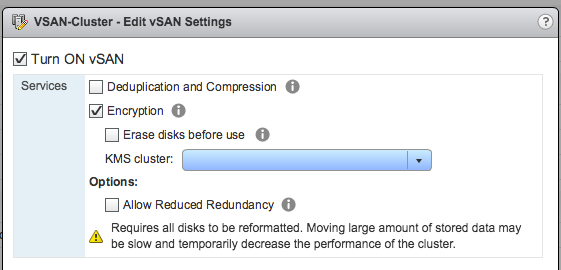
As mentioned, you can set policies on a per virtual machine or even virtual disk level. These policies define availability and performance aspects of your workloads. But for instance also allow you to specify whether checksumming needs to be enabled or not. There are 2 key features which are not policy driven at this point and these are “Deduplication and Compression” and Encryption. Both of these are enabled on a cluster level. But lets get back to the the policy based management. Before deploying your first VMs, you will typically create a (or multiple) policy. In this policy you define what the characteristics of the workload should be. For instance as shown in the example below, how many failures should the VM be able to tolerate? In the below example it shows that “primary” and “secondary” level of failures to tolerate is set to 1. Which in this case means the VM is stretched across 2 locations and also protected by RAID-5 in each site as the “Failure Tolerance Method” is also specified.
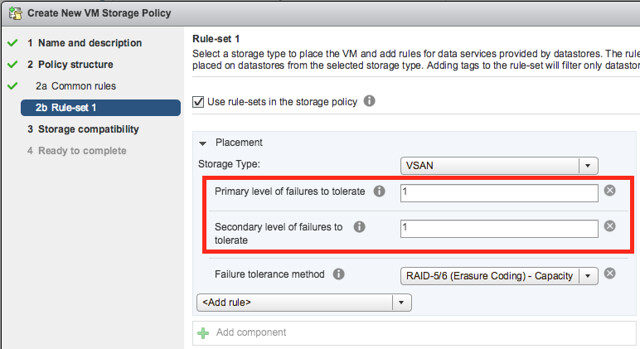
The above is a rather complex example, it can be as simple as only setting “Failures to tolerate” to “1”, which in reality is what most people do. This means you will need 3 nodes at a minimum and you will from a VM perspective have 2 copies of the data and 1 witness. vSAN is often referred to as a generic object based storage platform, but what does that mean? The VM can be seen as an object and each copy of the data and the witness can be seen as components. Objects are placed and distributed across the cluster as specified in your policy. As such vSAN does not require a local RAID set, just a bunch of local disks which can be attached to a passthrough disk controller. Now, whether you defined a 1 host failure to tolerate, or for instance a 3 host failure to tolerate, vSAN will ensure enough replicas of your objects are created within the cluster. Is this awesome or what?
Lets take a simple example to illustrate that as I realize it is also easy to get lost in all these technical terms. We have configured a 1 host failure and we create a new virtual disk. This results in vSAN creating 2 identical data components and a witness component. The witness is there just in case something happens to your cluster and to help you decide who will take control in case of a failure, the witness is not a copy of your data component let that be clear, it is just a quorum mechanis. Note, that the amount of hosts in your cluster could potentially limit the amount of “host failures to tolerate”. In other words, in a 3 node cluster you can not create an object that is configured with 2 “host failures to tolerate” as it would require vSAN to place components on 5 hosts at a minimum. (Cormac has a simple table for it here.) Difficult to visualize? Well this is what it would look like on a high level for a virtual disk which tolerates 1 host failure:
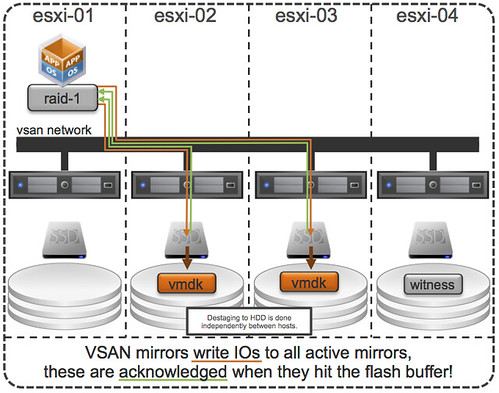
First, lets point out that the VM from a compute perspective does not need to be aligned with the data components. In order to provide optimal performance vSAN has an in memory read cache which is used to serve the most recent blocks from memory. Of course blocks which are not in the memory cache will need to be fetched from either of the two hosts that serve the data component. Note that a given block always comes from the same host for reads. This to optimize the flash based read cache. For writes it is straight forward. Every write is synchronously pushed to the hosts that contain data components for that VM. Some may refer to this as replication or mirroring. With all this replication going on, are there requirements for networking? At a minimum vSAN will require a dedicated 1Gbps NIC port for hybrid configurations, and 10GbE for all-flash configurations. Needless to say, but 10Gbps is definitely preferred with solutions like these, and you should always have an additional NIC port available for resiliency. There is no requirement from a virtual switch perspective, you can use either the Distributed Switch or the plain old vSwitch, both will work fine, the Distributed Switch is recommended and comes included with the vSAN license.
So what else is there, well from a feature / functionality perspective there’s a lot. Let me list some of my favourite features:
- RAID-1 / RAID-5 / RAID-6
- Stretched Clustering
- All-Flash for all License options
- Deduplication and Compression
- vSAN Datastore Encryption
- iSCSI Targets (for physical machines)
That more or less covers the basics and I think is a decent introduction to vSAN. Something that hopefully sparks your interest in this distributed storage platform that is deeply integrated with vSphere and enables convergence of compute and storage resources as never seen before. It provides virtual machine and virtual disk level granularity through policy based management. It allows you to control availability, performance and security in a way I have never seen it before, simple and efficient. And then I haven’t even spoken about features like the Health Check, Config Assist, Easy Install and any of the other cool features that are part of vSAN 6.6.
If there are any questions, find me on twitter!