• Skip to primary navigation
  • Skip to main content
  • Skip to primary sidebar

Yellow Bricks

by Duncan Epping

  • Home
  • Unexplored Territory Podcast
  • HA Deepdive
  • ESXTOP
  • Stickers/Shirts
  • Privacy Policy
  • About
  • Show Search
Hide Search

Startup News Flash part 5

Duncan Epping · Sep 10, 2013 ·

After the VMworld storm has slowly died down it is back to business again… This also means less frequent updates, although we are slowly moving towards VMworld Barcelona and I suspect there will be some new announcements at that time. So what happened in the world of flash/startups the last two weeks? This is Startup News Flash part 5, and it seems to be primarily around either funding rounds or acquisitions.

Probably one of the biggest rounds of funding I have seen for a “new world” storage company… $ 150 million. Yes, that is a lot of money. Congrats Pure Storage! I would expect an IPO at some point in the near future, and hopefully they will be expanding their EMEA based team. PureStorage is one of those companies which has always intrigued me. As GigaOm suggests this boosts will probably be used to lower the prices, but personally I would prefer a heavy investment in things like disaster recovery and availability. It is an awesome platform, but in my opinion it needs dedupe aware sync and a-sync replication! That should include VMware SRM integration from day 1 of course!

Flash is hot… Virident just got acquired by Western Digital for $685 million. Makes sense if you consider WD is known as the “hard disk” company, they need to keep on growing their business and the business of hard disks is going to be challenging in the upcoming years with SSD becoming cheaper and cheaper. Considering this is the second acquisition (sTec being the other) related to flash by WD you can say that they mean business.

I just noticed that Cisco announced they intent to acquire Whiptail for $415 million in cash. Interesting to see Cisco moving in to the storage space and definitely a smart move if you ask me.  With UCS for compute and Whiptail for storage they will be able to deliver the full stack considering they more or less already own the world of networking. Will be interesting to see how they integrate it in their UCS offerings. For those who don’t know, Whiptail is an all flash array (afa) which leverages a “scale out” approach, so start small and increase capacity by adding new boxes. Of course they offer most functionality other AFA vendors do, for more details I recommend reading Cormac’s excellent article.

To be honest, no one knew what to expect from this public VSAN Beta announcement. Would we get a couple of hundred registrations or thousands? Well I can tell you that they are going through the roof, make sure to register though if you want to be a part of this! Run it at home nested, run it on your test cluster at the office, do whatever you want with it… but make sure to provide feedback!
 

VMware vSphere Virtual SAN design considerations…

Duncan Epping · Sep 9, 2013 ·

I have been playing a lot with vSphere Virtual SAN (VSAN) in the last couple of months… I figured I would write down some of my thoughts around creating a hardware platform or constructing the virtual environment when it comes to VSAN. There are some recommended practices and there are some constraints, I aim to use this blog post to gather all of these Virtual SAN design considerations. Please read the VSAN introduction, how to install VSAN in your virtual lab and “How do you know where an object is located” to get a better understanding of the product. There is a long list of VSAN blogs that can be found here: vmwa.re/vsan

The below is all based on vSphere 5.5 Virtual SAN (public) Beta and my interpretation and thoughts based on various conversations with colleagues, engineering and reading various documents.

  • vSphere Virtual SAN (VSAN) clusters are limited to a maximum total of 32 hosts and there is a minimum of 3 hosts. VSAN is also currently limited to 100 VMs per host, resulting in a maximum of 3200 VMs in a 32 host cluster. Please note that HA currently has a limit of 2048 protected VMs in a single Datastore.
  • It is recommended to dedicate a 10GbE NIC port to your VSAN VMkernel traffic, although 1GbE is fully supported it could be a limiting factor in I/O intensive environments. Both VSS and VDS are supported.
  • It is recommended to have a VSAN VMkernel on every physical NIC! Ensure to configure them in a “active/standby” configuration so that when you have 2 physical NIC ports and 2 VSAN VMkernel’s each of them will have its own port. Do note that multiple VSAN VMkernel NICs on a single host on the same subnet is not a supported configuration, in  different subnets it is supported.
  • IP Hash Load Balancing is supported by VSAN, but due to limited number of IP-addresses between source/destination load balancing benefits could be limited. In other words, an etherchannel formed out of 4x1GbE NIC will most likely not result in 4GbE.
  • Although Jumbo Frames are fully supported with VSAN they do add a level of operational complexity. When Jumbo Frames are enabled ensure these are enabled end-to-end!
  • VSAN requires at a minimum 1 SSD and 1 Magnetic Disk per diskgroup on a host which is contributing storage. Each diskgroup can have a maximum of 1 SSD and 7 magnetic disks. When you have more than 7 HDDs or two or more SSDs you will need to create additional diskgroups.
  • Each host that is providing capacity to the VSAN datastore has at least one local diskgroup. There is a maximum of 5 disk groups per host!
  • It can beneficial to create multiple smaller disk groups instead of larger diskgroups. More diskgroups means smaller failure domains and more cache drives / queues.
  • Ensure when sizing your environment to take data replicas in to account. If your environment needs N+1 or N+2 (etc) resiliency factor this in accordingly.
  • SSD capacity does not count towards total VSAN datastore capacity. When sizing your environment, do not include SSD capacity in your totalized capacity calculation.
  • It is a recommended practice to have a minimum 1:10 ratio of SSD capacity to HDD capacity in each disk group. In other words, when you have 1TB of HDD capacity, it is recommended to have at least 100GB of SSD capacity. Note that VMware’s recommendation has changed since BETA, new recommendation is:
    • 10 percent of the anticipated consumed storage capacity before the number of failures to tolerate is considered
  • By default, 70% of the available SSD capacity will be used as read cache and 30% will be used as a write buffer. As in most designs, when it comes to cache/buffer –> more = better.
  • Selecting the SSD with the right performance profile can make a 5x-10x difference in VSAN performance easily, chose carefully and wisely. Both SSD and PCIe flash solutions are supported, but there are requirements! Make sure to check the HCL before purchasing new hardware. My tip Intel S3700, great price/performance balance.
  • VSAN relies on VM Storage Policies for policy based management. There is a default policy under the hood, but you cannot see this within the UI. As such it is a recommended practice to create a new standard policy for your environment after VSAN has been configured. It is recommended to start with all settings set to default, ensure “Number of failures to tolerate” is configured to 1. This guarantees that when a single host fails virtual machines can be restarted and recovered from this failure with minimal impact on the environment. Attach this policy to your virtual machines when migrating them to VSAN or during virtual machine provisioning.
  • Configure vSphere HA isolation response to “power-off” to ensure that virtual machines which reside on an isolated host can be safely restarted.
  • Ensure vSphere HA admission control policy (“host failures to tolerate” or the “percentage based) aligns with your VSAN availability strategy. In other words, ensure that both compute and storage are configured using the same “N+x” availability approach.
  • When defining your VM Storage Policy avoid unnecessary usage of “flash read cache reservation”. VSAN has internal read cache optimization algorithms, trust it like you trust the “host scheduler” or DRS!
  • VSAN does not support virtual machine disks greater than 2TB-512b, VMs which require larger VMDKs are not suitable candidates at this point in time for VSAN.
  • VSAN does not support FT, DPM, Storage DRS or Storage I/O Control. It should be noted though that VSAN internally takes care of scheduling and balancing when required. Storage DRS and SIOC are designed for SAN/NAS environments.
  • Although supported by VSAN, it is recommended practice to keep the hosts/disk configuration for a VSAN cluster similar. Non-uniform cluster configuration could lead to variations in performance and could make it more complex to stay compliant to defined policies after a failure.
  • When adding new SSDs or HDDs ensure these are not pre-formatted. Note that when VSAN is configured to “automatic mode” disks are added to existing disk groups or new disk groups are created automatically.
  • Note that vSphere HA behaves slightly different in a VSAN enabled cluster, here are some of the changes / caveats
    • Be aware that when HA is turned on in the cluster, FDM agent (HA) traffic goes over the VSAN network and not the Management Network. However, when an potential isolation is detected HA will ping the default gateway (or specified isolation address) using the Management Network.
    • When enabling VSAN ensure vSphere HA is disabled. You cannot enable VSAN when HA is already configured. Either configure VSAN during the creation of the cluster or disable vSphere HA temporarily when configuring VSAN.
    • When there are only VSAN datastores available within a cluster then Datastore Heartbeating is disabled. HA will never use a VSAN datastore for heartbeating.
    • When changes are made to the VSAN network it is required to re-configure vSphere HA.
  • VSAN requires a RAID Controller / HBA which supports passthrough mode or pseudo passthrough mode. Validate with your server vendor if the included disk controller has support for passthrough. An example of a passthrough mode controller which is sold separately is the LSI SAS 9211-8i.
  • Ensure log files are stored externally to your ESXi hosts and VSAN by leveraging vSphere’s syslog capabilities.
  • ESXi can be installed on: USB, SD and Magnetic Disk. Hosts with 512GB or more memory are only supported when ESXi is installed on magnetic disk.

That is it for now. When more comes to mind I will add it to the list!

VMworld TV, it just rocks!

Duncan Epping · Sep 8, 2013 ·

VMworld TV has been around for a long time, and I truly enjoy the videos. I know what kind of work goes in to recording these episodes and the long hours these guys make, so thanks for doing this Eric, Jeremy and production/camera crew! It is awesome work, and even though I attend VMworld, and the only way to get an idea about the atmosphere at the event and the awesomeness of some of the new products VMware announced and even VMware partners announced. I wanted to embed every video in this post, but considering they recorded over 40 that ended up being a bit too much. My fav. videos are in bold, here are the titles and links:

  • Welcome to VMworld 2013 San Francisco – http://bit.ly/1dPXg0t
  • VMworld TV Music Video for VMworld 2013 – http://bit.ly/1ar3NOW
  • VMworld 2013 Welcome Reception – http://bit.ly/15DR2sC
  • Interview with Douglas Gourlay at VMworld 2013 – http://bit.ly/19seOLj
  • Interview with Chad Sakac of EMC at VMworld 2013 – http://bit.ly/157ZyU3
  • Trend Micro Talks about VMware NSX Integration – http://bit.ly/17IJKDC
  • Interview with Sridhar Devarapalli of Citrix – http://bit.ly/1aVhncA
  • VMworld TV Investigates VMTurbo – http://bit.ly/1cSnCMu
  • VMware NSX Partners Talk about Working with VMware – http://bit.ly/1aVhrcq
  • Behind the Scenes at the VMworld 2013 Hands-On Labs – http://bit.ly/1cSnKLO
  • VMworld TV Crashes the CTO Party! – http://bit.ly/1aVhuoH
  • Interview with Brocade at VMworld 2013 – http://bit.ly/1dQaHxJ
  • Behind the Scenes with Simplivity – http://bit.ly/1cSnUTx
  • Interview with F5 Networks – http://bit.ly/17IKlW0
  • Exclusive Demo of CloudPhysics – http://bit.ly/1aVhDZ4
  • Interview with Aurelie Fonteny of Cumulus Networks – http://bit.ly/1cSocd1
  • Liquidware Labs to Discuss Profile Unity – http://bit.ly/1aVhFjN
  • Meet the Team Behind Nutanix – http://bit.ly/1cSolxi
  • Interview with Martin Casado – http://bit.ly/1cSopNz
  • Interview with Susan Gudenkauf – http://bit.ly/1dQbjDr
  • VMware CTO, Global Field, Paul Strong – http://bit.ly/1dQbnTL
  • Meet the Team Behind vCenter Log Insight – http://bit.ly/1cSowbT
  • Meet Mark Leake, Director of Product Marketing – http://bit.ly/1aVhLI2
  • Interview with Bruce Davie about VMware NSX – http://bit.ly/17ILg8K
  • Interview with Darla Hershberger about VMware Log Insight – http://bit.ly/1dQbxdP
  • Interview with Naomi Sullivan about VMware vCloud Automation – http://bit.ly/14ki3Gs
  • Interview with Neverfail at VMworld 2013 – http://bit.ly/17ILtJ6
  • Behind the Scenes for VMworld U.S. 2013 Keynotes – http://bit.ly/1cSoNLT
  • Interview and Demo with HyTrust – http://bit.ly/1aVhViH
  • Meet the Team Behind Rapid7 – http://bit.ly/1cSoTDi
  • Interview with Brad Hedlund on Network Virtualization – http://bit.ly/1aVhZir
  • Check out the VMworld 2013 U.S. Hang Space – http://bit.ly/1cSoZuz
  • Interview with Frank Denneman on his New Book – http://bit.ly/1aVi0CX
  • Interview with Jim Silvera on VMware vCenter Ops – http://bit.ly/1dQbXRf
  • Interview with Bethany Mayer – http://bit.ly/17IM25N
  • What is the Software-Defined Data Center? – http://bit.ly/160xW38
  • Meet the Team Behind the VMware vCloud Hybrid Service – http://bit.ly/18E3SrF
  • Behind the Scenes at VMworld Day 2 General Session – http://bit.ly/1dQcfHY
  • VMworld 2013 U.S. Day 1 Highlights – http://bit.ly/17IMpNE
  • VMworld 2013 U.S. Day 2 Highlights – http://bit.ly/17IMtx0
  • VMworld 2013 U.S. Day 3 Highlights – http://bit.ly/1dQcp1X
  • Wrap-up of VMworld 2013 U.S. – http://bit.ly/15DPnmJ


Want a free digital copy of the vSphere Design Pocketbook?

Duncan Epping · Sep 6, 2013 ·

I just noticed that PernixData is offering free copies of the vSphere Design Pocketbook. Only thing you will need to do is register here. I believe at VMworld they handed out roughly 1500 copies of these, and they have been very well received. For those who don’t know, this book was “authored by the community” with people like Frank Denneman, Cormac Hogan, Jason Nash, Eric Sloof, Vaughn Stewart and I deciding which consideration was in and which was one out. (Somehow we needed to ensure message weren’t conflicting or potentially “damaging” to an environment.)

Hopefully PernixData will have some more physical copies in Barcelona, but just in case they don’t… sign up for the free e-copy!

How do you know where an object is located with Virtual SAN?

Duncan Epping · Sep 5, 2013 ·

You must have been wondering the same thing after reading the introduction to Virtual SAN. Last week at VMworld I received many questions on this topic, so I figured it was time for a quick blog post on this matter. How do you know where a storage object resides with Virtual SAN when you are striping across multiple disks and have multiple hosts for availability purposes, what about Virtual SAN object location? Yes I know this is difficult to grasp, even with just multiple hosts for resiliency where are things placed? The diagram gives an idea, but that is just from an availability perspective (in this example “failures to tolerate” is set to 1). If you have stripe width configured for 2 disks then imagine what could happen that picture. (Before I published this article, I spotted this excellent primer by Cormac on this exact topic…)

Luckily you can use the vSphere Web Client to figure out where objects are placed:

  • Go to your cluster object in the Web Client
  • Click “Monitor” and then “Virtual SAN”
  • Click “Virtual Disks”
  • Click your VM and select the object

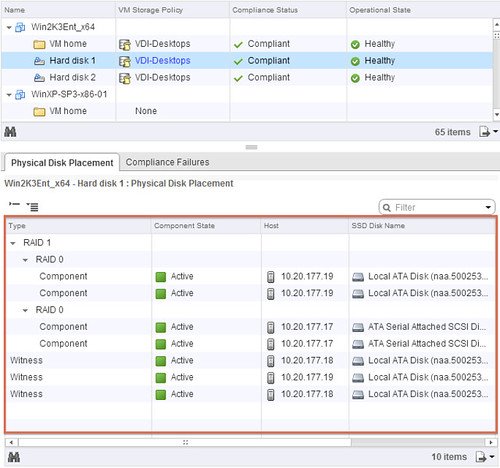
The below screenshot depicts what you could potentially see. In this case the Policy was configured with “1 host failure to tolerate” and “disk striping set to 2”. I think the screenshot explains it pretty well, but lets go over it.

The “Type” column shows what it is, is it a “witness” (no data) or a “component” (data). The “Component state” shows you if it is available (active) or not at the moment. The “Host” column shows you on which host it currently resides and the “SSD Disk Name” column shows which SSD is used for read caching and write buffering. If you go to the right you can also see on which magnetic disk the data is stored in the column called  “Non-SSD Disk Name”.

Now in our example below you can see that “Hard disk 2” is configured in RAID 1 and then immediately following with RAID 0. The “RAID 1” refers to “availability” in this case aka “component failures” and the “RAID 0” is all about disk striping. As we configured “component failures” to 1 we can see two copies of the data, and we said we would like to stripe across two disks for performance you see a “RAID 0” underneath. Note that this is just an example to illustrate the concept, this is not a best practice or recommendation as that should be based on your requirements! Last but not least we see the “witness”, this is used in case of a failure of a host. If host 10.20.177.19 would fail or be isolated from the network somehow then the witness would be used by host 10.20.177.17 to claim ownership. Makes sense right?

Virtual SAN object location

Hope this helps understanding Virtual SAN object location a bit better… When I have the time available, I will try to dive a bit more in to the details of Storage Policy Based Management.

  • « Go to Previous Page
  • Page 1
  • Interim pages omitted …
  • Page 180
  • Page 181
  • Page 182
  • Page 183
  • Page 184
  • Interim pages omitted …
  • Page 502
  • Go to Next Page »

Primary Sidebar

About the Author

Duncan Epping is a Chief Technologist and Distinguished Engineering Architect at Broadcom. Besides writing on Yellow-Bricks, Duncan is the co-author of the vSAN Deep Dive and the vSphere Clustering Deep Dive book series. Duncan is also the host of the Unexplored Territory Podcast.

Follow Us

  • X
  • Spotify
  • RSS Feed
  • LinkedIn

Recommended Book(s)

Also visit!

For the Dutch-speaking audience, make sure to visit RunNerd.nl to follow my running adventure, read shoe/gear/race reviews, and more!

Do you like Hardcore-Punk music? Follow my Spotify Playlist!

Do you like 80s music? I got you covered!

Copyright Yellow-Bricks.com © 2026 · Log in