• Skip to primary navigation
  • Skip to main content
  • Skip to primary sidebar

Yellow Bricks

by Duncan Epping

  • Home
  • Unexplored Territory Podcast
  • HA Deepdive
  • ESXTOP
  • Stickers/Shirts
  • Privacy Policy
  • About
  • Show Search
Hide Search

Virtual SAN webinars, make sure to attend!

Duncan Epping · Sep 29, 2013 ·

Interested in Virtual SAN? VMware is organizing various webinars about Virtual SAN in the upcoming weeks. Last week there was an introduction on VSAN, you can watch the recording here. The next one is by no one less than Cormac Hogan. Cormac will talk about how to install and configure Virtual SAN and will discuss various do’s and don’ts. If anyone has a vast experience with running Virtual SAN than it is Cormac, so make sure to attend this webinar upcoming Wednesday the 2nd of October at 08:30 PDT. Recording can be found here!

There is another great webinar scheduled for Wednesday October the 9th at 08:30 PDT, which is all about Monitoring Virtual SAN. This webinar is hosted by one of the lead engineers on the Virtual SAN product: Christian Dickmann. Christian was also responsible for developing the RVC extensions for VSAN and I am sure he will do a deepdive on how to monitor VSAN, needless to say: highly recommended. I will update this page when I know more around when it will be hosted!
I created a folder on my VSAN datastore, but how do I delete it?

Duncan Epping · Sep 27, 2013 ·

I created a folder on my VSAN datastore using the vSphere Web Client, but when I wanted to deleted it I received this error message that that wasn’t possible. So how do I delete a VSAN folder when I don’t need it any longer? It is fairly straight forward, you open up an SSH session to your host and do the following:

  • change directory to /vmfs/volumes/vsanDatastore
  • run “ls -l” in /vmfs/volumes/vsanDatastore to identify the folder you want to delete
  • run “/usr/lib/vmware/osfs/bin/osfs-rmdir <name-of-the-folder>” to delete the folder

This is what it would look like:

/vmfs/volumes/vsan:5261f0c54e0c785a-81e199f6c9a23d73 # ls -lah
total 6144
drwxr-xr-x    1 root     root         512 Sep 27 03:17 .
drwxr-xr-x    1 root     root         512 Sep 27 03:17 ..
drwxr-xr-t    1 root     root        1.4K Sep 24 05:38 16254152-1469-2c18-3319-002590c0c254
drwxr-xr-t    1 root     root        1.2K Sep 26 01:21 85803a52-6858-ded5-b40b-00259088447a
lrwxr-xr-x    1 root     root          36 Sep 27 03:17 ISO -> e64d1b52-1828-04ca-95a8-00259088447e
lrwxr-xr-x    1 root     root          36 Sep 27 03:17 TestVM -> ed31d351-a222-83bf-bb70-002590884480
drwxr-xr-t    1 root     root        1.4K Sep 27 01:40 cc8ebe51-6881-7dc8-37f8-00259088447e
drwxr-xr-t    1 root     root        1.2K Sep 27 01:52 e64d1b52-1828-04ca-95a8-00259088447e
drwxr-xr-t    1 root     root        1.2K Jul  3 07:52 ed31d351-a222-83bf-bb70-002590884480
lrwxr-xr-x    1 root     root          36 Sep 27 03:17 iso -> 16254152-1469-2c18-3319-002590c0c254
lrwxr-xr-x    1 root     root          36 Sep 27 03:17 las-fg01-vc01.vmwcs.com -> cc8ebe51-6881-7dc8-37f8-00259088447e
lrwxr-xr-x    1 root     root          36 Sep 27 03:17 vmw-iol-01 -> 85803a52-6858-ded5-b40b-00259088447a

/vmfs/volumes/vsan:5261f0c54e0c785a-81e199f6c9a23d73 # /usr/lib/vmware/osfs/bin/osfs-rmdir vmw-iol-01

Deleting directory 85803a52-6858-ded5-b40b-00259088447a in container id 5261f0c54e0c785a81e199f6c9a23d73 backed by vsan

Be careful though, cause when you delete it guess what… it is gone! Yes not being able to delete it using the Web Client is a known issue, and on the roadmap to be fixed.

vSphere HA advanced settings, the KB

Duncan Epping · Sep 26, 2013 ·

I’ve posted about vSphere HA advanced settings various times in the past, and let me start by saying that you shouldn’t play around with them unless you have a requirement to do so. But if you do, there is a KB article which I can highly recommend as it lists all the known and lesser known advanced settings. I had the KB article updated with vSphere 5.5 advanced settings yesterday (Thanks KB team for being so responsive!) but it also applies to vSphere 5.0 and 5.1. Recommended read for those who want to get in to the nitty gritty details of vSphere HA.

http://kb.vmware.com/kb/2033250

Initialized disks to be used by VSAN task completed successfully, but no disks added?

Duncan Epping · Sep 25, 2013 ·

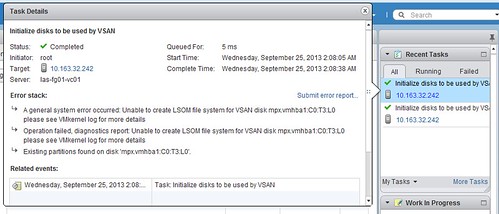
I’ve seen various people reporting the following, they wanted to create a diskgroup in Virtual SAN / VSAN, the task completes successfully but you don’t see any disks. Strange right because it gives a green checkmark?! I had the exact same scenario today, but if you click the task more details are revealed as shown in the screenshot below:

There are a couple of reasons why this can happen:

  • Did not fill in the license
    • VSAN licenses are applied on a cluster level. Open the Webclient click on your VSAN enabled cluster, click the “Manage” tab followed by “Settings”. Under “Configuration” click “Virtual SAN Licensing” and then click “Assign License Key”.
  • Running nested and virtual disks used are too small
    • SSD/HDD needs to be 4GB at a minimum (I think, have not tried this extensively though)
  • Existing partition on disk found
    • Wipe the disk before using it, you can do this using partedUtil for instance.


If you can’t figure out why it happens, make sure to check the task details as it can give a pretty good hint even though it looks like it was successful errors could still be in there.

Something to know about vSphere Flash Read Cache

Duncan Epping · Sep 24, 2013 ·

When I was looking in to vSphere Flash Read Cache (part of vSphere 5.5) there was one thing that had my interest, how does it interact with vSphere HA and DRS and more specifically, are there any caveats? It all started with the question what are the requirements for a virtual machine to be successfully restarted by vSphere HA?

The answer was simple, when you define a vSphere Flash Read Cache size for a virtual disk on a virtual machine, that amount of cache capacity defined for that virtual disk needs to be available on a local flash resource in order for the VM to be restarted / powered-on. So what does this mean? Well it means that when you set a flash read cache for a given virtual disk to 4GB, that 4GB needs to be available on your local host where the VM will be powered on. But what in the case of an HA initiated restart? Will HA ignore this requirement during restarts or will it try to guarantee the same performance? [Read more…] about Something to know about vSphere Flash Read Cache

  • « Go to Previous Page
  • Page 1
  • Interim pages omitted …
  • Page 177
  • Page 178
  • Page 179
  • Page 180
  • Page 181
  • Interim pages omitted …
  • Page 502
  • Go to Next Page »

Primary Sidebar

About the Author

Duncan Epping is a Chief Technologist and Distinguished Engineering Architect at Broadcom. Besides writing on Yellow-Bricks, Duncan is the co-author of the vSAN Deep Dive and the vSphere Clustering Deep Dive book series. Duncan is also the host of the Unexplored Territory Podcast.

Follow Us

  • X
  • Spotify
  • RSS Feed
  • LinkedIn

Recommended Book(s)

Also visit!

For the Dutch-speaking audience, make sure to visit RunNerd.nl to follow my running adventure, read shoe/gear/race reviews, and more!

Do you like Hardcore-Punk music? Follow my Spotify Playlist!

Do you like 80s music? I got you covered!

Copyright Yellow-Bricks.com © 2026 · Log in