• Skip to primary navigation
  • Skip to main content
  • Skip to primary sidebar

Yellow Bricks

by Duncan Epping

  • Home
  • Unexplored Territory Podcast
  • HA Deepdive
  • ESXTOP
  • Stickers/Shirts
  • Privacy Policy
  • About
  • Show Search
Hide Search

PernixData feature announcements during Storage Field Day

Duncan Epping · Apr 23, 2014 ·

During Storage Field Day today PernixData announced a whole bunch of features that they are working on and will be released in the near future. In my opinion there were four major features announced:

  • Support for NFS
  • Network Compression
  • Distributed Fault Tolerant Memory
  • Topology Awareness

Lets go over these one by one:

Support for NFS is something that I can be brief about I guess; as it is what it says it is. Something that has come up multiple times in conversations seen on twitter around Pernix and it looks like they have managed to solve the problem and will support NFS in the near future. One thing I want to point out, PernixData does not introduce a virtual appliance in order to support NFS or create an NFS server and proxy the IOs, sounds like magic right… Nice work guys!

It gets way more interesting with Network compression. What is it, what does it do? Network Compression is an adaptive mechanism that will look at the size of the IO and analyze if it makes sense to compress the data before replicating it to a remote host. As you can imagine especially with larger block sizes (64K and up) this could significantly reduce the data that is transferred over the network. When talking to PernixData one of the questions I had was well what about the performance and overhead… give me some details, this is what they came back with as an example:

  • Write back with local copy only = 2700 IOps
  • Write back + 1 replica = 1770 IOps
  • Write back + 1 replica + network compression = 2700 IOps

As you can see the number of IOps went down when a remote replica was added. However, it went up again to “normal” values when network compression was enabled, of course this test was conducted using large blocksizes. When it came to CPU overhead it was mentioned that the overhead so far has been demonstrated to be negligible.You may ask yourself why, it is fairly simple: the cost of compression weighs up against the CPU overhead and results in an equal performance due to lower network transfer requirements. What also helps here is that it is an adaptive mechanism that does a cost/benefit analyses before compressing. So if you are doing 512 byte or 4KB IOs then network compression will not kick in, keeping the overhead low and the benefits high!

I personally got really excited about this feature: DFTM = Distributed Fault Tolerant Memory. Say what? Yes, distributed fault tolerant memory! FVP, indeed besides virtualizing flash, can now also virtualize memory and create an aggregated pool of resources out of it for caching purposes. Or in a more simplistic way: what they allow you to do is reserve a chunk of host memory as virtual machine cache. Once again happens on a hypervisor level, so no requirement to run a virtual appliance, just enable and go! I would want to point out though that there is “cache tiering” at the moment, but I guess Satyam can consider that as a feature request. Also, when you create an FVP cluster hosts within that cluster will either provide “flash caching” capabilities or “memory caching” capabilities. This means that technically virtual machines can use “local flash” resources while the remote resources are “memory” based (or the other way around). I would avoid this at all cost personally though as it will give some strange unpredictable performance result.

So what does this add? Well crazy performance for instance…. We are talking 80k IOps easily with a nice low latency of 50-200 microseconds. Unlike other solutions, FVP doesn’t restrict the size of your cache either. By default it will make a recommendation of 50% unreserved capacity to be used per host. Personally I think this is a bit high, as most people do not reserve memory this will typically result 50% of your memory to be recommended… but fortunately FVP allows you to customize this as required. So if you have 128GB of memory and feel 16GB of memory is sufficient for memory caching then that is what you assign to FVP.

Another feature that will be added is Topology Awareness. Basically what this allows you to do is group hosts in a cluster and create failure domains. An example may make this a bit easier to grasp: Lets assume you have 2 blade chassis each with 8 hosts, when you enable “write back caching” you probably want to ensure that your replica is stored on a blade in the other chassis… and that is exactly what this feature allows you to do. Specify replica groups, add hosts to the replica groups, easy as that!
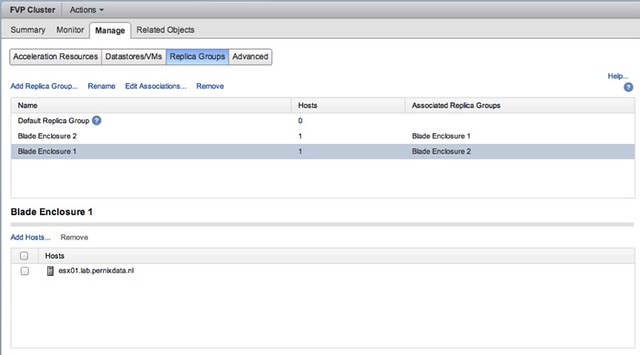
And then specify for your virtual machine where the replica needs to reside. Yes you can even specify that the replica needs to reside within its failure domain if there are requirements to do so, but in the example below the other “failure domain” is chosen.

Is that awesome or what? I think it is, and I am very impressed by what PernixData has announced. For those interested, the SFD video should be online soon, and those who are visiting the Milan VMUG are lucky as Frank mentioned that he will be presenting on these new features at the event. All in all, an impressive presentation again by PernixData if you ask me… awesome set of features to be added soon!

Heartbleed Security Bug fixes for VMware

Duncan Epping · Apr 19, 2014 ·

It seems to be patch Saturday as today a whole bunch of updates of products were released. All of these updates relate to the heartbleed security bug fix. There is no point in listing every single product as I assume you all know the VMware download page by now, but I do want to link the most commonly used for your convenience:

  • VMware vCenter Server 5.5 U1a
    • VCVA 5.5 U1a
  • VMware vCenter Server 5.5c
    • VCVA 5.5c
  • ESXi KB:VMware ESXi 5.5, Patch ESXi550-201404420-SG
  • ESXi KB:VMware ESXi 5.5, Patch Release ESXi550-201404001
  • VMware vCloud Networking and Security 5.5.2

Time to update, but before you do… if you are using NFS based storage make sure to read this first before jumping straight to vSphere 5.5 U1a!

Alert: vSphere 5.5 U1 and NFS issue!

Duncan Epping · Apr 19, 2014 ·

Some had already reported on this on twitter and the various blog posts but I had to wait until I received the green light from our KB/GSS team. An issue has been discovered with vSphere 5.5 Update 1 that is related to loss of connection of NFS based datastores. (NFS volumes include VSA datastores.)

*** Patch released, read more about it here ***

This is a serious issue, as it results in an APD of the datastore meaning that the virtual machines will not be able to do any IO to the datastore at the time of the APD. This by itself can result in BSOD’s for Windows guests and filesystems becoming read only for Linux guests.

Witnessed log entries can include:

2014-04-01T14:35:08.074Z: [APDCorrelator] 9413898746us: [vob.storage.apd.start] Device or filesystem with identifier [12345678-abcdefg0] has entered the All Paths Down state.
2014-04-01T14:35:08.075Z: [APDCorrelator] 9414268686us: [esx.problem.storage.apd.start] Device or filesystem with identifier [12345678-abcdefg0] has entered the All Paths Down state.
2014-04-01T14:36:55.274Z: No correlator for vob.vmfs.nfs.server.disconnect
2014-04-01T14:36:55.274Z: [vmfsCorrelator] 9521467867us: [esx.problem.vmfs.nfs.server.disconnect] 192.168.1.1/NFS-DS1 12345678-abcdefg0-0000-000000000000 NFS-DS1
2014-04-01T14:37:28.081Z: [APDCorrelator] 9553899639us: [vob.storage.apd.timeout] Device or filesystem with identifier [12345678-abcdefg0] has entered the All Paths Down Timeout state after being in the All Paths Down state for 140 seconds. I/Os will now be fast failed.
2014-04-01T14:37:28.081Z: [APDCorrelator] 9554275221us: [esx.problem.storage.apd.timeout] Device or filesystem with identifier [12345678-abcdefg0] has entered the All Paths Down Timeout state after being in the All Paths Down state for 140 seconds. I/Os will now be fast failed.

If you are hitting these issues than VMware recommends reverting back to vSphere 5.5. Please monitor the following KB closely for more details and hopefully a fix in the near future: http://kb.vmware.com/kb/2076392


Disk Controller features and Queue Depth?

Duncan Epping · Apr 17, 2014 ·

I have been working on various VSAN configurations and a question that always comes up is what are my disk controller features and queue depth for controller X? (Local disks, not FC based…) Note that this is not only useful to know when using VSAN, but also when you are planning on doing host local caching with solutions like PernixData FVP or SanDisk FlashSoft for instance. The controller used can impact the performance, and a really low queue depth will result in a lower performance, it is as simple as that.

** NOTE: This post is not about VSAN disk controllers, but rather about disk controllers and their queue depth. Always check the HCL before buying! **

I have found myself digging through documentation and doing searches on the internet until I stumbled across the following website. I figured I would share the link with you, as it will help you (especially consultants) when you need to go through this exercise multiple times:

http://forums.servethehome.com/index.php?threads/lsi-raid-controller-and-hba-complete-listing-plus-oem-models.599/

Just as an example, the Dell H200 Integrated disk controller is on the VSAN HCL. According to the website above it is based on the LSI 2008 and provides the following feature set: 2×4 port internal SAS, no cache, no BBU, RAID 0, 1 and 10. According to the VSAN HCL also provides “Virtual SAN Pass-Through”. I guess the only info missing is queue depth of the controller. I have not been able to find a good source for this. So I figured I would make this thread a source for that info.

Before we dive in to that, I want to show something which is also important to realize. Some controllers take: SAS / NL-SAS and SATA. Although typically the price difference between SATA and NL-SAS is neglectable, the queue depth difference is not. Erik Bussink was kind enough to provide me with these details of one of the controllers he is using as an example, first in the list is “RAID” device – second is SATA and third SAS… As you can see SAS is the clear winner here, and that includes NL-SAS drives.

mpt2sas_raid_queue_depth: int
     Max RAID Device Queue Depth (default=128)
  mpt2sas_sata_queue_depth: int
     Max SATA Device Queue Depth (default=32)
  mpt2sas_sas_queue_depth: int
     Max SAS Device Queue Depth (default=254)

If you want to contribute, please take the following steps and report the Vendor, Controller type and aqlength in a comment please.

  1. Run the esxtop command on the ESXi shell / SSH session
  2. Press d
  3. Press f and select Queue Stats (d)
  4. The value listed under AQLEN is the queue depth of the storage adapter

The following table shows the Vendor, Controller and Queue Depth. Note that this is based on what we (my readers and I) have witnessed in our labs and results my vary depending on the firmware and driver used. Make sure to check the VSAN HCL for the supported driver / firmware version, note that not all controllers below are on the VSAN HCL, this is a “generic” list as I want it to serve multiple use cases.

Generally speaking it is recommended to use a disk controller with a queue depth > 256 when used for VSAN or “host local caching” solutions.

Vendor Disk Controller Queue Depth
Adaptec RAID 2405 504
Dell (R610) SAS 6/iR 127
Dell PERC 6/i 925
Dell PERC H200 Integrated 600
Dell PERC H310 25
Dell PERC H330 256
Dell (M710HD) PERC H200 Embedded 499
Dell (M910) PERC H700 Modular 975
Dell PERC H700 Integrated 975
Dell (M620) PERC H710 Mini 975
Dell (T620) PERC H710 Adapter 975
Dell (T620) PERC H710p 975
Dell PERC H810 975
HP Smart Array B110i 1020
HP Smart Array B120i 31
HP Smart Array P220i 1020
HP Smart Array P400i 128
HP Smart Array P410i 1020
HP Smart Array P420i 1011
HP Smart Array P440ar 1020
HP Smart Array P700m 1200
IBM ServeRAID-M5015 965
IBM ServeRAID-M5016 975
IBM ServeRAID-M5110 975
Intel C602 AHCI (Patsburg) 31 (per port)
Intel C602 SCU (Patsburg) 256
Intel RMS25KB040 600
LSI 2004 25
LSI 2008 25 / 600 (firmware dependent!)
LSI 2108 600
LSI 2208 600
LSI 2308 600
LSI 3008 600
LSI 9271-8i 975
LSI 9300-8i 600

Startup News Flash part 17

Duncan Epping · Apr 17, 2014 ·

Number 17 already… A short one, I expect more news next week when we have “Storage Field Day”, hence I figured I would release this one already. Make sure to watch the live feed if you are interested in getting the details on new releases from companies like Diablo, SanDisk, PernixData etc.

Last week Tintri announced support for the Red Hat Enterprise Virtualization platform. Kind of surprising to see them selecting a specific linux vendor to be honest, but then again it probably also is the more popular option for people who want full support etc. What is nice in my opinion is that Tintri offers the exact same “VM Aware” experience for both platforms. Although I don’t see too many customers using both VMware and RHEV in production, it is nice to have the option.

Startup News Flash part 17 CloudVolumes, no not a storage company, announced support for View 6.0. CloudVolumes developed a solution which helps you manage applications. They provude a central management solution, and the option to distribute and elimate the need for streaming / packaging. I have looked at it briefly and it is an interesting approach they take. I like how they solved the “layering” problem by isolating the app in its own disk container. It does make me wonder how this scales when you have dozens of apps per desktop, never the less an interesting approach worth looking in to.

  • « Go to Previous Page
  • Page 1
  • Interim pages omitted …
  • Page 155
  • Page 156
  • Page 157
  • Page 158
  • Page 159
  • Interim pages omitted …
  • Page 497
  • Go to Next Page »

Primary Sidebar

About the Author

Duncan Epping is a Chief Technologist and Distinguished Engineering Architect at Broadcom. Besides writing on Yellow-Bricks, Duncan is the co-author of the vSAN Deep Dive and the vSphere Clustering Deep Dive book series. Duncan is also the host of the Unexplored Territory Podcast.

Follow Us

  • X
  • Spotify
  • RSS Feed
  • LinkedIn

Recommended Book(s)

Also visit!

For the Dutch-speaking audience, make sure to visit RunNerd.nl to follow my running adventure, read shoe/gear/race reviews, and more!

Do you like Hardcore-Punk music? Follow my Spotify Playlist!

Do you like 80s music? I got you covered!

Copyright Yellow-Bricks.com © 2026 · Log in