• Skip to primary navigation
  • Skip to main content
  • Skip to primary sidebar

Yellow Bricks

by Duncan Epping

  • Home
  • Unexplored Territory Podcast
  • HA Deepdive
  • ESXTOP
  • Stickers/Shirts
  • Privacy Policy
  • About
  • Show Search
Hide Search

vSAN

Does vSAN support a Franken cluster configuration?

Duncan Epping · May 28, 2025 · Leave a Comment

It is funny that this has come up a few times now, actually for the third time in a month. I had a question if you can mix AMD and Intel hosts in the same cluster. Although nothing stops you from doing this, and vSAN supports this configuration, you need to remember that you cannot live migrate (vMotion) between those hosts, which means that if you have DRS enabled you are seriously crippling the cluster as it makes balance resource much more complex.

You are creating a Franken cluster when mixing AMD and Intel. You may ask yourself, why would anyone want to do this in the first place? Well, you could do this for migration purposes for instance. If you use vSAN iSCSI Services for instance, this could be a way to migrate those iSCSI LUNs from old hosts to new host. How? Well, simply add the new hosts to the cluster, place the old hosts into maintenance, and make sure to migrate storage. Do note, all the VMs (or containers) will have to be powered off, and powered on again manually on the new hosts, as a result of moving from Intel to AMD (or the other way around).

If you do end up doing this for migration purposes, please ensure it is for the shortest time possible. Please avoid running with a Franken cluster for multiple days, weeks, or, god forbid, months. Nothing good will come out of it, and your VMs may become little monsters!

vSAN Component vote recalculation with Witness Resilience, the follow up!

Duncan Epping · Mar 21, 2025 · Leave a Comment

I wrote about the Witness Resilience feature a few years ago and had a question on this topic today. I did some tests and then realized I already had an article describing how it works, but as I also tested a different scenario I figured I would write a follow up. In this case we are particularly talking about a 2-node configuration, but this would also apply to stretched cluster.

In a stretched cluster, or a 2-node, configuration when a data site goes down (or is placed into maintenance mode) a vote recalculation will automatically be done on each object/component. This is to ensure that if now the witness ends up failing, the objects/VMs will remain accessible. How that works I’ve explained here, and demonstrated for a 2-node cluster here.

But what if the Witness fails first? Well, I can explain it fairly easily, then the VMs will be inaccessible if the Witness goes down. Why is that? Well because the votes will not be recalculated in this scenario. Of course, I tested this and the screenshots below demonstrate it.

This screenshot shows the witness as Absent and both the “data” components have 1 vote. This means that if we fail one of those hosts the component will become inaccessible. Let’s do that next and then check the UI for more details.

As you can see below, the VM is now inaccessible. This is the result of the fact that there’s no longer a quorum, as 2 out of 3 votes are dead.

I hope that explains how this works.

vSphere HA restart times, how long does it actually take?

Duncan Epping · Mar 13, 2025 · Leave a Comment

I had a question today, and it was based on material I wrote years ago for the Clustering Deepdive. (read it here) The material talks about the sequence HA goes through when a failure has occurred. If you look at the sequence for instance where a “secondary” host has failed, it looks as follows:

  • T0 – Secondary host failure.
  • T3s – Primary host begins monitoring datastore heartbeats for 15 seconds.
  • T10s – The secondary host is declared unreachable and the primary will ping the management network of the failed secondary host. This is a continuous ping for 5 seconds.
  • T15s – If no heartbeat datastores are configured, the secondary host will be declared dead if there is no reply to the ping.
  • T18s – If heartbeat datastores are configured, the secondary host will be declared dead if there’s no reply to the ping and the heartbeat file has not been updated or the lock was lost.

So, depending on whether you have heartbeat datastores or not, this sequence takes either 15 or 18 seconds. Does that mean the VMs are then instantly restarted, and if so, how long does that take? Well no, they won’t instantly restart, because when this sequence has ended, the secondary host which has failed is actually declared dead. Now the potentially impacted VMs will need to be verified if they have actually failed, a list of “to be restarted” VMs will need to be created, and a placement request will need to be done.

The placement request will either go to DRS, or will be handled by HA itself, depending on whether DRS is enabled and if vCenter Server is available. After placement has been determined, the primary host will then request the individual hosts to restart the VMs which should be restarted. After the host(s) has received the list of VMs it needs to restart it will do this in batches of 32, and of course restart priority / order, will be applied. The whole aforementioned process can easily take 10-15 seconds (if not longer), which means that in a perfect world, the restart of the VM occurs after about 30 seconds. Now, this is when the restart of the VM is initiated, that does not mean that the VM, or the services it is hosting, will be available after 30 seconds. The power-on sequence of the VM can take anywhere from seconds, to minutes, depending of course on the size of the VM and the services that need to be started during the power-on sequence.

So, although it only takes 15 to 18 seconds for vSphere HA to determine and declare a failure, there’s much more to it, hopefully, this post provides a better understanding of all that is involved.

Can I have an AF-4 ReadyNode for vSAN ESA with less memory?

Duncan Epping · Feb 18, 2025 · Leave a Comment

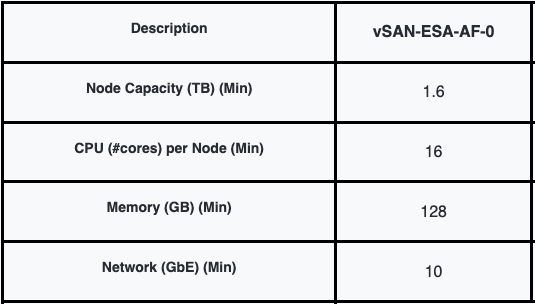
I got this question the other day, and it was around the amount of memory the AF-4 ReadyNode configuration needs to have in order for it to be supported. I can understand where the question comes from, but what most people don’t seem to understand is that there’s a set of minimal requirements, and that the ReadyNode profiles are as the KB states a “guidance”. The listed configurations are a guidance. This guidance is based on the anticipated resource consumption for a given set of VMs. Of course, this could be very different for your workload. That is why this article that describes the hardware guidance now clearly states the following:

To maintain a configuration supported by VMware Global Services (GS), all ReadyNodes certified for vSAN ESA must meet or exceed the resources of the smallest configuration (vSAN-ESA-AF-0 for vSAN HCI or vSAN-Max-XS for vSAN Max).

This not only applies to memory, but also to other components, as long as you meet the minimum specified below.

Can I have an AF-4 ReadyNode for vSAN ESA with less memory?

Can I disable the vSAN service if the cluster is running production workloads?

Duncan Epping · Feb 7, 2025 · Leave a Comment

I just had a discussion with someone who had to disable the vSAN service, while the cluster was running a production workload. They had all their VMs running on 3rd party storage, so vSAN was empty, but when they went to the vSAN Configuration UI the “Turn Off” option was grayed out. The reason this option is grayed out is that vSphere HA was enabled. This is usually the case for most customers. (Probably 99.9%.) If you need to turn off vSAN, make sure to temporarily disable vSphere HA first, and of course enable it again after you turned off vSAN! This ensures that HA is reconfigured to use the Management Network instead of the vSAN Network.

Another thing to consider, it could be that you manually configured the “HA Isolation Address” for the vSAN Network, make sure to also change that to an IP address on the Management Network again. Lastly, if there’s still anything stored on vSAN, this will be inaccessible when you disable the vSAN service. Of course, if nothing is running on vSAN, then there will be no impact to the workload.

Can I disable the vSAN service if the cluster is running production workloads?

  • « Go to Previous Page
  • Page 1
  • Interim pages omitted …
  • Page 3
  • Page 4
  • Page 5
  • Page 6
  • Page 7
  • Interim pages omitted …
  • Page 71
  • Go to Next Page »

Primary Sidebar

About the Author

Duncan Epping is a Chief Technologist and Distinguished Engineering Architect at Broadcom. Besides writing on Yellow-Bricks, Duncan is the co-author of the vSAN Deep Dive and the vSphere Clustering Deep Dive book series. Duncan is also the host of the Unexplored Territory Podcast.

Follow Us

  • X
  • Spotify
  • RSS Feed
  • LinkedIn

Recommended Book(s)

Also visit!

For the Dutch-speaking audience, make sure to visit RunNerd.nl to follow my running adventure, read shoe/gear/race reviews, and more!

Do you like Hardcore-Punk music? Follow my Spotify Playlist!

Do you like 80s music? I got you covered!

Copyright Yellow-Bricks.com © 2026 · Log in