• Skip to primary navigation
  • Skip to main content
  • Skip to primary sidebar

Yellow Bricks

by Duncan Epping

  • Home
  • Unexplored Territory Podcast
  • HA Deepdive
  • ESXTOP
  • Stickers/Shirts
  • Privacy Policy
  • About
  • Show Search
Hide Search

Server

No one ever got fired for buying IBM/HP/DELL/EMC etc

Duncan Epping · May 26, 2015 ·

Last week on twitter there was a discussion about hyper-converged solutions and how these were not what someone who works in an enterprise environment would buy for their tier 1 workloads. I asked the question: well what about buying Pure Storage, Tintri, Nimble or Solid Fire systems? All non-hyper converged solutions, but relatively new. Answer was straight forward: not buying those either, big risk. Then the classic comment came:

No one ever got fired for buying IBM (Dell, HP, NetApp, EMC… pick one)

Brilliant marketing slogan by the way (IBM) which has stuck around since the 70s and is now being used by many others. I wondered though… Did anyone ever get fired for buying Pure Storage? Or for buying Tintri? What about Nutanix? Or VMware Virtual SAN? Hold on, maybe someone got fired for buying Nimble, yeah probably Nimble then. No of course not, even after a dozen google searches nothing shows up. Why you may ask yourself, well because typically people don’t get fired for buying a certain solution. People get fired for being incompetent / lazy / stupid. In the case of infrastructure and workloads that translates in to managing and placing workloads incorrectly or misconfiguring infrastructure. Fatal mistakes which result in dataloss or long periods of downtime, that is what gets you fired.

Sure, buying from a startup may impose some risks. But I would hope that everyone reading this weighs those risks against the benefits, that is what you do as an architect in my opinion. You assess risks and you determine how to mitigate those within your budget. (Yes of course taking requirements and constraints in to account as well.)

Now when it comes to these newer storage solutions, and “new” is relative in this case as some have been around for over 5 years, I would argue that the risk is in most cases negligible. Will those newer storage systems be free of bugs? No, but neither will your legacy storage system be. Some of those systems have been around for over a decade and are now used in scenarios they were never designed for, which means that new problems may be exposed. I am not saying that legacy storage systems will break under your workload, but are you taking that risk in to account? Probably not, why not? Because hardly anyone talks about that risk.

If you (still) don’t feel comfortable with that “new” storage system (yet) but they do appear to give you that edge or bigger bang for the buck simply ask the sales rep a couple of questions which will help building trust:

  • How many systems are sold world wide similar to what you are looking to buy and for similar platforms
    • If they sold thousands, but none of them is using vSphere for instance then what are the chances of you hitting that driver problem firsts? If they sold thousand it will be useful to know…
  • How many customers for that particular model
    • Wouldn’t be the first time a vendors sells thousands of boxes to a single customer for a very specific use case and it works great for them, just not in your particular use case.
    • But if they have many customers, maybe ask…
  • If you can talk to a couple of customers
    • Best thing you can ask for in my opinion, reference call or visit. This is when you find out if what is promised actually is reality.

I do believe that the majority of infrastructure related startups are great companies with great technology. Personally I see a bigger threat in terms of sustainability, rather than technology. Not every startup is going to be around 10 years from now. But if you look at all the different storage (or infra) startups which are out there today, and then look at how they are doing in the market it shouldn’t be too difficult to figure out who is in it for the long run. Whether you buy from a well-established vendor or from a relatively new storage company, it is all about your workload. What are the requirements and how can those requirements be satisfied by that platform. Assess the risks and weigh them against the benefit and make a decision based on that. Don’t make decisions based on a marketing slogan that has been around since the 70s. The world looks different now, technology is moving faster than ever before, being stuck in the 70s is not going to help you or your company compete in this day and age.
VAAI support in vSphere Standard and up as of 6.0!

Duncan Epping · May 22, 2015 ·

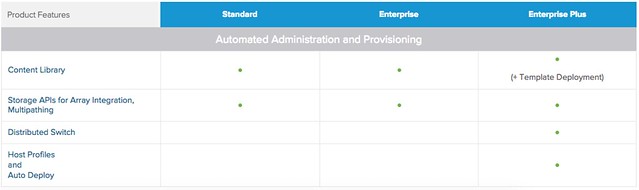
After some internal discussions over the last months it was decided to move VAAI (vSphere APIs for Array Integration) and Multi-Pathing down to vSphere Standard as of 6.0. Main reason for this was that Virtual Volumes, by many considered as the natural evolution of VAAI, is also part of vSphere Standard. So if you have vSphere Standard and a VAAI capable array and looking to move to 6.0, make sure to check the configuration of your hosts and use this great functionality! Note that VAAI did indeed already work in lower editions, but from a licensing point of view you weren’t entitled to it… I guess many folks never really looked at enabling / disabling it explicitly, but for those who did… now you can use it. More details on what is included with which license can be found here: http://www.vmware.com/au/products/vsphere/compare.html

VAAI support in vSphere Standard

This host currently has no network management redundancy

Duncan Epping · May 21, 2015 ·

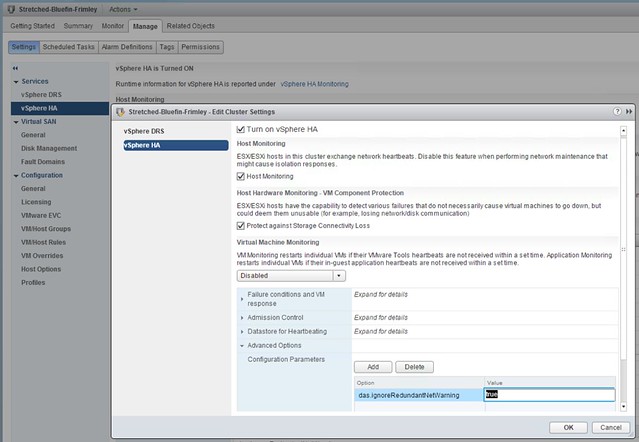
Bumped in to this a billion times by now, and I wouldn’t recommend applying this in production but for your lab when you need to take clean screenshots it works great. I’ve mentioned this setting before but as it was part of a larger article it doesn’t stand out when searching so I figured I would dedicate a short and simple article to it. Here is what you will need to do if you see the following message in the vSphere Web Client: this host currently has no network management redundancy.

  • Go to your Cluster object
  • Go to Settings
  • Go to “vSphere HA”
  • Click “Edit”
  • Add an advanced setting called “das.ignoreRedundantNetWarning”
  • Set the advanced setting to “true”
  • On each host right click and select “reconfigure for vSphere HA”

This is what it should look like in the UI:
This host currently has no network management redundancy

You can also do this in PowerCLI by the way, note that “Stretched-Bluefin-Frimley” is the name of my cluster.

New-AdvancedSetting -Entity Stretched-Bluefin-Frimley -type ClusterHA -Name "das.ignoreRedundantNetWarning" -Value "true" -force


Deploy VCSA 6.0 firstboot error

Duncan Epping · May 19, 2015 ·

I was doing some tests in my lab and while deploying a new VCSA 6.0 I received an error that firstboot was unsuccessful. Not really a great error message if you ask me but okay. I had already validated DNS twice before I got started, but I checked it again just in case… DNS was all good, what else could it be? Figured NTP could be another problem and my friend William Lam confirmed that. I checked the host if NTP was configured and it was not for some reason. So I configured NTP on my ESXi hosts which was straight forward, but what about the VCSA I had deployed? Also not too complicated, I logged in via SSH and did the following:

  • ntp.get
    Will show “Status: Down”
  • ntp.server.add –servers 10.17.0.1
    This configures VCSA to fetch the time from ntp server to 10.17.0.1
  • timesync.set –mode NTP
    Make sure that the time sync is set to ntp
  • ntp.get
    Should show “Status: Up”

That should do it… By the way, you can simply check “resolv.conf” for DNS to see how it is configured today, also look at “hosts” for the host name etc.

VMworld voting has started…

Duncan Epping · May 14, 2015 ·

Every year a percentage of VMworld sessions is selected based on community voting. This voting process has started this week and as I submitted a couple of sessions myself I would like to draw some attention to them and ask you to consider voting for them… that is, if you like the session of course. Below you can find the details of the two sessions I personally submitted. Just login and do a search on the session ID which is in bold below

  • Frank Denneman and Duncan Epping – Five Functions of Software Defined Availability (4535)
    In this session Frank and Duncan will discuss 5 functions of Software Defined Availability, which are part of vSphere 6.0. For each of these functions certain scenarios will be discussed to explain how vSphere can help improving availability of your workloads. This ranges from “how Site Recovery Manager and Storage DRS are loosely coupled but tightly integrated” with vSphere 6.0 to “how vSphere HA responds in the case of a certain failure”. Be prepared to get in to the trenches of workload availability…
  • Lee Dilworth and Duncan Epping – Five Common Customer Use Cases for Virtual SAN (4650)
    In this quick talk Lee Dilworth and Duncan Epping will discuss the five most common use cases seen within the Virtual SAN install base. This session will not just focus on the use case but also include some common hardware configuration details to provide a better understanding of the flexibility which Virtual SAN offers.
  • « Go to Previous Page
  • Page 1
  • Interim pages omitted …
  • Page 85
  • Page 86
  • Page 87
  • Page 88
  • Page 89
  • Interim pages omitted …
  • Page 336
  • Go to Next Page »

Primary Sidebar

About the Author

Duncan Epping is a Chief Technologist and Distinguished Engineering Architect at Broadcom. Besides writing on Yellow-Bricks, Duncan is the co-author of the vSAN Deep Dive and the vSphere Clustering Deep Dive book series. Duncan is also the host of the Unexplored Territory Podcast.

Follow Us

  • X
  • Spotify
  • RSS Feed
  • LinkedIn

Recommended Book(s)

Also visit!

For the Dutch-speaking audience, make sure to visit RunNerd.nl to follow my running adventure, read shoe/gear/race reviews, and more!

Do you like Hardcore-Punk music? Follow my Spotify Playlist!

Do you like 80s music? I got you covered!

Copyright Yellow-Bricks.com © 2026 · Log in