• Skip to primary navigation
  • Skip to main content
  • Skip to primary sidebar

Yellow Bricks

by Duncan Epping

  • Home
  • Unexplored Territory Podcast
  • HA Deepdive
  • ESXTOP
  • Stickers/Shirts
  • Privacy Policy
  • About
  • Show Search
Hide Search

Server

vCenter Server 7.0 U1a released, compatible with SRM!

Duncan Epping · Oct 23, 2020 ·

I’ve had a bunch of customers asking the past couple of weeks when vSphere / vCenter 7.0 U1 would be supported with SRM. Yesterday (22nd of October) vCenter Server 7.0 U1a was released and this release introduced support/compatibility with SRM. For those wondering why it wasn’t supported, there was an issue with vCLS and SRM which had to be fixed first. So if you are one of those customers who runs the latest and greatest version of vSphere in combination with SRM you can now move to 7.0 U1a. If you haven’t seen the details yet of the release you can find it here:

  • vCenter Server 7.0 U1a Release Notes
  • SRM Product Interop List

Start those download engines and plan your upgrades!

VMware vSphere Cluster Services (vCLS) considerations, questions and answers.

Duncan Epping · Oct 9, 2020 ·

In the vSphere 7.0 Update 1 release VMware introduced a new service called the VMware vSphere Cluster Services (vCLS). vCLS provides a mechanism that allows VMware to decouple both vSphere DRS and vSphere HA from vCenter Server. Niels Hagoort wrote a lengthy article on this topic here. You may wonder why VMware introduces this, well as Niels states. by decoupling the clustering services (DRS and HA) from vCenter Server via vCLS we ensure the availability of critical services even when vCenter Server is impacted by a failure.

vCLS is a collection of multiple VMs which, over time, will be the backbone for all clustering services. In the 7.0 U1 release a subset of DRS functionality is enabled through vCLS. Over the past week(s) I have seen many questions coming in and I wanted to create a blog with answers to these questions. When new questions or considerations come up, I will add these to the list below.

[Read more…] about VMware vSphere Cluster Services (vCLS) considerations, questions and answers.

vSAN HCI Mesh Considerations

Duncan Epping · Oct 7, 2020 ·

I did a vSAN File Services Considerations posts earlier this year and recently updated it to include some of the changes that were introduced for vSAN 7.0 U1. Considering vSAN HCI Mesh, aka Datastore Sharing, is also a brand new feature, I figured I would do a similar post. In this post, I am not going to do a deep-dive of the architecture, but I simply want to go over some of the considerations and best practices for implementing vSAN HCI Mesh. I collected these recommendations, and requirements, from our documentation and some VMworld sessions.

First of all, for those who don’t know, vSAN HCI Mesh allows you to mount a remote vSAN Datastore to a vSAN Cluster. In other words, if you have two (or more) vSAN Clusters, you can access the storage capacity from a cluster remotely. Why would you? Well, you can imagine that one cluster is running out of disk space for instance. Or, you may have a hybrid cluster and an all-flash cluster and want to provision a VM from a compute perspective on hybrid, but from a storage point of view on all-flash. By using Datastore Sharing you can now mount the other vSAN Datastore and use it as if it is a local datastore. [Read more…] about vSAN HCI Mesh Considerations

Highlighting some VMworld on-demand sessions

Duncan Epping · Oct 2, 2020 ·

It was a strange week for most of us. VMworld is THE event of the year, at least for those who focus on VMware technology and technology from the VMware ecosystem, and this year it was virtual. I spend a crazy amount of time watching keynotes and on-demand sessions. As always I had created this top 15 list, but after watching dozens of sessions I realized that I left out a few brilliant sessions which I would highly recommend watching. Here are the sessions that stood out to me the past couple of days. These sessions were interesting as they either contained unique content or just provided very useful use-cases.
  • Choosing the Best GPU Accelerator Approach for Machine Learning [ETML1110] by Justin Murray and Shawn Kelly
  • Simplify and Boost Apache Spark with vSphere with Tanzu [HCP2097] by Justin Murray and Enrique Corro

I would recommend watching both of these sessions, as HPC2097 goes over a great use case, especially as Spark can now leverage GPUs as well. Both sessions give you a better understanding of Kubernetes, Cloud Native workloads and GPU acceleration. Combine that with the announcements around Project Monterey, where VMware and NVIDIA have announced to work closely together to provide a new level of integration for the datacenter of the future.

  • The Nerdfest VDI Demo: VDI*(AI + ML + Deep learning + GPU) [DWHV2820] by Johan van Amersfoort

Again a session on AI/ML, I just loved the demos that Johan included. It gives you an idea what is possible today with AI/ML. It is a 35-minute session, so you should be able to get through it rather fast!

  • Core Storage Best Practice Deep Dive: Configuring the New Storage Features [HCI1691] by Jason Massae and Cody Hosterman

I had the session on the topic of vVols listed as a recommendation, but I just watched the Core Storage session, and I feel it may even be better. It discusses new technologies like NVMe over Fabric, but also discusses things like iSCSI best practices.

  • Achieving Enterprise Comfort with VMware Cloud Foundation [HCI2338] by Paul McSharry

The last session I want to plug is by Paul McSharry. This session is full of best practices, design/sizing, and operational guidance around vSAN and VMware Cloud Foundation.

Oh, although I already had this session listed on the top 15, make sure to check out Frank Denneman’s 60 minutes of NUMA, that is… if you want to wreck your brain, it is DEEP!

Announcing VMware Cloud Disaster Recovery! (VCDR)

Duncan Epping · Sep 30, 2020 ·

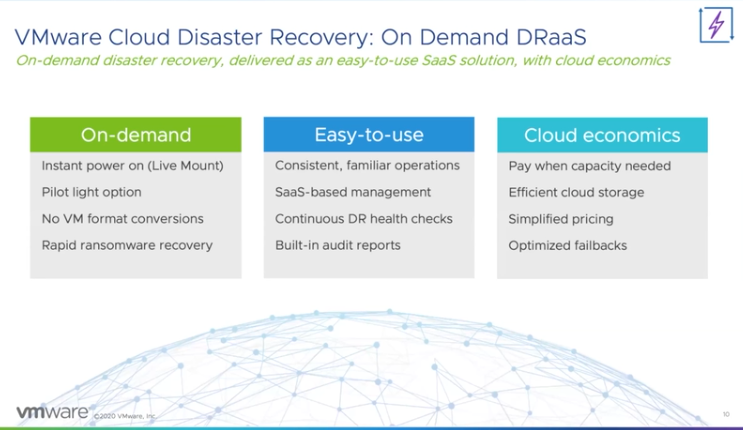
Most of you probably saw the announcements around the acquisition of Datrium not too long ago. One of the major drivers for that acquisition was the Disaster Recovery solution which Datrium developed. This week at VMworld this service was announced as a new VMware disaster recovery option. The service is named VMware Cloud Disaster Recovery, and it provides the ability to replicate workloads from on-prem into cloud storage, and recover from cloud storage into VMware Cloud on AWS! The three key pillars of the service are ease of use, fast recovery, cloud economics.

The solution is extensively covered in three VMworld sessions (HCI2876, HCI2886, HCI2865). I have watched all three and will provide a short summary here. What capabilities does VMware Cloud DR (VCDR) provide and why is VMware heading into this space?

The why was well explained by Mark Chuang in HCI2876, customers are saying that:

  • “DR is very complex and expensive to manage, and I can’t add IT Headcount”
  • “Our data grows 10-15% every year, with physical DR it is hard to accommodate the growth in the datacenter to meet the needs”
  • “We only test full DR once a year because it is disruptive. Any time there is a major change, how can we know it still works? It is a huge issue!”

I guess that makes it clear why VMware is interested in this space, it is a huge problem for customers and the solution typically comes at a high cost. VMware has always been in the business of solving complex solutions in preferably a simple way, and that is exactly what VMware Cloud Disaster Recovery delivers, a simple solution at a relatively low cost.

So what does it bring from a feature/functionality stance?

it all starts with cloud economics, to which ease-of-use also contributes, in my opinion. VMware Cloud Disaster Recovery is super simple to configure and it replicates data to “cheap and deep” cloud storage. This ensures that the cost can be kept low, and note that all of the typical cost that comes with cloud storage (network etc) are all included in the service offering by VMware. The challenge however typically with cloud storage is that it is relatively slow when it comes to restoring, but this is where the “on-demand” capabilities come into play. VMware Cloud DR provides the ability to instantly power-on workloads through a live mount option, without the need to convert the stored data back to a VM format.

When configuring the VMware Cloud DR solutions you will need to install/configure a DRaaS Connector on-prem. This on-prem Connector connects you to the SaaS platform and will provide the required details to the SaaS Orchestrator, note that you can have multiple DRaaS connectors for resiliency and performance reasons. When the connection is configured you will then be able to create “Protection Groups” and “DR Plans”. Those who have worked with Site Recovery Manager will recognize the terms. For those who haven’t:

  • Protection Groups – These groups list the workloads which will be protected by VMware Cloud DR. Of course you can define the protection schedule, basically how many snapshots need to be shipped remote cloud storage per day/week/month.
  • DR Plans – These plans list workloads that would need to be failed over when the plan is triggered, and for instance, include the order in which the workloads need to be powered on. Also, if workloads need to get a different IP address in the cloud, then you can specify this here also.

Of course besides creating protection groups and DR plans you have the ability to test and failover the workloads in those plans, again, very similar to what Site Recovery Manager offers. Before I forget, you will have the option of course to select the snapshot you want to recover from. So you can go back to any point in time. What is unique here is that VMs are powered without (initially) moving data from cloud storage to your VMware Cloud on AWS. It basically mounts an NFS share from the SaaS platform and the scale-out file system ensures that the VMs can be instantly be powered on. After you have tested the recovery you can then decide to migrate the VMs to your SDDC, or you can of course also discard the workloads if that is something you desire. Last but not least, of course, you also have the ability to replicate back to on-prem, so that you can bring your workloads back whenever you have recovered your environment from the disaster that occurred and you are ready to run those workloads on-prem again.

Now there are many more details, but I am not going to share those in this post, I may do a couple of additional blogs at a future time. I hope the above gives a good overview of what the offering will provide. For more details, I would recommend watching the VMworld sessions on this topic (HCI2876, HCI2886, HCI2865). The last thing I want to share though is where the solution will be available, or at least what is being planned. As shown below, the offering should be available in multiple regions soon.

  • « Go to Previous Page
  • Page 1
  • Interim pages omitted …
  • Page 23
  • Page 24
  • Page 25
  • Page 26
  • Page 27
  • Interim pages omitted …
  • Page 336
  • Go to Next Page »

Primary Sidebar

About the Author

Duncan Epping is a Chief Technologist and Distinguished Engineering Architect at Broadcom. Besides writing on Yellow-Bricks, Duncan is the co-author of the vSAN Deep Dive and the vSphere Clustering Deep Dive book series. Duncan is also the host of the Unexplored Territory Podcast.

Follow Us

  • X
  • Spotify
  • RSS Feed
  • LinkedIn

Recommended Book(s)

Also visit!

For the Dutch-speaking audience, make sure to visit RunNerd.nl to follow my running adventure, read shoe/gear/race reviews, and more!

Do you like Hardcore-Punk music? Follow my Spotify Playlist!

Do you like 80s music? I got you covered!

Copyright Yellow-Bricks.com © 2026 ยท Log in