• Skip to primary navigation
  • Skip to main content
  • Skip to primary sidebar

Yellow Bricks

by Duncan Epping

  • Home
  • Unexplored Territory Podcast
  • HA Deepdive
  • ESXTOP
  • Stickers/Shirts
  • Privacy Policy
  • About
  • Show Search
Hide Search

Server

HA/DRS and Flattened Shares

Duncan Epping · Jul 22, 2010 ·

A week ago I already touched on this topic but I wanted to get a better understand for myself what could go wrong in these situations and how vSphere 4.1 solves this issue.

Pre-vSphere 4.1 an issue could arise when shares had been set custom on a virtual machine. When HA fails over a virtual machine it will power-on the virtual machine in the Root Resource Pool. However, the virtual machine’s shares were scaled for its appropriate place in the resource pool hierarchy, not for the Root Resource Pool. This could cause the virtual machine to receive either too many or too few resources relative to its entitlement.

A scenario where and when this can occur would be the following:

VM1 has a 1000 shares and Resource Pool A has 2000 shares. However Resource Pool A has 2 VMs and both will have 50% of those “2000” shares.
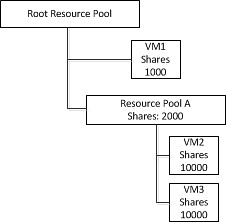
When the host would fail both VM2 and VM3 will end up on the same level as VM1. However as a custom shares value of 10000 was specified on both VM2 and VM3 they will completely blow away VM1 in times of contention. This is depicted in the following diagram:
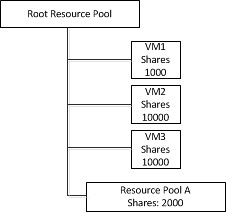
This situation would persist until the next invocation of DRS would re-parent the virtual machine to it’s original Resource Pool. To address this issue as of vSphere 4.1 DRS will flatten the virtual machine’s shares and limits before fail-over. This flattening process ensures that the VM will get the resources it would have received if it would have been failed over to the correct Resource Pool. This scenario is depicted in the following diagram. Note that both VM2 and VM3 are placed under the Root Resource Pool with a shares value of 1000.
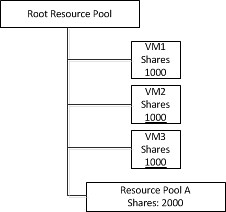
Of course when DRS is invoked  both VM2 and VM3 will be re-parented under Resource Pool A and will receive the amount of shares they had originally assigned again. I hope this makes it a bit more clear what this “flattened shares” mechanism actually does.

VUM and MS SQL 2008 support

Duncan Epping · Jul 22, 2010 ·

I received multiple questions around this so decided to ask around internally. I managed to get ahold of the VMware Update Manager (aka VUM) Product Manager and after exchanging a couple of emails this is the outcome:

VMware vSphere Compatibility Matrixes
Table 13 on page 14 of the above linked document states that VUM doesn’t support MS SQL 2008 Standard. This is however untrue and should be considered as a document bug. It is supported and the document will be modified soon to reflect these changes.

vCenter 4.1: this product can only be installed….

Duncan Epping · Jul 21, 2010 ·

When installing vCenter 4.1 on Windows 2008 R2 64-bit one of my colleagues ran into the following error message:

This product can only be installed on the following 64-bit operating systems:
Windows XP SP2 or above
Windows 2003
Windows 2008

Although this message is actually correct it was not what was causing this problem as he followed the documentation and installed Windows 2008 64-bit. In this case Active Directory had been installed and that was the reason it was failing. As vCenter installs ADAM it can’t run on top of a server which hosts AD.

Workaround for: ESX(i) 4.1 Password Issue

Duncan Epping · Jul 20, 2010 ·

As many of you already know there is an issue with the encryption mechanism of ESX(i) 4.1. When passwords are used which are longer than 8 characters the password will be truncated after the 8th character. As such during authentication only the first 8 characters are used. In other words if you have  a 10 character password you will only need to type the first 8 characters correct and the rest can be completely random.

The KB article that was published yesterday contains a workaround to change this behaviour. I recommend everyone to read the article and implement this workaround when your password policy describes passwords longer than 8 characters.

Cool vSphere 4.1 Feature: Cluster Operational Status

Duncan Epping · Jul 20, 2010 ·

There’s a cool new feature added to vSphere 4.1 for HA. If an error occurs you can easily check what the issue is by going to your cluster and clicking the “Cluster Operational Issues” line on the Summary tab.

If there are no issues the screen will be completely gray. I forced an issue though so you can see what is shows. Note that is also shows the “Role” of the host and in this case it is a Secondary Node!

  • « Go to Previous Page
  • Page 1
  • Interim pages omitted …
  • Page 209
  • Page 210
  • Page 211
  • Page 212
  • Page 213
  • Interim pages omitted …
  • Page 336
  • Go to Next Page »

Primary Sidebar

About the Author

Duncan Epping is a Chief Technologist and Distinguished Engineering Architect at Broadcom. Besides writing on Yellow-Bricks, Duncan is the co-author of the vSAN Deep Dive and the vSphere Clustering Deep Dive book series. Duncan is also the host of the Unexplored Territory Podcast.

Follow Us

  • X
  • Spotify
  • RSS Feed
  • LinkedIn

Recommended Book(s)

Also visit!

For the Dutch-speaking audience, make sure to visit RunNerd.nl to follow my running adventure, read shoe/gear/race reviews, and more!

Do you like Hardcore-Punk music? Follow my Spotify Playlist!

Do you like 80s music? I got you covered!

Copyright Yellow-Bricks.com © 2026 · Log in