• Skip to primary navigation
  • Skip to main content
  • Skip to primary sidebar

Yellow Bricks

by Duncan Epping

  • Home
  • Unexplored Territory Podcast
  • HA Deepdive
  • ESXTOP
  • Stickers/Shirts
  • Privacy Policy
  • About
  • Show Search
Hide Search

Server

Download it now… vSphere 5

Duncan Epping · Aug 25, 2011 ·

The wait is finally over… I’ve noticed many people on twitter craving for it so I figured it wouldn’t harm anyone if I would provide the links to the download page. Here are the links to the direct page of ESXi and vCenter

  • VMware ESXi 5.0 (Build 469512)
  • VMware vCenter 5.0 (Build 456005) (vCenter Server Appliance also available as of today (26/08))
  • VMware Data Recovery 2.0 (Build 433157)
  • vSphere Storage Appliance 1.0
  • VMware vShield Zones for vSphere 5 (Build 216288)
  • Documentation link (docs also available in epub and kindle format!)
    • What’s New in VMware vSphere 5.0
    • VMware vSphere 5.0 Release Notes
  • Some tools which will come in handy:
    • VMware vSphere PowerCLI 5.0
    • VMware vCenter Update Manager PowerCLI
    • VMware GuestAppMonitor SDK (HA Application Monitoring)
    • VMware vSphere Management Assistant 5.0 (vMA)
    • VMware vSphere CLI
  • vSphere 5 Compatible and Updated Products:
    • vCenter Operations 1.0.1 (release notes)
    • VMware vCenter Capacity IQ 1.5.2 (release notes)

Evaluation Guides:

  • VMware vSphere 5 Evaluation Guide – Volume One
  • VMware vSphere 5 Evaluation Guide – Volume Two – Advanced Storage Features
  • VMware vSphere 5 Evaluation Guide – Volume Three – Advanced Networking Features
  • VMware vSphere 5 Evaluation Guide – Volume Four – Auto Deploy
  • VMware Data Recovery Evaluation Guide

What’s new whitepapers (release at launch last month):

  • What’s New in vSphere 5.0
  • What’s New in VMware vSphere 5.0: VMware vCenter
  • What’s New in VMware vSphere 5.0: Platform Whitepaper
  • What’s New in VMware vSphere 5.0: Performance Whitepaper
  • What’s New in VMware vSphere 5.0: Storage Whitepaper
  • What’s New in VMware vSphere 5.0: Networking Whitepaper
  • What’s New in VMware vSphere 5.0: Availability Whitepaper
  • What’s New in VMware Data Recovery 2.0 Technical Whitepaper
  • VMware vSphere Storage Appliance Technical Whitepaper
  • What’s New in VMware vCenter Site Recovery Manager 5 Technical Whitepaper
  • What’s New in VMware vCloud Director 1.5 Technical Whitepaper

By the way, did you know there were over 140 new features in vSphere 5.0? Check out my article on the VMware vSphere Blog for a full list and for a nice contest / challenge!

Changelog:
edit 1 – added links to VSA, Zones and Data Recovery)
edit 2 –  added eval guide links
edit 3 – added different management tools etc
edit 4 – added a list with compatible and updated products
Mandatory DRS Rules and HA

Duncan Epping · Aug 24, 2011 ·

On twitter Mike Laverick asked a question around DRS Affinity Rules and if HA would respect these. In this particular instance the question was around VM-Host affinity rules and I noticed multiple tweeps responding and figured it would not hurt to repeat this.

There are two different types of VM-Host affinity rules:

  1. Must aka mandatory
  2. Should aka preferential

The difference between these two with regards to HA is that HA will always respect a must rule. These are mandatory, even if that results in downtime for the VM. The should rule is also known as the preferential rule. In others words it would be nice if this rule can be respected, but if it can’t… no harm.

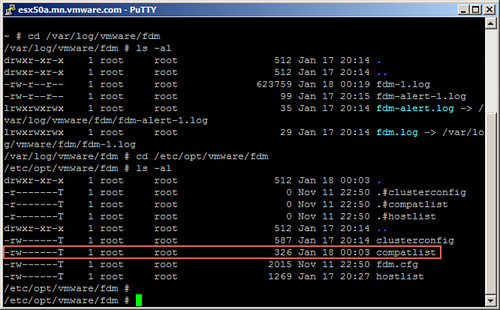
How does HA know which VM belongs to which host with regards to DRS rules? Well that is fairly straight forward. HA keeps track of which VM is compatible with which hosts. This “VM to Host compatibility list” is used for portgroups and datastores but also for DRS rules. Check the screenshot below for a hint…

Mandatory DRS Rules and HA

Please note, this is a very old article about HA, there are tons of new articles on this topic. Just do a search on my blog, or download my ebook freely available via Rubrik.

#VMworld is going to be E P I C!

Duncan Epping · Aug 22, 2011 ·

If anyone is overly excited about VMworld it is me. Although my schedule is completely overbooked and I expect to be running around like crazy every single day, I cannot wait for VMworld to start! Here are 10 things why I am excited about VMworld, in no particular order:

  • Networking
    No I am not talking about Distributed Switches here… I am talking about meeting various types of people and organizations. I suggest you try sitting down at a table with people you don’t know and start a conversation. I bet you will have a lot of things in common and in some scenarios can benefit from their expertise or the problems that they might have faced and solved. I’ve always enjoyed this and believe this is the most valuable part of the show.
  • The Killers
    Yes I know that some of you have never heard of this band before, but this is truly an amazing band. I’ve seen them live multiple times and it has always been well worth it, great performance and great music. It is probably the first time that I actually am looking forward to the VMworld band! If any of the VMworld folks are reading this, VMworld EMEA: Editors or Arctic Monkeys would be nice 🙂
  • Experts One on One!
    This is one of those great opportunities to meet up with some of the top knowledge experts within VMware. I am humbled to be part of a session (Experts-08 Wednesday at 11:00 – 12:00) and am joining people like Chris Colotti (vCloud), David Overbeek (vCenter Config Manager) and Venky Deshpande (vSphere Networking). Other sessions feature people like Kit Colbert, Lee Dilworth, Mike DiPetrillo, Massimo Re Ferre and many more. Check these sessions out, great opportunity to ask these guys the questions you always wanted to ask!
  • Keynotes
    I don’t know if others enjoy it as much as I do, but I love watching the keynotes. Paul Maritz’s talking about VMware’s strategic direction and his vision on IT/Cloud/Virtualization in the upcoming years are priceless! Last year Steve Herrod’s session was amazing, especially when Steve Herrod and Eddie Dinel were racing across the stage on their scooters. I expect nothing less this year!
  • VSP3205 – Technology Overview: vStorage APIs for VM and Application Granular Data Management
    This is one of the reasons I love attending events like VMworld. Satyam Vaghani hosts this session and happens to be one of the key engineers with regards to our low level storage initiatives. He was one of the people who developed VMFS and I can ensure you that a session hosted by Satyam will knock you out of your socks. I know they have a demo planned for this one and I know what you can expect… don’t miss out!
  • Solutions Exchange
    I always spent several hours just wandering around at the solutions exchange randomly stopping at booths and just checking out new technology. Every single year I find some new cool tool, new storage device, new hardware platform or just new relationships which were well worth spending the hours walking around. This year I plan on at least meeting up with the Tintri and Nutanix folks, but I definitely plan on stopping at others booths as well. If your kids love flashy / shiny / blinking things, I bet they will love you when you get back home.
  • VSP1956 – The VMware ESXi Quiz Show
    Do I need to say more? Will Chad Sakac beat Vaughn Stewart? Is Scott Herold able to slaughter Eric Siebert? Will the VDI Warrior Tom Howarth be able to exterminate Jason vTerminator Boche? We will see what happens, we will see who will take on VMware’s own vRaminators team! Death to Powerpoint, Hail the Quizmaster! Sign up, witness it! (**don’t take this too serious, we’re all friends, it it about having fun**)
  • VMUnderground Party
    I love these types of community events. I know the tickets sold out in literally seconds and people are still looking for tickets, if your not planning on attending give them to someone else. Before you give them away, I heavily recommend attending! These are always fun and there’s a high community presence. I know Frank Denneman and I will be there for sure, stop by and say hi! (Yes I know it collides with vOdgeball and that’s a shame indeed)
  • VMworld Fun Run / Bike Ride
    I started this tradition in 2009 and we had roughly 200 participants, since then the VMworld team took on the responsibilities of this event and it has returned in 2010 and of course in 2011. I am glad that they also kept it close to the original idea, just a fun event but with a serious touch… donating registration fees to a local charity foundation, this year it is Friends of Red Rock Canyon. Unique Event, be there!
  • VMworld Labs
    Most of you read my coverage of the VMworld Labs last year. I’ve not been as closely involved as last year but I know these will be well worth your time. The Labs team have worked really hard to get all Labs ready in time and to get the environment up and running in the vCloud! Last year we had people taking every single lab out there, queues outside at 07:15 well before the labs opened up… be there!

I am confident that VMworld will be epic and I hope all of you are as excited as I am. Once again, if you see me walking around don’t be shy and say hi!

See you at VMworld!

Swap to host cache aka swap to SSD?

Duncan Epping · Aug 18, 2011 ·

Before we dive in to it, lets spell out the actual name of the feature “Swap to host cache”. Remember that, swap to host cache!

I’ve seen multiple people mentioning this feature and saw William posting a hack on how to fool vSphere (feature is part of vSphere 5 to be clear) into thinking it has access to SSD disks while this might not be the case. One thing I noticed is that there seems to be a misunderstanding of what this swap to host cache actually is / does and that is probably due to the fact that some tend to call it swap to SSD. Yes it is true, ultimately your VM would be swapping to SSD but it is not just a swap file on SSD or better said it is NOT a regular virtual machine swap file on SSD.

When I logged in to my environment first thing I noticed was that my SSD backed datastore was not tagged as SSD. First thing I wanted to do was tag it as SSD, as mentioned William already described this in his article and it is well documented in our own documentation as well so I followed it. This is what I did to get it working:

  • Check the NAA ID in the vSphere UI
  • Opened up an SSH session to my ESXi host
  • Validate which SATP claimed the device:
    esxcli storage nmp device list
    In my case: VMW_SATP_ALUA_CX
  • Verify it is currently not recognized as SSD by typing the following command:
    esxcli storage core device list -d naa.60060160916128003edc4c4e4654e011
    should say: “Is SSD : False”
  • Set “Is SSD” to true:
    esxcli storage nmp satp rule add -s VMW_SATP_ALUA_CX  –device naa.60060160916128003edc4c4e4654e011  –option=enable_ssd
  • I reloaded claim rules and ran them using the following commands:
    esxcli storage core claimrule load
    esxcli storage core claimrule run
  • Validate it is set to true:
    esxcli storage core device list -d naa.60060160916128003edc4c4e4654e011
  • Now the device should be listed as SSD

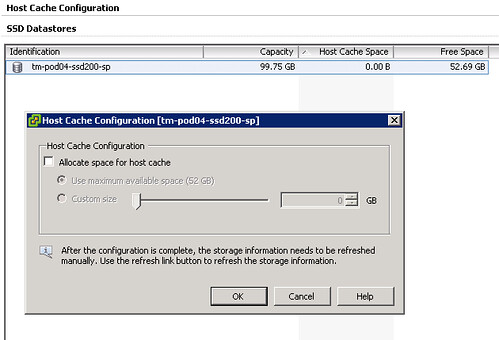
Next would be to enable the feature… When you go to your host and click on the “Configuration Tab” there should be a section called “Host Cache Configuration” on the left. When you’ve correctly tagged your SSD it should look like this:

Please note that I already had a VM running on the device and hence the reason it is showing some of the space as being in use on this device, normally I would recommend using a drive dedicated for swap. Next step would be enabling the feature and you can do that by opening the pop-up window (right click your datastore and select “Properties”). This is what I did:

  • Tick “Allocate space for host cache”
  • Select “Custom size”
  • Set the size to 25GB
  • Click “OK”

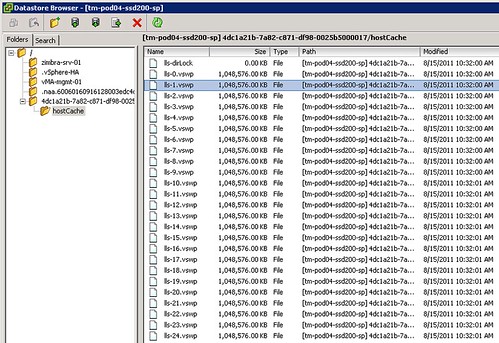
Now there is no science to this value as I just wanted to enable it and test the feature. What happened when we enabled it? We allocated space on this LUN so something must have been done with it? I opened up the datastore browser and I noticed a new folder was created on this particular VMFS volume:

Not only did it create a folder structure but it also created 25 x 1GB .vswp files. Now before we go any further, please note that this is a per host setting. Each host will need to have its own Host Cache assigned so it probably makes more sense to use a local SSD drive instead of a SAN volume. Some of you might say but what about resiliency? Well if your host fails the VMs will need to restart anyway so that data is no longer relevant, in terms of disk resiliency you should definitely consider a RAID-1 configuration. Generally speaking SAN volumes are much more expensive than local volumes and using local volumes also removes the latency caused by the storage network. Compared to the latency of a SSD (less than 100 μs), network latency can be significant. So lets recap that in a nice design principal:

Basic design principle
Using “Swap to host cache” will severely reduce the performance impact of VMkernel swapping. It is recommended to use a local SSD drive to elimate any network latency and to optimize for performance.

How does it work? Well fairly straight forward actually. When there is severe memory pressure and the hypervisor needs to swap memory pages to disk it will swap to the .vswp files on the SSD drive instead. Each of these, in my case, 25 files are shared amongst the VMs running on this host. Now you will probably wonder how you know if the host is using this Host Cache or not, that can of course simply be validated by looking at the performance statistics within vCenter. It contains a couple of new metrics of which “Swap in from host cache” and “Swap out to host cache” (and the “rate”…) metrics are most important to monitor. (Yes, esxtop has metrics as well to monitor it namely LLSWR/s  and LLSWW/s)

What if you want to resize your Host Cache and it is already in use? Well simply said the Host Cache is optimized to allow for this scenario. If the Host Cache is completely filled memory pages will need to be copied to the regular .vswp file. This could mean that the process takes longer than expected and of course it is not a recommended practice as it will decrease performance for your VMs as these pages more than likely at some point will need to be swapped in. Resizing however can be done on the fly, no need to vMotion away your VMs. Just adjust the slider and wait for the process to complete. If you decide to complete remove all host cache for what ever reason than all relevant data will be migrated to the regular .vswp.

What if the Host Cache is full? Normally it shouldn’t even reach that state, but when you run out of space in the host cache pages will be migrated from your host cache to your regular vswap file and it is first in first out in this case, which should be the right policy for most workloads. Now chances of course of having memory pressure to the extend where you fill up a local SSD are small, but it is good to realize what the impact is. If you are going down the path of local SSD drives with Host Cache enabled and will be overcommitting it might be good to do the math and ensure that you have enough cache available to keep these pages in cache rather than on rotating media. I prefer to keep it simple though and would probably recommend to equal the size of your hosts memory. In the case of a host with 128GB RAM that would be a 128GB SSD. Yes this might be overkill, but the price difference between 64GB and 128GB is probably neglect-able.

Basic design principle
Monitor swap usage. Although “Swap to host cache” will reduce the impact of VMkernel swapping it will not eliminate it. Take your expected consolidation ratio into account including your HA (N-X) strategy and size accordingly. Or keep it simple and just use the same size as physical memory.

One interesting use case could be to place all regular swap files on very cheap shared storage (RAID5 of SATA drives) or even local SATA storage using the “VM swapfile location” (aka. Host local swap) feature. Then install a host cache for any host these VMs can be migrated to. This should give you the performance of a SSD while maintaining most of the cost saving of the cheap storage. Please note that the host cache is a per-host feature. Hence in the time of a vMotion all data from the cache will need to be transferred to the destination host. This will impact the time a vMotion takes. Unless your vMotions are time critical, this should not be an issue though. I have been told that VMware will publish a KB article with advise how to buy the right SSDs for this feature.

Summarizing, Swap to SSD is what people have been calling this feature and that is not what it is. This is a mechanism that caches memory pages to SSD and should be referred to as “Swap to host cache”. Depending on how you do the math all memory pages can be swapped to and from SSD. If there is insufficient space available memory pages will move over to the regular .vswp file. Use local SSD drives to avoid any latency associated with your storage network and to minimize costs.

Nutanix Complete Cluster

Duncan Epping · Aug 18, 2011 ·

I was just reading up and noticed an article about Nutanix. Nutanix is a “new” company which just came out of stealth mode and offers a datacenter in a box type of solution. With that meaning that they have a solution which provides shared storage and compute resources in a single 2u chassis. This 2u chassis can hold up to 4 compute nodes and each of these nodes can have 2 CPUs, up to 192GB of memory, 320 GB of PCIe SSD, 300 GB SATA SSD and 5 TB of SATA HDDs. Now the cool thing about it is that each of the nodes “local” storage can be served up as shared storage to all of the nodes enabling you to use HA/DRS etc. I guess you could indeed describe Nutanix’s solution as the “Complete Cluster” solution and as Nutanix says it is unique and many analysts and bloggers have been really enthusiastic about this… but is it really that special?

What Nutanix actually uses for their building block is an HPC form factor case like the one I discussed in May of this year. I wouldn’t call that revolutionary as Dell, Super Micro, HP (and others) sell these as well but market it differently (in my opinion a missed opportunity). What does make Nutanix somewhat unique is that they package it as a complete solution including a Virtual Storage Appliance they’ve created. It is not just a VSA but it appears to be a smart device which is capable of taking advantage of the SSD drives available and uses that as a shared cache distributed amongst each of the hosts and it uses multiple tiers of storage; SSD and SATA. It kind of reminds me of what Tintri does only this is a virtual appliance that is capable of leveraging multiple nodes. (I guess HP could offer something similar in a heartbeat if they bundle their VSA with the DL170e) Still I strongly believe that this is a promising concept and hope these guys are at VMworld so I can take a peak and discuss the technology behind this a bit more in-depth as I have a few questions from a design perspective…

  • No 10Gbe redundancy? (according to the datasheet just a single port)
  • Only 2 nics for VM traffic, vMotion, Management? (Why not just 2 10Gbe nic ports?)
  • What about when the VMware cluster boundaries are reached? (Currently 32 nodes)
  • Out band management ports? (could be useful to have console access)
  • How about campus cluster scenarios, any constraints?
  • …..

Lets see if I can get these answered over the next couple of days or at VMworld.

  • « Go to Previous Page
  • Page 1
  • Interim pages omitted …
  • Page 175
  • Page 176
  • Page 177
  • Page 178
  • Page 179
  • Interim pages omitted …
  • Page 336
  • Go to Next Page »

Primary Sidebar

About the Author

Duncan Epping is a Chief Technologist and Distinguished Engineering Architect at Broadcom. Besides writing on Yellow-Bricks, Duncan is the co-author of the vSAN Deep Dive and the vSphere Clustering Deep Dive book series. Duncan is also the host of the Unexplored Territory Podcast.

Follow Us

  • X
  • Spotify
  • RSS Feed
  • LinkedIn

Recommended Book(s)

Also visit!

For the Dutch-speaking audience, make sure to visit RunNerd.nl to follow my running adventure, read shoe/gear/race reviews, and more!

Do you like Hardcore-Punk music? Follow my Spotify Playlist!

Do you like 80s music? I got you covered!

Copyright Yellow-Bricks.com © 2026 · Log in