• Skip to primary navigation
  • Skip to main content
  • Skip to primary sidebar

Yellow Bricks

by Duncan Epping

  • Home
  • Unexplored Territory Podcast
  • HA Deepdive
  • ESXTOP
  • Stickers/Shirts
  • Privacy Policy
  • About
  • Show Search
Hide Search

Server

VMware Partner Exchange 2012 – Las Vegas

Duncan Epping · Dec 9, 2011 ·

A couple of weeks back I received the news that one of the sessions I submitted was accepted for VMware Partner Exchange 2012. PEX is held in Las Vegas from the 13th til the 16th of February. There’s an excellent program again. Make sure to check the full list here. If you haven’t signed up yet, do it quick as the early bird discount has been extended with a couple of weeks, it will save you $ 400,-.

This is the session that I submitted:

Session 1359: Architecting a Cloud Infrastructure
Abstract: This session will discuss the various design considerations when architecting the foundation for every solid cloud environment: vSphere 5.0. We will start with sizing and scaling and end with some operational guidance. Different examples will be used to show the impact design considerations can have on the availability of your services.

Presenters: Duncan Epping and David Hill

Just added:

Session 1262 (Wednesday 2/12 @ 12:30pm): DR of the Cloud and to the Cloud

This session will look at DR and the cloud. Two different DR scenarios will be presented in depth – DR of the cloud and DR to the cloud. DR to the cloud is how end consumers fail over resources to a cloud provider. DR of the cloud is how you fail over cloud resources from one site to another. This session will go in depth on the consumer and provider side of the architecture. We’ll look at how to replicate the data, what applications are primary targets, how to size environments, how to maintain multi-tenancy, and what to avoid when architecting these solutions. This session is a must for anyone considering tier 1 applications for the cloud.

Presenters: Chris Colotti and Duncan Epping

I glanced over the list of sessions at PEX and I definitely highly recommend adding the following to your schedule. I tried to keep the list limited by forcing my self to only list 15, too many great sessions at PEX.

  • Emad Benjamin – (1187) Virtualizing Latency Sensitive Workloads and vFabric GemFire
  • Thomas Kraus – (1206) vCloud Director 1.5 solution integration
  • Cormac Hogan – (1231) vSphere Storage Appliance Deep Dive
  • Rob Randell – (1248) Using vShield and vCenter Configuration Manager to Achieve Better Than Physical Security for Business Critical Applications
  • Mike DiPetrillo – (1260) Multi-Site Cloud Deployment How-To
  • Clive Wenman – (1265) SRM 5.0 & vSphere Replication – Understanding the Use cases and Implementation Options
  • Chris Colotti – (1269) Upgrading the vCloud Solution Stack in an End to End Environment
  • Kamau Wanguhu – (1276) vCloud Director Networking and where VXLAN fits in
  • Carter Shanklin – (1316) Using Elastic Memory for Java to pool application server memory, improve consolidation ratios, and increase app server reliability.
  • Kyle Gleed – (1328) Upgrading to vSphere 5.0
  • Grant Suzuki – (1349) VMware vShield App and Data Security Deep Dive
  • Ken Werneburg – (1363) SRM 5 Demo – New Features in Action and Q&A
  • Tom Stephens – (1374) The Last Mile in HA: Application Availability
  • Justin King – (1388) Up and Running with vSphere vCenter Server Appliance (VCSA)
  • Alex Fontana – (1466) Design, Deploy and Optimize Exchange 2010 on vSphere

See you in Las Vegas!
Using Storage IO Control and Network IO Control together?

Duncan Epping · Dec 7, 2011 ·

I had a question today from someone who asked if there was any point in enabling SIOC (Storage IO Control) when you have NIOC (Network IO Control) enabled and configured. Lets start with the answer: Yes there is! NIOC controls traffic on a single NIC port level. In other words, when you have 10GbE NIC ports and vMotion, VMs and NFS (for instance) use the same NIC port it will prevent one of the streams from claiming all bandwidth while others need it. It basically is the police officer who controls a group of people getting too loud in a single room.

As not many people realize this lets repeat it… NIOC controls traffic on a NIC port level. Not on a NIC pair, not on a host level and not on a cluster wide level. On a NIC port level!

SIOC does IO control on a Datastore-VM layer. Meaning that when a certain threshold is reached it will determine on a datastore wide level which hosts and essentially which VMs get a specific chunk of the resources. SIOC prevents a single VM from claiming all IO resources for a datastore in a cluster. SIOC is cluster wide on a datastore level! It basically is the police officer who asks your neighbor to tone it down when as he is bothering the rest of the street.

Yes, enabling SIOC and NIOC together makes a lot of sense!

Some more nuggets about handling VIB files

Duncan Epping · Nov 30, 2011 ·

After I posted my article yesterday Jason Boche posted a comment about the reboot that was required according to the screenshot. I looked in to it and quickly realized that if I would alter my “descriptor.xml” I would not get this message. In other words, it depends on the package that is installed if a reboot is required or not, in my case I made the following simple changes to install the package without the need to reboot:

<live-install-allowed>true</live-install-allowed>
<live-remove-allowed>true</live-remove-allowed>

In other words, I am allowed to install it without a reboot and remove it without a reboot. Simple huh? Of course I tested it and this is the result:

~ # esxcli software vib install -v /test.vib
Installation Result
   Message: Operation finished successfully.
   Reboot Required: false
   VIBs Installed: Duncan_bootbank_firewallrule_1.0
   VIBs Removed:
   VIBs Skipped:
~ #

After clicking refresh in the vCenter client the firewall rule I created pops up as expected.

Now if you would like to know before installing what the package contains and what the requirements are you can simply figure that out by doing the following:

~ # esxcli software sources vib get -v file:/test.vib
Duncan_bootbank_firewallrule_1.0
   Name: firewallrule
   Version: 1.0
   Type: bootbank
   Vendor: Duncan
   Acceptance Level: CommunitySupported
   Summary: Firewall rule
   Description: Firewall rule
   Release Date: 2011-06-01
   Depends:
   Conflicts:
   Replaces:
   Provides:
   Maintenance Mode Required: False
   Hardware Platforms Required:
   Live Install Allowed: True
   Live Remove Allowed: True
   Stateless Ready: False
   Overlay: False
   Tags: driver, module
   Payloads: test
~ #

As you can see in this case, “live install allowed” is set to true. The vendor is “Duncan” and the Acceptance Level is “CommunitySupported”, these are important details in my opinion! Another one to keep an eye on is if the package is “Stateless Ready” or not. In my case I defined it as “false”.

Of course you can also remove a VIB file after installing it. This is pretty straight forward, first of all list all the installed VIBs:

~ # esxcli software vib list
Name                  Version                             Vendor  Acceptance Level  Install Date
--------------------  ----------------------------------  ------  ----------------  ------------
ata-pata-amd          0.3.10-3vmw.500.0.0.456551          VMware  VMwareCertified   2011-06-06
ata-pata-atiixp       0.4.6-3vmw.500.0.0.456551           VMware  VMwareCertified   2011-06-06
ata-pata-cmd64x       0.2.5-3vmw.500.0.0.456551           VMware  VMwareCertified   2011-06-06

After listing all installed VIBs you can easily remove them by using the following command:

~ # esxcli software vib remove -n ata-pata-amd

This would remove the VIB named “ata-pata-amd”. You could even do a “dry-run” to see what the result would be:

~ # esxcli software vib remove -n ata-pata-amd --dry-run
Removal Result
   Message: Dryrun only, host not changed. The following installers 
   will be applied: [BootBankInstaller]
   Reboot Required: true
   VIBs Installed:
   VIBs Removed: VMware_bootbank_ata-pata-amd_0.3.10-3vmw.500.0.0.456551
   VIBs Skipped:
~ #

I hope this provides some more details around how to handle VIB files. Don’t hesitate to leave a comment if you have any questions at all.

Fling: ESX System Analyzer

Duncan Epping · Nov 30, 2011 ·

When I joined Tech Marketing in February of this year my first task literally was the ESX System Analyzer. I was part of the team who developed the specs and test the app, but the main driving force behind the tool was my colleague Kyle Gleed (@VMwareESXi).

The tool / fling was designed specifically to help people migrate from ESX to ESXi and to smoothen the transition especially in those environments where the Service Console was customized over the years. If you haven’t migrated yet, and want to make the jump to a lean and mean hypervisor I suggest to take a look at this fling and analyze your environment to help with planning the transition!

Source: VMware Labs

The ESX System Analyzer is a tool designed to help administrators plan a migration from ESX to ESXi. It analyzes the ESX hosts in your environment and, for each host, collects information on factors that pertain to the migration process:

  • Hardware compatibility with ESXi
  • VMs registered on the ESX host, as well as VMs located on the host’s local disk
  • Modifications to the Service Console
    • RPMs which have been added or removed
    • Files which have been added
    • Users and cronjobs which have been added

This tool also provides summary information for the whole existing environment

  • Version of VMware Tools and Virtual Hardware for all VMs
  • Version of Filesystem for all datastores

By having this information, administrators can determine what tasks need to be done prior to the migration. Examples include:

  • Relocate VMs from local datastores to shared datastores
  • Make note of what agent software has been added to the host and obtain the equivalent agentless version
  • Replace cronjobs with equivalent remote scripts written with PowerCLI or vCLI

How to create your own .vib files

Duncan Epping · Nov 29, 2011 ·

** Be warned, this is totally unsupported. Only for educational purposes should this be used **

Today I was asked the question on how to create a VIB file (.vib). In our documentation it is mentioned that you can create a VIB file to add firewall rules to your ESXi host. As the .vib tool is not available yet to the general public I decided to dig in to it. I want to stress that I tested this in my own lab, it is not supported at all, but might give a nice insight in how these VIB are constructed. Before you read how I created my own VIB file I suggest reading this excellent article on what a .vib file is and contains by my colleague Kyle Gleed.

First thing I did was download an existing VIB file. I downloaded a tiny LSI SCSI driver. I did a “more” of the .vib file and I noticed the following:

!<arch>
debian-binary

That was my first lead, it appears to be a debian-binary, which is a format that the Linux distribution Debian uses to package software / drivers etc. I knew it should be possible to check what was included in this package. So I did a quick search and stumbled on some procedures on how to do this using some standard commands provided by my Debian virtual machine. (Links at the bottom) So I did the following on the package I downloaded:

ar tv file.vib

This showed me that the .vib file contained three files:

descriptor.xml
sig.pkcs7
scsi-meg

This seemed pretty obvious to me after reading Kyle’s article. The descriptor contained the metadata, the “sig*” file contained the signature and the “scsi-meg” was the actual driver. I decided to extract the VIB file to look at the content of these files:

ar vx file.vib

As the permissions on the files didn’t allow me to look at them I changed the permissions on those by using “chmod”. Now what? Well let’s look at the “scsci-meg” file first. What is it? I looked at what was in the file by using the following command:

tar -tzvf scsi-meg

It contained a list of files and that is it. I decided to extract it using “tar -xzvf” and as expected it was the folder structure and files part of this driver. I figured that it wouldn’t be too difficult to create a simple package. Why not try it… Here we go. First I deleted everything in the “sig.pkcs7” file. As Kyle mentioned in his article that community support packages can have an empty signature. I also deleted all the files and folders that were extracted from the “scsi-meg” package that I did not need. I then created a folder underneath the “/etc/vmware” structure as I wanted to create a firewall rule. (Added the folder “firewall”.)

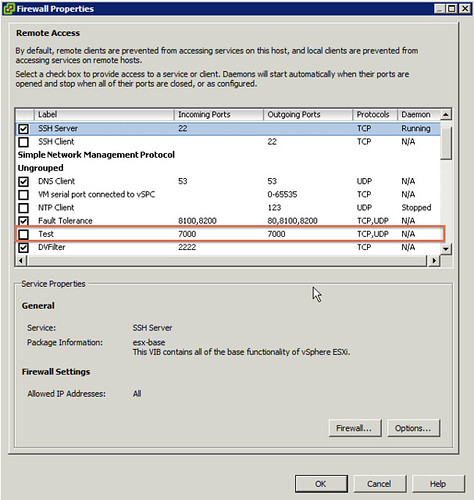
I copied a firewall rule from my existing ESXi host and which is created by HA to my Debian VM and edited the file, the original file was “fdm.xml”. I edited and and renamed it to test.xml. I changed all ports to 7000 and changed the <id> of the service that would need to be added and saved the file in “etc/vmware/firewall”.

Now it was time to package it all up and see if it would work. I guessed that the steps required would simply be the reverse of what I did to extract it all.

tar -czvf etc/ test

I then opened up the descriptor.xml file and changed some of the fields around, most don’t seem to matter much except for the following:

Change the following key to:
<acceptance-level>certified</acceptance-level>
<acceptance-level>community</acceptance-level>
Add your list of files:
<file-list>
<file>path-to-file</file>
</file-list>
Change the name of your package and the size accordingly:
<payload name="test" type="vgz" size="809">

I wasn’t sure if that would work, but I would find out eventually I guess (yes I also tried “communitysupport” as the acceptance-level but that doesn’t work!). I also removed the checksum details from the descriptor file just in case it would be used. This is what my full descriptor file looked like:

<vib version="5.0">
<type>bootbank</type>
<name>firewallrule</name>
<version>1.0</version>
<vendor>Duncan</vendor>
<summary>Firewall rule</summary>
<description>Firewall rule</description>
<release-date>2011-06-01T22:16:31.062257+00:00</release-date>
<urls/>

<relationships>
<depends>
</depends>
<conflicts/>
<replaces/>
<provides/>
<compatibleWith/>
</relationships>

<software-tags>
<tag>driver</tag>
<tag>module</tag>
</software-tags>

<system-requires>
<maintenance-mode>true</maintenance-mode>
</system-requires>

<file-list>
<file>etc/vmware/firewall/test.xml</file>
</file-list>

<acceptance-level>community</acceptance-level>
<live-install-allowed>false</live-install-allowed>
<live-remove-allowed>false</live-remove-allowed>
<cimom-restart>false</cimom-restart>
<stateless-ready>false</stateless-ready>
<overlay>false</overlay>

<payloads>
<payload name="test" type="vgz" size="809">
</payload>
</payloads>
</vib>

Next up would be making a single .vib file out of these three components again:

ar -r test.vib test descriptor.xml sig.pkcs7

Now I need to ‘scp’ the file to my ESXi host and see if I can install it:

scp test.vib root@esxi:test.vib
esxcli software vib install -v /test.vib

I received an error that the ImageProfile acceptance level needed to be changed. That was my next step:

esxcli software acceptance set --level CommunitySupported

After repeating the “esxcli software vib install” command I received the following output:

~ # esxcli software vib install -v /test.vib
Installation Result
   Message: The update completed successfully, but the system needs to be rebooted for the changes to be effective.
   Reboot Required: true
   VIBs Installed: Duncan_bootbank_firewallrule_1.0
   VIBs Removed:
   VIBs Skipped:
~ #

I rebooted the host and here’s a screenshot of the ESXi firewall with the newly added custom service “Test”:

Once again, I want to point out that this is currently unsupported. Don’t use this in your production environment!

The following articles helped me figuring this out and producing this article:

http://tldp.org/HOWTO/html_single/Debian-Binary-Package-Building-HOWTO/

http://linuxtrove.com/wp/?p=78

  • « Go to Previous Page
  • Page 1
  • Interim pages omitted …
  • Page 163
  • Page 164
  • Page 165
  • Page 166
  • Page 167
  • Interim pages omitted …
  • Page 336
  • Go to Next Page »

Primary Sidebar

About the Author

Duncan Epping is a Chief Technologist and Distinguished Engineering Architect at Broadcom. Besides writing on Yellow-Bricks, Duncan is the co-author of the vSAN Deep Dive and the vSphere Clustering Deep Dive book series. Duncan is also the host of the Unexplored Territory Podcast.

Follow Us

  • X
  • Spotify
  • RSS Feed
  • LinkedIn

Recommended Book(s)

Also visit!

For the Dutch-speaking audience, make sure to visit RunNerd.nl to follow my running adventure, read shoe/gear/race reviews, and more!

Do you like Hardcore-Punk music? Follow my Spotify Playlist!

Do you like 80s music? I got you covered!

Copyright Yellow-Bricks.com © 2026 · Log in