• Skip to primary navigation
  • Skip to main content
  • Skip to primary sidebar

Yellow Bricks

by Duncan Epping

  • Home
  • Unexplored Territory Podcast
  • HA Deepdive
  • ESXTOP
  • Stickers/Shirts
  • Privacy Policy
  • About
  • Show Search
Hide Search

Server

CloudPhysics, not so much stealth mode start-up anymore…

Duncan Epping · Jul 19, 2012 ·

<disclaimer: I am a technical advisor for CloudPhysics>

cloud physics logoToday at the New England VMUG CloudPhysics has their first official “public appearance”. Yes some of you have heard the name a couple of times before and some of you might even know who the brains are behind this new start-up… for those who don’t let me give a brief introduction.

CloudPhysics was recently founded by John Blumenthal and Irfan Ahmad. Some of you might recognize their names as they used to work at VMware, John was a Product Manager for storage and Irfan was the person who was responsible for awesome features like Storage DRS and Storage IO Control. Together with several other brilliant people, including no one less than Carl “TPS / DRS” Waldspurger acting as an advisor and consultant, they founded a new company.

So what is CloudPhysics about? CloudPhysics is about big data, about centralized data, about analytics, about modeling data. CloudPhysics is essentially about helping you! How? Well let me try to explain that without revealing too much.

We’ve all monitored and managed environments, some of you are responsible for 3 hosts and some might be responsible for 80 hosts in different sites and in different companies. We all face several challenges and in many cases these are similar… How do you find common themes? How do you validate best practices are applied on all levels in your environment? How do you validate if your practices are actually used by others, and do you benefit from them? How do you know if you sized correctly? How do I solve specific problems? Would I benefit from a different storage platform or SSD? All of these are questions or problems you probably face daily and that is where CloudPhysics aims to come in to play.

CloudPhysics will enable you to find common best practices and problems in your environment. CloudPhysics will provide you guidance, this could be custom but also generic through for instance a link to a VMware KB article. They will enable you to compare and explore performance results. Find patterns in your environment… See trends and provide you with meaningful statistics about your environment. Sounds amazing right and probably something you wouldn’t mind testing today… The CloudPhysics product will come as a virtual appliance. The data gathered will go up to the cloud and all of the analysis will happen outside of your environment, of course with various degrees of anonymity.

CloudPhysics is constructing an analytics platform for vSphere for the application of collective intelligence to individual, local vSphere environments and users.  At the same time the platform is intended to service the needs of consulting companies, customers and the blogging community by providing APIs to enable unique exploration and discovery within the dynamic, changing dataset CloudPhysics continuously generates. Access to this dataset enables them to transform qualitative discussions into quantitative views of vSphere design and operation. CloudPhysics is not seeking to build a community; rather, it exists to empower the engineer and architect in all of us, particularly the commentators and critics essential to the industry.

For those who can’t wait, sign up at www.cloudphysics.com now for announcements and news on the beta. I am excited about CloudPhysics and I hope you all are as well.
Removing the vCloud Director agent

Duncan Epping · Jul 19, 2012 ·

I had to remove the vCloud Director agent from 14 hosts today after an upgrade. I had to do it manually and I figured I would “document” the process. Although just a couple of steps it might be useful for others who need to do the same thing.

First list all currently installed vibs:

esxcli software vib list | grep vcloud

This will tell you if it is installed and the full name of the vib. Next you can remove it:

esxcli software vib remove -n vcloud-agent --maintenance-mode

Note that I added “–maintenance-mode”, this allows me to remove the vcloud-agent vib without the host being in maintenance mode. In most scenarios you will want the host to be in maintenance mode of course, but as this is a lab environment and I had nothing running on these hosts I figured this was the quickest way.

Chris Colotti also wrote an article on this topic which also includes how to remove “older” vCD agents. This article by Alan Renouf can also come in handy when you need to do dozens of hosts as Alan shows the PowerCLI fully automated way of doing it.

Why is %WAIT so high in esxtop?

Duncan Epping · Jul 17, 2012 ·

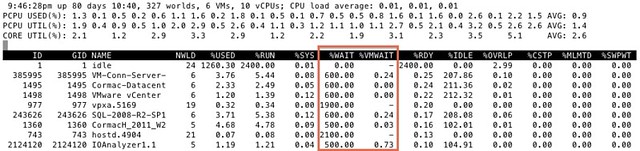
I got this question today around %WAIT and why it was so high for all these VMs. I grabbed a screenshot from our test environment. It shows %WAIT next to %VMWAIT.

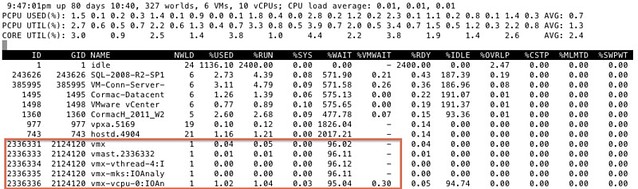
First of all, I suggest looking at %VMWAIT. This one is more relevant in my opinion than %WAIT. %VMWAIT is a derivative of %WAIT, however it does not include %IDLE time but does include %SWPWT and the time the VM is blocked for when a device is unavailable. That kind of reveals immediately why  %WAIT seems extremely high, it includes %IDLE! Another thing to note is the %WAIT for a VM is multiple worlds collided in to a single metric. Let me show you what I mean:

As you can see 5 worlds, which explains the %WAIT time to be around 500% constantly when the VM is not doing much. Hope that helps…

<edit> I just got pointed to this great KB article by one of my colleagues. It explains various CPU metrics in-depth. Key take away from that article for me is the following: %WAIT + %RDY + %CSTP + %RUN = 100%. Note that this is per world! Thanks Daniel for pointing this out!</edit>

Clearing up a misunderstanding around CPU throttling with vMotion

Duncan Epping · Jul 16, 2012 ·

I was reading a nice article by Michael Webster on multi-nic vMotion. In the comment section Josh Attwell refers to a tweet by Eric Siebert around how CPUs are throttled when many VMs are simultaneously vMotioned. This is the tweet:

Heard interesting vMotion tidbit today, more simultaneous vMotions are made possible by throttling the clock speed of VMs to slow them down

— Eric Siebert (@ericsiebert) June 6, 2012

I want to make sure that everyone understands that this is not exactly the case. There is a vMotion enhancement in 5.0 which is called SDPS aka “Slow Down During Page Send”. I wrote an article about this feature when vSphere 5.0 was released but I guess it doesn’t hurt to repeat this as the blogosphere was literally swamped with info around the 5.0 release.

SDPS kicks in when the rate at which pages are changed (dirtied) exceeds the rate at which the pages can be transferred to the other host. In other words, if your virtual machines are not extremely memory active then chances of SDSP ever kicking in is small, very very small. If it does kick in, it kicks in to prevent the vMotion process from failing for this particular VM. Now note that by default SDPS is not doing anything, normally your VMs will not be throttled by vMotion and it will only be throttled when there is a requirement to do so.

I quoted my original article on this subject below to provide you the details:

Simply said, vMotion will track the rate at which the guest pages are changed, or as the engineers prefer to call it, “dirtied”. The rate at which this occurs is compared to the vMotion transmission rate. If the rate at which the pages are dirtied exceeds the transmission rate, the source vCPUs will be placed in a sleep state to decrease the rate at which pages are dirtied and to allow the vMotion process to complete. It is good to know that the vCPUs will only be put to sleep for a few milliseconds at a time at most. SDPS injects frequent, tiny sleeps, disrupting the virtual machine’s workload just enough to guarantee vMotion can keep up with the memory page change rate to allow for a successful and non-disruptive completion of the process. You could say that, thanks to SDPS, you can vMotion any type of workload regardless of how aggressive it is.

It is important to realize that SDPS only slows down a virtual machine in the cases where the memory page change rate would have previously caused a vMotion to fail.

This technology is also what enables the increase in accepted latency for long distance vMotion. Pre-vSphere 5.0, the maximum supported latency for vMotion was 5ms. As you can imagine, this restricted many customers from enabling cross-site clusters. As of vSphere 5.0, the maximum supported latency has been doubled to 10ms for environments using Enterprise Plus. This should allow more customers to enable DRS between sites when all the required infrastructure components are available like, for instance, shared storage.

vSphere 5.0 U1a was just released, vDS/SvMotion bug fixed!

Duncan Epping · Jul 13, 2012 ·

Many of you who hit the SvMotion / VDS / HA problem requested the hotpatch that was available for it. Now that Update 1a has been released with a permanent fix how do you go about installing it? This is the recommended procedure:

  1. Backup your vCenter Database
  2. Uninstall the vCenter hot-patch
  3. Install the new version by pointing it to the database

The reason for this is that the hot-patch increased the build number, and this could possibly conflict with later versions.

And for those who have been waiting on it, the vCenter Appliance has also been update to Update 1 and now includes a vPostgress database by default instead of DB2!

  • « Go to Previous Page
  • Page 1
  • Interim pages omitted …
  • Page 146
  • Page 147
  • Page 148
  • Page 149
  • Page 150
  • Interim pages omitted …
  • Page 336
  • Go to Next Page »

Primary Sidebar

About the Author

Duncan Epping is a Chief Technologist and Distinguished Engineering Architect at Broadcom. Besides writing on Yellow-Bricks, Duncan is the co-author of the vSAN Deep Dive and the vSphere Clustering Deep Dive book series. Duncan is also the host of the Unexplored Territory Podcast.

Follow Us

  • X
  • Spotify
  • RSS Feed
  • LinkedIn

Recommended Book(s)

Also visit!

For the Dutch-speaking audience, make sure to visit RunNerd.nl to follow my running adventure, read shoe/gear/race reviews, and more!

Do you like Hardcore-Punk music? Follow my Spotify Playlist!

Do you like 80s music? I got you covered!

Copyright Yellow-Bricks.com © 2026 · Log in