• Skip to primary navigation
  • Skip to main content
  • Skip to primary sidebar

Yellow Bricks

by Duncan Epping

  • Home
  • Unexplored Territory Podcast
  • HA Deepdive
  • ESXTOP
  • Stickers/Shirts
  • Privacy Policy
  • About
  • Show Search
Hide Search

Server

I can’t download vCenter Converter / Standalone Converter?

Duncan Epping · Feb 4, 2022 ·

UPDATE: Please read this article about the new Beta of VMware vCenter Converter! Yes, it is back!!

I tweeted about this yesterday, but as I had about 14 questions in 24 hours I figured I would do a blog post as well so that it gets indexed by Google properly. Many folks are asking where vCenter Converter / Standalone Converter has gone to as it has disappeared from the VMware Download website. Although the links are still there on the VMware website and for instance in VMware Workstation, those links do not go to a download.

Somehow I missed this article, seems that VMware vCenter Converter was completely removed from the Download section on the VMware website. New product under development! https://t.co/8HLfmWn00f

— Duncan Epping (@DuncanYB) February 3, 2022

As stated in the article I tweeted, the downloads for Converter have been completely removed from the VMware website. There are some locations on the internet where you can still find the download like on Softpedia, Filehorse, Download3k, and probably some other random sites. I do however not recommend downloading the product as it is “end-of-life”, has not been updated for years, and there are some security concerns. According to the official blog, VMware is working on a new product for P2Vs, a timeline has not been provided, but there are alternatives out there from other vendors and for V2V there’s VMware’s HCX.
vSAN File Services IPs not reachable when using NSX-T?

Duncan Epping · Jan 25, 2022 ·

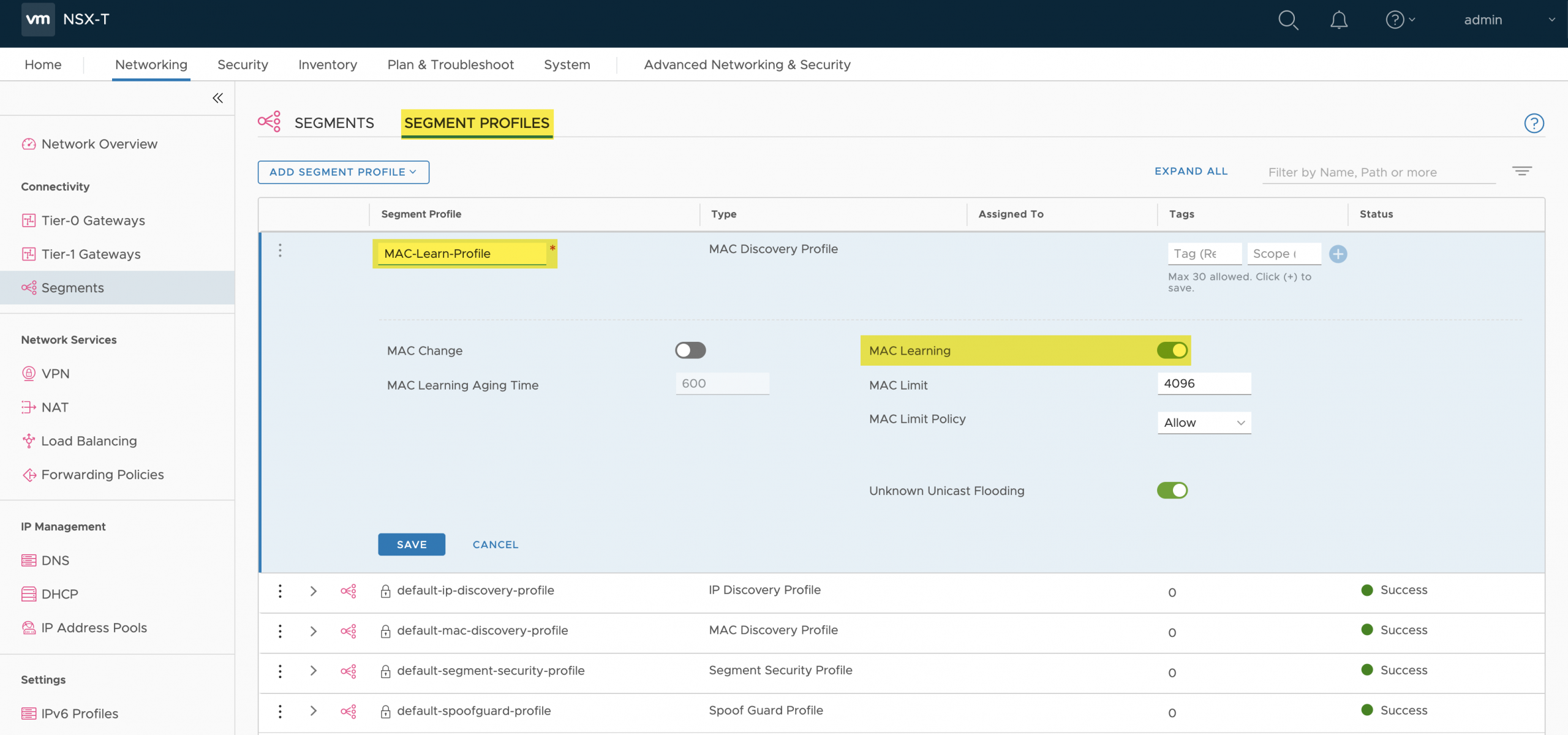
I’ve had this question a few times, if you enable vSAN File Services and you use NSX-T and it’s not possible to reach the vSAN File Service IP addresses, what should you do? In 999 out of the 1000 cases, it typically is a matter of enabling Mac Learning on the Segment Profile for the segment being used by vSAN File Services. I stole the below screenshot from William, it shows you how to enable it.

You may wonder why this needs to be enabled, well basically because the vSAN File Services VM is not what you are directly communicating with. The IP Address and MAC address you communicate with is associated with the vSAN File Service protocol stack container. As a result, MAC Learning needs to be enabled. I described this already in my FAQ post, but as it comes up frequently I figured I would dedicate a post to it.

Unexplored Territory #008: Virtual Reality with Matt Coppinger

Duncan Epping · Jan 24, 2022 ·

Episode 008 of the Unexplored Territory podcast is available! This week we spoke with Matt Coppinger about Virtual Reality and VMware Workspace ONE XR HUB, which is the enabler for VR adoption in the enterprise. Listen to it via Spotify (https://spoti.fi/3fSUrAM), Apple (https://apple.co/3FUOLkq), or anywhere else you get your podcast!

Unexplored Territory #007: Tanzu/Kubernetes with Cormac Hogan

Duncan Epping · Jan 10, 2022 ·

Episode 007 of the Unexplored Territory podcast is available! In this episode we spoke with Cormac Hogan about the VMware Tanzu portfolio, and Kubernetes in general. Listen to it via Spotify (https://spoti.fi/3GcjaM9), Apple (https://apple.co/3Gc6Efn), or anywhere else you get your podcast!

Why does HA not power-on VMs after a full cluster shutdown?

Duncan Epping · Dec 20, 2021 ·

I received this question and figured I would write a quick post about it, as it comes up occasionally. Why does vSphere HA no power-on VMs after a full cluster is brought back online after a full cluster shutdown? In this case, the customer had a power outage, so their hosts and all VMs were powered off, by an administrator cleanly, as a result of the backup power unit running out of power. Unfortunately, this happens more frequently than you would think.

When VMs are powered off by an administrator, or anyone/anything (PowerCLI etc) else which has permissions to power off VMs, then vCenter Server will mark these VMs as “cleanly powered off”. Next, also the state of the VMs is tracked by vSphere HA. So if a host is powered off, HA will know if the VM was powered on, or powered off at the time the host goes missing.

Now, when the host (or hosts) returns for duty, vSphere HA will of course verify what the last known state was of the cluster. It will read the list of all the VMs that were powered on, and it will restart those that were powered on and are configured for HA. It will also look at a VM property called “runtime.cleanPowerOff”, this property indicates if the VM was cleanly powered off by an Admin or a script, or if the VM was for instance powered off by vSphere HA itself. (PDL response etc.) Depending on the value of the property, the VM will, or will not be restarted.

Having said all of that, when you power off a VM manually through the UI, or via a script, then the VM will be marked as being “cleanly powered off”. This means that HA has no reason to restart it, as the powered-off VM is not the result of a host, network, or storage failure.

  • « Go to Previous Page
  • Page 1
  • Interim pages omitted …
  • Page 12
  • Page 13
  • Page 14
  • Page 15
  • Page 16
  • Interim pages omitted …
  • Page 336
  • Go to Next Page »

Primary Sidebar

About the Author

Duncan Epping is a Chief Technologist and Distinguished Engineering Architect at Broadcom. Besides writing on Yellow-Bricks, Duncan is the co-author of the vSAN Deep Dive and the vSphere Clustering Deep Dive book series. Duncan is also the host of the Unexplored Territory Podcast.

Follow Us

  • X
  • Spotify
  • RSS Feed
  • LinkedIn

Recommended Book(s)

Also visit!

For the Dutch-speaking audience, make sure to visit RunNerd.nl to follow my running adventure, read shoe/gear/race reviews, and more!

Do you like Hardcore-Punk music? Follow my Spotify Playlist!

Do you like 80s music? I got you covered!

Copyright Yellow-Bricks.com © 2026 · Log in