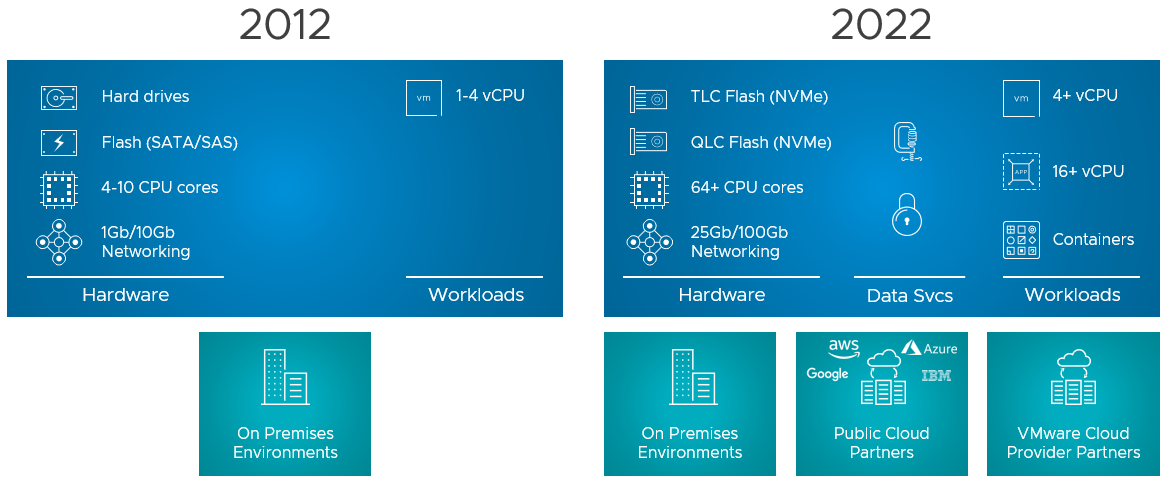
I debated whether I would write this blog now or wait a few weeks, as I know that the internet will be flooded with articles. But as it helps me as well to write down these things, I figured why not. So what is this new version of vSAN? vSAN Express Storage Architecture (vSAN ESA) introduces a new architecture for vSAN specifically with vSAN 8.0. This new architecture was developed to cater to this wave of new flash devices that we have seen over the past years, and we expect to see in the upcoming years. Not just storage, it also takes the huge improvements in terms of networking throughput and bandwidth into consideration. On top of that, we’ve also seen huge increases in available CPU and Memory capacity, hence it was time for a change.
Does that mean the “original” architecture is gone? No, vSAN Original Storage Architecture (OSA) still exists today and will exist for the foreseeable future. VMware understands that customers have made significant investments, so it will not disappear. Also, vSAN 8 brings fixes and new functionality for users of the current vSAN architecture (the logical cache capacity has been increased to 1.6TB instead of 600GB for instance.) VMware also understands that not every customer is ready to adopt this “single tier architecture”, which is what vSAN ESA delivers in the first release, but mind that this architecture also caters to other implementations (two-tier) in the future. What does this mean? When you create a vSAN cluster, you get to pick the architecture that you want to deploy for that environment (ESA or OSA), it is that simple! And of course, you do that based on the type of devices you have available. Or even better, you look at the requirements of your apps and you base your decision of OSA vs ESA and the type of hardware you need on those requirements. Again, to reiterate, vSAN Express Storage Architecture provides a flexible architecture that will use a single tier in vSAN 8 taking modern-day hardware (and future innovations) into consideration.
Before we look at the architecture, why would a customer care, what does vSAN ESA bring?
- Simplified storage device provisioning
- Lower CPU usage per processed IO
- Adaptive RAID-5 and RAID-6 at the performance of RAID-1
- Up to 4x better data compression
- Snapshots with minimal performance impact
When you create a vSAN ESA cluster the first thing that probably stands out is that you no longer need to create disk groups, which speaks to the “Simplified storage device provisioning” bullet point. With the OSA implementation, you create a disk group with a caching device and capacity devices, but with ESA that is no longer needed. This is the first thing I noticed. You now simply select all devices and they will be part of your vSAN datastore. It doesn’t mean though that there’s no caching mechanism, but it just has been implemented differently. With vSAN ESA, all devices contribute to capacity and all devices contribute to performance. It has the added benefit that if one device fails that it doesn’t impact anything else but what is stored on that device. With OSA, of course, it could impact the whole disk group that the device belonged to.
So now that we know that we no longer have disk groups with caching disks, how do we ensure we still get the performance customers expect? Well, there were a couple of things that were introduced that helped with that. First of all, a new log-structured file system was introduced. This file system helps with coalescing writes and enables fast acknowledgments of the IOs. This new layer will also enable direct compression of the data (enabled by default, and can be disabled via policy) and packaging of full stripes for the capacity “leg”. Capacity what? Yes, this is a big change that is introduced as well. With vSAN ESA you have a capacity leg and a performance leg. Let me show you what that looks like, and kudos to Pete Koehler for the great diagram!
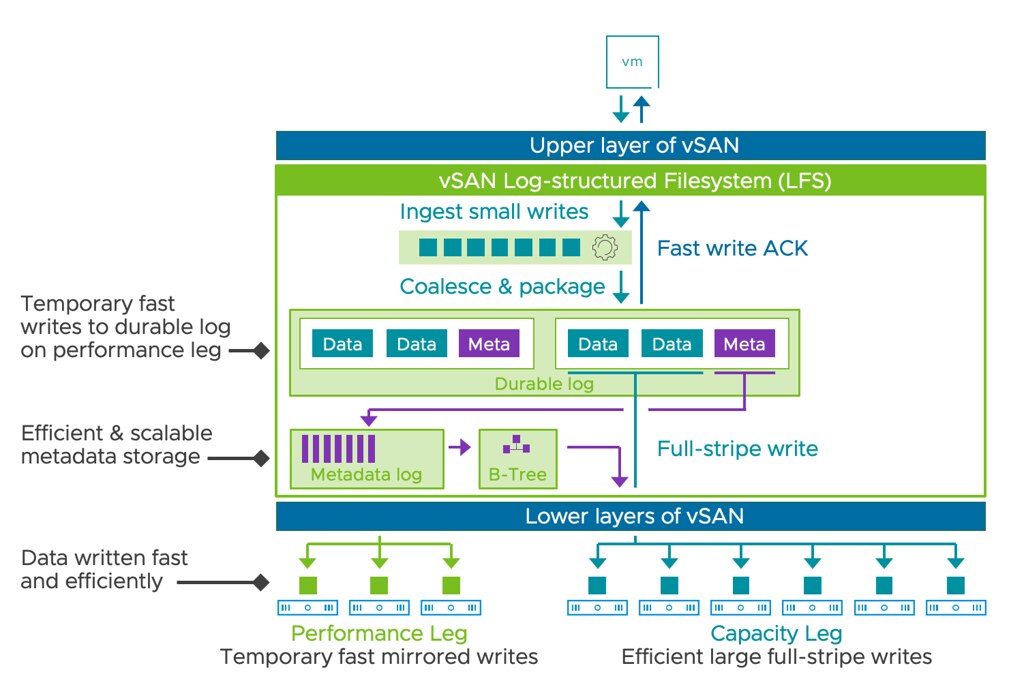
As the above diagram indicates, you have a performance leg which is RAID-1 and then there’s a capacity leg which can be RAID-1 but will typically be RAID-5 or RAID-6. Depending on the size of your cluster of course. Another thing that will depend on the size of the cluster, this the size of your RAID-5 configuration, that is where the adaptable RAID-5 comes into play. It is an interesting solution, and it enables customers to use RAID-5 implementations starting with only 3 hosts all the way up to 6 hosts or more. If you have 3-5 hosts then you will get a 2+1 configuration, meaning 2 components for data and 1 for parity. When you have 6 hosts or larger you will get a 4+1 configuration. This is different from the original implementation as there you would always get 3+1. For RAID-6 the implementation is 4+2 by the way.
I’ve already briefly mentioned it, but compression is now enabled by default. The reason for it is that the cost of compression is really low with the current implementation as compression happens all the way at the top. That means that when a write is performed the blocks actually are sent over the network compressed as well to their destination and they are stored immediately. So no need to unpack and compress again. The other interesting thing is that the implementation of compression has also changed, leading to an improved efficiency that can go up to an 8:1 data reduction. The same applies to encryption implementation, it also happens at the top, so you get data-at-rest and data-in-transit encryption automatically when it is enabled. Enabling encryption still happens at the cluster level though, where compression can now be enabled/disabled on a per VM basis.
Another big change is the snapshot implementation. We’ve seen a few changes in snapshot implementation over the years, but this one is a major change. I guess the big change is that when you create a snapshot vSAN does not create a separate object. This means that the snapshot basically exists within the current object layout. Big benefit, of course, being that the object count doesn’t skyrocket when you create many snapshots, another added benefit is the performance of this implementation. Consolidation of a snapshot for instance when tested went 100x faster, this means much lower stun times, which I know everyone can appreciate. Not only is it much much faster to consolidate, but also normal IO is much faster during consolidation and during snapshot creation. I love it!
The last thing I want to mention is that from a networking perspective vSAN ESA not only performs much better, but it also is much more efficient. Allowing for ever faster resyncs, and faster virtual machine I/O. On top of that, because compression has been implemented the way it has been implemented it simply also means there’s more bandwidth remaining.
For those who prefer to hear the vSAN 8 ESA story through a podcast, make sure to check the Unexplored Territory Podcast next week, as we will have Pete Koehler answering all questions about vSAN ESA. Also, on core.vmware.com you will find ALL details of this new architecture in the upcoming weeks, and also make sure to read this official blog post on vmware.com.