• Skip to primary navigation
  • Skip to main content
  • Skip to primary sidebar

Yellow Bricks

by Duncan Epping

  • Home
  • Unexplored Territory Podcast
  • HA Deepdive
  • ESXTOP
  • Stickers/Shirts
  • Privacy Policy
  • About
  • Show Search
Hide Search

Software Defined

Tintri announces all-flash storage device and Tintri OS 4.0

Duncan Epping · Aug 20, 2015 ·


Last week I had the pleasure of catching up with Tintri. It has been a while since I spoke with them, but I have been following them from the very start. I met up with them in Mountain View a couple of times when it was just a couple of guys on a rather empty floor with a solution that sounded really promising. Tintri’s big thing is simplicity if you ask me. Super simple to setup, really easy to manage, and providing VM granular controls for about everything you can imagine. The solution comes in the form of a hybrid storage device (disks and flash) which is served up to the hypervisor as an NFS mount.

Today Tintri announces that they will be offering an all-flash system next to their hybrid systems. When talking to Kieran he made it clear that the all-flash system would probably be only for a subset of their customers. The key reason for this being that the hybrid solution already brings great performance and is at a much lower cost of course. The new all-flash model is named VMstore T5000 and comes in two variants: T5060 and T5080. The T5060 can hold up to 2500 VMs and around 36TB with dedupe and compression. For the T5080 that is 5000 VMs and around 73TB. Both delivered in a 2U form factor by the way. The expected use case for the all flash systems is large persistent desktops and multi TB high performance databases. Key thing here is of course not jus the number of IOPS it can drive, but the consistent low latency it can deliver.

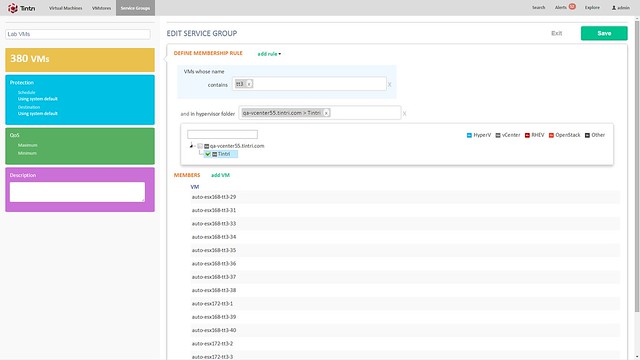
Besides the hardware, there is also a software refresh. Tintri OS 4.0 and Global Center 2.1 are being announced. Tintri OS 4.0 is what is sitting on the VMstore storage systems and Global Center is their central management solution. With the 2.1 release Global Center now supports up to 100.000 VMs. It allows you to centrally manage both Tintri’s hybrid and all-flash systems from one UI and smart things like informing you when a VM is provisioned to the wrong storage system (hybrid but performance wise requires all-flash for instance). Not just inform you, but it also has the ability to migrate the VM from storage system to storage system. Note that during the migration all aspects that were associated with it (QoS, Replication etc) is kept. (Not unlike Storage DRS, but in this case the solution is aware of all that happens on the storage system) What I liked personally about Global Center is the performance views / health views. It is very easy to see what the state of your environment is, where latency is coming from etc. Also, if you need to configure things like QoS, replication or snapshotting for multiple VMs you can do this from the Global Center console by simply grouping them as show in the screenshot below.
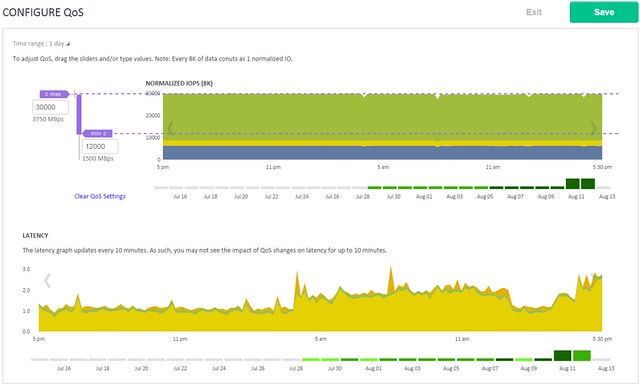
Tintri QoS was demoed during the call, and I found this also particularly interesting as it allows you to define QoS on a VM (or VMDK) granular level. When you do things like specifying an IOPS limit it is good to know that Tintri normalizes the IOPS based on the size of the IO. Simply said, all IO of 8KB or lower becomes 1 normalized IOPS, an IO which is 16KB will be 2 normalized IOPS etc. This to ensure fairness in environments (this will be almost every environment) where IO sizes greatly vary. Those whom have ever tried to profile their workloads will know why this is important. What I’ve always like about Tintri is their monitoring things like latency for instance how they split that up in hypervisor, network and storage is very useful. They have done an excellent job again for QoS management.
Last but not least Tintri introduces Tintri VMstack. Basically their converged offering where Compute + Storage + Hypervisor is bundled and delivered as a single stack to customers. It will provide you the choice of storage platform (well needs to be Tintri of course), hypervisor, compute and network infrastructure. It can also include things like OpenStack or the vRealize Suite. Personally I think this is a smart move, but this is something I would have preferred to have seen launched 12-18 months ago. Nevertheless, it is a good move.
Rubrik 2.0 release announced today

Duncan Epping · Aug 19, 2015 ·

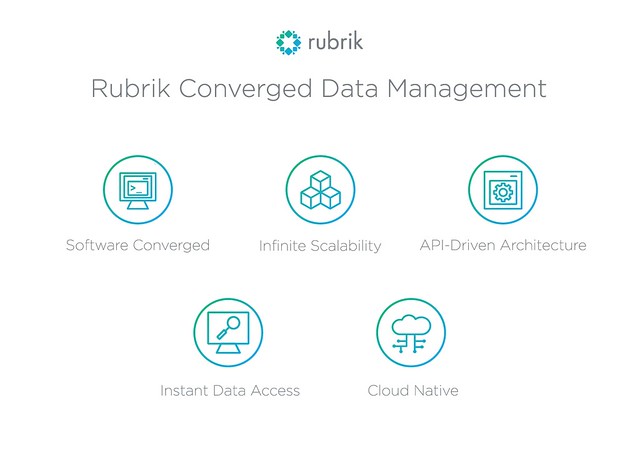
Today the Rubrik 2.0 release was announced. I’ve written about who they are and what they do twice now so I am not going to repeat that. If you haven’t read those articles please read those first. (Article 1 and article 2) Chris Wahl took the time to brief me and the first thing that stood out to me was the new term that was coined namely: Converged Data Management. Considering what Rubrik does and has planned for the future I think that term is spot on.

When it comes to 2.0 there are a bunch of features that are introduced, I will list them out and then discuss some of them in a bit more detail:

  • New Rubrik appliance model r348
    • Same 2U/4Node platform, but leveraging 8TB disks instead of 4TB disks
  • Replication
  • Auto Protect
  • WAN Efficient (global deduplication)
  • AD Authentication – No need to explain
  • OpenStack Swift support
  • Application aware backups
  • Detailed reporting
  • Capacity planning

Lets start at the top, a new model is introduced next to the two existing models. The 2 other models are also both 2U/4Node solutions but use 4TB drives instead of the 8TB drives the R348 will be using. This will boost capacity for  single Brik up to roughly 300TB, in 2U this is not bad at all I would say.

Of course the hardware isn’t the most exiting, the software changes fortunately are. In the 2.0 release Rubrik introduces replication between sites / appliances and global dedupe which ensures that replication is as efficient as it can be. The great thing here is that you backup data and replicate it straight after it has been deduplicated to other sites. All of this is again policy driven by the way, so you can define when you want to replicate, how often and for how long data needs to be saved on the destination.

Auto-protect is one of those features which you will take for granted fast, but is very valuable. Basically it will allow you to set a default SLA on a vCenter level, or Cluster – Resource Pool – Folder, you get the drift. Set and forget is basically what this means, no longer the risk of newly provisioned VMs which have not been added to the backup schedule. Something really simple, but very useful.

When it comes to applications awareness Rubrik in version 2.0 will also leverage a VSS provider to allow for transactional consistent backups. This applies today for Microsoft Exchange, SQL, Sharepoint and Active Directory. More can be expected in the near future. Note that this applies to backups, for restoring there is no option (yet) to restore a specific mailbox for instance, but Chris assured me that this on their radar.

When it comes to usability a lot of improvements have been made starting with things like reporting and capacity planning. One of the reports which I found very useful is the SLA Compliancy reporting capability. It will simply show you if VMs are meeting the defined SLA or not. Capacity planning is also very helpful as it will inform you what the growth rate is locally and in the cloud, and also when you will be running out of space. Nice trigger to buy an additional appliance right, or change your retention period or archival policy etc. On top of that things like object deletion, task cancellation, progress bars and much more usability improvements have made it in to the 2.0 release.

All in all an impressive release, especially considering the 1.0 was released less than 6 months ago. It is great to see a high release cadence for an industry which has been moving extremely slow for the past decades. Thanks Rubrik for stirring things up!

Virtual SAN going offshore

Duncan Epping · Aug 17, 2015 ·

Over the last couple of months I have been talking to many Virtual SAN customers. After having spoken to so many customers and having heard many special use cases and configurations I’m not easily impressed. I must say that half way during the conversation with Steffan Hafnor Røstvig from TeleComputing I was seriously impressed. Before we get to that lets first look at the background of Steffan Hafnor Røstvig and TeleComputing.

TeleComputing is one of the oldest service providers in Norway. They started out as an ASP with a lot of Citrix expertise. In the last years they’ve evolved more to being a service provider rather than an application provider. Telecomputing’s customer base consists of more than 800 companies and in excess of 80,000 IT users. Customers are typically between 200-2000 employees, so significant companies. In the Stavanger region a significant portion of the customer base is in the oil business or delivering services to the Oil business. Besides managed services, TeleComputing also has their own datacenter they manage and host services in for customers.

Steffan is a solutions architect but started out as a technician. He told me he still does a lot of hands-on, but besides that also supports sales / pre-sales when needed. The office he is in has about 60 employees. And Steffan’s core responsibility is virtualization, mostly VMware based! Note that TeleComputing is much larger than those 60 employees, they have about 700 employees worldwide with offices in Norway, Sweden and Russia.

Steffan told me he got first introduced to Virtual SAN when it was just launched. Many of their offshore installation used what they call “datacenter in a box” solution which was based on IBM Bladecenter. Great solution for that time but there were some challenges with it. Cost was a factor, rack size but also reliability. Swapping parts isn’t always easy either and that is one of the reasons they started exploring Virtual SAN.

For Virtual SAN they are not using blades any longer but instead switched to rack mounted servers. Considering the low number of VMs that are typically running in these offshore environments a fairly “basic” 1U server can be used. With 4 hosts you will now only take up 4U , instead of the 8 or 10U a typical blade system requires. Before I forget, the hosts itself are Lenovo x3550 M4’s with one S3700 Intel SSD of 200GB and 6 IBM 900GB 10K RPM drives. Each host has 64GB of memory and two Intel E5-2630 6 core CPUs. It also uses an M5110 SAS controller. Especially in the type of environments they support this is very important, on top of that the cost is significantly lower for 4 rack mounts vs a full bladecenter. What do I mean with type of environments? Well as I said offshore, but more specifically Oil Platforms! Yes, you are reading that right, Virtual SAN is being used on Oil Platforms.

For these environments 3 hosts are actively used and a 4th host is just there to serve as a “spare”. If anything fails in one of the hosts the components can easily be swapped, and if needed even the whole host could be swapped out. Even with a spare host the environment is still much cheaper than compared to the original blade architecture. I asked Steffan if these deployments were used by staff on the platform or remotely. Steffan explained that staff “locally” can only access the VMs, but that TeleComputing manages the hosts, rent-an-infrastructure or infrastructure as a service is the best way to describe it.

So how does that work? Well they use a central vCenter Server in their datacenter and added the remote Virtual SAN clusters connected via a satellite connection. The virtual infrastructure as such is completely managed from a central location. Not just virtual, also the hardware is being monitored. Steffan told me they use the vendor ESXi image and as a result gets all of the hardware notification within vCenter Server, single pane of glass when you are managing many of these environments like these is key. Plus it also eliminates the need for a 3rd party hardware monitoring platform.

Another thing I was interested in was knowing how the hosts were connected, considering the special location of the deployment I figured there would be constraints here. Steffan mentioned that 10GbE is very rare in these environments and that they have standardized on 1GbE. Number of connection is even limited and today they have 4 x 1GbE per server of which 2 are dedicated to Virtual SAN. The use of 1GbE wasn’t really a concern, the number of VMs is typically relatively low so the expectation was (and testing and production has confirmed) that 2 x 1GbE would suffice.

As we were wrapping up our conversation I asked Steffan what he learned during the design/implementation, besides all the great benefits already mentioned. Steffan said that they learned quickly how critical the disk controller is and that you need to pay attention to which driver you are using in combination with a certain version of the firmware. The HCL is leading, and should be strictly adhered to. When Steffan started with VSAN the Healthcheck plugin wasn’t released yet unfortunately as that could have helped with some of the challenges. Other caveat that Steffan mentioned was that when single device RAID-0 sets are being used instead of passthrough you need to make sure to disable write-caching. Lastly Steffan mentioned the importance of separating traffic streams when 1GbE is used. Do not combine VSAN with vMotion and Management for instance. vMotion by itself can easily saturate a 1GbE link, which could mean it pushes out VSAN or Management traffic.

It is fair to say that this is by far the most exciting and special use case I have heard for Virtual SAN. I know though there are some other really interesting use cases out there as I have heard about installations on cruise ships and trains as well. Hopefully I will be able to track those down and share those stories with you. Thanks Steffan and TeleComputing for your time and great story, much appreciated!

Datrium finally out of stealth… Welcome Datrium DVX!

Duncan Epping · Jul 28, 2015 ·

Before I get started, I have not been briefed by Datrium so I am also still learning as I type this and it is purely based on the somewhat limited info on their website. Datrium’s name has been in the press a couple of times as it was the company that was often associated with Diane Greene. The rumours back then were that Diane Greene was the founder and was going to take on EMC, that was just a rumour as Diane Greene is actually an investor in Datrium. Not just her of course, Datrium is also backed by NEA (Venture Capitalist) and various other well known people like Ed Bugnion, Mendel Rosenblum, Frank Slootman and Kai Li. Yes, a big buy in from some of the original VMware founders. Knowing that two of the Datrium founders (Boris Weissman and Ganesh Venkitachalam) are former VMware Principal Engineers (and old-timers) that makes sense. (Source) This morning a tweet was send out, and it seems today they are officially out of stealth.

As the sun rises this morning, so does a new dominant #datastorage player #Datrium #stealthmode

— Datrium (@Datrium) July 28, 2015

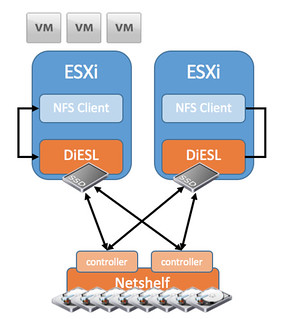
So what is Datrium about? Well Datrium delives a new type of storage system which they call DVX. Datrium DVX is a hybrid solution comprised of host local data services and a network accessed capacity shelf called “netshelf”. I think this quote from their website says it all what their intention is… Move all functionality to the host and let the “shelf” just take care of storing bits. I included a diagram that I found on their website as it makes it more clear.

On the host, DiESL manages in-use data in massive deduplicated and compressed caches on BYO (bring your own) commodity SSDs locally, so reads don’t need a network hop. Hosts operate locally, not as a pool with other hosts.

datrium dvx

It seems that from a host perspective the data services (caching, compression, raid, cloning etc) are implemented through the installation of a VIB. So not VM/Appliance based but rather kernel based. The NetShelf is accessible via 10GbE and Datrium uses a proprietary protocol to connect to it. From a host side (ESXi) they connect locally over NFS, which means they have implemented an NFS Server within the host. The NFS connection is also terminated within the host and they included their own protocol/driver on the host to be able to connect to the NetShelf. It is a bit of an awkward architecture, or better said … at first it is difficult to wrap your head around it. This is the reason I used the word “hybrid” but maybe I should have used unique. Hybrid, not because of the mixture of flash and HDD but rather because it is a hybrid of hyper-converged / host local caching and more traditional storage but done in a truly unique way. What does that look like? Something like this I guess:

datrium dvx

So what does this look like from a storage perspective? Well each NetShelf will come with 29TB of usable capacity. Expected deduplication and compression rate for enterprise companies is between 2-6x which means you will have between 58TB and 175TB to your disposal. In order to ensure your data is high available the NetShelf is a dual controller setup with dual port drives (Which means the drives are connected to both controllers and used in an “active/standby” fashion). Each controller has NVRAM which is used for write caching, and a write will be acknowledge to the VM when it has been written to the NVRAM of both controllers. In other words, if a controller fails there should be no data loss.

Talking about availability, what if a host fails? If I read their website correctly then there is no write caching from a host point of view as it is states that each host operates independently from a caching point of view (no mirroring of writes to other hosts). This also means that all the data services need to be inline –> dedupe / compress / raid. When those actions complete the result will be stored on the NetShelf and then it is accessible by other hosts when needed. It makes me wonder what happens when DRS is enabled and a VM is migrated from one host to another. Will the read cache migrate with it to the other host? And what about very write intensive workloads, how will those perform when all data services are inline? What kind of overhead can/will it have on the host? How will it scale out? What if I need more than 1 Netshelf? Those are some of the questions that popup immediately. Considering the brain-power within Datrium I am assuming they have a simple answer to those questions… (Former VMware, Data Domain, NetApp, EMC etc) I will try to ask them these questions at VMworld or during a briefing and write a follow up.

From an operational aspect it is an interesting solution as it should lower the effort involved with managing storage almost to zero. There is the NFS connection and you have your VMs and VMDKS at the front end, at the back-end you have a blackbox or better said a shelf dedicated to storing bits. This should be dead easy to manage and deploy. It shouldn’t require a dedicated storage administrator but the VMware admin should be able to manage it. Some of you may ask, well what if I want to connect anything other than a VMware host to it? For now Datrium appears to be mainly targeting VMware environments (which makes sense considering their dna) but I guess they could implement this for various platforms in a similar fashion.

Again, I was not briefed by Datrium and I accidentally saw their tweet this morning but their solution is so intriguing I figured I would share it anyway. Hope it was useful.

Interested? More info here:

  • Datasheet – http://www.datrium.com/datasheet/DVX_DataSheet.pdf
  • Host side implementation info – http://www.datrium.com/dvx-overview/diesl-software/
  • DVX Netshelf – http://www.datrium.com/dvx-overview/datrium-netshelf/
  • Twitter: http://www.twitter.com/datriumstorage

Extending your vSphere platform with Virtual SAN

Duncan Epping · Jul 21, 2015 ·

Over the last couple of months I’ve spoken to many customers about Virtual SAN. What struck me during these conversations is how these customers spoke about Virtual SAN. In all cases when we start the conversation it starts with a conversation about what their environment used to looked like. What kind of storage they had. How it was configured, number of disks etc you name it. Of course we would discuss what kind of challenges they had with their legacy environment. Thinking back to these conversations there is one thing that really stood out, although never explicitly mentioned, the big difference between Virtual SAN and traditional storage systems is that Virtual SAN is not a storage system but rather an extension of the VMware vSphere Platform.

Source: Wiki
Software extension, a file containing programming that serves to extend the capabilities of or data available to a more basic program

I believe this statement is spot on. What is great about Virtual SAN is that it does the extension of the capabilities of vSphere in an extremely easy way. Virtual SAN achieves this simply by abstracting layers of complexity and pooling the resources and allow these to be assigned to workloads in an automated fashion whether through the use of policies and a simple UI or through the vSphere APIs. Keywords here are definitely: abstract, pool and automate.

Maybe I should have used the word “converging” instead of “abstracting”. That is essentially what is happening, and although many other vendors claim the same, I truly believe that Virtual SAN is one of the few solutions which is truly hyper-converged as it seamlessly converges layers instead of adding a layer on top of another layer. Hyper-convergence is more than just stacking layers in a single box.

With Virtual SAN storage is just there. Not bolted on, layered on top or mounted to the side, an integral part of your environment, an extension of your platform. Virtual SAN does for storage what vSphere does for CPU and Memory, it becomes a fundamental component of your cluster.

  • « Go to Previous Page
  • Page 1
  • Interim pages omitted …
  • Page 40
  • Page 41
  • Page 42
  • Page 43
  • Page 44
  • Interim pages omitted …
  • Page 71
  • Go to Next Page »

Primary Sidebar

About the Author

Duncan Epping is a Chief Technologist and Distinguished Engineering Architect at Broadcom. Besides writing on Yellow-Bricks, Duncan is the co-author of the vSAN Deep Dive and the vSphere Clustering Deep Dive book series. Duncan is also the host of the Unexplored Territory Podcast.

Follow Us

  • X
  • Spotify
  • RSS Feed
  • LinkedIn

Recommended Book(s)

Also visit!

For the Dutch-speaking audience, make sure to visit RunNerd.nl to follow my running adventure, read shoe/gear/race reviews, and more!

Do you like Hardcore-Punk music? Follow my Spotify Playlist!

Do you like 80s music? I got you covered!

Copyright Yellow-Bricks.com © 2026 · Log in