• Skip to primary navigation
  • Skip to main content
  • Skip to primary sidebar

Yellow Bricks

by Duncan Epping

  • Home
  • Unexplored Territory Podcast
  • HA Deepdive
  • ESXTOP
  • Stickers/Shirts
  • Privacy Policy
  • About
  • Show Search
Hide Search

Software Defined

Disable VSAN site locality in low latency stretched cluster

Duncan Epping · Jan 15, 2016 ·

This week I was talking to a customer in Germany who had deployed a VSAN stretched cluster within a building. As it was all within a building (extremely low latency) and they preferred to have a very simple operational model they decided not to implement any type of VM/Host rules. By default when a stretched cluster is deployed in VSAN (and ROBO uses this workflow as well) then “site locality” is implemented for caching. This means that a VM will have its read cache on the host which holds the components in the site where it is located.

This is great of course and avoids incurring latency hit for reads. Now in some cases you may not desire this behaviour. For instance in the situation above where there is an extremely low latency connection between the different rooms in the same building. In this case as well because there are no VM/Host rules implemented a VM can freely roam around the cluster. Now when a VM moves between VSAN Fault Domains in this scenario the cache will need to be rewarmed as it only reads locally. Fortunately you can disable this behaviour easily through the advanced setting called DOMOwnerForceWarmCache:

[root@esxi-01:~] esxcfg-advcfg -g /VSAN/DOMOwnerForceWarmCache
Value of DOMOwnerForceWarmCache is 0
[root@esxi-01:~] esxcfg-advcfg -s 1 /VSAN/DOMOwnerForceWarmCache
Value of DOMOwnerForceWarmCache is 1

In a stretched environment you will see that this setting is set to 0 set it to 1 to disable this behaviour. In a ROBO environment VM migrations are uncommon, but if they do happen on a regular basis you may also want to look in to setting this setting.

Where do I run my VASA Vendor Provider for vVols?

Duncan Epping · Jan 6, 2016 ·

I was talking to someone before the start of the holiday season about running the Vendor Provider (VP) for vVols as a VM and what the best practices are around that. I was thinking about the implication of the VP not being available and came to the conclusion that when the VP is unavailable a bunch of things stop working out of which “bind” is probably most important.

The “bind” operation is what allows vSphere to access a given Virtual Volume (vVol), and this operation is issued during a power-on of a VM. This is how the vVols FAQ describes it:

When a vVol is created, it is not immediately accessible for IO. To Access vVol, vSphere needs to issue a “Bind” operation to a VASA Provider (VP), which creates IO access point for a vVol on a Protocol Endpoint (PE) chosen by a VP. A single PE can be the IO access point for multiple vVolss. “Unbind” Operation will remove this IO access point for a given vVol.

This means that when the VP is unavailable, you can’t power-on VMs at that particular time. For many storage systems that problem is mitigated by having the VP as part of their storage system itself, and of course there is the option to have multiple VPs as part of your solution, either in active/active or in active/standby configuration. In the case of VSAN for instance, each host has a VASA provider out of which one is active and others are standby, if the active fails the standby will take over automatically. So to be clear, it is up to the vendor to decide what type of availability to provide for the VP, some have decided to go for a single instance and rely on vSphere HA to restart the appliance, others have created active/standby etc.

But back to vVols, what if you own a storage system that requires an external VASA VP as a VM?

  • Run your VP VMs in a management cluster, if the hosts in the “production” cluster are impacted and VMs are restarted then at least the VP VMs should be up and running in your management cluster
  • Use multiple VP VMs if and when possible, if active/active or active / standby is supported make sure to run your VPs in that configuration
  • Do not use vVols for the VP itself, you don’t want to have any (circular) dependency between the availability of the VP and being able to power-on the VP itself
  • If there is no availability story for the VP, depending on the configuration of the appliance vSphere FT should be considered.

One more thing, if you are considering buying new storage, I think one question you definitely need to ask your vendor is what their story is around the VP. Is it a VM or is it part of the storage system itself? Is there an availability story for the VP, and if so is this “active/active” or “active/standby”? If not, what do they have on their roadmap around this? You are probably also asking yourself what VMware has planned to solve this problem, well there are a couple of things cooking and I can’t say too much about it. One important effort though is the inclusion of bind/unbind in the T10 SCSI standard, but as you can imagine, those things take time. (Which would allow us to power-on new VMs even when the VP is unavailable as it would be a SCSI command.) Until then, when you design a vVol environment, take the above into account when it comes to your Vendor Provider aka VP!

Removing stretched VSAN configuration?

Duncan Epping · Dec 15, 2015 ·

I had a question today around how to safely remove a stretched VSAN configuration without putting any of the workloads in danger. This is fairly straight forward to be honest, there are 1 or 2 things though which are important. (For those wondering why you would want to do this, some customers played with this option and started loading workloads on top of VSAN and then realized it was still running in stretched mode.) Here are the steps required:

  1. Click on your VSAN cluster and go to Manage and disable the stretched configuration
    • This will remove the witness host, but will leave 2 fault domains in tact
  2. Remove the two remaining fault domains
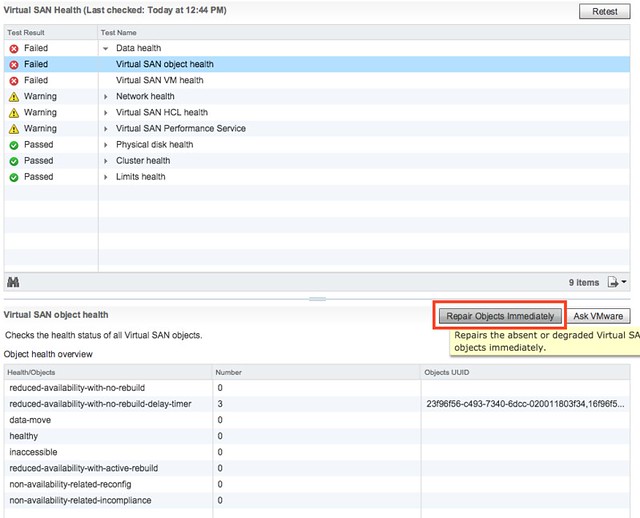
  3. Go to the Monitor section and click on Health and check the “virtual san object health”. Most likely it will be “red” as the “witness components” have gone missing. VSAN will repair this automatically by default in 60 minutes. We prefer to take step 4 though asap after removing the failure domains!
  4. Click “repair object immediately”, now witness components will be recreated and the VSAN cluster will be healthy again.
  5. Click “retest” after a couple of minutes

By the way, that “repair object immediately” feature can also be used in the case of a regular host failure where “components” have gone absent. Very useful feature, especially if you don’t expect a host to return any time soon (hardware failure for instance) and have the spare capacity.

VSAN Healthcheck Plugin requires DRS??

Duncan Epping · Dec 11, 2015 ·

I had a question today on my blog from a user who said that the VSAN Healthcheck Plugin was great but unfortunately required DRS to be able to install/configure it, which means that if you have vSphere Standard you can’t use. A very valid point, at least for the first version of the healthcheck plugin. However that problem has been fixed for a while now. I haven’t seen anyone pointing it out so I figured I would write a couple of lines about it for those who want to use it as I figure that more have hit this problem with the first release of the healthcheck plugin and haven’t seen that it has been fixed yet.

As of VSAN Healthcheck Plugin version 6.0.1 it is no longer required to have DRS enabled (this was a bug). You can find the link to download version 6.0.1 below:

  • Download 6.0.1 – https://my.vmware.com/web/vmware/details?downloadGroup=VSANHEALTH600&productId=492
  • Release notes 6.0.1 – https://www.vmware.com/support/vsphere6/doc/vmware-virtual-san-healthcheck-601-release-notes.html

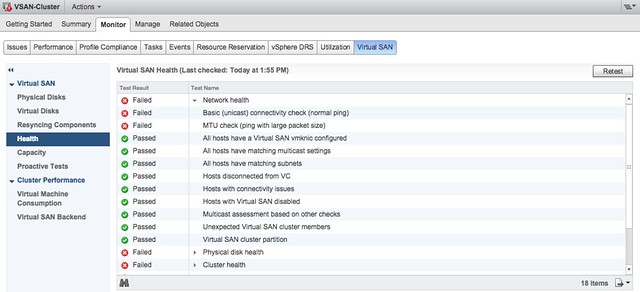
For those who aren’t using the Healthcheck yet and are running vSphere 6.0, it is highly recommended! With the newer versions of vSphere 6.0 it will always come included (U1 and up). It has some great health checks that will enable you to validate the state of your VSAN cluster in a simple overview. I personally find the pro-active tests very valuable, especially the “burn in/perf” type tests, and of course the multi-cast test.

VSAN Healthcheck Plugin

And there is more coming pretty soon, been testing the next version of this in my lab and I must say that it looks great. Having all of the perf stats straight in the Web Client is definitely making life easier. Hopefully it is out soon!

VSAN enabling Sky to be fast / responsive / agile…

Duncan Epping · Nov 30, 2015 ·

Over the last couple of months I’ve been talking to a lot of VSAN customers. A while ago I had a very interesting use case with a deployment on an Oil Platform. This time it is a more traditional deployment: I had the pleasure of talking to James Cruickshank who works for Sky. Sky is Europe’s leading entertainment company, serving 21 million customers across five countries: Italy, Germany, Austria, the UK and Ireland.

James is part of Sky’s virtualisation group which primarily focusses on new technologies. In short, the team figures out if a technology will benefit Sky, how it works, how to implement it and how to support it. He documents all of his findings then develops and delivers the solution to the operations team.

One of the new products that James is working with is Virtual SAN. The project started in March and Sky has a handful of VSAN ready clusters in each of its strategic data centres. These clusters currently have ESXi 5.5 hosts with one 400GB SSD and 4 x 4TB NL-SAS drives all connected over 10GbE, a significant amount of capacity per host. The main reason for that is that there is a requirement for Sky to run with FTT=2 (for those who don’t know, this means that a 1TB disk will consume ~3TB). James anticipates VSAN 6 will be deployed with a view to deliver production workloads in Q1 2016.

We started talking about the workloads Sky had running and what some of the challenges were for James. I figured that, considering the size of the organisation and the number of workloads it has, getting all the details must not have been easy. James confirmed that it was difficult to get an understanding of the IO profile and that he spent a lot of time developing representative workloads. James mentioned that when he started his trial the VSAN Assessment Tool wasn’t available yet, and that it would have saved him a lot of time.

So what is Sky running? For now mainly test/dev workloads. These clusters are used by developers for short term usage, to test what they are building and trash the environment, all of which is enabled through vRealize Automation. Request a VM or multiple, deploy on VSAN cluster and done. So far in Sky’s deployment all key stakeholders are pleased with the technology as it is fast and responsive, and for the ops team in particular it is very easy to manage.

James mentioned that recently he has been testing both VSAN 5.5 and 6.0. He was so surprised about the performance increase that he re-ran his test multiple times, then had his colleagues do the same, while others reviewed the maths and the testing methodology. Each time they came to the same conclusion; there was an increase in excess of 60% performance between 5.5 and 6.0 (using a “real-world” IO profile), an amazing result.

Last question for me was around some of the challenges James faced. The first thing he said was that he felt the technology was fantastic. There were new considerations around the design/sizing of their VSAN hosts, the increased dependency on TCP/IP networks and the additional responsibilities for storage placed within the virtualisation operations team. There were also some minor technical challenges, but these were primarily from an operational perspective, and with vSphere / VSAN 5.5. In some cases he had to use RVC, which is a great tool, but as it is CLI based it does have a steep learning curve. The HealthCheck plugin has definitely helped a lot with 6.0 to improve this.

Another thing James wanted to call out is that in the current VSAN host design Sky uses an SSD to boot ESXi, as VSAN hosts with more than 512GB RAM cannot boot from SD card. This means the company is sacrificing a disk slot which could have been used for capacity, when it would prefer to use SD for boot if possible to optimise hardware config.

I guess it is safe to say that Sky is pleased with VSAN and in future the company is planning on adopting a “VSAN first” policy for a proportion of their virtual estate. I want to thank Sky, and James in particular, for taking the time to talk to me about his experience with VSAN. It is great to get direct feedback and hear the positive stories from such a large company, and such an experienced engineer.


  • « Go to Previous Page
  • Page 1
  • Interim pages omitted …
  • Page 35
  • Page 36
  • Page 37
  • Page 38
  • Page 39
  • Interim pages omitted …
  • Page 71
  • Go to Next Page »

Primary Sidebar

About the Author

Duncan Epping is a Chief Technologist and Distinguished Engineering Architect at Broadcom. Besides writing on Yellow-Bricks, Duncan is the co-author of the vSAN Deep Dive and the vSphere Clustering Deep Dive book series. Duncan is also the host of the Unexplored Territory Podcast.

Follow Us

  • X
  • Spotify
  • RSS Feed
  • LinkedIn

Recommended Book(s)

Also visit!

For the Dutch-speaking audience, make sure to visit RunNerd.nl to follow my running adventure, read shoe/gear/race reviews, and more!

Do you like Hardcore-Punk music? Follow my Spotify Playlist!

Do you like 80s music? I got you covered!

Copyright Yellow-Bricks.com © 2026 · Log in