• Skip to primary navigation
  • Skip to main content
  • Skip to primary sidebar

Yellow Bricks

by Duncan Epping

  • Home
  • Unexplored Territory Podcast
  • HA Deepdive
  • ESXTOP
  • Stickers/Shirts
  • Privacy Policy
  • About
  • Show Search
Hide Search

Management & Automation

Hyper-Converged is here, but what is next?

Duncan Epping · Oct 11, 2016 ·

Last week I was talking to a customer and they posed some interesting questions. What excites me in IT (why I work for VMware) and what is next for hyper-converged? I thought they were interesting questions and very relevant. I am guessing many customers have that same question (what is next for hyper-converged that is). They see this shiny thing out there called hyper-converged, but if I take those steps where does the journey end? I truly believe that those who went the hyper-converged route simply took the first steps on an SDDC journey.

Hyper-converged I think is a term which was hyped and over-used, just like “cloud” a couple of years ago. Lets breakdown what it truly is: hardware + software. Nothing really groundbreaking. It is different in terms of how it is delivered. Sure, it is a different architectural approach as you utilize a software based / server side scale-out storage solution which sits within the hypervisor (or on top for that matter). Still, that hypervisor is something you were already using (most likely), and I am sure that “hardware” isn’t new either. Than the storage aspect must be the big differentiator right? Wrong, the fundamental difference, in my opinion, is how you manage the environment and the way it is delivered and supported. But does it really need to stop there or is there more?

There definitely is much more if you ask me. That is one thing that has always surprised me. Many see hyper-converged as a complete solution, reality is though that in many cases essential parts are missing. Networking, security, automation/orchestration engines, logging/analytic engines, BC/DR (and orchestration of it) etc. Many different aspects and components which seem to be overlooked. Just look at networking, even including a switch is not something you see to often, and what about the configuration of a switch, or overlay networks, firewalls / load-balancers. It all appears not to be a part of hyper-converged systems. Funny thing is though, if you are going on a software defined journey, if you want an enterprise grade private cloud that allows you to scale in a secure but agile manner these components are a requirement, you cannot go without them. You cannot extend your private cloud to the public cloud without any type of security in place, and one would assume that you would like to orchestrate every thing from that same platform and have the same networking / security capabilities to your disposal both private and public.

That is why I was so excited about the VMworld US keynote. Cross Cloud Services on top of hyper-converged leveraging all the tools VMware provides today (vSphere, VSAN, NSX) will exactly allow you to do what I describe above. Whether that is to IBM, vCloud Air or any other of the mega clouds listed in the slide below is even besides the point. Extending your datacenter services in to public clouds is what we have been talking about for a while, this hybrid approach which could bring (dare I say) elasticity. This is a fundamental aspect of SDDC, of which a hyper-converged architecture is simply a key pillar.
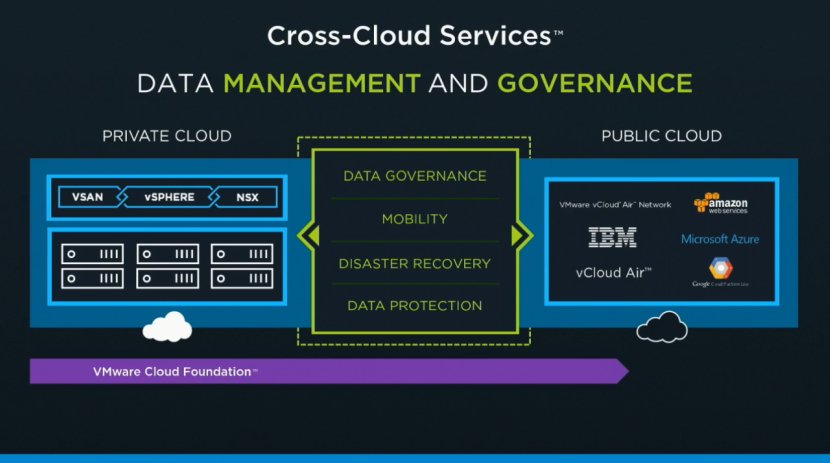
Hyper-converged by itself does not make a private cloud. Hyper-converged does not deliver a full SDDC stack, it is a great step in to the right direction however. But before you take that (necessary) hyper-converged step ask yourself what is next on the journey to SDDC. Networking? Security? Automation/Orchestration? Logging? Monitoring? Analytics? Hybridity? Who can help you reach full potential, who can help you take those next steps? That’s what excites me, that is why I work for VMware. I believe we have a great opportunity here as we are the only company who holds all the pieces to the SDDC puzzle. And with regards to what is next? Deliver all of that in an easy to consume manner, that is what is next!


Sharing VMworld slides

Duncan Epping · Sep 7, 2016 ·

I know the VMworld team will share them as well over time, but I figured I would do the same thing through my blog. Here are two decks. First deck is the deck for “VMworld – sto7650 -Software defined storage @VMmware primer”. This session I presented with Lee Dilworth. I presented VSAN and Lee did the VVol and VAIO section. Second deck is the deck for “VMworld 2016 – INF8036 – enforcing a vSphere cluster design with PowerCLI automation” which I presented with Chris Wahl. I added the youtube video that the VMworld team shared to the second deck as well. Hope you folks find it useful.

download / comments for “sto7650 -Software defined storage @VMmware primer”

download / comments for “INF8036 – enforcing a vSphere cluster design with PowerCLI automation”

download / comments for “INF7875 – A day in the life of a VSAN IO.”

Want to watch a VMworld 2016 session?

Duncan Epping · Sep 6, 2016 ·

I had a long discussion with the VMworld team about this the past editions and I am happy to say that ALL sessions have been made available to the public straight after the event. VMware made all VMworld 2016 session available to the public. You can find them here: http://www.vmworld.com/en/sessions/2016.html. And also, if you want a more “limited” list, you can go for the top ranked sessions. You can find the top-10 session of each VMworld day here: http://www.vmworld.com/en/sessions/top-10-us.html.

There is one session I want to call out, I wasn’t able to do a live blog on it, mainly because it went deep, and it went deep fast. Ravi R. is one of the best deep tech speakers I have seen: INF8108 – Extreme Performance Series: vCenter Performance Deep Dive.

Thanks VMworld team for doing this. Time for some binge watching 🙂

C# Client is officially dead…

Duncan Epping · May 19, 2016 ·

Many of you have seen the news by now, yesterday VMware announced that the Windows vSphere Client, usually referred to as the C# Client, is dead. Yes indeed, it has been declared dead and going forward will no longer be made available for future release of vSphere. Now this means that it is still available for all releases out there today (up to 6.0) and it will of course stick to the standard support period.

I have always loved the C# Client, but I don’t have mixed feelings on this one… It needs to go, it has been dead for a long time but it was still walking, it is time for a change and time we put it to rest once and for all. Yes it will be painful for some, but I believe this is the only way to move forward.

That also means for you, the admin / consultant, that there needs to be an alternative. Well one has been in the making for a while and that is the HTML-5 based “Host Client”. The Host Client started out as a fling, but as of vSphere 6.0 U2 is part of the default install of ESXi. Personally I really like the client and I can’t wait for it to be feature complete. What I probably like most, besides the slick interface and the speed, is the fact that you can access it from anywhere and that the developers are out there waiting for feedback and ready to engage and improve on what they released. It gets updated very frequently, just visit the Fling’s page (version 8.1 is up there right now) and if you have feedback engage with the engineers through the fling page, or simply drop a note on twitter to Etienne.

But that’s not it, VMware has also shown that it has the intention to get rid of Flash from the Web Client… Again released as a fling and you can download it and try it out as well, next to the regular Web Client. It was recently updated to version 1.6 and believe me when I say that these developers and the PM are also constantly looking for feedback and ways to improve the experience. The message was loud and clear over the past couple of years and they are doing everything they can to improve the Web Client experience, which includes performance and just generic usability aspects.

I would like to ask everyone to try out both the Host Client and the HTML-5 Web Client and leave feedback on those fling pages. What’s working, what is not, what about performance, different devices etc. And if you have strong feelings about the announcement, always feel free to leave a comment here, or on the announcement blog, as PM and Dev will be reading and commenting there where and when needed.

Cool tool update: RVTools 3.8

Duncan Epping · Mar 30, 2016 ·

It has been a year since version 3.7, but finally here it is… RVTools 3.8. Rob de Vey has been developing this tool since early 2008 and over half a million copies have been downloaded so far. I understand why, as it is a very easy to use tool that produces a lot of great information. On top of everything it was already providing, Rob introduced the following in version 3.8:

  • VI SDK reference changed from 5.5 to 6.0
  • on vInfo tab page new field: ChangeVersion unique identifier for a given version of the configuration
  • on vInfo tab page new field: HA VM Monitoring status
  • on vInfo tab page new fields: Number of supported monitors and Video RAM in KB
  • on vInfo tab page new field: Config status. Config issues are visible on the vHealth tab page
  • on vInfo tab page new field: OS according to the VMware Tools
  • on vTools tab page new fields: App state, App heartbeat status and Kernel crash state
  • on vTools tab page new fields: Operations availability, State change support and Interactive Guest Operations availability
  • on vHost tab page new field: NTPD running state.
  • NTP issues are visible on the vHealth tab page
  • on vHost tab page new field: Config status. Config issues are visible on the vHealth tab page
  • on vCluster tab page new field: Config status. Config issues are visible on the vHealth tab page
  • on vDatastore tab page new field: Config status. Config issues are visible on the vHealth tab page
  • on vSC+VMK tab page new fields: IP 6 Address and IP 6 Gateway
  • all VM related tab pages now have a VM Object ID and VM UUID columns
  • all VM related tab pages now have powerstate and template columns
  • all tab pages. Now have a vCenter UUID column (= unique identifier for a vCenter Server)
  • all VM related tab pages. The Custom Attributes columns are now ordered alphabetically
  • all tab pages. A select is now a full row select so it is easier to follow the information across many columns
  • bug fix: Refresh data issue on vRP and vCluster tab pages solved
  • bug fix: Filter issue on vCluster tab page solved
  • bug fix: On vInfo tab page the HA information was not filled with cluster default values
  • bug fix: Content Libraries vmdk files are no longer reported as possible zombie files
  • bug fix: msi installer sometimes installs RVTools in root of c:\ drive. This is solved now.

  • « Go to Previous Page
  • Page 1
  • Interim pages omitted …
  • Page 3
  • Page 4
  • Page 5
  • Page 6
  • Page 7
  • Interim pages omitted …
  • Page 44
  • Go to Next Page »

Primary Sidebar

About the Author

Duncan Epping is a Chief Technologist and Distinguished Engineering Architect at Broadcom. Besides writing on Yellow-Bricks, Duncan is the co-author of the vSAN Deep Dive and the vSphere Clustering Deep Dive book series. Duncan is also the host of the Unexplored Territory Podcast.

Follow Us

  • X
  • Spotify
  • RSS Feed
  • LinkedIn

Recommended Book(s)

Also visit!

For the Dutch-speaking audience, make sure to visit RunNerd.nl to follow my running adventure, read shoe/gear/race reviews, and more!

Do you like Hardcore-Punk music? Follow my Spotify Playlist!

Do you like 80s music? I got you covered!

Copyright Yellow-Bricks.com © 2026 · Log in