• Skip to primary navigation
  • Skip to main content
  • Skip to primary sidebar

Yellow Bricks

by Duncan Epping

  • Home
  • Unexplored Territory Podcast
  • HA Deepdive
  • ESXTOP
  • Stickers/Shirts
  • Privacy Policy
  • About
  • Show Search
Hide Search

Management & Automation

Minor Update: RVTools 2.4.1

Duncan Epping · Mar 20, 2009 ·

Rob de Veij just uploaded a minor update of RVTools, version 2.4.1. Make sure you download it and replace the 2.4 version I blogged about just three days ago.

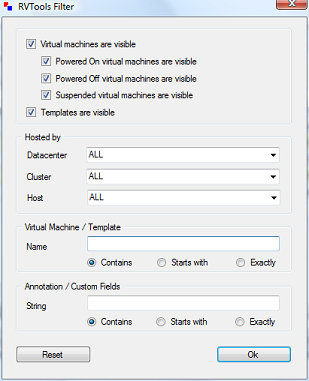
The new filter throws an exception when there are ESX hosts which do not belong to any cluster. With the help from Mario Vinet this problem is now solved! Thanks again Mario.
Upgrading ESX 3.5 to the next version with Update Manager

Duncan Epping · Mar 17, 2009 ·

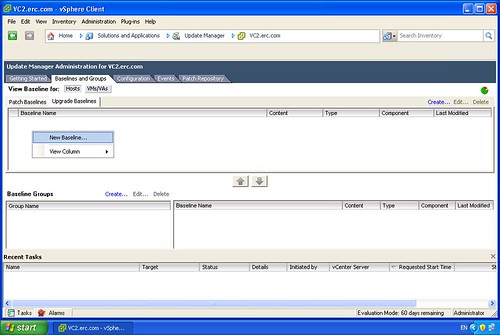
In my Lab I was exploring the upgrade possibilities from ESX 3.5 to the next version.  Usually I do a full reinstall just to be absolutely sure there’s no old packages floating around. For testing purposes I decided to do an upgrade of the ESX host. I opened up Update Manager and with a couple simple clicks I upgraded my host to the next version. (I did an upgrade of vCenter and Update Manager before I even started.) I removed a couple of screenshots that didn’t contain much useful info, in total it were 15 steps to create a baseline and update the host:

Create a new Baseline:

[Read more…] about Upgrading ESX 3.5 to the next version with Update Manager

Cool tool update: RVTools 2.4

Duncan Epping · Mar 15, 2009 ·

Another update again by Rob de Veij, RVTools 2.4. This release includes a new feature, filtering. Rob also revealed that the upcoming version will contain health checks. Here are the changes:

Version 2.4 (March 2009)

  • On the vDatastore tab you can now see which hosts are connected to the datastore.
  • The data on the vInfo, vCpu, vMemory, vDisk, vFloppy, vCD, vSnapshot and vTools tab pages can now be filtered.

Now head over to Rob’s website and download the new version!

Powershell and importing .CSV files

Duncan Epping · Mar 11, 2009 ·

I’ve been playing around with powershell yesterday. We needed to create over 100 VM’s and there’s no point in doing that all by hand. The customer provided us with a .csv file that contained specific info on these VM’s. It took me a while to figure out how to read the info.csv file and how to actually use it. But as always it’s actually fairly simple and that’s why I decided to write it down:

Before we even start, the CSV should be formatted as follows:

vmname,cluster
VM001,HA-DRS-Yellow-Bricks

Read the complete csv file into a variable:

$csv_info = Import-Csv c:\scripts\info.csv

For every line in the csv variable do something:

foreach ($line in $csv_info) {
write-host " This is virtual machine $($line.vmname) on cluster $($line.cluster)"
}

This line would print something like this:

This is virtual machine VM001 on cluster HA-DRS-Yellow-Bricks

As you noticed in the example above we used $line.vmname to get the name of the VM printed and $line.cluster for the cluster name, cool huh! BTW, Alan’s quick reference guide really helped me out!

Set Disk.UseDeviceReset with powershell

Duncan Epping · Mar 9, 2009 ·

Last week the well known powershell guru Alan Renouf helped me out with a script for enabling virtualized MMU. This week I needed to set Disk.UseDeviceReset to “0” on at least 60 hosts. (Check the link for more info on why!) No point in doing it all by hand when the VI Toolkit can help you out and set this parameter for the entire environment with just one line:

Get-VMHost | Set-VMHostAdvancedConfiguration -Name Disk.UseDeviceReset -Value 0

I’m really starting to get excited about the VI Toolkit, thanks to guys like Alan and of course the VMworld VI Toolkit Lab I did a couple of weeks ago. With the quick reference guide that Alan created it’s very simple to come up with one-liners like the one above.

DEPRECATED See this article for more info.

  • « Go to Previous Page
  • Page 1
  • Interim pages omitted …
  • Page 27
  • Page 28
  • Page 29
  • Page 30
  • Page 31
  • Interim pages omitted …
  • Page 44
  • Go to Next Page »

Primary Sidebar

About the Author

Duncan Epping is a Chief Technologist and Distinguished Engineering Architect at Broadcom. Besides writing on Yellow-Bricks, Duncan is the co-author of the vSAN Deep Dive and the vSphere Clustering Deep Dive book series. Duncan is also the host of the Unexplored Territory Podcast.

Follow Us

  • X
  • Spotify
  • RSS Feed
  • LinkedIn

Recommended Book(s)

Also visit!

For the Dutch-speaking audience, make sure to visit RunNerd.nl to follow my running adventure, read shoe/gear/race reviews, and more!

Do you like Hardcore-Punk music? Follow my Spotify Playlist!

Do you like 80s music? I got you covered!

Copyright Yellow-Bricks.com © 2026 · Log in