• Skip to primary navigation
  • Skip to main content
  • Skip to primary sidebar

Yellow Bricks

by Duncan Epping

  • Home
  • Unexplored Territory Podcast
  • HA Deepdive
  • ESXTOP
  • Stickers/Shirts
  • Privacy Policy
  • About
  • Show Search
Hide Search

Management & Automation

Resizing your VMFS the right way, exploring the next version of ESX/vCenter

Duncan Epping · Mar 26, 2009 ·

I’ve been playing around with my vSphere/Next gen ESX lab. I was replaying the VMworld lab and one of the assignments was to  resize a VMFS volume. Yes that’s correct, resize not extent. Extents have been discussed by many and the general consensus is avoid them if/when possible. But when running out of diskspace you don’t always have the option to avoid them. Some can’t afford the downtime that comes with a “cold migration”, and most aren’t willing to take the risk of using storage vmotion when running out of diskspace. (Snapshot is placed on source VMFS volume) This has all been solved in the next version of ESX/vCenter. You can resize your VMFS volume without resorting to extents, and you can do this with the vCenter client.

The original size:
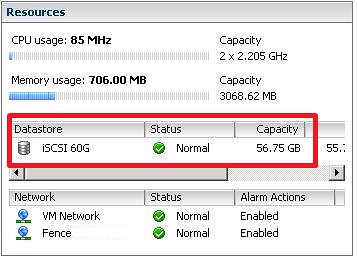
First thing you will need to do is increase the size of the LUN on your SAN. If your SAN doesn’t support LUN resizing you can still do it the old fashion way, extent. [Read more…] about Resizing your VMFS the right way, exploring the next version of ESX/vCenter

vCenter Mobile Access technology preview available today

Duncan Epping · Mar 25, 2009 ·

I received a private message on the VMTN Community that the vCenter Mobile Access forum had been opened up. I wasn’t sure if I could blog about it but John Troyer just posted a message on twitter so it’s out in the open. Read the VMTN blog post about vCenter Mobile Access for more info or just watch the youtube movie and discover what it is all about. Go to the VMTN Community forums, join the program and manage your virtual environment from your mobile phone!

VCB Management Console 1.0.6 Beta

Duncan Epping · Mar 25, 2009 ·

@lamw pointed me out via twitter to the “diy” VCB Management Console. The “vcbMC” is a front end  for scheduling and creating backup jobs based on VMware Consolidated Backup. As “athlon_crazy” points out you don’t need to remember all the VCB commands and parameters. You can use vcbMC to browse all your VM’s and back them up according to the schedule you created:

I haven’t tested it myself so far unfortunately, make sure to test the results of the backup.

Speed up your powershell scripts

Duncan Epping · Mar 24, 2009 ·

On the VI Toolkit blog there’s a great article for people like me. They explain how to speed up your scripts. I’m no powershell guru, and these kind of articles are more than welcome to boost my scripting skills.

In short, it comes down to these three tips:

  1. Try to load as many objects as possible into arrays beforehand. Once you’ve got them loaded you can use them as arguments to multiple calls without having to resort to potentially expensive lookups every time.
  2. Just like in sample 1 above, when you’ve loaded objects, use the objects directly rather than using their names. This is usually not hard as our cmdlets are designed to take object first-and-foremost, and names are supported just as a convenience.
  3. If you absolutely need to load a single VM object by name, load it using the Get-VMFast function below. While this approach can certainly help, it’s not nearly as good as using the other two techniques mentioned above.

Head over to the VI Toolkit blog and start reading.

VMware vCenter Mobile Access & Virtual Appliances

Duncan Epping · Mar 20, 2009 ·

VMware just announced that there’s a new technology preview coming up, vCenter Mobile Access. For a demo/preview go to the VMTN Blog section: vCenter Mobile Access.

Introducing VMware vCenter Mobile Access (vCMA).  vCMA allows you to monitor and manage VMware Infrastructure from your mobile phone with an interface that is optimized for such devices. Specifically, it allows you to:

  • Search for virtual machines in your data center
  • Migrate virtual machines from one host to another using vMotion
  • Execute recovery plans using VMware Site Recovery Manager
  • Access Scheduled Tasks, Alarms and Events
  • And much more…

vCMA will be delivered as a Virtual Appliance which makes installing a matter of minutes. Talking about Virtual Appliances, VMware’s Virtual Appliance Marketplace has been completely overhauled. There’s a complete “what’s new” section to be found here, be sure to look into it and start exploring the endless posibilities of this virtual world. I personally use it to explore new Operating Systems and virtual router / firewall appliances!

  • « Go to Previous Page
  • Page 1
  • Interim pages omitted …
  • Page 26
  • Page 27
  • Page 28
  • Page 29
  • Page 30
  • Interim pages omitted …
  • Page 44
  • Go to Next Page »

Primary Sidebar

About the Author

Duncan Epping is a Chief Technologist and Distinguished Engineering Architect at Broadcom. Besides writing on Yellow-Bricks, Duncan is the co-author of the vSAN Deep Dive and the vSphere Clustering Deep Dive book series. Duncan is also the host of the Unexplored Territory Podcast.

Follow Us

  • X
  • Spotify
  • RSS Feed
  • LinkedIn

Recommended Book(s)

Also visit!

For the Dutch-speaking audience, make sure to visit RunNerd.nl to follow my running adventure, read shoe/gear/race reviews, and more!

Do you like Hardcore-Punk music? Follow my Spotify Playlist!

Do you like 80s music? I got you covered!

Copyright Yellow-Bricks.com © 2026 · Log in