• Skip to primary navigation
  • Skip to main content
  • Skip to primary sidebar

Yellow Bricks

by Duncan Epping

  • Home
  • Unexplored Territory Podcast
  • HA Deepdive
  • ESXTOP
  • Stickers/Shirts
  • Privacy Policy
  • About
  • Show Search
Hide Search

Archives for February 2011

PowerCLI reference book

Duncan Epping · Feb 26, 2011 ·

I blogged about this almost two months ago and just on Luc’s blog that the release date has been set and the cover art was released. I wanted to remind all of you the book that is one of a kind, VMware vSphere PowerCLI Reference: Automating vSphere.

Release date: 28th of March
Authors: Luc Dekens, Alan Renouf, Glen Sizemore, Arnim van Lieshout, Jonathan Medd
ISB: 0470890797

RE: VMFS 3 versions – maybe you should upgrade your vmfs?

Duncan Epping · Feb 25, 2011 ·

I was just answering some questions on the VMTN forum when someone asked the following question:

Should I upgrade our VMFS luns from 3.21 (some in 3.31) to 3.46 ? What benefits will we get?

This person was referred to an article by Frank Brix Pedersen who states the following:

Ever since ESX3.0 we have used the VMFS3 filesystem and we are still using it on vSphere. What most people don’t know is that there actually is sub versions of the VMFS.

  • ESX 3.0 VMFS 3.21
  • ESX 3.5 VMFS 3.31 key new feature: optimistic locking
  • ESX 4.0 VMFS 3.33 key new feature: optimistic IO

The good thing about it is that you can use all features on all versions. In ESX4 thin provisioning was introduced but it does need the VMFS to be 3.33. It will still work on 3.21. The changes in the VMFS is primarily regarding the handling of SCSI reservations. SCSI reservations happens a lot of times. Creation of new vm, growing a snapshot delta file or growing thin provisioned disk etc.

I want to make sure everyone realizes that this is actually not true. All the enhancements made in 3.5, 4.0 and even 4.1 are not implemented on a filesystem level but rather on a VMFS Driver level or through the addition of specific filters or even a new datamover.

Just to give an extreme example: You can leverage VAAI capabilities on a VMFS volume with VMFS filesystem version 3.21, however in order to invoke VAAI you will need the VMFS 3.46 driver. In other words, a migration to a new datastore is not required to leverage new features!

Storage vMotion performance difference?

Duncan Epping · Feb 24, 2011 ·

Last week I wrote about the different datamovers being used when a Storage vMotion is initiated and the destination VMFS volume has a different blocksize as the source VMFS volume. Not only will it make a difference in terms of reclaiming zero space, but as mentioned it also makes a different in performance. The question that always arises is how much difference does it make? Well this week there was a question on the VMTN community regarding a SvMotion from FC to FATA and the slow performance. Of course within a second FATA was blamed, but that wasn’t actually the cause of this problem. The FATA disks were formatted with a different blocksize and that cause the legacy datamover to be used. I asked Paul, who started the thread, if he could check what the difference would be when equal blocksizes were used. Today Paul did his tests and he blogged about it here and but I copied the table which contains the details that shows you what performance improvement the fs3dm (please note, that VAAI is not used… this is purely a different datamover) brought:

From To Duration in minutes
FC datastore 1MB blocksize FATA datastore 4MB blocksize 08:01
FATA datastore 4MB blocksize FC datastore 1MB blocksize 12:49
FC datastore 4MB blocksize FATA datastore 4MB blocksize 02:36
FATA datastore 4MB blocksize FC datastore 4MB blocksize 02:24

As I explained in my article about the datamover, the difference is caused by the fact that the data doesn’t travel all the way up the stack… and yes the difference is huge!

Installing drivers during a scripted install of ESXi

Duncan Epping · Feb 23, 2011 ·

As you hopefully have read I have been busy over the last weeks with a new project. This project is all about enabling migrations to ESXi. I wrote two articles for the ESXi Chronicles blog of which the first article describes the scripted install procedure and the seconds gives some additional advanced examples of what is possible in these scripts. Based on that article I started receiving some questions from the field and last week I had a conference call with a customer who had issues “injecting” a driver into ESXi during the install. Normally installing a driver is done by using a simple “esxupdate” command and a reboot, but in this case however the situation was slightly different and let me explain the problem first.

This customer implemented a script that would run during the %firstboot section. The name of the section already explains what it is, this section will run after the reboot of the scripted install has been completed. The way this works is that ESXi creates a script in /etc/vmware/init/init.d with the prefix 999. This script will run as the last script during the boot and is generally used to configure the host. After a final reboot this script is automatically deleted and the host is ready to be added to vCenter.

The challenge however that this customer was facing is that it was using a Xsigo network environment. In this scenario a server that would need to be reinstalled would get a temporary network configuration that would only work during the first boot. Meaning that before this %firstboot section would even run the original network configuration would be restored. The problem with that however is that the original network configuration requires the drivers to be installed before it can be used. In other words, after the reboot done by the installer you will not be able to access the network unless you have loaded the drivers. This rules out downloading the drivers during the %firstboot section. Now how do we solve this?

The scripted installation has multiple sections that can contain your commands. The first section is called %post. The ESXi setup guide describes this section as follows:

Executes the specified script after package installation has been completed. If you specify multiple %post sections, they are executed in the order they appear in the installation script.

This means that in the case of this customer we will be able to use this section to download any driver package required with for instance “wget” and that is what I did. I issued the command below during the %post section and rebooted the server.

wget http://192.168.1.100/xsigo.zip

The problem however was that the package wasn’t persisted after a reboot which brought me back to right where I began, without a network after the restart. Than I figured that during the install a local datastore is created and I could use that as persistent storage. So I issued the following command in the %post section of the script:

wget http://192.168.1.100/xsigo.zip -O /vmfs/volumes/datastore1/xsigo.zip

I rebooted the installer and checked after the install if the driver bundle was there or not, and yes it was. The only thing left to do was to install the driver in the %fistboot section. This by itself is a fairly simple task:

esxupdate --bundle=/vmfs/volumes/datastore1/xsigo.zip update

As the host will need to reboot before the drivers are loaded I also added a “reboot” command at the end of to the “%firstboot” section. This ensures the drivers are loaded and the network is accessible.

I guess this demonstrates how easy a solution can be. When I first started looking into this issue and started brainstorming I was making things way too complex. By using the standard capabilities of the scripted install mechanism and a simple “wget” command you can do almost everything you need to do during the install. This also removes the need to fiddle around with injecting drivers straight into the ISO itself.

Go ESXi 🙂

Blocksize impact?

Duncan Epping · Feb 18, 2011 ·

I was answering a couple of questions on the VMTN forum and stumbled on the impact of using similar blocksizes for all VMFS volume which I never realized. Someone did a zero out on their VM to reclaim some wasted diskspace by doing a Storage vMotion to a different datastore. (Something that I have described in the past here, and also with relationship to VCB here.) However to the surprise of this customer the zeroed out space was not reclaimed even though he did a Storage vMotion to a thin disk.

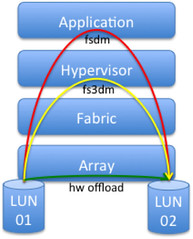
After some tests they noticed that when doing a Storage vMotion between Arrays or between datastores formatted with a different blocksize they were able to reclaim the zeroed out diskspace. This is a cool workaround to gobble the zeroes Now the question of course remains why this is the case. The answer is simple: there is a different datamover used. Now this might not say much to some so let me explain the three types that can be used:

  • fsdm – This is the legacy datamover which is the most basic version and the slowest as the data moves all the way up the stack and down again.
  • fs3dm – This datamover was introduced with vSphere 4.0 and contained some substantial optimizations where data does not travel through all stacks.
  • fs3dm – hardware offload – This is the VAAI hardware offload full copy that is leveraged and was introduced with vSphere 4.1. Maximum performance and minimal host CPU/Mem overhead.

I guess it is a bit easier to digest when it is visualized. It should be noted here that fs3dm is used in software mode when HW Offload (VAAI) capabilities are not available. Also note that “application”, the top layer, can be Storage vMotion or for instance vmkfstools:


(Please note that the original diagram came from a VMworld preso (TA3220))

Now why does it make a difference? Well remember this little line in the VAAI FAQ?

  • The source and destination VMFS volumes have different block sizes

As soon as different blocksized vmfs volume or a different array is selected as the destination the hypervisor uses the legacy datamover (fsdm). The advantage of this datamover, and it is probably one of the few advantages, is that it gobbles the zeroes. The new datamover (fs3dm), and that includes both the software datamover and the HW Offload, will not do this currently and as such all blocks are copied. The fs3dm datamover however is substantially faster than the fsdm datamover though. The reason for this is that the fsdm datamover reads the block in to the applications buffer (Storage vMotion in our case) and then write the block. The new datamover just moves the block without adding it to the application buffer. I guess it is a “minor” detail as you will not do this on a day to day basis, but when you are part of operations it is definitely a “nice to know”.

  • Page 1
  • Page 2
  • Page 3
  • Go to Next Page »

Primary Sidebar

About the Author

Duncan Epping is a Chief Technologist and Distinguished Engineering Architect at Broadcom. Besides writing on Yellow-Bricks, Duncan is the co-author of the vSAN Deep Dive and the vSphere Clustering Deep Dive book series. Duncan is also the host of the Unexplored Territory Podcast.

Follow Us

  • X
  • Spotify
  • RSS Feed
  • LinkedIn

Recommended Book(s)

Also visit!

For the Dutch-speaking audience, make sure to visit RunNerd.nl to follow my running adventure, read shoe/gear/race reviews, and more!

Do you like Hardcore-Punk music? Follow my Spotify Playlist!

Do you like 80s music? I got you covered!

Copyright Yellow-Bricks.com © 2026 · Log in