• Skip to primary navigation
  • Skip to main content
  • Skip to primary sidebar

Yellow Bricks

by Duncan Epping

  • Home
  • Unexplored Territory Podcast
  • HA Deepdive
  • ESXTOP
  • Stickers/Shirts
  • Privacy Policy
  • About
  • Show Search
Hide Search

Archives for 2009

vSphere HA Isolation Response

Duncan Epping · May 24, 2009 ·

As of VMware vCenter 2.5 Update 2 the HA default isolation response changed from “Power Off” to “Leave powered on”. A lot of people liked this new default setting because it would lower the chances of downtime due to a “false positive”. I’ve never been a fan though, I just don’t like using degraded hardware or a degraded ESX host for that matter.

Those that did like the change should take notice of the fact that with vSphere comes a new default isolation response:
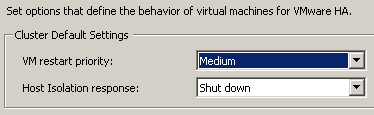
Note that this change is only for new clusters, if you upgrade(d) your vCenter the selected isolation response will remain. For those of you who never looked into the setting “Shut down”, it uses VMware Tools to initiate a guest shut down. If the shut down does not complete within five minutes the VM will be powered off. These five minutes are a configurable setting, if you want to increase or decrease it add the following advanced option das.isolationShutdownTimeout with the new value in seconds.

Change VUM download location from https to http

Duncan Epping · May 23, 2009 ·

One of my customers asked me if it is possible to change the download protocol for VMware Update Manager into http. Due to security regulations they are not allowed to have traffic over https on their server backbone.

To achieve this you will need to change the vci-integrity.xml file in the Update Manager directory.

The default url is: https://www.vmware.com/PatchManagementSystem/patchmanagement

When you change the https into http it works:

http://www.vmware.com/PatchManagementSystem/patchmanagement

Cheers,

Marco

Unofficial Online VMware User Group

Duncan Epping · May 22, 2009 ·

As most of you know, in the Netherlands we have a pretty big VM User Group. I don’t think there are any VMUGs out there with so many active members and such a large number of attendees at meetings. This is about to change.

Mr Alan Renouf is one of the initiators of the Online VMware User Group. At this point it’s still unofficial but Alan told me he will be discussing it with VMware to get the needed formal approval to make this official.

I would like to invite everyone to join Alan on the 1st of June 2009. I think this is a great initiative. Let’s make this a success and the world biggest VMUG.

Here are the details:

The Agenda at the moment is as follows:

  • Introduction
  • Presentation and Demonstration of The Virtualization EcoShell Initiative by Scott Herold
  • Virtual Coffee break (bring your own coffee)
  • Overview and Demonstration of vSphere new features by a VMware Employee
  • Finish and details of next Unofficial Online VMUG

This meeting is being hosted over Microsoft Live meeting, if you have not installed the client it is recommended you do this 15 mins before the meeting.

Video:  Video will be delivered via the Microsoft Live Meeting client.
Audio:  For attendees, audio will be delivered via the Internet using your computer’s speakers. There will not be a call-in number for this meeting.

The meeting will also be recorded for people who are unable to attend.

Meeting Details:

Date: 1st June 2009

Time: 08:00 PM GMT / 03:00 PM EDT

Meeting URL:  https://www.livemeeting.com/cc/winserver_usergroup/join?id=QP5K5Q&role=attend&pw=8%5E-%5CzqX

Meeting ID:  QP5K5Q

Attendee Entry Code:  8^-\zqX

Registration Link:
http://www.clicktoattend.com/?id=138358

VMware Converter 4.0.1

Duncan Epping · May 21, 2009 ·

VMware vCenter Converter Standalone 4.0.1
Latest Version: 4.0.1 | 2009/05/21 | Build: 161434

What’s New

The VMware vCenter Converter Standalone 4.0.1 release is an update to Converter Standalone 4.0, and includes the following new features:

  • Support for vSphere 4.0 as source and destination targets:
    • Support for configuring target disks as thin provisioned disks
    • Support creation of IDE disks on vSphere 4.0
    • Support for backup products to restore vSphere 4.0 virtual machines backed up using VCB
    • Support for creation of virtual hardware version 7.0 virtual machines on vSphere 4.0. targets as well as migration of hardware version 7.0 virtual machines from Workstation and Server platforms to vSphere 4.0
  • Support for importing OVF 1.0 single virtual machine images.
  • Support for customization of Windows Server 2008 guests.

vSphere, finally available…

Duncan Epping · May 21, 2009 ·

When ESX 3.0 was released people were excited about it but it can’t be compared to the buzz that has been created around vSphere. It’s all over the blogosphere, I think every single blog out there published articles  about vSphere weeks even months before it was released . Now the time has finally come, it’s available! Go to the download section of the VMware website to download it.

Equally important is the update documentation section. Be sure to download all the documents and start reading!

Have fun today guys, while we in the Netherlands enjoy our holiday.

  • « Go to Previous Page
  • Page 1
  • Interim pages omitted …
  • Page 40
  • Page 41
  • Page 42
  • Page 43
  • Page 44
  • Interim pages omitted …
  • Page 85
  • Go to Next Page »

Primary Sidebar

About the Author

Duncan Epping is a Chief Technologist and Distinguished Engineering Architect at Broadcom. Besides writing on Yellow-Bricks, Duncan is the co-author of the vSAN Deep Dive and the vSphere Clustering Deep Dive book series. Duncan is also the host of the Unexplored Territory Podcast.

Follow Us

  • X
  • Spotify
  • RSS Feed
  • LinkedIn

Recommended Book(s)

Also visit!

For the Dutch-speaking audience, make sure to visit RunNerd.nl to follow my running adventure, read shoe/gear/race reviews, and more!

Do you like Hardcore-Punk music? Follow my Spotify Playlist!

Do you like 80s music? I got you covered!

Copyright Yellow-Bricks.com © 2026 · Log in