• Skip to primary navigation
  • Skip to main content
  • Skip to primary sidebar

Yellow Bricks

by Duncan Epping

  • Home
  • Unexplored Territory Podcast
  • HA Deepdive
  • ESXTOP
  • Stickers/Shirts
  • Privacy Policy
  • About
  • Show Search
Hide Search

Archives for 2009

MSCS VM’s in a HA/DRS cluster

Duncan Epping · Jun 3, 2009 ·

We(VMware PSO) had a discussion yesterday on the fact whether it’s supported to have MSCS(Microsoft Clustering Services) VM’s in a HA/DRS cluster with both HA and DRS set to disable. I know many people struggle with this because it doesn’t make sense in a way. In short: No, this is not supported. MSCS VM’s can’t be part of a VMware HA/DRS cluster, even if they are set to disabled.

I guess you would like to have proof:

For ESX 3.5:
http://www.vmware.com/pdf/vi3_35/esx_3/r35u2/vi3_35_25_u2_mscs.pdf

Page 16 – “Clustered virtual machines cannot be part of VMware clusters (DRS or HA).”

For vSphere:
http://www.vmware.com/pdf/vsphere4/r40/vsp_40_mscs.pdf

Page 11 – “The following environments and functionality are not supported for MSCS setups with this release of vSphere:
Clustered virtual machines as part of VMware clusters (DRS or HA).”

As you can see certain restrictions apply, make sure to read the above documents for all the details.

VMworld first sessions unofficially announced…

Duncan Epping · Jun 3, 2009 ·

VMworld 2009 – August 31 -Sept 3. | The Moscone Center, San Francisco

I opened up tweetdeck this morning and noticed that some of the first VMworld 2009 sessions have been approved and unofficially announced. I was really surprised to find an email this morning that my session had been approved, I totally forgot about the fact that Rick(VMwaretips.com) submitted a session and that I was listed as one of the presenters. As you can see below Rick, Scott Lowe and myself will be doing a session on Virtualization Design. It’s an interactive session so we will need you guys to participate!

Of course Eric Sloof aka Mr Scoop broke the news:

TA2650 “Take PowerShell and the VI Toolkit to the Next Level” @LucD22 and @halr9000
TA2259 “Ask the Experts – Virtualization Design” @rick_vmwaretips, @depping and @scott_lowe
TA2262 “vSphere Enterprise Stability – It’s all in the Design” @rick_vmwaretips

And of course @cshanklin is one of the lucky ones. I think his session will have to do something with the vSphere PowerCLI. I didn’t hear anything about my submission though. I will keep a close watch on my inbox.

Update more unofficial announcements:
VM3040 “High performance VI Operations Checklist” @stevie_chambers
VM3041 “Integrating Virtualization with Capacity Management” @stevie_chambers
VM3743 “Automating Continuous Software Integration Testing for SaaS on VMware” @mcowger
VM2648 “Managing Compliance in Virtual Environments” @daveshackleford

That’s why I love blogging…

Duncan Epping · Jun 2, 2009 ·

I’m an outspoken person as most of you noticed by now, but I’m also open for discussion and that’s why I particularly like blogging. Every now and then a good discussion starts based on one of my blog articles. (Or a blog article of any of the bloggers for that matter.) These usually start in the form of a comment on an article but also via email or Twitter, even within VMware some of my articles have been discussed extensively.

A couple of weeks ago I voiced my opinion about VMFS block sizes and growing your VMFS. Growing your VMFS is a new feature, introduced with vSphere. In the article I stated that a large block size, 8MB, would be preferabel because of the fact that you would have less locking when using thin provisioned disks.

If you create a thin provisioned disk on a datastore with a 1MB block size the thin provisioned disk will grow with increments of 1MB. Hopefully you can see where I’m going. A thin provisioned disk on a datastore with an 8MB block size will grow in 8MB increments. Each time the thin-provisioned disk grows a SCSI reservation takes place because of meta data changes. As you can imagine an 8MB block size will decrease the amount of meta data changes needed, which means less SCSI reservations. Less SCSI reservations equals better performance in my book.

As a consultant I get a lot of question on vmfs locking and I assumed, with the current understanding I had, that a larger blocksize would be beneficial in terms of performance. I’m no scientist or developer and I rely on the information I find on the internet, manuals, course material and the occasional internal mailinglists… In this case this information wasn’t correct, or better said not updated yet to the changes that vSphere introduced. Luckily for me, and you guys, one of my colleagues jumped in to give us some good insights:

I am a VMware employee and I wrote VMFS with a few cronies, but the following is a personal opinion:

Forget about locking. Period. Yes, SCSI reservations do happen (and I am not trying to defend that here) and there will be some minor differences in performance, but the suggestion on the (very well written) blog post goes against the mission of VMFS, which is to simplify storage virtualization.

Heres a counter example: if you have a nearly full 8MB VMFS volume and a less full 1MB VMFS volume, you’ll still encounter less IO overheads allocating blocks on a 1MB VMFS volume compared to the 8MB volume because the resource allocator will sweat more trying to find a free block in the nearly full volume. This is just one scenario, but my point is that there are tons of things to consider if one wants to account for overheads in a holistic manner and the VMFS engineers don’t want you to bother with these “tons” of things. Let us handle all that for you.

So in summary, blocksizes and thin provisioning should be treated orthogonally. Since thin provisioning is an official feature, the thing for users to know is that it will work “well” on all VMFS blocksize configurations that we support. Thinking about reservations or # IOs the resource manager does, queue sizes on a host vs the blocksize, etc will confuse the user with assertions that are not valid all the time.

I like the post in that it explains blocks vs sub-blocks. It also appeals to power users, so that’s great too. But reservation vs. thin provisioning considerations should be academic only. I can tell you about things like non-blocking retries, optimistic IO (not optimistic locking) and tons of other things that we have done under the covers to make sure reservations and thin provisioning don’t belong in the same sentence with vSphere 4. But conversely, I challenge any user to prove that 1MB incurs a significant overhead compared to 8MB with thin provisioning :)

Satyam Vaghani

Does this mean that I would not pick an 8MB block size over a 1MB block size any more?

Not exactly, but it will depend on the specific situation of a customer. My other reason for picking an 8MB block size was VMFS volume growing. If you grow a VMFS volume the reason for this probably is the fact that you need to grow a VMDK. If the VMDK needs to grow larger than the maximum file size, which is dictated by the chosen block size, you would need to move(Storage VMotion or cold migration) the VMDK to a different datastore. But if you would have selected an 8MB block size when you created the VMFS volume you would not be in this position. In other words I would prefer a larger block size, but this is based on flexibility in terms of administration and not based on performance or possible locking issues.

I want to thank Satyam for his very useful comment, thanks for chipping in!

vSphere and the Windows Server Virtualization Validation Program

Duncan Epping · Jun 2, 2009 ·

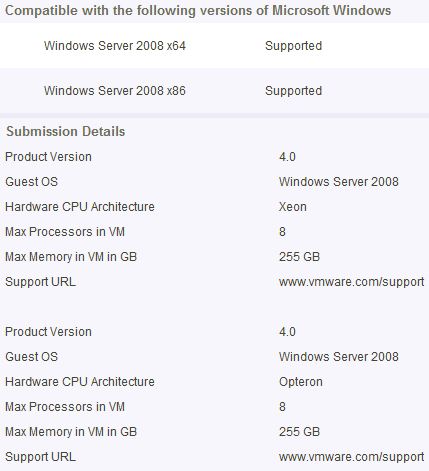
I just noticed that vSphere has been added to the Windows Server Virtualization Validation Program:

source

Products that have passed the SVVP requirements for Windows Server 2008 R2 are considered supported on Windows Server 2008, Windows 2000 Server SP4 and Windows Server 2003 SP2 and later Service Packs, both x86 32-bit, and x64 64-bit.

Might come in handy when you need to get support from Microsoft….

Nehalem CPU and TPS on vSphere

Duncan Epping · May 31, 2009 ·

As I wrote a while ago when you enable virtualized MMU for your virtual machine it enables Large Pages and Large Pages don’t get “TPS’ed”. The article I wrote was specifically related to AMD cause it was the only platform at the moment for which enhanced memory techniques where used. (AMD RVI!) As of vSphere 4.0 Intel EPT is also fully utilized. As expected this leads to the same “issue” as with AMD, no TPS when you enable vMMU. VMTN Community User MCWill reported this here. I wanted to specifically point this topic out to you because of the excellent replies from Kichaonline and Rajesh Venkatasubramanian. It’s worth reading the full topic if you want to get a good understanding of TPS/Virtualized MMU.

A small correction — we are currently investigating ways to fix the high memory usage issue also. Regarding TPS, as noted earlier this shoud not lead to any performance degradation. When a 2M guest memory region is backed with a machine large page, VMkernel installs page sharing hints for the 512 small (4K) pages in the region. If the system gets overcommitted at a later point, the machine large page will be broken into small pages and previously installed page sharing hints helps to quickly share the broken down small pages. So low TPS numbers when a system is undercommitted does not mean that we won’t reap benefits out of TPS when machine gets overcommitted.

  • « Go to Previous Page
  • Page 1
  • Interim pages omitted …
  • Page 38
  • Page 39
  • Page 40
  • Page 41
  • Page 42
  • Interim pages omitted …
  • Page 85
  • Go to Next Page »

Primary Sidebar

About the Author

Duncan Epping is a Chief Technologist and Distinguished Engineering Architect at Broadcom. Besides writing on Yellow-Bricks, Duncan is the co-author of the vSAN Deep Dive and the vSphere Clustering Deep Dive book series. Duncan is also the host of the Unexplored Territory Podcast.

Follow Us

  • X
  • Spotify
  • RSS Feed
  • LinkedIn

Recommended Book(s)

Also visit!

For the Dutch-speaking audience, make sure to visit RunNerd.nl to follow my running adventure, read shoe/gear/race reviews, and more!

Do you like Hardcore-Punk music? Follow my Spotify Playlist!

Do you like 80s music? I got you covered!

Copyright Yellow-Bricks.com © 2026 · Log in