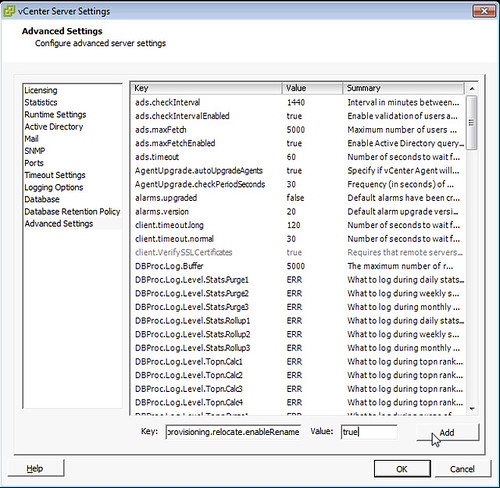
A while back I posted that 5.0 U2 re-introduced the renaming behavior for VM file names. I was just informed by our excellent Support Team that unfortunately the release notes missed something crucial and Storage vMotion does not rename files by default. In order to get the renaming behavior you will have to set an advanced setting within vCenter.. This is how you do it:
- Go to “Administration”
- Click on “vCenter Server Settings”
- Click “Advanced Settings”
- Add the key “provisioning.relocate.enableRename” with value “true” and click “add”
- Restart vCenter service or vCenter Server
Now the renaming of the files during the SvMotion process should work again!
All of you who need this functionality, please make sure to add this advanced setting.
Hi Duncan,
Great post!
Does this advanced option also work for ESXi 5.1?
No, only fixed in U2. Will be added to a 5.1 update pack soon.
Hi Duncan,
Informative as usual.
Had a really unusal Interview for a Job. I was asked if I follow any Virtualization Blogs I said Yes Yellow-Bricks. Next Question was ok “then what is the Latest topic he blogged about last night.
I said apologies but I did not read the blog this morning. To which they said Do you actually follow the blog.”
Then i was asked if i follow you on Twitter…. I do but – I didnt get the Job lol but I enjoyed it. 🙂
How weird. You read the blog, but not frequently enough to get the job!?
Humm what can I say !! I am only human !!
That is probably one of the strangest interviews I have heard about 🙂
I hope you will have more luck next time.
Thank you Duncan.
So great, I was missing the feature !
Thanks for the tip.
tested multiple times in the lab… fix works! Thank you sir!
Hey,
That fix was missing me. Somoene did it try on 5.0 U1 ?
We talked about this today during a vSphere Design workshop training. I just told this feature was back in u2 and half an hour later you posted this…. Made me look bad 😉
I shared the link to your site so they can take this action in account if needed. Thanks for the information
I was also beating my head against the wall because it did not work despite of U2…now it does. Many thanks 🙂
It is extremely disappointing that this wasn’t returned to being enabled by default. There is really no logical reason someone wouldn’t want it to behave like that.
same thing it should be enable by default…
Hi,
is this advanced settings supported? As it is not possible to delete the key from the advanced settings I am not sure if I want to use it in my production environment…
Regards
Andi
Yes it is officially supported.
Excellent question, Andi.. 😉
/Rubeck
So when I add this value, it gets changed from “provisioning.relocate.enableRename” to “config.provisioning.relocate.enableRename”, is this the expected behaviour? When trying to script this with powershell it also fails unless I add the “config.” in front
Example: get-advancedsetting -entity $defaultVIServer -name “provisioning.relocate.enableRename” | set-advancedsetting -value true -confirm:$false
Correct, expected behavior.
Does this Key “provisioning.relocate.enableRename” works for VMware VirtualCenter 5.0.0 build-455964 version ?
5.0 U2 is the requirement as mentioned in the blog post.
Hi Duncan,
thank you for this hint. But global question: Is it today (vSphere 5.1) not possible to edit Advanced Parameters within the WebClient? I get always a white caracters on white Screen ;-(
it works fine here… weird
I am trying to figure out what is the importance of the renaming feature?
I think I am missing something
Please elaborate.
Todd
If you rename your VM in vCenter the filename on the VMFS doesn’t change. Just imagine something happens with your VM and you need to troubleshoot it on the command-line how do you know which one it is? So people use SvMotion to rename the virtual machine files by moving it to a different datastore.
This functionality was removed, but now introduced again.
Can anyone come up with a good reason why it was removed in the first place?
I’m thinking there must be a (good?) reason – and if there is, what are the drawbacks of re-enabling the feature?
Worked for all files except the .nvram file. Is that expected behavior?
Hi,
it’s not working with vCenter 5.1 (Build 947673). Doesn’t matter if the value is set or not. 🙁
No it doesn’t indeed. Fix will make it in to an update as indicated in a comment above
Thank You for confirming.
Hey Duncan – looks like this change made it in to ESXi 5.1 Update 1. Good stuff!
In the documentation it says that the original problem was due to a limitation in Storage DRS in vCenter 5.0 that needed the files and folders to remain the same on moves to keep track of servers SDRS stats. Somehow they figured out to use a UUID or other form of ID in the U2 release (no needed to track folder/file names). Then they used the same old code block for SDRS from 5.0 and broke it again in 5.1! LOL Obviously 5.1 U1 fixes it… again.
I can confirm that this does NOT work on vCenter Server 5.1.0b aka 947673
We will be upgrading our environment to 5.1 update 1.a and reposting.
-A.B.
New York, NY
Greenwich, CT
Just tried this with vCenter Server 5.1.0 build 947673. Will not rename files, even with provisioning.relocate.enableRename = true.
vCenter Server 5.1.0 build 1123961 is renaming files correctly. Last week, downloads from vmWare were ridiculously slow…less than 300Kbps. That was a no-go for a 3.4GB ISO.
Today, we’re getting them at 16-17MB/sec. Took just a few minutes.
Thanks for all this information: does any one who has renamed Production and live VM ( win2k8R2) on esxi5.1.Please post step by steps. Thanks to all of you.
I have to perform this change in next Tuesday, does any one who has renamed Production and live VM ( win2k8R2) on esxi5.1.Please post it ( send it [email protected] )
Is there a way to remove a key? while entering the key “provisioning.relocate.enableRename”, I had typo and mispressed enter twice, which let to adding the key. now there is a key that has no value assigned to it, but exists with other key, in the name “config.provisioning”.
How lame, they should have even have one more tab to remove key!!!