I have been testing various things as part of the Take 3 I started not too long ago. While I was setting up my environment I ran into a few issues. One of those issues was something very strange. Just so people understand what I am testing, I have an Oculus Quest headset to which I want to stream a VR app over WIFI from a powerful VM which has a passthrough GPU. Now by default, this isn’t possible. The Quest wasn’t intended for this particular usecase. In order to do this you need to setup some kind of remoting technology, which is where ALVR comes in to play. ALVR is an open source remoting/streaming solution for VR applications. Huh, what are you doing? Well as shown in the diagram below I am basically running an App using Steam within Windows and then streaming that output using ALVR from the server to the client, where the client runs as an app on the HMD (head-mounted display).
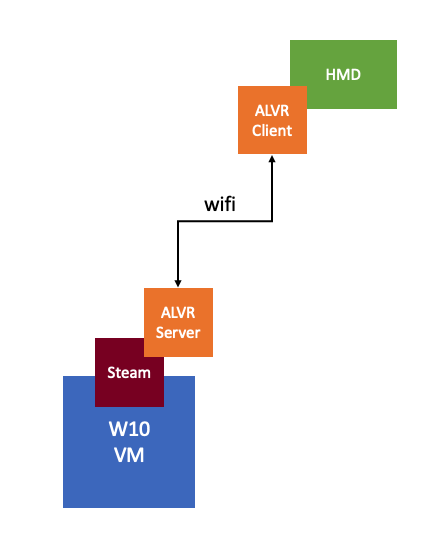
There’s also AMD ReLive VR and NVIDIA Cloud XR by the way, of which I have also tested AMD ReLive VR, which is embedded in the AMD Driver and can be enabled through the AMD advanced settings. Anyway, while testing this solution I had to disable the display head by setting “svga.present = false” in order for ALVR to work (otherwise I would get an error stating “could not create graphics device for adapter 0”), which means that as a result, I can’t access the VM using the Web/Remote Console, unfortunately.
So in order to launch the VR app and ALVR Server I have to RDP into the Windows 10 VM. When doing so I can launch the apps and connect the Headmount to ALVR Server, great… But when putting on the headset I would only see green, basically a big green screen. So why did this happen? Well, it appears that it is an artifact caused by the fact that I am launching the VR app from within an RDP session. When using RDP you end up using a specific video driver for the screen rendering, which is not something ALVR (or AMD ReLive VR) understands. So in order to get around it, you will need to log in from a “proper” console to the Windows VM and launch the app from there so that it is rendered by the AMD or NVIDIA driver instead. I used TightVNC to get around the problem, there are other solutions, but this was the fastest to implement for me.
 I first got introduced to Virtual Reality (VR) in the 90’s. Back then it was all about gaming of course. Even today though the perception is that it is mainly about gaming, and to be honest that was also my perception. When I spoke with Alan Renouf the first time about the project he was working on and I saw his keynote demo I didn’t really see the opportunity. It all felt a bit gimmicky, to be honest, but can you blame me when the focus of the demo is moving workloads to the cloud by picking up a VM and throwing it over “the fence”.
 It isn’t something I ever thought about, but in order to train firefighters they create a room inside a container, burn down the container and then have groups of firefighters try to figure out how and where the fire started. The problem is though if they train 10 groups per day, only the last group can touch the objects and do a proper investigation. With VR this problem is solved, as after every training session you reset and start over. Same for instance could apply to police force training for things like crime scene investigation. Or for instance training of personnel working (nuclear) power plants, oil platforms, etc etc. Or even customer services training for retailers like Walmart, let them deal with difficult customers in VR first, let them handle dozens of difficult situations in VR before they are exposed to “real” customers.