• Skip to primary navigation
  • Skip to main content
  • Skip to primary sidebar

Yellow Bricks

by Duncan Epping

  • Home
  • Unexplored Territory Podcast
  • HA Deepdive
  • ESXTOP
  • Stickers/Shirts
  • Privacy Policy
  • About
  • Show Search
Hide Search

vSphere

Storage VMotion, exploring the next version of ESX/vCenter

Duncan Epping · Apr 2, 2009 ·

I was exploring the next version of ESX / vCenter again today and did a Storage VMotion via the vSphere client. I decided to take a couple of screenshots to  get you guys acquainted with the new look/layout.

Doing a Storage VMotion via the GUI is nothing spectacular cause we all have used the 3rd party plugins. But changing the disk from thick to thin is. With vSphere it will be possible to migrate to thin provisioned disks, which can and will save disk space and might me desirable for servers that have low disk utilization and disk changes. [Read more…] about Storage VMotion, exploring the next version of ESX/vCenter
Resizing your VMFS the right way, exploring the next version of ESX/vCenter

Duncan Epping · Mar 26, 2009 ·

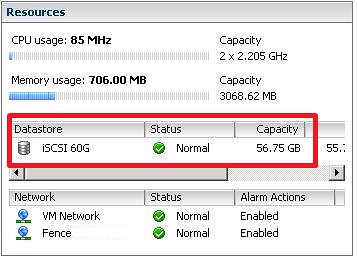
I’ve been playing around with my vSphere/Next gen ESX lab. I was replaying the VMworld lab and one of the assignments was to  resize a VMFS volume. Yes that’s correct, resize not extent. Extents have been discussed by many and the general consensus is avoid them if/when possible. But when running out of diskspace you don’t always have the option to avoid them. Some can’t afford the downtime that comes with a “cold migration”, and most aren’t willing to take the risk of using storage vmotion when running out of diskspace. (Snapshot is placed on source VMFS volume) This has all been solved in the next version of ESX/vCenter. You can resize your VMFS volume without resorting to extents, and you can do this with the vCenter client.

The original size:

First thing you will need to do is increase the size of the LUN on your SAN. If your SAN doesn’t support LUN resizing you can still do it the old fashion way, extent. [Read more…] about Resizing your VMFS the right way, exploring the next version of ESX/vCenter

An 8MB VMFS blocksize doesn’t increase performance?

Duncan Epping · Mar 24, 2009 ·

VMFS Blocksizes have always been a hot topic regarding storage performance. It has been discussed by many including Eric Siebert on ITKE and Gabe also opened a topic on VMTN and he answered  his own question at the bottom. Steve Chambers wrote a great article about Disk Alignment and Blocksize on VI:OPS which also clearly states:”the VMFS block size is irrelevant for guest I/O.” Reading these articles/topics we can conclude that an 8MB blocksize opposed to a 1MB blocksize doesn’t increase performance.

But, is this really the case? Isn’t there more to it than meets the eye?

Think about thin-provisioning for a second. If you create a thin provisioned disk on a datastore with a 1MB blocksize the thin provisioned disk will grow with increments of 1MB. Hopefully you can see where I’m going. A thin provisioned disk on a datastore with an 8MB blocksize will grow in 8MB increments. Each time the thin-provisioned disk grows a SCSI reservation takes place because of meta data changes. As you can imagine an 8MB blocksize will decrease the amount of meta data changes needed, which means less SCSI reservations. Less SCSI reservations equals better performance in my book.

For the current VI3 environments, besides VDI, I hardly have any customers using thin provisioned vmdk’s. But with the upcoming version of ESX/vCenter this is likely to change because the GUI will make it possible to create thin provisioned vmdk’s. Not only during the creation of vmdk’s will thin provisioned disks be an option, but also when you initiate a Storage VMotion you will have the option to migrate to a thin provisioned disk. It’s more than likely that thin provisioned disks will become a standard in most environments to reduce the storage costs. If it does, remember that when a thin provisioned disk grows a SCSI reservation takes place and less reservations is definitely beneficial for the stability and performance of your environment.

HA enhancements, exploring the next version of ESX/vCenter

Duncan Epping · Mar 23, 2009 ·

Let’s start with a screenshot:

These are the properties of an HA cluster, as you can see there are two sections that changed:

  1. “Enable Host Monitoring” is a brand new feature. Anyone who did network maintenance while HA was enabled knows why this feature will come in handy. Those that didn’t: Isolation response! If ESX is unable to send or receive it’s heartbeat and can’t ping it’s default isolation response address it will shutdown all VM’s. To avoid this behavior you can switch of HA for a specific host with this new feature. In just four words: Maintenance mode for HA.
  2. Besides the amount of host failures a cluster can tolerate you can also specify a percentage. With the “host failures” option VMware uses the highest values of CPU and Memory reservations to calculate the amount of slots. (For more on slot / slot size read the Resource Management Guide for ESX 3.5) With the new option “Percentage of cluster resources” this isn’t the case. This new option uses the actual reservation of the VM and calculates the total percentage of resources used based on these calculations. If no reservation have been made it uses the default 256Mhz / 256MB reservation. In other words, you will be more flexible and will get a higher consolidation ratio. If the default reservation values are to low you can always use the advanced options to increase it. Another new option is “specify a failover host”. This option can be compared to “das.defaultfailoverhost”. The good thing about this option is that the designated host will be used for fail-over only. DRS will not migrate VM’s to this host, and it’s not possible to start VM’s on this host.

Pluggable Storage Architecture, exploring the next version of ESX/vCenter

Duncan Epping · Mar 19, 2009 ·

The next version of ESX has a totally different architecture for storage. The new architecture is called “Pluggable Storage Architecture”. For my own understanding I wanted to write down how this actually works and what all the different abbreviations/acronyms mean:

  • PSA = Pluggable Storage Architecture
  • NMP = Native Multipathing
  • MPP = Multipathing Plugin
  • PSP = Path Selection Plugin
  • SATP = Storage Array Type Plugin

At the top level we have “Pluggable Storage Architecture”. This is just the name of the new concept, but it’s a well chosen name cause that’s what it is… a new storage architecture that uses plugins. Let’s start with the native VMware plugins. [Read more…] about Pluggable Storage Architecture, exploring the next version of ESX/vCenter

  • « Go to Previous Page
  • Page 1
  • Interim pages omitted …
  • Page 155
  • Page 156
  • Page 157
  • Page 158
  • Page 159
  • Go to Next Page »

Primary Sidebar

About the Author

Duncan Epping is a Chief Technologist and Distinguished Engineering Architect at Broadcom. Besides writing on Yellow-Bricks, Duncan is the co-author of the vSAN Deep Dive and the vSphere Clustering Deep Dive book series. Duncan is also the host of the Unexplored Territory Podcast.

Follow Us

  • X
  • Spotify
  • RSS Feed
  • LinkedIn

Recommended Book(s)

Advertisements


Copyright Yellow-Bricks.com © 2025 · Log in