• Skip to primary navigation
  • Skip to main content
  • Skip to primary sidebar

Yellow Bricks

by Duncan Epping

  • Home
  • Unexplored Territory Podcast
  • HA Deepdive
  • ESXTOP
  • Stickers/Shirts
  • Privacy Policy
  • About
  • Show Search
Hide Search

vSphere

Running vSphere within Workstation will take up a lot of memory…

Duncan Epping · May 8, 2009 ·

As some of you noticed, when you install vSphere(ESX) within a VM you will need at least 2GB to get the installer started. Even when it has finished installing you can’t reduce the memory because the following error will occur:

I couldn’t find a way of  pre-adjusting the memory requirements but there’s a way to change this behavior and to downsize the memory when the installation has finished. Keep in mind this is, as far as I know, not supported… it’s only to be used to run ESX within VMware Workstation for your demo / test environment. I personally use it for running 2 ESX servers and vCenter within VMware Workstation on my 4GB laptop. (That’s what I actually use to create screenshots and prepare blog articles.)

ESX:

  1. Install vSphere(ESX) with at least 2 GB memory
  2. Login to the Service Console and type the following:
    vi /etc/vmware/init/init.d/00.vmnix
  3. Change the following line to the desired value:
    RequiredMemory=2064384
  4. Shutdown the virtual machine and change the VMs memory and boot it up!

Thanks Mark for the comment on ESXi:

  1. Install vSphere(ESXi) with at least 2 GB memory
  2. Login to the console via the “unsupported” method.
  3. Edit the file /etc/vmware/esx.conf and add the following line:
    /vmkernel/minMemoryCheck = “false”
  4. Save the file and shutdown ESXi, change the memory and boot it up!

Don’t use any other editor than “vi”, there are multiple reports of nano wrecking the layout of the file which leads to an unrecoverable error during booting.


“vSphere” Screensaver

Duncan Epping · Apr 21, 2009 ·

I received this one via E-Mail… the vSphere Launch Screensaver. Pick it up here. It’s only 2MB by the way, and it’s pretty much similar to the flash movie on the announcement website.

vSphere Linkage

Duncan Epping · Apr 21, 2009 ·

There’s hardly any point in covering the announcements of today. There are so many people blogging right now that no one will have the chance to keep up with reading. That’s why I decided not to write or copy any of the announcements. Of course I just might give my thoughts on the webcast this evening but that’s probably it… Anyway, I divided it up in two major sections “News” and “Previews” and within these sections VMware and of course “Bloggers Community”. I will keep updating this post, make sure to visit it again. Here we go:

News / Coverage

VMware

  • VMware.com (includes podcast) – vSphere Product page
  • VMware.com (press) – Press Kit
  • VMware.com (press) – VMware Enables Users to Easily Test-Drive Cloud Computing through the VMware Virtual Appliance Marketplace (VAM) and VMware vCloud Service Provider Free Trials
  • VMware.com (press) – VMware vSphere 4 Provides ‘Always On IT’ for SMB and Branch Office IT Environments With Low Cost, High Availability Solutions
  • VMware.com (press) – VMware Unveils the Industry’s First Operating System for Building the Internal Cloud—VMware vSphere 4
  • VMware.com (press) – VMware vSphere 4 Launch Supported by Broad Virtualization Ecosystem
  • VMware.com (press) – VMware vSphere 4 Sets New Records in Virtualization Performance
  • VMTN – Introducing VMware vSphere 4 – The Industry’s First Cloud Operating System
  • VMTN – VMware vSphere Resources And Webcasts Customers Should Know About!
  • VMTN Community – VMware vSphere Community is here – plus some rearrangement…
  • Vroom – Database sizing charts for vSphere 4.0
  • Networking – vSphere launches
  • VMware (pdf’s) – vSphere list of Key Features
  • VMware (pdf’s) – vStorage: What’s New Whitepaper
  • VMware (pdf’s) – vNetwork: What’s New Whitepaper
  • VMware (pdf’s) – vSphere Pricing, Packaging, and Licensing Whitepaper

Bloggers Community

  • Chriswolf.com – VMware Launches the V series mainframe
  • itsjustanotherlayer.com – vSphere 4 – the next great thing
  • blog.VirtualTacIt.com – VMware vSphere: Not your average Cloud-OS… oh wait the only Cloud-OS
  • Blog.Fosketts.net – Storage changes in the VMware vSphere 4 family
  • VMETC.com – vSphere announced. Now what for VMware customers?
  • BriandMadden.com – VMware announces vSphere – the foundation for the next generation datacenter
  • vinternals.com – VMware Slaps Enterprise and Cisco  In Face, Opens Doors For Competitors
  • technodrone.blogspot.com – vSphere 4, so what is new?
  • Dabcc.com – vSphere, initial comparison with Hyper-v and Xen
  • VMware-land.com – My growing collection of vSphere links
  • Virtualgeek.typepad.com – One man’s take on the vSphere launch
  • VMwareTips.com – VMware vSphere launch event, onsite coverage
  • Mikedipetrillo.com – VMware Launches vSphere
  • Ideationcloud.com – VMware unveils vSphere 4.0; calls it Cloud Operating System
  • sqlchicken.blogspot.com – VMware unveils new vSphere 4
  • virtualizationexchange.blogspot.com – Breaking news from VMware: vSphere 4 unveiled
  • Hypervizor.com – The ultimate vSphere4 learning path: Videos, Webcasts, Podcasts, Free online classes and much more
  • Latogalabs.com – VMware Announces vSphere 4 Cloud OS
  • ROIDude.typepad.com – VMware has its Head in the Clouds, but its Feet are Planted Firmly on the Ground
  • TheVirtualBlackhole.com – Partner Exchange and the vSphere Press Release
  • vmjunkie.wordpress.com – vSphere Launch
  • chucksblog.emc.com – The real impact of vSphere
  • chucksblog.emc.com – vSphere as an I/O engine
  • OzVMs.com – vSphere – Skillsets and VCP
  • OzVMs.com – Paul Maritz quotes from the vSphere launch
  • OzVMs.com – Efficiency, control and choice – vSphere launch review
  • VirtualLifestyle.nl – One big step for VMware, one giant leap for virtualization: VMware launches vSphere 4
  • NTPRO.nl – VMware vSphere(TM) 4 Sets New Records in Virtualization Performance
  • NTPRO.nl – VMware vSphere(TM) 4 Provides ‘Always On IT’ for SMB and Branch Office IT Environments With Low Cost, High Availability Solutions
  • NTPRO.nl – VMware Enables Users to Easily Test-Drive Cloud Computing Through the VMware Virtual Appliance Marketplace (VAM) and VMware vCloud(TM) Service Provider Free Trials
  • NTPRO.nl – VMware vSphereTM 4 Launch Supported by Broad Virtualization Ecosystem
  • NTPRO.nl – VMware Unveils the Industry’s First Operating System for Building the Internal Cloud–VMware vSphere(TM) 4
  • NTPRO.nl – VMware vSphere Podcasts
  • rtfm-ed.co.uk – vSphere4 Pricing – From the Press Release
  • rtfm-ed.co.uk – vSphere launch video
  • VMGuru.nl –VMware announces vSphere 4
  • MalaysiaVM.com – VMware vSphere 4
  • MalaysiaVM.com – 6 cores limitation per socket for vSphere Enterprise
  • Boche.net – vSphere licensing notables
  • Boche.net – VMware vSphere Cheat Sheet
  • Punchingclouds.com – Reach out and touch the clouds
  • virtualization-spotlight.com – VMware Unveils vSphere 4
  • kevinkomiegasstorageblog.blogspot.com – VMware vSphere of influence
  • Techtarget.com – A guide to VMware vSphere 4.0
  • blog.ScottLowe.org – Mastering VMware vSphere 4.0
  • VirtualizationReview.com – Breaking down vSphere pricing
  • Gabesvirtualworld.com – List of VMware FT compatible CPUs
  • thestoragearchitect.com – Enterprise computing – VMware announces vSphere 4.0
  • virtualisedreality.wordpress.com – vSphere launch

Previews

VMware

  • –

Bloggers Community

  • Dailyhypervisor.com – VMware vSphere 4 under the covers, first look
  • Boche.net – A random collection of what’s new vSphere eye candy
  • Mikedipetrillo.com – Time to Upgrade
  • OzVMs.com – vSphere Networking enhancements and features
  • Virtualgeek.typepad.com – Incoming treat for EMC CLARiiON/Celerra+VMware Customers
  • Virtualgeek.typepad.com – A sneak peek at vSphere 4 I/O goodness (and world records)
  • Yellow-Bricks.com – Storage views, exploring the next version of ….
  • Yellow-Bricks.com – Alarm Actions, exploring the new version of ESX/vCenter
  • Yellow-Bricks.com – Storage VMotion, exploring the next version of ESX/vCenter
  • Yellow-Bricks.com – Resizing your VMFS the right way, exploring the next version of ESX/vCenter
  • Yellow-Bricks.com – Pluggable Storage Architecture, exploring the next version of ESX/vCenter
  • Yellow-Bricks.com – iSCSI multipathing with esxcli! Exploring the next version of ESX
  • Yellow-Bricks.com – esxcfg-scsidevs, Exploring the next version of ESX!
  • Yellow-Bricks.com – Disabling the VMFS-2 module! Exploring the next generation of ESX
  • Yellow-Bricks.com – VMFS recognized as a snapshot what to do? Exploring the next version of ESX…
  • NTPRO.nl – CPU compatibility with VMware Fault Tolerance
  • NTPRO.nl – Datastore Performance Charts
  • NTPRO.nl – Migration with Storage vMotion
  • NTPRO.nl – How to set up an email event trigger
  • NTPRO.nl – Using vNetwork Distributed Switches and dvPort Groups
  • NTPRO.nl – New Alarm Actions
  • NTPRO.nl – Acknowledge Triggered Alarms
  • NTPRO.nl – Managing VMware vApp
  • NTPRO.nl – Zoom In or Out of the Map View
  • NTPRO.nl – New alarm definitions in the next version
  • NTPRO.nl – Generate virtual machine desktop shortcut
  • NTPRO.nl – EMC Powerpath/VE for VMware vSphere
  • MalaysiaVM.com – Windows 7 on vSphere
  • MalaysiaVM.com – Virtual CPU Increase on Demand in vSphere
  • MalaysiaVM.com – ESX Host Profiles with vSphere
  • MalaysiaVM.com – Match RDM to Actual LUN on SAN Storage with vSphere
  • MalaysiaVM.com – Storage VMotion through GUI in vSphere
  • MalaysiaVM.com – Memory Hot Add for Virtual Machine
  • MalaysiaVM.com – Storage Management in VMware vSphere
  • Vinf.net – Remote in-place upgrade from ESX 3.5 to vSphere

Storage views, exploring the next version of ….

Duncan Epping · Apr 20, 2009 ·

I was playing around with vSphere this weekend while replying to topics on the VMTN Community. One of the things often asked is storage reporting… (Snapshot info / Disk utilization etc) With ESX 3.5 / vCenter 2.5 it needs to be scripted and can be integrated into vCenter by using custom fields, but as you can imagine not everyone would like to add custom functionality to vCenter.

As of the next version of ESX/vCenter aka vSphere you can just click the storage tab on a host or VM. The following is the storage tab of a VM, click the pic for a large version:

And of course the storage view on a host:

And of course the storage view on a host:

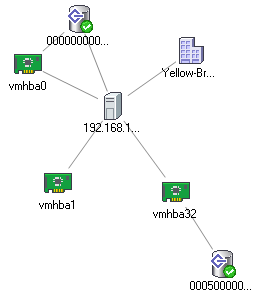
And what about the new map functionality, drilling down to HBA level

Rescan for datastores, exploring the next version of ESX/vCenter

Duncan Epping · Apr 8, 2009 ·

I love exploring new products, no matter how many times I click through the GUI and browse through the directory structure on the console you discover will discover something new everyday.

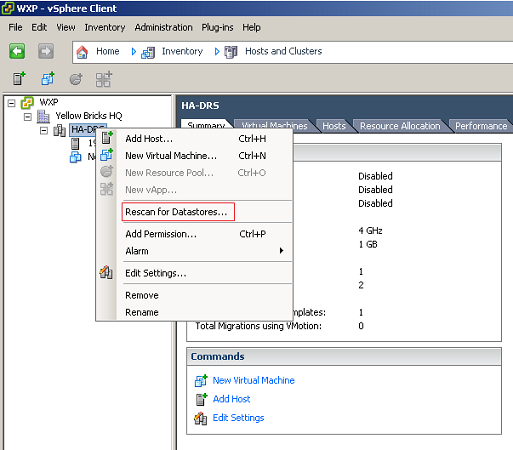
I never noticed this one, but as of the next version of ESX/vCenter you can rescan your complete cluster or datacenter just by right clicking on the object and click on “Rescan for Datastore”. Cool now I will not need to run a script anymore…

  • « Go to Previous Page
  • Page 1
  • Interim pages omitted …
  • Page 154
  • Page 155
  • Page 156
  • Page 157
  • Page 158
  • Page 159
  • Go to Next Page »

Primary Sidebar

About the Author

Duncan Epping is a Chief Technologist and Distinguished Engineering Architect at Broadcom. Besides writing on Yellow-Bricks, Duncan is the co-author of the vSAN Deep Dive and the vSphere Clustering Deep Dive book series. Duncan is also the host of the Unexplored Territory Podcast.

Follow Us

  • X
  • Spotify
  • RSS Feed
  • LinkedIn

Recommended Book(s)

Also visit!

For the Dutch-speaking audience, make sure to visit RunNerd.nl to follow my running adventure, read shoe/gear/race reviews, and more!

Do you like Hardcore-Punk music? Follow my Spotify Playlist!

Do you like 80s music? I got you covered!

Copyright Yellow-Bricks.com © 2026 · Log in