• Skip to primary navigation
  • Skip to main content
  • Skip to primary sidebar

Yellow Bricks

by Duncan Epping

  • Home
  • Unexplored Territory Podcast
  • HA Deepdive
  • ESXTOP
  • Stickers/Shirts
  • Privacy Policy
  • About
  • Show Search
Hide Search

virtual san

SMP-FT support for Virtual SAN ROBO configurations

Duncan Epping · Oct 12, 2015 ·

When we announced Virtual SAN 2-node ROBO configurations at VMworld we received a lot of great feedback and responses. A lot of people asked if SMP-FT was supported in that configuration. Apparently many of the customers using ROBO still have legacy applications which can use some form of extra protection against a host failure etc. The Virtual SAN team had not anticipated this and had not tested this explicit scenario unfortunately so our response had to be: not supported today.
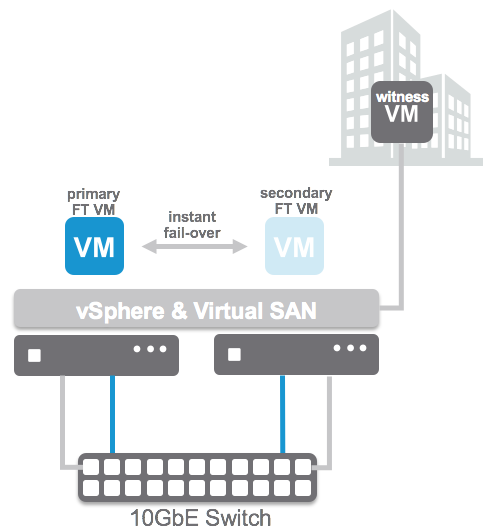
We took the feedback to the engineering and QA team and these guys managed to do full end-to-end tests for SMP-FT on 2-node Virtual SAN ROBO configurations. Proud to announce that as of today this is now fully supported with Virtual SAN 6.1! I want to point out that still all SMP-FT requirements do apply, which means 10GbE for SMPT-FT! Nevertheless, if you have the need to provide that extra level of availability for certain workloads, now you can!

Dell FX2 platform certified for VSAN with storage blades!

Duncan Epping · Oct 8, 2015 ·

A couple of weeks ago the Dell FX2 disk controller was added to the Virtual SAN Compatibility Guide and shortly after the Ready Node configurations were added. For those who haven’t looked at the Dell FX2 platform, it is (in my opinion)  hyper-converged on steroids. Not only can it provide you with 4 compute nodes in 2U it also packs a 10GbE switch and can hold two storage blades with each 16 disks in it. What? Yes indeed, that is a lot of horse power in a single system.

I am working with a customer right now who is designing a new cluster configuration leveraging the Dell FX2 platform. In this case they are planning on 16 hosts in total. In their case after assessing their current workloads they are going with the FC430 E5-2670 v3 series with 12 cores (dual processor). Each host will have 256GB of memory and uses SD to boot from.

From a storage perspective they are looking to use the FD332 storage blades. Two per FX2 chassis, fully maxed out with 32 drives in total, which is 8 drives per host. All-flash by the way, leveraging 1.6TB devices for the capacity tier and 400GB devices for the write cache. Yes that is 38.4TB raw capacity per FX2 chassis, times 4… ~153TB.Not a coincidence that the configuration is very similar to the “AF-6 Series – Dell FX2 Platform”, they prefer to use a certified and tested solution instead of picking their own components, which makes sense if you ask me.

One of the key reasons for them to go with all-flash is the beta which is coming up. They want to get their hands dirty with functionality like deduplication, checksumming and RAID-5/6 (aka erasure coding) as soon as possible. All 4 chassis will run in one site first for testing purposes for now and they are considering after the initial tests to deploy them across two sites in a stretched configuration. They asked me what the big benefit was of RAID-5 or RAID-6 over the network (aka erasure coding) and it definitely is the lower raw capacity requirements it will lead to. If you look at the current FTT=1 implementation it means that a 20GB disk requires an additional 20GB for availability reasons, which means 40GB in total. With an RAID-5 implementation instead of RAID-1 this 20GB disk would only require 26.6GB of disk space, that is a savings of almost 14GB immediately. And that is before any type of space efficiency (dedupe) is enabled. Anyway, back to the FX2.

So far only “all-flash” has made it to VSAN Ready Node list, and of course components are also listed as in the disk controller “FD332-PERC” (single and dual ROC) and I’ve seen the 1.8″ flash devices also on the list. Waiting to see what one of these boxes would cost in an all-flash configuration, and hoping to also see a hybrid configuration soon. I’m a fan of the Dell FX2 systems, that is for sure.

2 is the minimum number of hosts for VSAN if you ask me

Duncan Epping · Oct 1, 2015 ·

In 2013 I wrote an article about the minimum number of hosts for Virtual SAN. Since then this post has started living its own life. Somehow people have misunderstood my post and used/abused it in many shapes and forms. When I look at the size of a traditional cluster (non-VSAN) the minimum size is 2. From an availability perspective I ask myself what is the risk I am willing to take. What does that mean?

In a previous life I did many projects for SMB customers. My SMB customers typically had somewhat in the range of 2-5 hosts. With the majority having 2-3. In many cases those having 2-3 hosts were running roughly a similar number of virtual machines. The difference between the two situations “2 hosts” versus “3 hosts” was whether during times of maintenance (upgrading / updating) or failure if the ability to restart the virtual machine after a secondary failure. Many customers decided to go with 2 node clusters. Key reason for it being price vs risk. At normal operations risk is low, but the price of an additional host was relatively high.

Now compare this to Virtual SAN and you will see the same applies. With Virtual SAN we have a minimum of 3 hosts, well in a ROBO configuration you can have 2 with an external witness. This means that from a support perspective the bare minimum of dedicated physical hosts required for VSAN is 2. There you go, 2 is the bare minimum for ROBO. For non-ROBO 3 is the minimum. Fully supported, offers all functionality and similar to 4 hosts.

Is having an extra host a good plan? Yes of course it is. HA / DRS / VSAN (and any other scale-out storage solution for that matter) will benefit from more hosts. You as a customer need to ask yourself what the risk is, and if the cost is justifiable.

PS1: A question just came in, want to make that it is clear. Even in a 2-host ROBO configuration you can do maintenance! A single copy of the data and the witness remains available and will have quorum.

PS2: No, you cannot host your “witness” VM on the VSAN cluster itself, this is not supported as the witness is the quorom for the cluster and it should be outside of the cluster to provide certainty of the state in the case of a failure.

VSAN made storage management a non issue for the 1st time

Duncan Epping · Sep 28, 2015 ·

When ever I talk to customers about Virtual SAN the question that comes up usually is why Virtual SAN? Some of you may expect it to be performance, or the scale-out aspect, or the resiliency… None of that is the biggest differentiator in my opinion, management truly is. Or should I say the fact that you can literally forget about it after you have configured it? Yes, of course that is something you expect every vendor to say about their own product. I think the reply of one of the users during the VSAN Chat that was held last week is the biggest testimony I can provide: “VSAN made storage management a non-issue for the first time for the vSphere cluster admin”. (see tweet below)

@vmwarevsan VSAN made storage management a non-issue for this first time vSphere cluster admin! #vsanchat http://t.co/5arKbzCdjz

— Aaron Kay (@num1k) September 22, 2015

When we released the first version of Virtual SAN I strongly believed we had a winner on our hands. It was so simple to configure, you don’t need to be a VCP to enable VSAN, it is two clicks. Of course VSAN is a bit more than just that tick box on a cluster level that says “enable”. You want to make sure it performs well, all drivers/firmware combinations are certified, the network is correctly configured etc. Fortunately we also have a solution for that, this isn’t a manual process.

No, you simply go to the VSAN healthcheck section on your VSAN cluster object and validate everything is green. Besides simply looking at those green checks, you can also run certain pro-active tests that will allow you to test for instance multicast performance, VM creation, VSAN performance etc. It all comes as part of vCenter Server as of the 6.0 U1 release. On top of that there is more planned. At VMworld we already hinted at it, advanced performance management inside vCenter based on a distributed and decentralized model. You can expect that at some point in the near future, and of course we have the vROps pack for Virtual SAN if you prefer that!

No, if you ask me, the biggest differentiator definitely is management… simplicity is the key theme, and I guarantee that things will only improve with each release.

vSAN licensing / packaging

Duncan Epping · Sep 14, 2015 ·

I’ve seen many questions on vSAN packaging over the last months so I figured I would share a table that shows what is possible with which license. A lot of the confusion is around the “ROBO” use case, and I want to make it crystal clear that you can deploy a 2-node ROBO configuration using Standard, Advanced or the special “vSAN for ROBO” 25VM pack that will be made available. Anyway, when it comes to functionality the table below should make it crystal clear what is included with what.

Before anyone asks, “stretched clusters” refers to the vSAN stretched cluster workflow / feature. Two data center rooms in the same building leveraging external witness capabilities through the stretched cluster workflow requires “Advanced”. Three datacenters stretched across campus distance using “fault domains” does not require Advanced, but can use Standard.

Also note that “vSAN Advanced” is included in the “Horizon Advanced” and the “Horizon Enterprise” Suites. If you have either of those, I highly recommend testing vSAN, I am seeing more and more customers taking advantage of it, a great storage platform which performs extremely and is really simple to manage is included in your suite, why not use it?!

The below table shows what the current licensing/packaging looks like for vSAN 6.6. Note that for vSAN 6.5 “all-flash” is now available in all licensing levels. In vSAN 6.6 “QoS” has been dropped down to Standard, and “Local Site Protection for Stretched Clusters” and “vSAN Encryption” have been added to Enterprise. For pricing, please contact your partner or a VMware sales rep.

vSAN
Standard
vSAN
Advanced
vSAN EnterprisevSAN for ROBO StandardvSAN for ROBO Advanced
SPBMXXXXX
Read/Write SSD CachingXXXXX
Distributed RAIDXXXXX
Distributed SwitchXXXXX
Snapshots / ClonesXXXXX
Rack AwarenessXXXXX
Health MonitoringXXXXX
vSphere Replication *XXXXX
Two Node Robo ConfigurationXXXXX
Two Node Direct ConnectXXXXX
All-FlashXXXXX
Quality of ServiceXXXXX
Dedupe and CompressionXXX
RAID-5/6XXX
Stretched ClusterX
Local Site Protection for Stretched ClustersX
vSAN EncryptionX

* vSphere Replication is new with a 5 minute RPO, this was exclusive certified for vSAN. In some material you will see this being referred too as vSAN Replication.

Full licensing white paper can be found here,

  • « Go to Previous Page
  • Page 1
  • Interim pages omitted …
  • Page 14
  • Page 15
  • Page 16
  • Page 17
  • Page 18
  • Interim pages omitted …
  • Page 36
  • Go to Next Page »

Primary Sidebar

About the Author

Duncan Epping is a Chief Technologist and Distinguished Engineering Architect at Broadcom. Besides writing on Yellow-Bricks, Duncan is the co-author of the vSAN Deep Dive and the vSphere Clustering Deep Dive book series. Duncan is also the host of the Unexplored Territory Podcast.

Follow Us

  • X
  • Spotify
  • RSS Feed
  • LinkedIn

Recommended Book(s)

Also visit!

For the Dutch-speaking audience, make sure to visit RunNerd.nl to follow my running adventure, read shoe/gear/race reviews, and more!

Do you like Hardcore-Punk music? Follow my Spotify Playlist!

Do you like 80s music? I got you covered!

Copyright Yellow-Bricks.com © 2026 · Log in