• Skip to primary navigation
  • Skip to main content
  • Skip to primary sidebar

Yellow Bricks

by Duncan Epping

  • Home
  • Unexplored Territory Podcast
  • HA Deepdive
  • ESXTOP
  • Stickers/Shirts
  • Privacy Policy
  • About
  • Show Search
Hide Search

update 2

Compute only HCI Mesh with vSAN 7.0 U2

Duncan Epping · Mar 16, 2021 ·

I guess that title explains it all, starting with vSAN 7.0 U2, we now also support connecting a compute-only cluster with a vSAN cluster. Meaning that if you have a vSphere cluster that does not have vSAN enabled, you can now mount a remote vSAN Datastore to it and leverage all the capabilities it provides!

I am sure seeing this new capability will make many of you happy, as we had many customers asking for this when we launched HCI Mesh with vSAN 7.0 U1. The great thing is that there’s no need for a vSAN license on the compute-only cluster, even though we load up the vSAN Client on the Client Cluster. No, we are not using NFS, but we are using the vSAN proprietary protocol for this. Another thing that may be useful to know is that we doubled the number of hosts that can be connected to a single datastore, this has gone from 64 to 128!

Last but not least, we have also extended the Policy Based Management Framework to allow for customers to specify which data services should be enabled on a datastore level. So if you select a policy, the vSAN datastores that will be presented, should not only be able to provide the RAID configuration specified, but should also have the data services enabled you require. Those data services would be: Deduplication and Compression, Compression, and/or Encryption, as shown in screenshot of the new policy capability below.
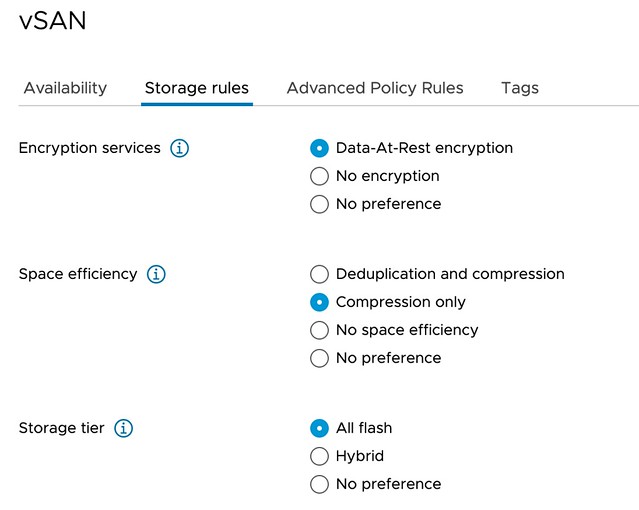
As mentioned, the feature itself is pretty straightforward and very easy to use. There are some things to take into consideration, of course, I wrote those down here. If you want to see it in action, make sure to check the demo below.
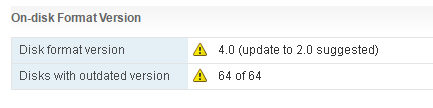
Disk format version 4.0 update to 2.0 suggested

Duncan Epping · Jun 15, 2016 ·

I’ve seen some people reporting a strange message in the Virtual SAN UI. The UI states the following: Disk format version 4.0 (update to 2.0 suggested). This is what that looks like (stole the pic from VMTN, thanks Phillip.)

disk format version 4.0 update to 2.0 suggested

A bit strange considering you apparently have 4.0 why would you go to 2.0 then? Well you are actually on 2.0 and are supposed to go to 3.0. The reason this happens is because, most likely, not all hosts within you cluster are on the same version of Virtual SAN, or vCenter Server was not updated to the last version and ESXi has a higher version. So far I have seen this being reported when people upgrade to vSphere 6.0 Update 2. If you are upgrading, make sure to upgrade all hosts to ESXi 6.0 Update 2, but before you do, upgrade the vCenter Server to 6.0 Update 2 first!

Primary Sidebar

About the Author

Duncan Epping is a Chief Technologist and Distinguished Engineering Architect at Broadcom. Besides writing on Yellow-Bricks, Duncan is the co-author of the vSAN Deep Dive and the vSphere Clustering Deep Dive book series. Duncan is also the host of the Unexplored Territory Podcast.

Follow Us

  • X
  • Spotify
  • RSS Feed
  • LinkedIn

Recommended Book(s)

Also visit!

For the Dutch-speaking audience, make sure to visit RunNerd.nl to follow my running adventure, read shoe/gear/race reviews, and more!

Do you like Hardcore-Punk music? Follow my Spotify Playlist!

Do you like 80s music? I got you covered!

Copyright Yellow-Bricks.com © 2026 · Log in