• Skip to primary navigation
  • Skip to main content
  • Skip to primary sidebar

Yellow Bricks

by Duncan Epping

  • Home
  • Unexplored Territory Podcast
  • HA Deepdive
  • ESXTOP
  • Stickers/Shirts
  • Privacy Policy
  • About
  • Show Search
Hide Search

software defined

How do you know where an object is located with Virtual SAN?

Duncan Epping · Sep 5, 2013 ·

You must have been wondering the same thing after reading the introduction to Virtual SAN. Last week at VMworld I received many questions on this topic, so I figured it was time for a quick blog post on this matter. How do you know where a storage object resides with Virtual SAN when you are striping across multiple disks and have multiple hosts for availability purposes, what about Virtual SAN object location? Yes I know this is difficult to grasp, even with just multiple hosts for resiliency where are things placed? The diagram gives an idea, but that is just from an availability perspective (in this example “failures to tolerate” is set to 1). If you have stripe width configured for 2 disks then imagine what could happen that picture. (Before I published this article, I spotted this excellent primer by Cormac on this exact topic…)

Luckily you can use the vSphere Web Client to figure out where objects are placed:

  • Go to your cluster object in the Web Client
  • Click “Monitor” and then “Virtual SAN”
  • Click “Virtual Disks”
  • Click your VM and select the object

The below screenshot depicts what you could potentially see. In this case the Policy was configured with “1 host failure to tolerate” and “disk striping set to 2”. I think the screenshot explains it pretty well, but lets go over it.

The “Type” column shows what it is, is it a “witness” (no data) or a “component” (data). The “Component state” shows you if it is available (active) or not at the moment. The “Host” column shows you on which host it currently resides and the “SSD Disk Name” column shows which SSD is used for read caching and write buffering. If you go to the right you can also see on which magnetic disk the data is stored in the column called  “Non-SSD Disk Name”.

Now in our example below you can see that “Hard disk 2” is configured in RAID 1 and then immediately following with RAID 0. The “RAID 1” refers to “availability” in this case aka “component failures” and the “RAID 0” is all about disk striping. As we configured “component failures” to 1 we can see two copies of the data, and we said we would like to stripe across two disks for performance you see a “RAID 0” underneath. Note that this is just an example to illustrate the concept, this is not a best practice or recommendation as that should be based on your requirements! Last but not least we see the “witness”, this is used in case of a failure of a host. If host 10.20.177.19 would fail or be isolated from the network somehow then the witness would be used by host 10.20.177.17 to claim ownership. Makes sense right?
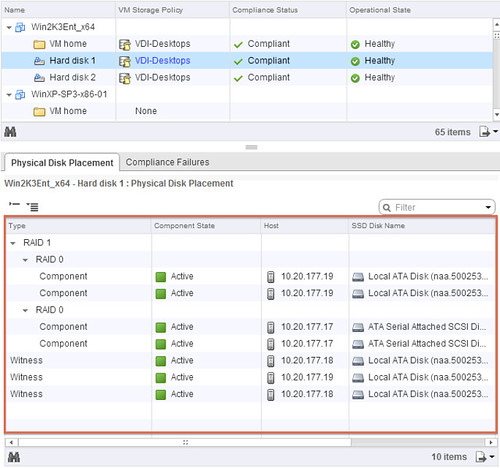
Virtual SAN object location

Hope this helps understanding Virtual SAN object location a bit better… When I have the time available, I will try to dive a bit more in to the details of Storage Policy Based Management.
Introduction to VMware Virtual SAN (vSAN)

Duncan Epping · Aug 26, 2013 ·

VMware Virtual SAN, or I should say VMware vSAN, has been around since August 2013. Back then it was indeed called Virtual SAN, today is it is officially known as vSAN, but that is what most people used anyway. As this article keeps popping up on google search I figured I would rewrite it and provide a better more generic introduction to vSAN which is up to date and covers all that VMware vSAN is about up to the current version of writing, which is VMware vSAN 6.6.

VMware vSAN is a software based distributed storage solution. Some will refer to it as hyper-converged, others will call it software defined storage and some even referred to is as hypervisor converged at some point. The reason for this is simple, VMware vSAN is fully integrated with VMware vSphere. Those of you who are vSphere administrators who are reading this will have no problem configuring vSAN. If you know how to enable HA and DRS, then you know how to configure vSAN. Of course you will need to have a vSAN Network, and you achieve this by creating a VMkernel interface and enabling vSAN on it. vSAN works with L2 and L3 networks, and as of vSAN 6.6 no longer requires multicast to be enabled on the network. (If you want to know what changed with vSAN 6.6 read this article.)

enable vsan

Before we will get a bit more in to the weeds, what are the benefits of a solution like vSAN? What are the key selling points?

  • Software defined – Use industry standard hardware, as long as it is on the HCL you are good to go!
  • Flexible – Scale as needed and when needed. Just add more disks or add more hosts, yes both scale-up and scale-out are possible.
  • Simplicity – Ridiculously easy to manage! Ever tried implementing or managing some of the storage solutions out there? If you did, you know what I am getting at.
  • Automated – Per virtual machine and per virtual disk policy based management. Yes, even VMDK level granularity. No more policies defined on a per LUN/Datastore level, but at the level where you need it!
  • Hyper-Converged – It allows you to create dense / building block style solutions!

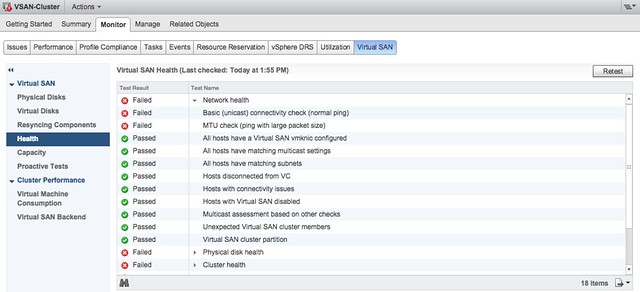
To me “simplicity” is the key reason customers buy vSAN. Not just simplicity in configuring or installing, but even more so simplicity in management. Features like the vSAN Health Check provide a lot of value to the admin. With one glance you can see what the status is of your vSAN. Is it healthy or not? If not, what is wrong?

vsan health check

Okay that sounds great right, but where does that fit in? What are the use-cases for vSAN, how are our 7000+ customers using it today?

  • Production / Business Critical Workloads
    • Exchange, Oracle, SQL, anything basically…. This is what the majority of customers use vSAN for.
  • Management Clusters
    • Isolate their management workloads completely, and remove the dependency on your storage systems to be available. Even when your enterprise storage system is down you have access to your management tools
  • DMZ
    • Where NSX helps isolating a DMZ from the world from a networking/security point of view, vSAN can do the same from a storage point of view. Create a separate cluster and avoid having your production storage go down during a denial of service attack, and avoid complex isolated SAN segments!
  • Virtual desktops
    • Scale out model, using predictive (performance etc) repeatable infrastructure blocks lowers costs and simplifies operations. Note that vSAN is included with Horizon Advanced and Enterprise!
  • Test & Dev
    • Avoids acquisition of expensive storage (lowers TCO), fast time to provision, easy scale out and up when required!
  • Big Data
    • Scale out model with high bandwidth capabilities, Hadoop workloads are not uncommon on vSAN!
  • Disaster recovery target
    • Cheap DR solution, enabled through a feature like vSphere Replication that allows you to replicate to any storage platform. Other options are of course VAIO based replication mechanisms like Dell/EMC Recover Point.

Yes that is a long list of use cases, I guess it it fair to say that vSAN fit everywhere and anywhere! Now, lets get a bit more technical, just a bit as this is an introduction and for those who want to know more about specific features and settings I have hundreds of vSAN articles on my blog. Also a vSAN book available, and then there’s of course the long list of articles by the likes of William Lam and Cormac Hogan.

When vSAN is enabled a single shared datastore is presented to all hosts which are part of the vSAN enabled cluster. Typically all hosts will contribute performance (SSD) and capacity (magnetic disks or flash) to this shared datastore. This means that when your cluster grows from a compute perspective, your datastore will typically grow with it. (Not a requirement, there can be hosts in the cluster which just consume the datastore!) Note that there are some requirements for hosts which want to contribute storage. Each host will require at least one flash device for caching and one capacity device. From a clustering perspective, vSAN supports the same limits as vSphere: 64 hosts in a single cluster. Unless you are creating a stretched cluster, then the limit is 31 hosts. (15 per site.)

As can be expected from any recent storage system, vSAN heavily relies on flash for performance. Every write I/O will go to the flash cache first, and eventually they will go to the capacity tier. vSAN supports different types of flash devices, broadest support in the industry, ranging from SATA SSDs to 3D XPoint NVMe based devices. This goes for both the caching as well as the capacity tier. Note that for the capacity layer, vSAN of course also supports regular spinning disks. This ranges from NL-SAS to SAS, 7200 RPM to 15k RPM. Just check the vSAN Ready Node HCL or the vSAN Component HCL for what is supported and what is not.

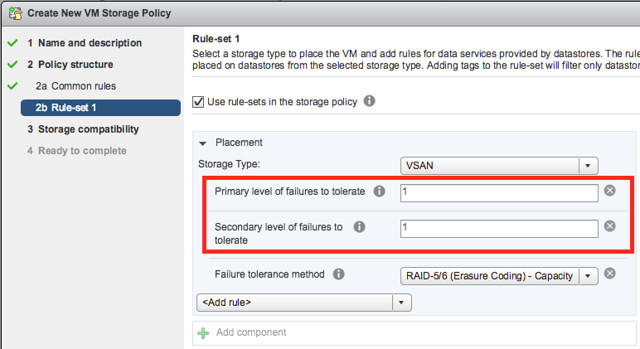
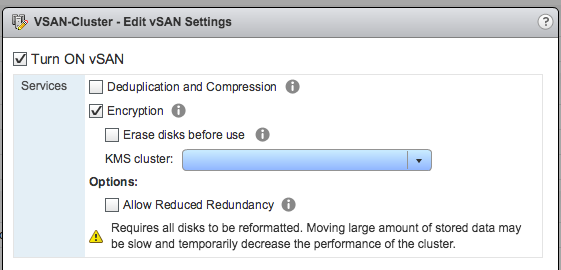
As mentioned, you can set policies on a per virtual machine or even virtual disk level. These policies define availability and performance aspects of your workloads. But for instance also allow you to specify whether checksumming needs to be enabled or not. There are 2 key features which are not policy driven at this point and these are “Deduplication and Compression” and Encryption. Both of these are enabled on a cluster level. But lets get back to the the policy based management. Before deploying your first VMs, you will typically create a (or multiple) policy. In this policy you define what the characteristics of the workload should be. For instance as shown in the example below, how many failures should the VM be able to tolerate? In the below example it shows that “primary” and “secondary” level of failures to tolerate is set to 1. Which in this case means the VM is stretched across 2 locations and also protected by RAID-5 in each site as the “Failure Tolerance Method” is also specified.

vsan policy

The above is a rather complex example, it can be as simple as only setting “Failures to tolerate” to “1”, which in reality is what most people do. This means you will need 3 nodes at a minimum and you will from a VM perspective have 2 copies of the data and 1 witness. vSAN is often referred to as a generic object based storage platform, but what does that mean? The VM can be seen as an object and each copy of the data and the witness can be seen as components. Objects are placed and distributed across the cluster as specified in your policy. As such vSAN does not require a local RAID set, just a bunch of local disks which can be attached to a passthrough disk controller. Now, whether you defined a 1 host failure to tolerate, or for instance a 3 host failure to tolerate, vSAN will ensure enough replicas of your objects are created within the cluster. Is this awesome or what?

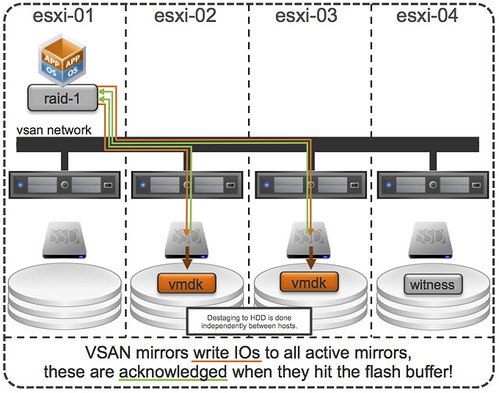
Lets take a simple example to illustrate that as I realize it is also easy to get lost in all these technical terms. We have configured a 1 host failure and we create a new virtual disk. This results in vSAN creating 2 identical data components and a witness component. The witness is there just in case something happens to your cluster and to help you decide who will take control in case of a failure, the witness is not a copy of your data component let that be clear, it is just a quorum mechanis. Note, that the amount of hosts in your cluster could potentially limit the amount of “host failures to tolerate”. In other words, in a 3 node cluster you can not create an object that is configured with 2 “host failures to tolerate” as it would require vSAN to place components on 5 hosts at a minimum. (Cormac has a simple table for it here.) Difficult to visualize? Well this is what it would look like on a high level for a virtual disk which tolerates 1 host failure:

First, lets point out that the VM from a compute perspective does not need to be aligned with the data components. In order to provide optimal performance vSAN has an in memory read cache which is used to serve the most recent blocks from memory. Of course blocks which are not in the memory cache will need to be fetched from either of the two hosts that serve the data component. Note that a given block always comes from the same host for reads. This to optimize the flash based read cache. For writes it is straight forward. Every write is synchronously pushed to the hosts that contain data components for that VM. Some may refer to this as replication or mirroring. With all this replication going on, are there requirements for networking? At a minimum vSAN will require a dedicated 1Gbps NIC port for hybrid configurations, and 10GbE for all-flash configurations. Needless to say, but 10Gbps is definitely preferred with solutions like these, and you should always have an additional NIC port available for resiliency. There is no requirement from a virtual switch perspective, you can use either the Distributed Switch or the plain old vSwitch, both will work fine, the Distributed Switch is recommended and comes included with the vSAN license.

So what else is there, well from a feature / functionality perspective there’s a lot. Let me list some of my favourite features:

  • RAID-1 / RAID-5 / RAID-6
  • Stretched Clustering
  • All-Flash for all License options
  • Deduplication and Compression
  • vSAN Datastore Encryption
  • iSCSI Targets (for physical machines)

That more or less covers the basics and I think is a decent introduction to vSAN. Something that hopefully sparks your interest in this distributed storage platform that is deeply integrated with vSphere and enables convergence of compute and storage resources as never seen before. It provides virtual machine and virtual disk level granularity through policy based management. It allows you to control availability, performance and security in a way I have never seen it before, simple and efficient. And then I haven’t even spoken about features like the Health Check, Config Assist, Easy Install and any of the other cool features that are part of vSAN 6.6.

If there are any questions, find me on twitter!

Startup intro: SolidFire

Duncan Epping · Jun 27, 2013 ·

This seems to becoming a true series, introducing startups… Now in the case of SolidFire I am not really sure if I should use the word startup as they have been around since 2010. But then again, it is not a consumer solution that they’ve created and enterprise storage platforms do typically take a lot longer to develop and mature. SolidFire was founded in 2010 by Dave Wright who discovered a gap in the current storage market when he was working for Rackspace. The opportunity Dave saw was in the Quality of Service area. Not many storage solutions out there could provide a predictable performance in almost every scenario, and were designed for multi-tenancy and offered a rich API. Back then the term Software Defined Storage wasn’t coined yet, but I guess it is fair to say that is how we would describe it today. This actually how I got in touch with SolidFire. I wrote various articles on the topic of Software Defined Storage, and tweeted about this topic many times, and SolidFire was one of the companies who consistently joined the conversation. So what is SolidFire about?

SolidFire is a storage company, they sell a storage systems and today they offer two models namely the SF3010 and the SF6010. What is the difference between these two? Cache and capacity! With the SF3010 you get 72Gb of cache per node and it uses 300GB SSD’s where the SF6010 gives you 144GB of cache per node and uses 600GB SSD’s. Interesting? Well to a certain point I would say, SolidFire isn’t really about the hardware if you ask me. It is about what is inside the box, or boxes I should say as the starting point is always 5 nodes. So what is inside?

Architecture

SolidFire’s architecture is based on a scale-out model and of course flash, in the form of SSD. You start out with 5 nodes and you can go up to 100 nodes, all connected to your hosts via iSCSI. Those 100 nodes would be able to provide you 5 million IOps and about 2.1 Petabyte of capacity. Each node that is added linearly scales performance and of course adds capacity. Of course SolidFire offers deduplication, compression and thin provisioning. Considering it is a scale-out model it is probably not needed to point this out, but dedupe and compression are cluster wide. Now the nice thing about the SolidFire architecture is that they don’t use a traditional RAID, this means that the long rebuild times when a disk fails or a node fails do not apply to SolidFire. Rather SolidFire evenly distributes data across all disk and nodes, so when a single disk fails or even a node fails rebuild time is not constraint due to a limited amount of resources but many components can help in parallel to get back to a normal state. What I liked most about their architecture is that it already closely aligns with VMware’s Virtual Volume (VVOL) concept, SolidFire is prepared for VVOLs when it is released.

Quality of Service

I already has briefly mentioned this, but Quality of Service (QoS) is one of the key drivers of the SolidFire solution. It revolves around having the ability to provide an X amount of capacity with an X amount of performance (IOps). What does this mean? SolidFire allows you to specify a minimum and maximum number of IOps for a volume, and also a burst space. Lets quote the SolidFire website as I think they explain it in a clear way:

  • Min IOPS – The minimum number of I/O operations per-second that are always available to the volume, ensuring a guaranteed level of performance even in failure conditions.
  • Max IOPS – The maximum number of sustained I/O operations per-second that a volume can process over an extended period of time.
  • Burst IOPS – The maximum number of I/O operations per-second that a volume will be allowed to process during a spike in demand, particularly effective for data migration, large file transfers, database checkpoints, and other uneven latency sensitive workloads.

Now I do want to point out here that SolidFire storage systems have no “form of admission control” when it comes to QoS. Although it is mentioned that there is a guaranteed level of performance this is up to the administrator, you as the admin will need to do the math and not overprovision from a performance point of view if you truly want to guarantee a specific performance level. If you do, you will need to take failure scenarios in to account!

One thing that my automation friends William Lam and Alan Renouf will like is that you can manage all these settings using their REST-based API.

(VMware) Integration

Ofcourse during the conversation integration came up. SolidFire is all about enabling their customers to automate as much as they possibly can and have implemented a REST-based API. They are heavily investing in for instance integration with Openstack but also with VMware. They offer full support for the vSphere Storage APIs – Storage Awareness (VASA) and are also working towards full support for vSphere Storage APIs – Array Integration (VAAI). Currently not all VAAI primitives are supported but they promised me that this is a matter of time. (They support: Block Zero’ing, Space Reclamation, Thin Provisioning. See HCL for more details.) On top of that they are also looking at the future and going full steam ahead when it comes to Virtual Volumes. Obvious question from my side: what about replication / SRM? This is being worked on, hopefully more news about this soon!

Now with all this integration did they forget about what is sitting in between their storage system and the compute resources? In other words what are they doing with the network?

Software Defined Networking?

I can be short, no they did not forget about the network. SolidFire is partnering with Plexxi and Arista to provide a great end-to-end experience when it comes to building a storage environment. Where with Arista currently the focus is more on monitoring the the different layers Plexxi seems to focus more on the configuration and optimization for performance aspect. No end-to-end QoS yet, but a great step forward if you ask me! I can see this being expanded in the future

Wrapping up

I had already briefly looked at SolidFire after the various tweets we exchanged but this proper introduction has really opened my eyes. I am impressed by what SolidFire has achieved in a relatively short amount of time. Their solution is all about customer experience, that could be performance related or the ability to automate the full storage provisioning process… their architecture / concept caters for this. I have definitely added them to my list of storage vendors to visit at VMworld, and I am hoping that those who are looking in to Software Defined Storage solutions will do the same as SolidFire belongs on that list.

Software Defined Storage – What are our fabric friends doing?

Duncan Epping · Jun 13, 2013 ·

I have been discussing Software Defined Storage for a couple of months now and I have noticed that many of you are passionate about this topic as well. One thing that stood out to me during these discussion is that the focus is on the “storage system” itself. What about the network in between your storage system and your hosts? Where does that come in to play? Is there something like a Software Defined Storage Network? Do we need it, or is that just part of Software Defined Networking?

When thinking about it, I could see some clear advantages of a Software Defined Storage Network, I think the answer to all of these is: YES.

  • Wouldn’t it be nice to have end-to-end QoS? Yes from the VM up to the array and including the network sitting in between your host and your storage system!
  • Wouldn’t it be nice to have Storage DRS and DRS be aware of the storage latency, so that the placement engine can factor that in? It is nice to have improved CPU/Memory performance, but when your slowest component (storage+network) is the bottleneck?
  • Wouldn’t it be nice to have a flexible/agile but also secure zoning solution which is aware of your virtual infrastructure? I am talking VM mobility here from a storage perspective!
  • Wouldn’t it be nice to have a flexible/agile but also secure masking solution which is VM-aware?

I can imagine that some of you are iSCSI or NFS users and are less concerned with things like zoning for instance but QoS end-to-end could be very useful right? For everyone a tighter integration between the three different layers (compute->network<-storage) from a VM Mobility would be useful, not just from a performance perspective but also from an operational complexity perspective. Which datastore is connected to which cluster? Where does VM-A reside? If there is something wrong with a specific zone, which workloads does it impact? There are so many different use cases for a tighter integration, I am guessing that most of you can see the common one: storage administrator making zoning/masking changes leading to a permanent device loss and ultimately your VMs hopelessly crashing. Yes that could be prevented when all three layers are aware of each other and integration would warn both sides about the impact of changes. (You could also try communicating to each-other of course, but I can understand you want to keep that to a bare minimum ;-))

I don’t hear too many vendors talking about this yet to be honest. Recently I saw Jeda Networks making an announcement around Software Defined Storage Networks, or at least a  bunch of statements and a high level white paper. Brocade is working with EMC to provide some more insight/integration and automation through ViPR… and maybe others are working on something similar, so far I haven’t see too much to be honest.

Wondering, what you guys would be looking for and what you would expect? Please chip in!

Is flash the saviour of Software Defined Storage?

Duncan Epping · May 22, 2013 ·

I have this search column open on twitter with the term “software defined storage”. One thing that kept popping up in the last couple of days was a tweet from various IBM people around how SDS will change flash. Or let me quote the tweet:

“What does software-defined storage mean for the future of #flash?”

It is part of a twitter chat scheduled for today, initiated by IBM. It might be just me misreading the tweets or the IBM folks look at SDS and flash in a completely different way than I do. Yes SDS is a nice buzzword these days. I guess with the billion dollar investment in flash IBM has announced they are going all-in with regards to marketing. If you ask me they should have flipped it and the tweet should have stated: “What does flash mean for the future of Software Defined Storage?” Or to make it even sound more marketing is flash the saviour of Software Defined Storage?

Flash is a disruptive technology, and changing the way we architect our datacenters. Not only did it already allow many storage vendors to introduce additional tiers of storage it also allowed them to add an additional layer of caching in their storage devices. Some vendors even created all flash based storage systems offering thousands of IOps (some will claim millions), performance issues are a thing of the past with those devices. On top of that host local flash is the enabler of scale-out virtual storage appliances. Without flash those type of solutions would not be possible, well at least not with a decent performance.

Since a couple of years host side flash is also becoming more common. Especially since several companies jumped in to the huge gap there was and started offering caching solutions for virtualized infrastructures. These solutions allow companies who cannot move to hybrid or all-flash solutions to increase the performance of their virtual infrastructure without changing their storage platform. Basically what these solutions do is make a distinction between “data at rest” and “data in motion”. Data in motion should reside in cache, if configured properly, and data in rest should reside on your array. These solutions once again will change the way we architect our datacenters. They provide a significant performance increase removing many of the performance constraints linked to traditional storage systems; your storage system can once again focus on what it is good at… storing data / capacity / resiliency.

I think I have answered the questions, but for those who have difficulties reading between the lines, how does flash change the future of software defined storage? Flash is the enabler of many new storage devices and solutions. Be it a virtual storage appliance in a converged stack, an all-flash array, or host-side IO accelerators. Through flash new opportunities arise, new options for virtualizing existing (I/O intensive) workloads. With it many new storage solutions were developed from the ground up. Storage solutions that run on standard x86 hardware, storage solutions with tight integration with the various platforms, solutions which offer things like end-to-end QoS capabilities and a multitude of data services. These solutions can change your datacenter strategy; be a part of your software defined storage strategy to take that next step forward in optimizing your operational efficiency.

Although flash is not a must for a software defined storage strategy, I would say that it is here to stay and that it is a driving force behind many software defined storage solutions!

  • « Go to Previous Page
  • Page 1
  • Page 2
  • Page 3
  • Go to Next Page »

Primary Sidebar

About the Author

Duncan Epping is a Chief Technologist and Distinguished Engineering Architect at Broadcom. Besides writing on Yellow-Bricks, Duncan is the co-author of the vSAN Deep Dive and the vSphere Clustering Deep Dive book series. Duncan is also the host of the Unexplored Territory Podcast.

Follow Us

  • X
  • Spotify
  • RSS Feed
  • LinkedIn

Recommended Book(s)

Also visit!

For the Dutch-speaking audience, make sure to visit RunNerd.nl to follow my running adventure, read shoe/gear/race reviews, and more!

Do you like Hardcore-Punk music? Follow my Spotify Playlist!

Do you like 80s music? I got you covered!

Copyright Yellow-Bricks.com © 2026 · Log in