• Skip to primary navigation
  • Skip to main content
  • Skip to primary sidebar

Yellow Bricks

by Duncan Epping

  • Home
  • Unexplored Territory Podcast
  • HA Deepdive
  • ESXTOP
  • Stickers/Shirts
  • Privacy Policy
  • About
  • Show Search
Hide Search

esxi

Minor Update: RVTools 2.4.1

Duncan Epping · Mar 20, 2009 ·

Rob de Veij just uploaded a minor update of RVTools, version 2.4.1. Make sure you download it and replace the 2.4 version I blogged about just three days ago.

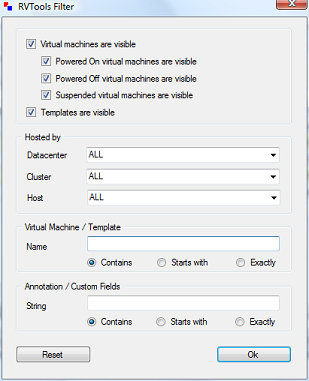
The new filter throws an exception when there are ESX hosts which do not belong to any cluster. With the help from Mario Vinet this problem is now solved! Thanks again Mario.
Upgrading ESX 3.5 to the next version with Update Manager

Duncan Epping · Mar 17, 2009 ·

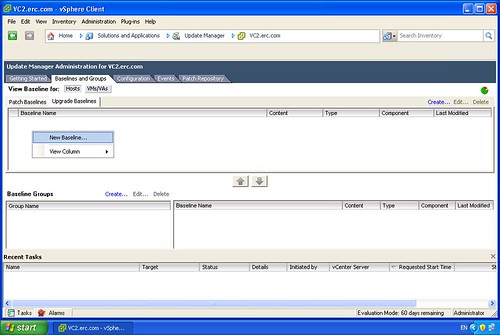
In my Lab I was exploring the upgrade possibilities from ESX 3.5 to the next version.  Usually I do a full reinstall just to be absolutely sure there’s no old packages floating around. For testing purposes I decided to do an upgrade of the ESX host. I opened up Update Manager and with a couple simple clicks I upgraded my host to the next version. (I did an upgrade of vCenter and Update Manager before I even started.) I removed a couple of screenshots that didn’t contain much useful info, in total it were 15 steps to create a baseline and update the host:

Create a new Baseline:

[Read more…] about Upgrading ESX 3.5 to the next version with Update Manager

Whitepaper: Performance Evaluation of AMD RVI Hardware Assist

Duncan Epping · Mar 17, 2009 ·

I recently discussed the effect of RVI/Virtualized MMU on Transparent page Sharing, and just 5 days later VMware published this extensive PDF:”Performance Evaluation of AMD RVI Hardware Assist“.

AMD recently introduced its second generation of hardware support for virtualization, incorporating MMU virtualization called Rapid Virtualization Indexing (RVI). Hardware support for MMU virtualization can improve performance, particularly for MMU-intensive workloads.

VMware ESX 3.5 leverages this RVI support in AMD processors. This paper compares the performance with and without RVI of a number of industry-standard benchmarks and microbenchmarks running in VMware ESX 3.5, Update 2 on AMD Opteron 8384 (“Shanghai”) processors.

Read the PDF for more indepth info, but I think the most important bit is:”The improvement provided by RVI increases with larger numbers of vCPUs; in the four vCPU case RVI performed 42% better than BT.” And that’s just for one of the benchmarks. If you’ve got an AMD processor or Intel Processor that supports virtualized MMU, be sure to do a benchmark and it probably will be beneficial to turn it on.

esxcfg-scsidevs, Exploring the next version of ESX!

Duncan Epping · Mar 16, 2009 ·

Whenever I do a beta test of a product / OS the first thing I do is check if all the features / commands that I used with the previous version still exist. When I did an “esxcfg- tab tab” on the next version of ESX one thing stood out, esxcfg-vmhbadevs was gone. I use this command a lot when investigating SAN problems, same goes for esxcfg-mpath by the way. Both print really valuable information that I usually copy & paste for keeping track of changes.

With the upcoming version of ESX(vSphere) a new command will be introduced which replaces esxcfg-vmhbadevs: esxcfg-scsidevs.

This new command has a couple of extra command line options and prints more detail than ever before, of which -l is probably the most useful. Using “esxcfg-scsidevs -l” results in:

mpx.vmhba2:C0:T0:L0
   Device Type: Direct-Access
   Size: 6144 MB
   Display Name: Local VMware, Disk (mpx.vmhba2:C0:T0:L0)
   Plugin: NMP
   Console Device: /dev/sda
   Devfs Path: /vmfs/devices/disks/mpx.vmhba2:C0:T0:L0
   Vendor: VMware,   Model: VMware Virtual S  Revis: 1.0
   SCSI Level: 2  Is Pseudo: false Status: on
   Is RDM Capable: false Is Removable: false
   Is Local: true
   Other Names:
      vml.0000000000766d686261323a303a30

One of the options I used the most with esxcfg-vmhbadevs was “-m”, which would result in the following:

vmhba0:0:0:5 /dev/sdb5 49b785f3-f263cec4-a4bd-000c29123ede

For esxcfg-scsidevs the option -m also displays this information, but VMware has added the VMFS name which makes it clear what the relationship is and saves me the extra step of matching ID’s with names manually:

mpx.vmhba0:C0:T0:L0:5 /dev/sdb5
  49b785f3-f263cec4-a4bd-000c29123ede  0  Storage1

So far I’m happy with the improvements in the service console / remote cli! Up next: iSCSI.

Cool tool update: RVTools 2.4

Duncan Epping · Mar 15, 2009 ·

Another update again by Rob de Veij, RVTools 2.4. This release includes a new feature, filtering. Rob also revealed that the upcoming version will contain health checks. Here are the changes:

Version 2.4 (March 2009)

  • On the vDatastore tab you can now see which hosts are connected to the datastore.
  • The data on the vInfo, vCpu, vMemory, vDisk, vFloppy, vCD, vSnapshot and vTools tab pages can now be filtered.

Now head over to Rob’s website and download the new version!

  • « Go to Previous Page
  • Page 1
  • Interim pages omitted …
  • Page 43
  • Page 44
  • Page 45
  • Page 46
  • Page 47
  • Interim pages omitted …
  • Page 66
  • Go to Next Page »

Primary Sidebar

About the Author

Duncan Epping is a Chief Technologist and Distinguished Engineering Architect at Broadcom. Besides writing on Yellow-Bricks, Duncan is the co-author of the vSAN Deep Dive and the vSphere Clustering Deep Dive book series. Duncan is also the host of the Unexplored Territory Podcast.

Follow Us

  • X
  • Spotify
  • RSS Feed
  • LinkedIn

Recommended Book(s)

Also visit!

For the Dutch-speaking audience, make sure to visit RunNerd.nl to follow my running adventure, read shoe/gear/race reviews, and more!

Do you like Hardcore-Punk music? Follow my Spotify Playlist!

Do you like 80s music? I got you covered!

Copyright Yellow-Bricks.com © 2026 · Log in