• Skip to primary navigation
  • Skip to main content
  • Skip to primary sidebar

Yellow Bricks

by Duncan Epping

  • Home
  • Unexplored Territory Podcast
  • HA Deepdive
  • ESXTOP
  • Stickers/Shirts
  • Privacy Policy
  • About
  • Show Search
Hide Search

esxi

vCenter Server 4.0 Patch 1

Duncan Epping · Aug 21, 2009 ·

Don’t think many people have noticed this KB article yet or even experienced this issue with HA but nevertheless it’s worth mentioning. Apparently there’s an issue with HA in vCenter 4.0 when a class A network is being used. When a node fails this will not be detected and thus the fail-over of VMs will not occur. Although not many customers are using these class A ranges it is something I think you all should be aware of. This issue has been resolved and VMware released the following KB article which contains a link to the patch:

http://kb.vmware.com/kb/1013013
A vSphere 4.0 VMware High Availability cluster may not failover virtual machines when ESX is configured with certain IP addresses

You experience these symptoms:

  • In vCenter 4.0, VMware HA might not failover virtual machines when a host failure occurs.
  • When the ESX host’s IP address in a VMware HA enabled cluster is configured with certain IP addresses, the node failure detection algorithm fails.
  • You are susceptible to this issue when all of your Service Console Port(s) or Management Network IP address(s) on your ESX host fall within the following range:
    3.x.x.x – 9.x.x.x
    26.x.x.x – 99.x.x.x

Note: You are not affected if one of Service Console Port(s) or Management Network IP address(s) on your ESX host falls outside of this range.
HA Admission Control and DPM

Duncan Epping · Aug 20, 2009 ·

A couple of days ago we had a discussion on Admission Control and DPM internally at VMware. One of our customers had enabled DPM on a HA cluster. During the evening 4 out of 5 hosts where placed into standby mode because of this.

This customer, as many of our customers have these days, had vCenter running virtual. This of course led to the question; what happens if this one host fails and our virtual vCenter server is running on it?
That’s an easy one; nothing. It might not be the answer you are looking for but when the host fails that runs vCenter there’s no host or service left to get these hosts out of maintenance mode or restart your VMs.

Now maybe even more important; what causes this behavior?
This behavior is caused by the fact that admission control is disabled. If you disable admission control DPM will put hosts into standby mode even if it violates failover requirements. This means that if you have virtualized your vCenter server this is definitely something to be aware of.

For more info/background: http://kb.vmware.com/kb/1007006

vSphere and slotsizes

Duncan Epping · Aug 20, 2009 ·

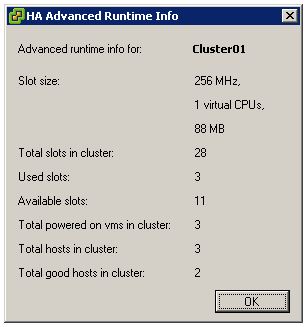
I discussed slot sizes a week ago but forgot to add a screenshot of a great new vSphere feature which reports slot info of a cluster.

I just love vSphere!

HyTrust Appliance 1.5

Duncan Epping · Aug 19, 2009 ·

HyTrust just published info on their latest and greatest version of their appliance which will be released on the 24th of August and will carry version number 1.5. Hytrust sits between your virtual environment and the admin and enforces granular authorization of all virtual infrastructure management operations, according to user role, object, label, protocol and IP address. If you will attend VMworld I suggest you  head over to their booth and ask for a demo.

Additional New Features:

  • Support for VMware vSphere (ESX 4.0 and vCenter 4.0)
  • Support for VMware ESXi (all versions)
  • Two‐factor authentication including RSA SecureID
  • Label‐based policy enforcement
  • VM‐to‐host and VM‐to‐network segment control
  • VM tag policy import
  • XACML policy import/export
  • AD policy import for virtual machine management

First Success of VMware’s Performance Service Offering

Duncan Epping · Aug 17, 2009 ·

Scott Drummonds just posted a new blog article which deals about an upcoming VMware PSO offering. When Scott Drummonds is involved you know the topic of this offering is performance. In this case it’s performance related to SQL databases and I/O bottlenecks, which is probably the most reported issue. As Scott explains briefly they were able to identify the issue rather quickly by monitoring the physical servers and the virtual environment.

I guess the quote of Scott’s article captures the essence:

In the customer’s first implementation of the virtual infrastructure, both SQL Servers, X and Y, were placed on RAID group A. But in the native configuration SQL Server X was placed on RAID group B. This meant that the storage bandwidth of the physical configuration was approximately 1850 IOPS. In the virtual configuration the two databases shared a single 800 IOPS RAID volume.It does not take a rocket scientist to realize that users are going to complain when a critical SQL Server instances goes from 1050 IOPS to 400. And this was not news to the VI admin on-site, either. What we found as we investigated further was that virtual disks requested by the application owners were used in unexpected and undocumented ways and frequently demanded more throughput than originally estimated. In fact, through vscsiStats analysis (Using vscsiStats for Storage Performance Analysis), my contact and I were able to identify an “unused” VMDK with moderate sequential IO that we immediately recognized as log traffic. Inspection of the application’s configuration confirmed this.

  • « Go to Previous Page
  • Page 1
  • Interim pages omitted …
  • Page 34
  • Page 35
  • Page 36
  • Page 37
  • Page 38
  • Interim pages omitted …
  • Page 66
  • Go to Next Page »

Primary Sidebar

About the Author

Duncan Epping is a Chief Technologist and Distinguished Engineering Architect at Broadcom. Besides writing on Yellow-Bricks, Duncan is the co-author of the vSAN Deep Dive and the vSphere Clustering Deep Dive book series. Duncan is also the host of the Unexplored Territory Podcast.

Follow Us

  • X
  • Spotify
  • RSS Feed
  • LinkedIn

Recommended Book(s)

Also visit!

For the Dutch-speaking audience, make sure to visit RunNerd.nl to follow my running adventure, read shoe/gear/race reviews, and more!

Do you like Hardcore-Punk music? Follow my Spotify Playlist!

Do you like 80s music? I got you covered!

Copyright Yellow-Bricks.com © 2026 · Log in