• Skip to primary navigation
  • Skip to main content
  • Skip to primary sidebar

Yellow Bricks

by Duncan Epping

  • Home
  • Unexplored Territory Podcast
  • HA Deepdive
  • ESXTOP
  • Stickers/Shirts
  • Privacy Policy
  • About
  • Show Search
Hide Search

ESX

Cool tool update: RVTools 2.4

Duncan Epping · Mar 15, 2009 ·

Another update again by Rob de Veij, RVTools 2.4. This release includes a new feature, filtering. Rob also revealed that the upcoming version will contain health checks. Here are the changes:

Version 2.4 (March 2009)

  • On the vDatastore tab you can now see which hosts are connected to the datastore.
  • The data on the vInfo, vCpu, vMemory, vDisk, vFloppy, vCD, vSnapshot and vTools tab pages can now be filtered.
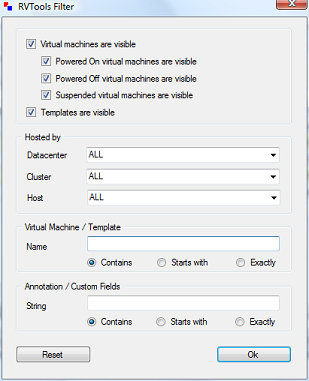
Now head over to Rob’s website and download the new version!

Disabling the VMFS-2 module! Exploring the next generation of ESX

Duncan Epping · Mar 13, 2009 ·

When I started out with ESX 3.0.x the first thing I wanted to do was disable the VMFS-2 driver. There’s no need for it when you’re not accessing VMFS-2 volumes and removing it can lead to performance gains or at least a faster rescan of your storage. Removing it, according to to this section of the VMware website, was supposed to be really easy:

vmkload_mod -u vmfs2

Unfortunately, this just unloads the module and every time the server gets rebooted the module is loaded again. Same goes for the esxcfg-module command, it unloaded it but after a reboot the module was loaded again. You could add the command to /etc/rc.local of course. This would unload the module every time the server booted. I’m not a big fan of manually changing files like this, and luckily as of the next generation of ESX(vSphere) this doesn’t seem to be necessary anymore:

esxcfg-module -d
-d|--disable - Disable a given module,
indicating it should not be loaded on boot.

The funny thing is when I run the “esxcfg-module -l” command it still lists the module as loaded. If I run the “esxcfg-module -q”, which only queries the enabled modules, it’s not listed. After a closer investigation I noticed that the following line changed in “/etc/vmware/esx.conf”:

/vmkernel/module/vmfs2/enabled = "false"

I did a cross-check, it’s most definitely not loaded. Cool, remember this one “esxcfg-module -d”. It will come in handy some day.

VMFS recognized as a snapshot what to do? Exploring the next version of ESX…

Duncan Epping · Mar 13, 2009 ·

Your VMFS has been recognized as a snapshot, what are you going to do? Hopefully most of you have read my previous post on this topic by now. If you didn’t, be very ashamed and start reading my EnableResignature post before you continue.

I was just playing with a VMworld Europe lab manual, which was about the next version of ESX/vCenter(Part of vSphere). I noticed the following new command on the command-line: esxcfg-volume. I did a help and the following showed up:

-l | --list
-m | --mount <vmfs uuid|label>
-u | -- umount <vmfs uuid|label>
-r | -- resignature <vmfs uuid|label>
-M | --persistent-mount <vmfs uuid|label>

As you can imagine this command will come in handy when a VMFS/LUN is being recognized as a clone or snapshot! With version 3.5 you needed to change an advanced setting. This setting wasn’t specifically for just one LUN, but for all of them, which is a risk. With the next version of ESX you could do the following if a volume has been detected as a snapshot and you want to resignature it:

  1. esxcfg-volume -l
  2. esxcfg-volume -r 49ba276a-c9e135b6-26f8-000c29123ede

Or if the current cloned volume isn’t connected you could also just mount it:

  1. esxcfg-volume -l
  2. esxcfg-volume -m 49ba276a-c9e135b6-26f8-000c29123ede

And if you are absolutely sure the cloned volume will not return you could mount it persistantly, which is the equivallent of “EnableResignature=0, DisallowSnapshotLUN=0”:

  1. esxcfg-volume -l
  2. esxcfg-volume -M 49ba276a-c9e135b6-26f8-000c29123ede

Don’t you just love this new exciting command-line magic! There’s more to come over the next days/weeks.

btw: there’s also a way of doing this from the GUI… Just add a new LUN, select the LUN that you want to mount, depending on what needs to be done pick “Assign a new signature” or “Keep Existing Signature”. But where’s the fun in that?

Powershell and importing .CSV files

Duncan Epping · Mar 11, 2009 ·

I’ve been playing around with powershell yesterday. We needed to create over 100 VM’s and there’s no point in doing that all by hand. The customer provided us with a .csv file that contained specific info on these VM’s. It took me a while to figure out how to read the info.csv file and how to actually use it. But as always it’s actually fairly simple and that’s why I decided to write it down:

Before we even start, the CSV should be formatted as follows:

vmname,cluster
VM001,HA-DRS-Yellow-Bricks

Read the complete csv file into a variable:

$csv_info = Import-Csv c:\scripts\info.csv

For every line in the csv variable do something:

foreach ($line in $csv_info) {
write-host " This is virtual machine $($line.vmname) on cluster $($line.cluster)"
}

This line would print something like this:

This is virtual machine VM001 on cluster HA-DRS-Yellow-Bricks

As you noticed in the example above we used $line.vmname to get the name of the VM printed and $line.cluster for the cluster name, cool huh! BTW, Alan’s quick reference guide really helped me out!

XenServer Enterprise for free?

Duncan Epping · Mar 10, 2009 ·

Before anyone starts shouting, yes I’m a VMware employee and a VMware fanatic or whatever they call it these days.

One of my customers phoned me up today and wanted to discuss the fact that XenServer Enterprise is available for free. I wasn’t prepared at all which makes a discussion like this very “interesting” to say the least, especially because I’m not a competitive expert.

I answered the customers question by asking a question: Do you really think the product is free and enterprise ready?

The customer referred me to this blog article by Mr. Crosby, the article clearly states:”…will find in XenServer a complete free Enterprise Virtual Infrastructure solution”.

This particular customer is a heavy DRS user, I’m talking about multiple clusters with each at least 3 resource pools which contains at least 100 VM’s each. The current version of XenServer doesn’t have the DRS implementation the customer currently uses, but not only doesn’t the current version have this feature… the next version will also not have this feature. DRS will be part of Xenserver Essentials, in other words the paid management tool.

I’m just a consultant, I might be wrong… but most of my customers consider DRS to be an Enterprise feature. But it’s actually not only DRS that’s missing from the Free “Enterprise” Virtual Infrastructure solution… what about High Availability? I could be wrong again but all my customers seem to agree that High Availability is an Enterprise feature. Again HA is available, but it has been shifted from XenServer Enterprise to XenServer Essentials, yes the paid version… and what about support on the Free version, can’t seem to find any info on support.

Now I’m not going to tell you guys that VMware has the best product or that XenServer doesn’t cut it in an enterprise environment because that depends on your needs and wants. I do want to stress that not everything is what it seems to be and don’t believe everything you read.

  • « Go to Previous Page
  • Page 1
  • Interim pages omitted …
  • Page 34
  • Page 35
  • Page 36
  • Page 37
  • Page 38
  • Interim pages omitted …
  • Page 83
  • Go to Next Page »

Primary Sidebar

About the Author

Duncan Epping is a Chief Technologist and Distinguished Engineering Architect at Broadcom. Besides writing on Yellow-Bricks, Duncan is the co-author of the vSAN Deep Dive and the vSphere Clustering Deep Dive book series. Duncan is also the host of the Unexplored Territory Podcast.

Follow Us

  • X
  • Spotify
  • RSS Feed
  • LinkedIn

Recommended Book(s)

Also visit!

For the Dutch-speaking audience, make sure to visit RunNerd.nl to follow my running adventure, read shoe/gear/race reviews, and more!

Do you like Hardcore-Punk music? Follow my Spotify Playlist!

Do you like 80s music? I got you covered!

Copyright Yellow-Bricks.com © 2026 ยท Log in