• Skip to primary navigation
  • Skip to main content
  • Skip to primary sidebar

Yellow Bricks

by Duncan Epping

  • Home
  • Unexplored Territory Podcast
  • HA Deepdive
  • ESXTOP
  • Stickers/Shirts
  • Privacy Policy
  • About
  • Show Search
Hide Search

ESX

vSphere and the Windows Server Virtualization Validation Program

Duncan Epping · Jun 2, 2009 ·

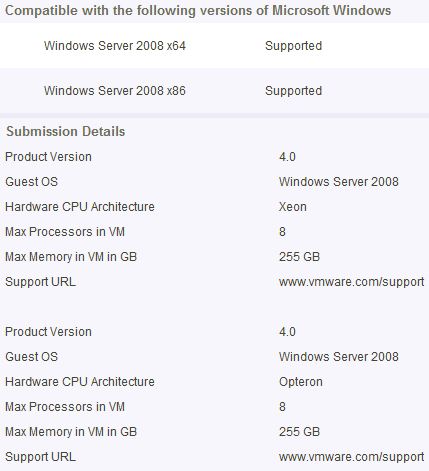
I just noticed that vSphere has been added to the Windows Server Virtualization Validation Program:

source

Products that have passed the SVVP requirements for Windows Server 2008 R2 are considered supported on Windows Server 2008, Windows 2000 Server SP4 and Windows Server 2003 SP2 and later Service Packs, both x86 32-bit, and x64 64-bit.
Might come in handy when you need to get support from Microsoft….
Nehalem CPU and TPS on vSphere

Duncan Epping · May 31, 2009 ·

As I wrote a while ago when you enable virtualized MMU for your virtual machine it enables Large Pages and Large Pages don’t get “TPS’ed”. The article I wrote was specifically related to AMD cause it was the only platform at the moment for which enhanced memory techniques where used. (AMD RVI!) As of vSphere 4.0 Intel EPT is also fully utilized. As expected this leads to the same “issue” as with AMD, no TPS when you enable vMMU. VMTN Community User MCWill reported this here. I wanted to specifically point this topic out to you because of the excellent replies from Kichaonline and Rajesh Venkatasubramanian. It’s worth reading the full topic if you want to get a good understanding of TPS/Virtualized MMU.

A small correction — we are currently investigating ways to fix the high memory usage issue also. Regarding TPS, as noted earlier this shoud not lead to any performance degradation. When a 2M guest memory region is backed with a machine large page, VMkernel installs page sharing hints for the 512 small (4K) pages in the region. If the system gets overcommitted at a later point, the machine large page will be broken into small pages and previously installed page sharing hints helps to quickly share the broken down small pages. So low TPS numbers when a system is undercommitted does not mean that we won’t reap benefits out of TPS when machine gets overcommitted.

Partitioning your ESX host – part II

Duncan Epping · May 27, 2009 ·

A while back I published an article on partitioning your ESX host. This was based on 3.5, and of course with vSphere this has slightly changed. Let me start by quoting a section from the install and configure guide.

You cannot define the sizes of the /boot, vmkcore, and /vmfs partitions when you use the graphical or text installation modes. You can define these partition sizes when you do a scripted installation.

The ESX boot disk requires 1.25GB of free space and includes the /boot and vmkcore partitions. The /boot partition alone requires 1100MB.

The reason for this is the fact that the service console is a VMDK. This VMDK is stored on the local VMFS volume by default in the following location: esxconsole-<system-uuid>/esxconsole.vmdk. By the way, “/boot” has been increased as a “safety net” for future upgrades to ESX(i).

So for the manual installations there are three partitions less to worry about. I would advise to use the following sizes for the rest of the partitions, and I would also recommend to rename the local VMFS partition during installation. The default name is “Storage1”, my recommendation would be “<hostname>-localstorage”.

Primary:
/     - 5120MB
Swap  - 1600MB
Extended Partition:
/var  - 4096MB
/home - 2048MB
/opt  - 2048MB
/tmp  - 2048MB

With the disk sizes these days you should have more than enough space for a roughly 18GB for ESX in total.

vSphere HA Isolation Response

Duncan Epping · May 24, 2009 ·

As of VMware vCenter 2.5 Update 2 the HA default isolation response changed from “Power Off” to “Leave powered on”. A lot of people liked this new default setting because it would lower the chances of downtime due to a “false positive”. I’ve never been a fan though, I just don’t like using degraded hardware or a degraded ESX host for that matter.

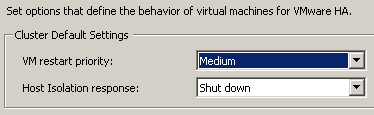
Those that did like the change should take notice of the fact that with vSphere comes a new default isolation response:

Note that this change is only for new clusters, if you upgrade(d) your vCenter the selected isolation response will remain. For those of you who never looked into the setting “Shut down”, it uses VMware Tools to initiate a guest shut down. If the shut down does not complete within five minutes the VM will be powered off. These five minutes are a configurable setting, if you want to increase or decrease it add the following advanced option das.isolationShutdownTimeout with the new value in seconds.

vSphere, finally available…

Duncan Epping · May 21, 2009 ·

When ESX 3.0 was released people were excited about it but it can’t be compared to the buzz that has been created around vSphere. It’s all over the blogosphere, I think every single blog out there published articles  about vSphere weeks even months before it was released . Now the time has finally come, it’s available! Go to the download section of the VMware website to download it.

Equally important is the update documentation section. Be sure to download all the documents and start reading!

Have fun today guys, while we in the Netherlands enjoy our holiday.

  • « Go to Previous Page
  • Page 1
  • Interim pages omitted …
  • Page 26
  • Page 27
  • Page 28
  • Page 29
  • Page 30
  • Interim pages omitted …
  • Page 83
  • Go to Next Page »

Primary Sidebar

About the Author

Duncan Epping is a Chief Technologist and Distinguished Engineering Architect at Broadcom. Besides writing on Yellow-Bricks, Duncan is the co-author of the vSAN Deep Dive and the vSphere Clustering Deep Dive book series. Duncan is also the host of the Unexplored Territory Podcast.

Follow Us

  • X
  • Spotify
  • RSS Feed
  • LinkedIn

Recommended Book(s)

Also visit!

For the Dutch-speaking audience, make sure to visit RunNerd.nl to follow my running adventure, read shoe/gear/race reviews, and more!

Do you like Hardcore-Punk music? Follow my Spotify Playlist!

Do you like 80s music? I got you covered!

Copyright Yellow-Bricks.com © 2026 · Log in