• Skip to primary navigation
  • Skip to main content
  • Skip to primary sidebar

Yellow Bricks

by Duncan Epping

  • Home
  • Unexplored Territory Podcast
  • HA Deepdive
  • ESXTOP
  • Stickers/Shirts
  • Privacy Policy
  • About
  • Show Search
Hide Search

6.1

Can I still provision VMs when a VSAN Stretched Cluster site has failed?

Duncan Epping · Apr 13, 2016 ·

A question was asked internally if you can still provision VMs when a site has failed in a VSAN stretched cluster environment. In a regular VSAN environment when you don’t have sufficient fault domains you cannot provision new VMs, unless you explicitly enable Force Provisioning, which most people do not have enabled. In a VSAN stretched cluster environment this behaviour is different. In my case I tested what would happen if the witness appliance would be gone. I had already created a VM before I failed the witness appliance, and I powered it on after I failed the witness, just to see if that worked. Well that worked, great, and if you look at the VM at a component level you can see that the witness component is missing.

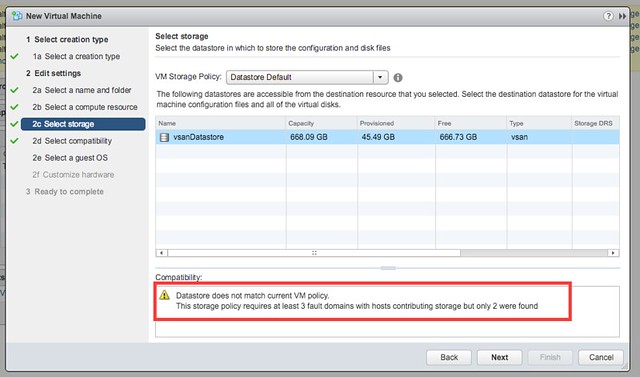
Next test would be to create a new VM while the Witness Appliance is down. That also worked, although I am notified by vCenter during the provisioning process that there are less fault domain than expected as shown in the below screenshot. This is the difference with a normal VSAN environment, here we actually do allow you to provision new workloads, mainly because the site could be down for a longer period of time.
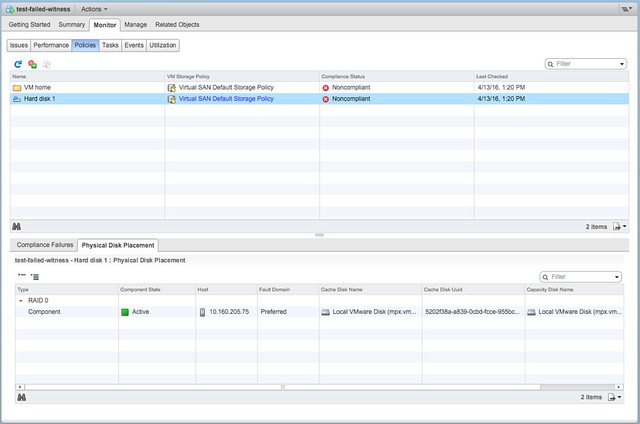
Now next step would be to power on the just created VM and then look at the components. The power on works without any issues and as shown below, the VM is created in the Preferred site with a single component. As soon though as the Witness recovers the the remaining components are created and synced.
Good to see that provisioning and power-on actually does work and that behaviour for this specific use-case was changed. If you want to know more about VSAN stretched clusters, there are a bunch of articles on it to be found here. And there is a deepdive white paper also available here.

Rebuilding failed disk in VSAN versus legacy storage

Duncan Epping · Jan 26, 2016 ·

This is one of those questions that comes up every now and then, I have written about this before, but it never hurts to repeat some of it. The comment I got was around rebuild time of failed drives in VSAN, surely it takes longer than with a “legacy” storage system. The answer of course is: it depends (on many factors).

But what does it depend on? Well it depends on what exactly we are talking about, but in general I think the following applies:

With VSAN components (copies of objects, in other words copies of data) are placed across multiple hosts, multiple diskgroups and multiple disks. Basically if you have a cluster of lets say 8 hosts with 7 disks each and you have 200 VMs then the data of those 200 VMs will be spread across 8 hosts and 56 disks in total. If one of those 56 disks happens to fail then the data that was stored on that disk would need to be reprotected. That data is coming from the other 7 hosts which is potentially 49 disks in total. You may ask, why not 55 disks? Well because replica copies are never stored on the same hosts for resiliency purposes, look at the diagram below where a single object is split in to 2 data components and a witness, they are all located on different hosts!

We do not “mirror” disks, we mirror the data itself, and the data can and will be place anywhere. This means that when a failure has occurred of a disk within a diskgroup on a host all remaining disk groups / disk / hosts will be helping to rebuild the impacted data, which is 49 disks potentially. Note that not only will disks and hosts containing impacted objects help rebuilding the data, all 8 hosts and 55 disks will be able to receive the replica data!

Now compare this to a RAID set with a spare disk. In the case of a spare disk you have 1 disk which is receiving all the data that is being rebuild. That single disk can only take an X number of IOPS. Lets say it is a really fast disk and it can take 200 IOPS. Compare that to VSAN… Lets say you used really slow disks which only do 75 IOPS… Still that is (potentially) 49 disks x 75 IOPS for reads and 55 disks for writes.

That is the major difference, we don’t have a single drive as a designated hot spare (or should I say bottleneck?), we have the whole cluster as a hot spare! As such rebuild times when using similar drives should always be faster with VSAN compared to traditional storage. 

Disable VSAN site locality in low latency stretched cluster

Duncan Epping · Jan 15, 2016 ·

This week I was talking to a customer in Germany who had deployed a VSAN stretched cluster within a building. As it was all within a building (extremely low latency) and they preferred to have a very simple operational model they decided not to implement any type of VM/Host rules. By default when a stretched cluster is deployed in VSAN (and ROBO uses this workflow as well) then “site locality” is implemented for caching. This means that a VM will have its read cache on the host which holds the components in the site where it is located.

This is great of course and avoids incurring latency hit for reads. Now in some cases you may not desire this behaviour. For instance in the situation above where there is an extremely low latency connection between the different rooms in the same building. In this case as well because there are no VM/Host rules implemented a VM can freely roam around the cluster. Now when a VM moves between VSAN Fault Domains in this scenario the cache will need to be rewarmed as it only reads locally. Fortunately you can disable this behaviour easily through the advanced setting called DOMOwnerForceWarmCache:

[root@esxi-01:~] esxcfg-advcfg -g /VSAN/DOMOwnerForceWarmCache
Value of DOMOwnerForceWarmCache is 0
[root@esxi-01:~] esxcfg-advcfg -s 1 /VSAN/DOMOwnerForceWarmCache
Value of DOMOwnerForceWarmCache is 1

In a stretched environment you will see that this setting is set to 0 set it to 1 to disable this behaviour. In a ROBO environment VM migrations are uncommon, but if they do happen on a regular basis you may also want to look in to setting this setting.

Jumbo Frames and VSAN Stretched Cluster configurations

Duncan Epping · Dec 22, 2015 ·

I received a question last week from a customer who had implemented a stretched VSAN cluster. The Health Check after the implementation indicated that there was an “issue” with the MTU configuration. The customer had explained that he had configured an MTU of 9000 between the two data sites and an MTU of (default) 1500 between data sites and the witness.

The question of course was, why the Health Check indicated there was an issue. The problem here is that witness traffic and data in todays version of Virtual SAN use the same VMkernel interface. If the VSAN VMkernel interface on the the “data” site is configured for 9000 and one the “witness” site is configured for 1500 then there is a mismatch which causes fragmentation etc. This is what the health check calls out. VSAN (and the health check as such) expects an “end-to-end” consistently configured MTU, even in a stretched environment.

VSAN VROps Management Pack version 6.0.3 available

Duncan Epping · Dec 17, 2015 ·

On the 15th the VROps Management Pack for VSAN 6.0.3 was released. If you have VROps Standard or higher you can take advantage of this management pack. It is supported for the latest release of VSAN, 6.1, as of this management pack officially. Very useful to find out if there are any anomalies and what the trends are. I’ve always loved VROps and it just became even more useful to me!

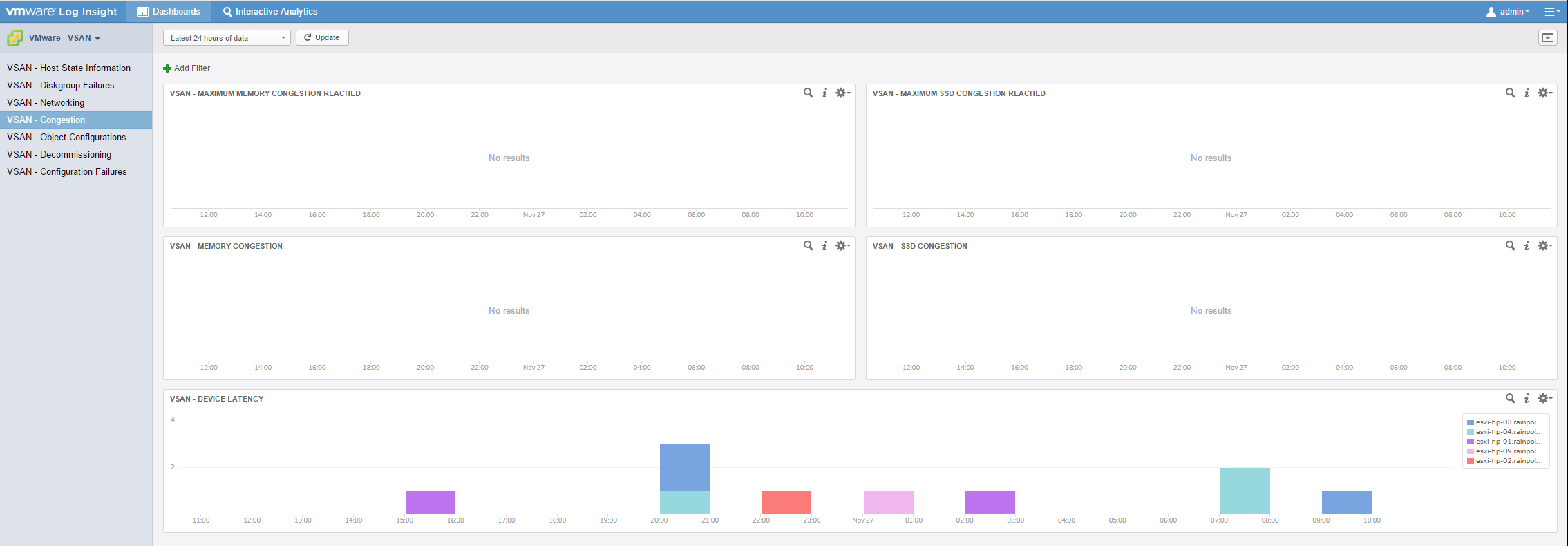
For those who want even more info, there is also a Log Insight Content Pack for VSAN available, which can give you some great insights on what is going on within your VSAN environment. For instance when there is congestion as shown in the screenshot below, which I borrowed from Cormac.

  • « Go to Previous Page
  • Page 1
  • Page 2
  • Page 3
  • Page 4
  • Go to Next Page »

Primary Sidebar

About the Author

Duncan Epping is a Chief Technologist and Distinguished Engineering Architect at Broadcom. Besides writing on Yellow-Bricks, Duncan is the co-author of the vSAN Deep Dive and the vSphere Clustering Deep Dive book series. Duncan is also the host of the Unexplored Territory Podcast.

Follow Us

  • X
  • Spotify
  • RSS Feed
  • LinkedIn

Recommended Book(s)

Also visit!

For the Dutch-speaking audience, make sure to visit RunNerd.nl to follow my running adventure, read shoe/gear/race reviews, and more!

Do you like Hardcore-Punk music? Follow my Spotify Playlist!

Do you like 80s music? I got you covered!

Copyright Yellow-Bricks.com © 2026 · Log in