• Skip to primary navigation
  • Skip to main content
  • Skip to primary sidebar

Yellow Bricks

by Duncan Epping

  • Home
  • Unexplored Territory Podcast
  • HA Deepdive
  • ESXTOP
  • Stickers/Shirts
  • Privacy Policy
  • About
  • Show Search
Hide Search

5.0

iBook / Nook? What really?

Duncan Epping · Jan 24, 2012 ·

It took us a while to figure this one out, but finally we managed to create a proper epub version of our book. Converting from Kindle to iBooks / Nook is not easy, but after using multiple tools and manually editing the book using Sigil we managed to create version which was submitted to the iBooks store and Barnes & Nobles a couple of weeks ago. This morning I noticed that the book has been made available. So for all those who have been asking about it, here are the links:

  • iBook – $ 9.99
  • Nook – $ 9.99

We hope you will enjoy it!

No Jumbo frames on your Management Network! (Updated!)

Duncan Epping · Jan 20, 2012 ·

I was just reading some of the comments posted today and Marc Sevigny, one of the vSphere HA developers, pointed out something which I did not know. I figured this is probably something that many are not aware of so I copied and pasted his comment:

Another thing to check if you experience this error is to see if you have jumbo frames enabled on the management network, since this interferes with HA communication.

This is document here in a note: http://kb.vmware.com/kb/2006729

To make it crystal clear: disable jumbo frames on your management network with vSphere 5.0 as there’s a problem with it! This problem is currently being investigated by the HA engineering team and will hopefully be resolved.

<Update> Just received an email that all the cases where we thought vSphere HA issues were caused by Jumbo Frames being enabled were actually caused by the fact that it was not configured correctly end-to-end. Please validate Jumbo Frame configuration on all levels when configuring. (Physical Switches, vSwitch, Portgroup, VMkernel etc)</Update>

Avoid changing your VMs IP in a DR procedure…

Duncan Epping · Jan 19, 2012 ·

I was thinking about one of the most challenging aspects with DR procedures, IP changes. This is a very common problem. Although changing the IP address of a VM is usually straight forward it doesn’t mean that this is propagated to the application layer. Many applications use hardcoded IP addresses and changing these is usually a huge challenge.

But what about using vShield Edge? If you look at how vShield Edge is used in a vCloud Director environment, mainly NAT’ing and Firewall functionality, you could use it in exactly the same way for your VMs in a DR enabled environment. I know there are many Apps out there which don’t use hardcoded IP adresses and which are simple to re-IP. But for those who are not, why not just leverage vShield Edge… NAT the VMs and when there is a DR event just swap out the NAT pool and update DNS. On the “inside” nothing will change… and the application will continue to work fine. On the outside things will change, but this is an “easy” fix with a lot less risk than re-IP’ing that whole multi-tier application.

I wonder how some of you out in the field do this today.


Enabling Hot-Add by default? /cc @gabvirtualworld

Duncan Epping · Jan 16, 2012 ·

Gabe asked the question on one of my recent posts if it made sense to enable Hot-Add by default and if there was an impact/overhead?

Lets answer the impact/overhead portion first, yes there is an overhead. It is in the range of percents. You might ask yourself where this overhead is coming from and if that is vSphere overhead or… When CPU and Memory Hot-add is enabled the Guest OS, especially Windows, will accommodate for all possible memory and CPU changes. For CPU is will take the max amount of vCPUs into account, so with vSphere 5 that would be 32. For memory it will take 16 x  power-on memory in to account, as that is the max you can provision . Does it have an impact? Again, a matter of percents. It could also lead to problems however when you don’t have sufficient memory provisioned as described in this KB by Microsoft: http://support.microsoft.com/kb/913568.

Another impact, mentioned by Valentin (VMware), is the fact that on ESXi 5.0 vNUMA would not be used if you had the HotAdd feature enabled for that VM.

What is our recommendation? Enable it only when you need it. Yes they impact might be small, but if you don’t need it why would you incur it?!

Why selecting the correct OS when creating/upgrading a VM is important

Duncan Epping · Jan 13, 2012 ·

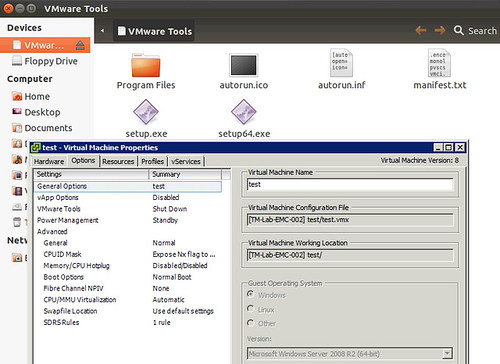
I had a discussion yesterday about why one would care about changing the “OS” type for a VM when it is upgraded, or even during the provisioning of a VM. I guess the obvious one is that a VM is “customized / optimized” based on this information from a hardware perspective. Another one that many people don’t realize is that when you initiate a VMware Tools install or Upgrade the information provided in the “Guest Operating System” (VM properties, Options, General Options) is used to mount the correct file. As you can see in the screenshot below, I selected “Windows 2008” but actually installed Ubuntu, when I wanted to install VMware Tools the Windows binaries popped up. So make sure you update this info correctly,

  • « Go to Previous Page
  • Page 1
  • Interim pages omitted …
  • Page 15
  • Page 16
  • Page 17
  • Page 18
  • Page 19
  • Interim pages omitted …
  • Page 33
  • Go to Next Page »

Primary Sidebar

About the Author

Duncan Epping is a Chief Technologist and Distinguished Engineering Architect at Broadcom. Besides writing on Yellow-Bricks, Duncan is the co-author of the vSAN Deep Dive and the vSphere Clustering Deep Dive book series. Duncan is also the host of the Unexplored Territory Podcast.

Follow Us

  • X
  • Spotify
  • RSS Feed
  • LinkedIn

Recommended Book(s)

Also visit!

For the Dutch-speaking audience, make sure to visit RunNerd.nl to follow my running adventure, read shoe/gear/race reviews, and more!

Do you like Hardcore-Punk music? Follow my Spotify Playlist!

Do you like 80s music? I got you covered!

Copyright Yellow-Bricks.com © 2026 · Log in