• Skip to primary navigation
  • Skip to main content
  • Skip to primary sidebar

Yellow Bricks

by Duncan Epping

  • Home
  • Unexplored Territory Podcast
  • HA Deepdive
  • ESXTOP
  • Stickers/Shirts
  • Privacy Policy
  • About
  • Show Search
Hide Search

iSCSI IQN may have changed after upgrade to 7.0 U2

Duncan Epping · Jun 29, 2021 ·

Last week I noticed some folks reporting that they had an issue with upgrades to 7.0 U2 from 7.0 U1. The issue they experienced was not being able to access their iSCSI Datastores any longer. I did some digging internally and found out there was a change in how we store the iSCSI IQN when the IQN is randomly created. Now note, this problem only exists for randomly created IQNs, so if you have a custom-named iSCSI IQN then you can stop reading here. If you have a random IQN and also have access control defined for your initiators, then you will want to read this if you are planning on upgrading.

Basically what happens if you upgrade from 7.0 U1 to 7.0U2 and you use a randomly generated IQN is that we regenerate the IQN after a reboot. What does that look like, well on VMTN user Nebb2k8 posted this:

7U1d = iqn.1998-01.com.vmware:labesx06-4ff17c83

7U2a = iqn.1998-01.com.vmware:labesx07:38717532:64

As you can see, the format also changed.

So if you lose (or lost) access after the upgrade, you simply copy the newly generated IQN and add it to the access control list of your storage system for the LUNs it applies to. Make sure to remove the old IQNs. Another option of course is to configure the randomly generated IQN as a custom IQN, this is pretty straightforward as shown below for “vmhba67”. You could create new IQNs, or you could re-use the randomly generated old IQNs if you want to keep them the same.

$ esxcli iscsi adapter get -A vmhba67

 vmhba67
   Name: iqn.1998-01.com.vmware:w1-hs3-n2503.eng.vmware.com:452738760:67

$ esxcli iscsi adapter set -A vmhba67 -n iqn.1998-01.com.vmware:w1-hs3-n2503.eng.vmware.com:452738760:67

If you would like to know more about this issue, make sure to read this KB article, or read this article by Jason Massae which also provides some PowerCLI code to get/set the IQN.
How do I change the name of a vSwitch with vSphere 7.0 U2 and higher?

Duncan Epping · Jun 14, 2021 ·

Some of you may have noticed it already, and some may not, but a lot of the configuration details that were traditionally stored in “esx.conf” have now moved elsewhere. The question is where did it go? Well it went into “configstore” and with “configstore” now also comes a commandline interface called “configstorecli”. I briefly mentioned this in a previous post a few weeks ago. Today I noticed a question on VMTN around renaming a vswitch on a host and how you can do this now that the vswitch details have disappeared from esx.conf.

I figured I should be able to test this in my lab and write a short howto. So here we go.

You can look at the current network configuration for your vSwitch using the following command:

configstorecli config current get -c esx -g network_vss -k switches

Then what you can do is dump the info in a json file, which you will then be able to edit:

configstorecli config current get -c esx -g network_vss -k switches > vswitch.json

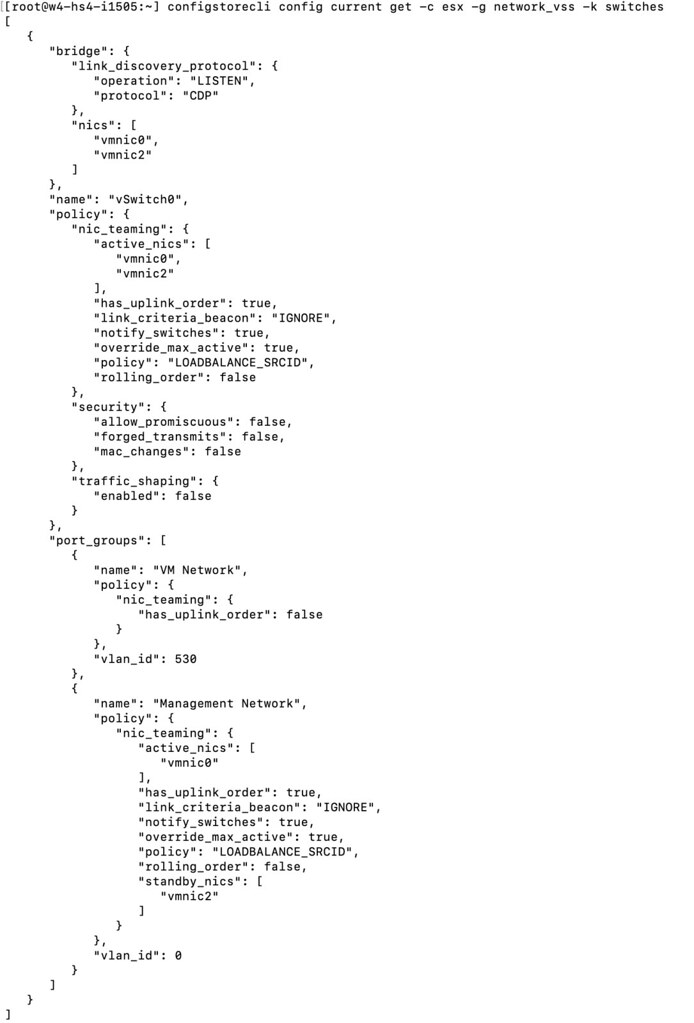
The file will look something like this:

After you made the required changes, you then load the configuration using the json file:

configstorecli config current set -c esx -g network_vss -k switches -i vswitch.json --overwrite

I changed the name of my vSwitch0 to “vSwitchDuncan” and as you can see below, the change worked! Although do note, you will need to reboot the host before you see the change!

For those who prefer video content, I also created a quick demo which shows the above process:

Which vSAN Maintenance Mode option was used on a host?

Duncan Epping · Jun 7, 2021 ·

Last week there was a question on VMTN around maintenance mode, this customer wanted to find out which vSAN Maintenance Mode option was used while the host was placed in maintenance mode. The person who placed the host into maintenance wasn’t around, and I guess the customer wanted to know if data was moved from the host or not. They looked at the events and tasks, but unfortunately it wasn’t obvious from that vCenter section, next up were the logs. I also looked at the logs, and you would expect this info to be stored in hostd.log, but it wasn’t, so where is it? Well it actually is a configuration item, and you can dig it up here:

Pre ESXi 7.0 the info is stored in the “esx.conf” file, just grep for “hostDecommission”. Let me show you:

$ grep "/vsan/hostDecommission" /etc/vmware/esx.conf
/vsan/hostDecommissionVersion = "10"
/vsan/hostDecommissionState = "decom-state-decommissioned"
/vsan/hostDecommissionMode = "decom-mode-ensure-object-accessibility"

If the ESX is at 7.0 or later, just run the below config store command:

$ configstorecli config current get -c vsan -g system -k host_state
{
   "decom_mode": "ENSUREOBJECT_ACCESSIBILITY",
   "decom_state": "DECOMMISSIONED",
   "decom_version": 0
}

I hope that helps others who have a similar question!

Issue adding tags to the vCLS VMs with vCenter Server 7.0 U2b

Duncan Epping · Jun 1, 2021 ·

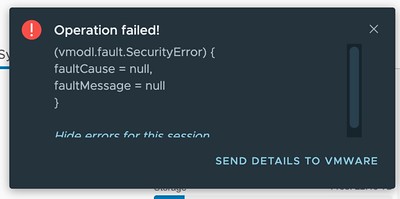
Today I was talking to one of our field folks and he asked if there was an issue with Tags in combination with vCLS VMs in 7.0 U2b specifically. I had tested assigning tags to vCLS VMs before, and it worked just fine. With 7.0 U2b unfortunately this has stopped working. The error you will see displayed in the vSphere Client is the following:

(vmodl.fault.SecurityError) {
faultCause = null,
faultMessage = null
}

Or as it shows in the UI:

So what can you do about it? Well, unfortunately not much right now, I filed a bug and uploaded the logs, engineers are looking at it as we speak, and hopefully, I will have an answer for those who need to use tags soon.

UPDATE: Engineering has found a workaround, customers who can’t wait for the fix can contact GSS to get the workaround implemented!

Can I make a host in a cluster the vSphere HA primary / master host?

Duncan Epping · May 21, 2021 ·

There was an interesting question on the VMware VMTN Community this week, although I wrote about this in 2016 I figured I would do a short write-up again as the procedure changed since 7.0u1. The question was if it was possible to make a particular host in a cluster the vSphere HA primary (or master as it was called previously) host. The use case was pretty straightforward, in this case, the customer had a stretched cluster configuration with vSAN, they wanted to make sure that the vSphere HA primary host was located in the “preferred” site, as this could potentially speed up the restart of VMs. Now, mind you, that when I say “speed up” we are talking about 2-3 seconds difference at most, but for some folks, this may be crucial. I personally would not recommend making configuration changes, but if you do want to do this, vSphere does have the option to do so.

When it comes to vSphere HA, there’s no UI option or anything like that to assign the “primary/master” host role. However, there’s the option to specify an advanced setting on a host level to indicate that a certain host needs to be favored during the primary/master election. Again, this is not very common for customers to configure, but if you desire to do so, it is possible. The advanced setting is called “fdm.nodeGoodness” and depending on which version you use, you will need to configure it either via the fdm.cfg file, or via the configstorecli. You can read about this process in-depth here.

Of course, I did try if this worked in my lab, here’s what I did, I first list the current configured advanced options using configstorecli for vSphere HA:

configstorecli config current get -g cluster -c ha -k fdm
{
   "mem_reservation_MB": 200,
   "memory_checker_time_in_secs": 0
}

Next, I will set the “node_goodness” for my host, when setting this it will need to be a positive value, in my case I am setting it to 10000000. I first dumped the current config in a json file:

configstorecli config current get -g cluster -c ha -k fdm > test.json

Next, I edited the file and added the setting “node_goodness” with a value of 10000000, so that is looks as follows:

{ 
    "mem_reservation_MB": 200, 
    "memory_checker_time_in_secs": 0,
    "node_goodness": 10000000
} 

I then imported the file:

configstorecli config current set -g cluster -c ha -k fdm -infile test.json

After importing the file and reconfiguring for HA on one of my hosts, you can see in the screenshots below that the master role moved from 1507 to 1505.


I also created a quick demo, for those who prefer video content:

  • « Go to Previous Page
  • Page 1
  • Interim pages omitted …
  • Page 41
  • Page 42
  • Page 43
  • Page 44
  • Page 45
  • Interim pages omitted …
  • Page 502
  • Go to Next Page »

Primary Sidebar

About the Author

Duncan Epping is a Chief Technologist and Distinguished Engineering Architect at Broadcom. Besides writing on Yellow-Bricks, Duncan is the co-author of the vSAN Deep Dive and the vSphere Clustering Deep Dive book series. Duncan is also the host of the Unexplored Territory Podcast.

Follow Us

  • X
  • Spotify
  • RSS Feed
  • LinkedIn

Recommended Book(s)

Also visit!

For the Dutch-speaking audience, make sure to visit RunNerd.nl to follow my running adventure, read shoe/gear/race reviews, and more!

Do you like Hardcore-Punk music? Follow my Spotify Playlist!

Do you like 80s music? I got you covered!

Copyright Yellow-Bricks.com © 2026 · Log in