I was updating my environment to vCenter Server 7.0 U2c, while going through the process I got this error that says “Test RPM transaction failed”. Below is the screenshot of the error. if you click “resume” you then, unfortunately, get stuck in an infinite loop. The only way to get out of the loop is by removing a file via SSH on vCSA called “/etc/applmgmt/appliance/software_update_state.conf”.
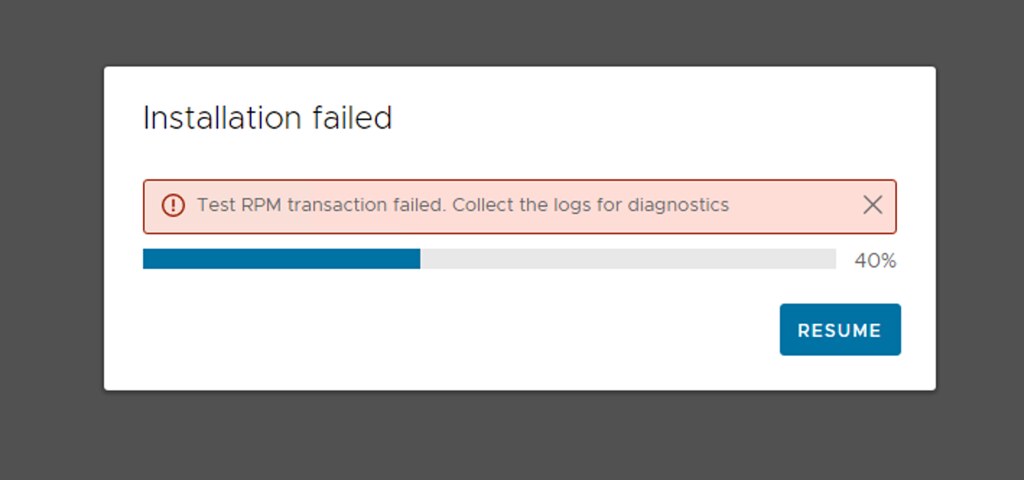
So now what if you want to update? We resolved it as follows, and let me include the deletion of the state file as well:
rm /etc/applmgmt/appliance/software_update_state.conf
Then we rebooted the VCSA:
reboot
Then we went into the appliance shell via SSH and ran the installer from the appliance:
appliancesh
software-packages install --url --acceptEulas
After which the installation was completed correctly.

 I wanted to inform the Yellow-Bricks readers that I started a podcast recently with Frank Denneman and Johan van Amersfoort. The name of the podcast is “In de aap gelogeerd” and that may already reveal that it is not in English, but it is in Dutch. Some may wonder why, well I guess that is easy to explain, all three of us are Dutch. Yes, we know, the podcast would have a bigger reach in English, and we may consider starting an additional podcast over time in English, but for now… just in Dutch. (For now… we are considering a podcast in English as well, but more on that later!)
 It is that time of the year again, the