• Skip to primary navigation
  • Skip to main content
  • Skip to primary sidebar

Yellow Bricks

by Duncan Epping

  • Home
  • Unexplored Territory Podcast
  • HA Deepdive
  • ESXTOP
  • Stickers/Shirts
  • Privacy Policy
  • About
  • Show Search
Hide Search

Will vSAN OSA Hybrid be available in future versions?

Duncan Epping · Sep 29, 2026 · Leave a Comment

I’ve had this question three times in the past two weeks surprisingly enough, will vSAN OSA Hybrid be available in future versions? I thought most people would have known or heard by now, but apparently that is not the case. With the release of VCF 9.0, and vSAN 9.0, a deprecation notice was releaaed for vSAN OSA Hybrid. The same applies to RDMA for vSAN OSA. It was listed in the release notes here.

Deprecation of the hybrid configuration in vSAN Original Storage Architecture (OSA):
The hybrid configuration in vSAN Original Storage Architecture feature will be discontinued in a future VCF release.

Deprecation of support for vSAN over RDMA:
The support for vSAN over RDMA for vSAN OSA will be discontinued in a future VCF release.

Note, this means that vSAN OSA All-Flash has not been announced for deprecation, just the hybrid variant. Also note, that for hybrid the release at which it will be deprecated has not been officially announced either, but expect it to be in a major upcoming version.

#127 – Drew Nielsen introducing the overhauled VCDX program!

Duncan Epping · Sep 28, 2026 · Leave a Comment

I bumped into Drew Nielsen at Explore in Las Vegas and we briefly discussed the overhauled VCDX Program. Not only did the name change from VMware Certified Design Expert to ⁠VMware Certified Distinguished Expert⁠, the whole program has been overhauled with job specific tracks for the various personas. Where the focus was on architects in the past, Broadcom now made the top tier certificationt track accessible for support engineers, administrators, and of course still for architects. Besides sharing the details of the renewed VCDX program, Drew also discusses what has changed for the VCAP exams. If you are interested in getting certified, this is a must listen! Oh, and before I forget, the price of the VCDX exam has been lowered to 250 USD from 995 (and 3000 USD before that).

You can listen to this episode via Spotify, Apple, or anywhere else you get your podcasts. Make sure to leave a review or a rating, as that is how other people find the podcast. You can also watch the video on youtube, or use the embedded players below!

Host placement for the secondary FT VM with Fault Domains?

Duncan Epping · Sep 23, 2026 · Leave a Comment

On Reddit there was a question about how to specify on which group of hosts the secondary VM of an FT-enabled VM would land on. Now this is a problem that has been around for a while, and for the longest time we actually did not have a solution for it, but now we do. I did a quick search, and somehow I couldn’t find an article where I describe how this works, so I figured I would write one. Having said that, I would not be surprised if there’s already and article out there, but somehow didn’t pop up.

When it comes to vSphere Fault Tolerance, when you enable it on a VM, what you will see happening is that the VM you enabled it on will get “(primary)” behind the name. This VM is, as you would expect, the primary and is paired with a “secondary”. This “secondary” VM runs in lockstep with the primary, so that it can take over instantly if the primary would fail for any reason. Now, that secondary VM is kind of a strange VM. Although you can find the VM in your inventory on a host level, you cannot find it on a cluster level or in the VM view. It is like a shadow copy, it is there, but yet it isn’t really.

As a result, making VM-Host rules for it is rather difficult. Although you can do it, this shadow / secondary VM can also be reinstantiated and as a result that VM-Host rule would unfortunately break. Why? Well, the newly instantiated VM is literally that… a newly instantiated VM, so the old rules do not apply. So although the VM-Host rules with tags can work through the Compute Policy option, it not ideal. Probably should also mention, traditional VM-Host groups and rules do not even work with the secondary VM, as you simply cannot select the secondary VM to begin with.

So what does work? Well, there’s a new option called Enable Metro Cluster Fault Tolerance. What this does is that when you select a Host Group for the primary, the secondary VM automatically ends up on a host outside of the selected group. The Host Group can simply be defined via the VM-Host group option under your cluster’s Configure tab as shown in the screenshots below.

Hopefully this helps those who are planning on leveraging FT and want to ensure the primary and secondary are placed on different fault domains.

Host placement for the secondary FT VM with Fault Domains?


Memory Tiering aware vSphere HA Admission Control in VCF/vSphere 9.1.1!

Duncan Epping · Sep 22, 2026 · Leave a Comment

To be fair, I have not had many customers complain about the fact that vSphere HA Admission Control was not Memory Tiering aware, but if you had concerns then it is good to know that this problem was resolved with the 9.1.1 release of VCF/vSphere. For those who never gave it any thought even, what was the problem?

When Memory Tiering is enabled, vSphere and vSphere HA considers the total amount of DRAM and the amount of NVMe of the Memory Tier as the total amount of available memory. So if you have 512GB of DRAM, and 512GB of NVMe for Memory Tiering, it would be considered as a single pool of memory of 1TB. Of course, this is the whole idea behind Memory Tiering, you have a hot and a cold tier and memory pages move up and down based on access patterns.

However, this only applies to memory pages of a VM (so for instance not of vSAN). On top of that, it only applies to memory pages which are not reserved and pinned to DRAM. On top of that, the memory overhead of a VM is also never considered for the NVMe tier. You can imagine that in certain scenarios, you could end up in the situation where vSphere HA expects there to be memory available, and even though there’s capacity in the memory pool, it is only in NVMe and not in DRAM. If that happens, it becomes impossible to restart a VM, as for instance the memory overhead always needs to be backed by DRAM.

As a result, starting with VCF/vSphere 9.1.1, the vSphere HA team has included logic for HA Admission Control to differentiate between DRAM and NVMe, and also between a tiered VM and a non-tiered VM. This by the way, only applies to the “Percentage based” admission control policy, and the “Failover Host” admission control policy. The slot policy does not differentiate between these!

Now when it comes to Admission Control and Memory Tiering, Admission Control will actually take the total amount of memory in to account (DRAM+NVMe tier) but it will also look at the capacity of DRAM only and consider that. When you set for instance the percentage to 25%, it will do the math for both DRAM as well as DRAM+NVMe, and new workloads will not be accepted unless they would pass both admission control calculations. This to prevent a situation where memory pages can be backed by NVMe and DRAM but for instance a reservation of the memory overhead cannot be guaranteerd by DRAM alone, as that would result in a failed restart.

There documentation of vSphere HA has been updated to reflect the latest changes, if you use Memory Tiering and have Admission Control enabled I would recommend looking at the documentation for the various examples of how it works. I would also highly recommend customers who use Memory Tiering and HA Admission Control to verify which policy has been selected, as that will also have an impact as explained above.

PS: the memory tiering aware HA Admission Control only comes in to play when DRS is enabled, and vSphere HA can call DRS for placement recommendations. It does not work when vCenter is unavailable and the SPE is used.

VCF Native S3 Object Storage Tech Preview “available” now!

Duncan Epping · Sep 9, 2026 · 1 Comment

Some may have noticed, others may have read over it, but in VCF 9.1.1 a brand new capability is available as a Tech Preview.

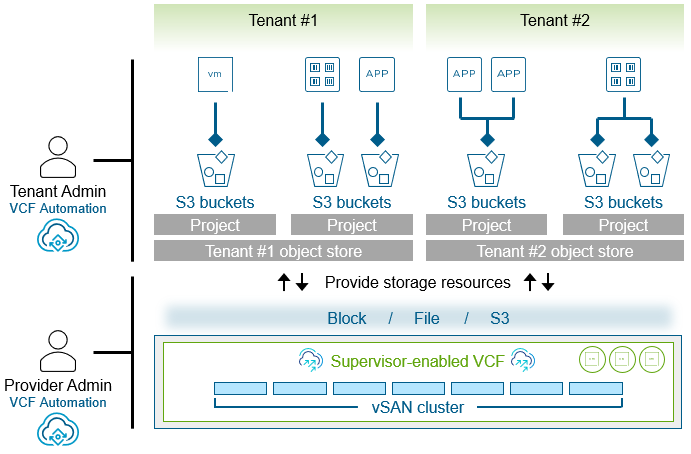
VCF 9.1.1 introduces a Tech Preview of native, S3-compatible object storage built directly into vSAN. By eliminating the need for third-party add-ons, native object storage provides a unified, scalable, and multi-tenant object storage platform for modern workloads.

Now the words “Tech Preview” are key here, and one thing that is not mentioned is that this Tech Preview is only available via a request. Meaning that you will need to request access to the documentation via your VMware representative, as the candidates for the Tech Preview will be selected by product management. The capability is not available in the UI, and can only be enabled when you have the documentation and access to the binaries. Cormac described this extensively in his blog here.

The Native S3 capability can only be enabled when running vSAN ESA, so that is the first requirement. Secondly, VCF 9.1.1 (with Supervisor) is a hard requirement, with preferably VCF Automation included as well. Although it is possible to use the S3 capability without VCF Automation, with VCF Automation it is definitely easier to implement if you ask me. Also, VCF-A provides the framework for multi tenancy capabilities, which appears to be a requirement for most of the customers I talk to.

Let’s break this down a bit further. I am looking at this from a VCF/VCF-A perspective, so how does this work? The Object Storage capability is enabled for a region. Each organization (tenant) with access to that region gains access to the capability. This enables them to create an S3 Object Storage (as a service) instance. When you have created an object storage service instance, you can create buckets and have users/developers/services consume those buckets as desired. Just to make it clear, the bucket can be used by a developer to store data, can be used as a backup target for VKS/DSM, for example, but can also be used for AI use cases. I recorded a demo a while back, and you can watch it below if you want to have an idea of what it looks like. There’s also a nice introductory blog by Pete Koehler here, and a fantastic post by Cormac here. Make sure to go back to Cormac’s blog regularly, as knowing him, he will have a series diving deeper coming soon. Now go an watch the demo, it gives a good idea of what is available now as a tech preview and will be GA probably in 9.1.2.

  • « Go to Previous Page
  • Page 1
  • Page 2
  • Page 3
  • Page 4
  • Interim pages omitted …
  • Page 502
  • Go to Next Page »

Primary Sidebar

About the Author

Duncan Epping is a Chief Technologist and Distinguished Engineering Architect at Broadcom. Besides writing on Yellow-Bricks, Duncan is the co-author of the vSAN Deep Dive and the vSphere Clustering Deep Dive book series. Duncan is also the host of the Unexplored Territory Podcast.

Follow Us

  • X
  • Spotify
  • RSS Feed
  • LinkedIn

Recommended Book(s)

Also visit!

For the Dutch-speaking audience, make sure to visit RunNerd.nl to follow my running adventure, read shoe/gear/race reviews, and more!

Do you like Hardcore-Punk music? Follow my Spotify Playlist!

Do you like 80s music? I got you covered!

Copyright Yellow-Bricks.com © 2026 · Log in