• Skip to primary navigation
  • Skip to main content
  • Skip to primary sidebar

Yellow Bricks

by Duncan Epping

  • Home
  • Unexplored Territory Podcast
  • HA Deepdive
  • ESXTOP
  • Stickers/Shirts
  • Privacy Policy
  • About
  • Show Search
Hide Search

Increase Storage IO Control logging level

Duncan Epping · May 2, 2013 ·

I received this question today around how to increase the Storage IO Control logging level. I knew either Frank or I wrote about this in the past but I couldn’t find it… which made sense as it was actually documented in our book. I figured I would dump the blurp in to an article so that everyone who needs it for whatever reason can use it.

Sometimes it is necessary to troubleshoot your environment and having logs to review is helpful in determining what is actually happening. By default, SIOC logging is disabled, but it should be enabled before collecting logs. To enable logging:

  1. Click Host Advanced Settings.
  2. In the Misc section, select the Misc.SIOControlLogLevel parameter. Set the value to 7 for complete logging.  (Min value: 0 (no logging), Max value: 7)
  3. SIOC needs to be restarted to change the log level, to stop and start SIOC manually, use: /etc/init.d/storageRM {start|stop|status|restart}
  4. After changing the log level, you see the log level changes logged in /var/log/vmkernel

Please note that SIOC log files are saved in /var/log/vmkernel.

Limit a VM from an IOps perspective

Duncan Epping · Apr 29, 2013 ·

Last couple of weeks I heard people either asking questions around how tot limit a VM from an IOps perspective or making comments that Storage IO Control (SIOC) allows you to limit VMs. As I pointed at least three folks to this info I figured I would share it publicly.

There is an IOps limit setting on the virtual disk as an option… This is what allows you to limit a virtual machine / virtual disk to a specific amount of IOps. Now it should be noted that when you set this limit this is handled (vSphere 5.1 and prior) by the local host scheduler, also known as SFQ. One thing to realize though is that when you set a limit on multiple virtual disks for a virtual machine is that all of these limits will be added up and that will be your threshold. In other words:

  • Disk01 – 50 IOps limit
  • Disk02 – 200 IOps limit
  • Combined total: 250 IOps limit
  • If Disk01 only uses 5 IOps then Disk02 can use 245 IOps!

There is one caveat though, “combined total” only goes for the disks which are stored on the same datastore. So if you have 4 disks and they are stored across 4 datastores then each of the individual limits apply respectively.

More details can be found in this KB article: http://kb.vmware.com/kb/1038241

RE: Is VSA the future of Software Defined Storage? (OpenIO)

Duncan Epping · Apr 24, 2013 ·

I was reading this article on the HP blog about the future of Software Defined Storage and how the VSA fits perfectly. Although I agree that a VSA (virtual storage appliance) could potentially be a Software Defined Storage solution I do not really agree with IDC quote used for the basis of this article and on top of that I think some crucial factors are left out. Lets start with the IDC quote:

IDC defines software-based storage as any storage software stack that can be installed on any commodity resources (x86 hardware, hypervisors, or cloud) and/or off-the-shelf computing hardware and used to offer a full suite of storage services and federation between the underlying persistent data placement resources to enable data mobility of its tenants between these resources.

Software Defined Storage solutions to me are not necessarily just a software-based storage product. Yes as said a VSA, or something like Virtual SAN (VSAN), could be part of your strategy but how about the storage you have today? Do we really expect customers to forget about their “legacy” storage and just write it off? Surely that won’t happen, especially not in this economical climate and considering many companies invested heavily in storage when they started virtualizing production workloads. What is missing in this quote, or in that article (although briefly mentioned in linked article), is the whole concept of “abstract, pool, automate”. I guess some of you will say, well that is VMware’s motto right? Well yes and no. Yes, “abstract, pool, automate” is the way of the future if you ask VMware. However this is not something new. Think about Software Defined Networking for instance, this is fully based on the “abstract, pool, automate” concept.

This had me thinking, what is missing today? There are various different initiatives around networking (openflow etc), but what about storage? I created this diagram that from a logical perspective explains what I think we need when it comes to Software Defined Storage. I guess this is what Ray Lucchesi is referring to in his article on Openflow and the storage world. Brent Compton from FusionIO also had an insightful article on this topic, worth reading.

future of software defined storage - OpenIO?

If you look at my diagram… (yes FCoE/Infiniband/DAS etc is missing, not because it shouldn’t be supported but just to simplify the diagram) I drew a hypervisor at the top, reason for it being is that I have been in the hypervisor business for years but reality is this could be anything right. From a hypervisor perspective all you should see is a pool. A pool for your IO, a pool where you can store your data. Now this layer should provide you various things. Lets start at the bottom and work our way up.

  • IO Connect = Abstract / Pool logic. This should allow you to connect to various types of storage abstract it for your consumers and pool it of course
  • API = Do I need to explain this? It addresses the “automate” part but also probably even more importantly the integration aspect. Integration is key for a Software Defined Datacenter. The API(s) should be able to provide both north-, south-, east- and west-bound capabilities (for explanation around this read this article, although it is about Software Defined Networking it should get the point across)
  • PE = Policy Engine, takes care of making sure your data ends up on the right tier with the right set of services
  • DS = Data Services. Although the storage can provide specific data services this is also an opportunity for the layer in between the hypervisor and the storage. Matter a fact, data services should be possible on all layers: physical storage, appliance, host based etc
  • $$ = Caching. I drew this out separately for a reason, yes it could be seen as a data service but I wanted it separately as for any layer inserted there is an impact on performance. An elegant and efficient caching solution at the right level could mitigate the impact. Again, caching could be part of this framework but could very well sit outside of it on the host-side or at the storage layer, or appliance based

One thing I want to emphasize here is the importance of the API. I briefly mentioned enabling north-, south-, east- and west-bound capabilities but in order for a solution like this to be successful this is a must. Although with automation you can go a long way, integration is key here! Whether it is seamless integration with your physical systems, integration with your virtual management solution or with an external cloud storage solution… These APIs should be able to provide that kind of functionality and be enable a true pluggable framework experience.

If you look at this approach, and I drew this out before I even looked at Virsto, it kind of resembles what Virsto offers today. Although there are components missing the concept is similar. It also resembles VVOLs in a way, which was discussed at VMworld in 2011 and 2012. I would say that what I described is a combination of both combined with what Software Defined Networking promises.

So where am I going with this? Good question, honestly I don’t know… For me articles like these are a nice way of blowing steam, get the creative juices going and open up the conversation. I do feel the world is ready for the next step from a Software Defined Storage perspective, I guess the really question is who is going to take this next step and when? I would love to hear your feedback.

Install and configure Virsto

Duncan Epping · Apr 23, 2013 ·

Last week I was in Palo Alto and I had a discussion about Virsto. Based on that discussion I figured it was time to setup Virsto in my Lab. I am not going to go in to much details around what Virsto is or does as I already did that in this article around the time VMware acquired Virsto. On top of that there is an excellent article by Cormac which provides an awesome primer. But lets use two quotes from both of the articles to give an idea of what to expect:

source: yellow-bricks.com
Virsto has developed an appliance and a host level service which together forms an abstraction layer for existing storage devices. In other words, storage devices are connected directly to the Virsto appliance and Virsto aggregates these devices in to a large storage pool. This pool is in its turn served up to your environment as an NFS datastore.

source: cormachogan.com
Virsto Software aims to provide the advantages of VMware’s linked clones (single image management, thin provisioning, rapid creation) but deliver better performance than EZT VMDKs.

Just to give an idea, what do I have running in my lab?

  • 3 x ESX 5.1 host
  • 1 x vCenter Server (Windows install as VCVA isn’t supported_
  • VNX 5500

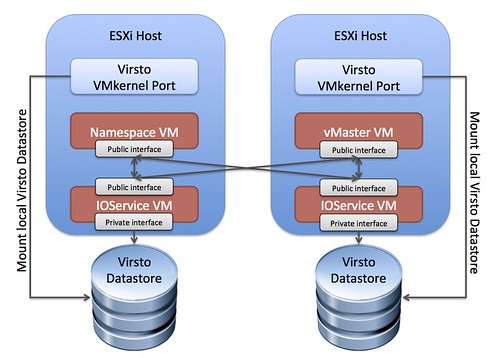
After quickly glancing the quickstart guide I noticed I needed a Windows VM to install some of Virsto’s components, that VM is what Virsto refers to as the “vMaster”. I also need a bunch of empty LUNs which will be used for storage. I also noticed reference of Namespace VMs and vIOService VMs. Hmmm, it sounds complicated, but is it? I am guessing these components will need to be connected. This is kind of the idea, note that the empty LUNs will be automatically connected by to the IOService VMs. I did not add those to the diagram as that would make it more complex than needed.

Virsto Network Architecture Diagram

[Read more…] about Install and configure Virsto

vOpenData – feed up!

Duncan Epping · Apr 15, 2013 ·

A couple of weeks ago I asked this question on twitter about what the average disk size of a virtual machine is these days. Within a couple of minutes Ben Thomas replied and said we might be able to create a survey script and he copied William Lam in. Now for those who never worked with William, if you ask him a question like that you can expect him to knock something out… William and Ben decided not to just knock out a survey script, but rather an open community project called vOpenData.

vOpenData

This open community project consists of a script that collects the data (and they collect a significant amount, you can see what they collect here.) and is aiming to provide various trending statistics and data for virtualized environments. The data is fed back in to the vOpenData database. The vOpenData website has a great dashboard which provides you all these cool stats. For instance, at the moment there are 77 infrastructures that provided data to their collection. The question I asked, what is the average disk size, currently says “61.51GB”. That average is based on those 77 infrastructures with over 27.000 VMs in total combined. Nice right!?!

I have already emailed William a bunch of suggestions, and as I will be in Palo Alto this week I am sure some more will bubble up during conversations. I am hoping that everyone sees the power of a solution like this and can help feeding data in to the vOpenData platform.

Go here to download the bits and feed up!

** I have had some people asking me how vOpenData compares to CloudPhysics. I have also seen some people comparing vOpenData to CloudPhysics… To be honest you can’t really compare them. Where vOpenData is about averages and statistics, CloudPhysics is more about analytics and simulation models. **

  • « Go to Previous Page
  • Page 1
  • Interim pages omitted …
  • Page 195
  • Page 196
  • Page 197
  • Page 198
  • Page 199
  • Interim pages omitted …
  • Page 502
  • Go to Next Page »

Primary Sidebar

About the Author

Duncan Epping is a Chief Technologist and Distinguished Engineering Architect at Broadcom. Besides writing on Yellow-Bricks, Duncan is the co-author of the vSAN Deep Dive and the vSphere Clustering Deep Dive book series. Duncan is also the host of the Unexplored Territory Podcast.

Follow Us

  • X
  • Spotify
  • RSS Feed
  • LinkedIn

Recommended Book(s)

Also visit!

For the Dutch-speaking audience, make sure to visit RunNerd.nl to follow my running adventure, read shoe/gear/race reviews, and more!

Do you like Hardcore-Punk music? Follow my Spotify Playlist!

Do you like 80s music? I got you covered!

Copyright Yellow-Bricks.com © 2026 · Log in