• Skip to primary navigation
  • Skip to main content
  • Skip to primary sidebar

Yellow Bricks

by Duncan Epping

  • Home
  • Unexplored Territory Podcast
  • HA Deepdive
  • ESXTOP
  • Stickers/Shirts
  • Privacy Policy
  • About
  • Show Search
Hide Search

(ab)using vSphere advanced settings?

Duncan Epping · Jun 24, 2013 ·

Almost on a daily basis, I get questions from colleagues and customers about specific advanced settings. Somehow they spotted a vSphere advanced setting and wonder if they should set it. They go on a hunt to figure out what it is this specific vSphere advanced setting does and typically find a description on a random website that makes it sound like it is a good idea to configure it. I even had someone asking if I could give a list of all optimized values for the advanced kernel parameters recently. My answer was short and maybe a bit blunt, but I think it was clear:

I hope the sign above makes it clear you should not randomly set advanced settings. Some of you will laugh and say “well that is obvious” while others probably will scratch their head and open their vSphere client and check the advanced settings section. I know I discuss advanced settings every once in a while, but you should only apply these settings when:

  1. You have a requirement to implement this advanced setting, do not tweak them “just because you can”. An example would be in a stretched cluster you set “disk.terminateVMOnPDLDefault” because of the infrastructure implemented.
  2. The advanced setting solves a problem in your environment (and preferably, in that case, see 3)
  3. When recommended by VMware Global Support Services

If you have implemented an advanced setting, document it and with every update or upgrade validate it is still applicable to that specific version or not. (If you are aspiring to be a VCDX, this is key.) If it no longer applies, remove revert to default!
What is Diane Greene up to these days?

Duncan Epping · Jun 21, 2013 ·

I am not an expert on networking like some of my colleagues out there are but still I was intrigued by the Cumulus release Wednesday. I liked the whole decoupling hardware from software aspect and how they allow you to buy the switch you want and combine it with their software solution aka Cumulus Linux. I am not going in to much details, as that isn’t the title of this article or what triggered me to write this. (If you want to know more about Cumulus I suggest you read this article by Ben Kepes or hit their website.) What triggered this article was a quote in the Silicon Valley Business Journal which was taken from an article on the Wall Street Journal blog and it made me wonder, what is Diane Greene up to these days?

“They’re taking a lot of the cost out of the system…especially with people building larger and larger data centers,” said Greene, who said she needed a switch and a scalable data center for her own new project. “We invested because of the disruptive nature of the company, and it’s such a smart thing to do.”

For those who don’t know, Diane Greene was one of the founders and CEO of VMware from 1998 until 2008. She’s currently on the board of Google and Intuit, she has invested in companies like Cumulus, Cloudera, Typesafe, CloudPhysics, Nicira, Pure Storage, Rockmelt, Unity Technologies and Nimbula. An impressive track record indeed, but anyway… what stood out to me from this article is “she needed a switch and a scalable data center for her own new project“.

I have heard some rumors about the talent she is recruiting, and I guess time will tell what it is this new company is working on. It must be something big, exciting and challenging if Diane Greene decided to take it on herself. When I bump in to more details, you guys will be the first to know.

Startup Intro: Infinio

Duncan Epping · Jun 20, 2013 ·

Infinio is demo’ing their brand new product today at Tech Field Day #9. I was briefed by Infinio a couple of weeks back and figured I would share some details with you. Infinio is releasing a product called Infinio Accelerator and describes it as a “downloadable storage performance” solution. That sounds nice, but what does that mean?

Infinio has developed a virtual appliance that sits in between your virtual machine storage traffic and your NFS datastore. Note I said “NFS datastore” and not just “datastore”, as NFS is their current focus. Why just NFS and not block storage? Currently that is because of the architecture they have chosen, or better said due to how they intercept traffic going to or coming from the datastore.

The Infinio virtual appliance enhances storage performance by caching IO. Their primary use case is to do caching in memory. So what does it look like? Basically every host in the cluster gets an Infinio appliance installed. This appliance has 2 vCPUs and 8GB of memory by default and from that memory a shared caching pool is created to accelerate read IO. (Yes there is a downside to using an appliance, read this article by Frank.) The nice thing is that this pool of memory is cluster wide deduplicated, considering though the appliance holds 8GB of memory that deduplication is a requirement if you ask me. (Just revealed at TFD is that the appliance will get deployed with 4, 8 or 16GB memory based on the amount of memory in the host.) The other key word here is “read IO”, for now Infinio Accelerator is a read cache solution, so no write back, but that might change in the future, who knows. The video below also mentions SSD caching, the Tech Field Day session revealed that this is something that is being worked on to be included in the future.

One thing where Infinio definitely excels is the installation / configuration process, and even the purchase options are simple. You download a simple installer, point it to your vCenter Server, do a couple of “next / next / finish” actions and that is that. You want to buy the product? It will be even easier then installing, just hit the website, grab your creditcard and that is it. Definitely something I always appreciate, companies keeping it simple.

One thing I want to call, I asked this question during the TFD broadcast, as that today there is no direct integration with vCenter Server or with VC Ops. In my opinion a missed opportunity, especially considering the product is focused on the virtualization market.

How do they compare to other caching solutions out there? Well that is difficult to say at the moment, if I can find the time and get some proper SSDs in my lab I might test and compare the various solutions at some point. If you ask me there are benefits to both SSD/Flash and “in memory” caching. What will determine their success is: how it is implemented (product quality), where they sit in the I/O stack, how resilient the solution is and what kind of caching they offer. As I said, maybe more in the future on this.

That is all about I can share for now, for some more details I suggest watching the 8 minute pitch by their Co-founder and CEO Arun Agarwal all the way at the bottom or the Tech Field Day introduction videos and deepdive.

When will it be available? The public beta is scheduled to be available around VMworld, and Infinio is aiming for a GA release in Q4 of 2013.

Tech Field Day – Introductions

Tech Field Day – Demo

Tech Field Day – Deepdive / How it works

8 Minute Pitch

Hybrid, flash, converged storage, what’s next? Hybrid storage stack!?

Duncan Epping · Jun 19, 2013 ·

I saw a tweet pass by from PernixData and although I already knew the world of datacenter/storage design was changing it just really sank in. Over the last 5 years we have seen the world of storage change significantly. We have seen new types of storage being introduced like all-flash-based storage, hybrid storage (mix of SSD and SATA) and hyper-converged solutions. Examples of these would be Violin Memory (all-flash), Tintri (hybrid) and Nutanix (converged). More recently object-based storage solutions are trending, as Stephen Foskett states in his article on scaling storage it is nothing new but it seems to be more relevant in this new day and age.

I would expect Frank Denneman to dive in to the whole architecture aspect as part of his “Basic elements of a flash virtualization platform” series, so I am not going in to a huge amount of depth, but I did wanted to coin this term / strategy / direction. Host based flash caching solutions like VMware vFlash (when released), PernixData, FlashSoft and others will allow you to decouple performance from capacity. It truly should be treated as a new tier of storage, an extension of your storage system! This is something which will take time to realize… as it is natural to see host based flash caching solution as an extension of your hypervisor. I have been struggling with this myself for a while to be honest. When you realize that host based flash caching is a new storage tier you will also wonder what would sit behind that new storage tier? In an existing environment it is clear what the next tier is, but in a green field deployment which components should be part of a hybrid storage stack?

Just to clarify, “hybrid” in “hybrid storage stack” refers to the usage of flash for performance requirements and spindles for capacity whereas “stack” refers to the fact that this solution is not contained with in a single box as opposed to a hybrid storage device. So the first component obviously would be host based flash caching, this would enable you to meet your performance requirements. Now, I will aim to keep things simple but there are various host based data services like replication which could be included if needed. From a capacity perspective a storage system would be needed, something that can easily scale out and is easy to manage. Object-based storage solutions are trending for a reason, and I think they could be a good fit. No need for me to explain why, when Stephen has already done that in his excellent article, lets just quote the relevant portion:

This is exactly the architecture that the latest storage arrays are adopting: Object storage inside, with loosely-coupled nodes offering truly dynamic scaling. Although many allow native API access, most of these products also include an integrated object-to-file gateway, with VMware-friendly NFS or Windows-oriented SMB as the front-end protocol. These aren’t the ideal protocols for scaly-storage access, but at least they’re compatible with existing applications.

By finally divorcing data storage from legacy RAID, these systems offer compelling advantages. Many include integrated tiering, with big, slow disks and flash storage acting in concert.

Now here comes the problem I see… These object storage solutions today are not designed to work in-conjunction with host local flash caching solutions. Not that I would expect it to cause issues from a technical perspective, but fit might cause issues from a total cost of ownership perspective. What I am saying is that many of these systems are already “optimized” for both performance and capacity. So what would be next? Smart object based storage solution that integrates with host local flash caching solutions and can easily scale out for a fair price? I haven’t seen too many (which doesn’t mean there aren’t any), it seems there is an opportunity here.

Maybe a call-to-action for all those vendors working on host based flash caching solutions… It would be nice to see reference architectures for existing environments with legacy storage, but also for green-field deployments. What if I have a brand new datacenter, where does your platform fit? How do I control cost by decoupling performance and capacity? What are good options for capacity? How well do these solutions interact / integrate? I know, a lot of questions and not a lot of answers for now… hopefully that will change.

How to register a Storage Provider using the vSphere Web Client

Duncan Epping · Jun 18, 2013 ·

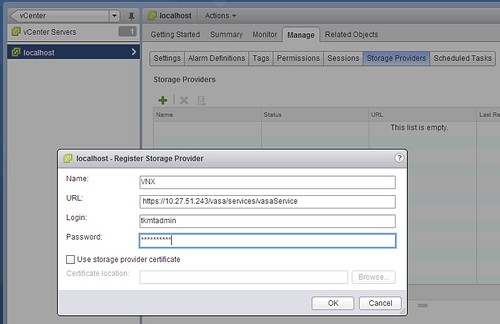
I needed to register a Storage Provider for vSphere Storage APIs for Storage Awareness (VASA) today. I force myself to use the vSphere Web Client and it had me looking for this option for a couple of minutes. It actually was the second time this week I had to do this, so I figured if I need to search for it there will probably be more people hitting the same issue. So where can you register those VASA Storage Provider’s in the Web Client?

  • In your vSphere Web Client “home screen” click “vCenter”
  • Now in the “Inventory Lists” click “vCenter Servers”
  • Select your “vCenter Server” in the left pane
  • Click the “Manage” tab in the right pane
  • Click “Storage Provider” in the right pane
  • Click on the “green plus”
  • Fill out your details and hit “OK” just like the example below (VNX, block storage)
    registering a Storage Provider

I personally find this not very intuitive and would prefer to have it in the Rules and Profiles section of the Web Client, and when I do configure it… I should be able to configure it for all vCenter Server instances just by select all or individual vCenter Servers. Do you agree? I am going to push for this within VMware, so if you don’t agree, please speak up and let me know why :-).

  • « Go to Previous Page
  • Page 1
  • Interim pages omitted …
  • Page 189
  • Page 190
  • Page 191
  • Page 192
  • Page 193
  • Interim pages omitted …
  • Page 502
  • Go to Next Page »

Primary Sidebar

About the Author

Duncan Epping is a Chief Technologist and Distinguished Engineering Architect at Broadcom. Besides writing on Yellow-Bricks, Duncan is the co-author of the vSAN Deep Dive and the vSphere Clustering Deep Dive book series. Duncan is also the host of the Unexplored Territory Podcast.

Follow Us

  • X
  • Spotify
  • RSS Feed
  • LinkedIn

Recommended Book(s)

Also visit!

For the Dutch-speaking audience, make sure to visit RunNerd.nl to follow my running adventure, read shoe/gear/race reviews, and more!

Do you like Hardcore-Punk music? Follow my Spotify Playlist!

Do you like 80s music? I got you covered!

Copyright Yellow-Bricks.com © 2026 · Log in