Recently Data Services Manager 2.2 was released, so it was time for me to ask my friend Cormac Hogan back on the show to share with us what was introduced. Although it was just a “minor” release, there were some major announcements, of which the S3 Object Storage capabilities are probably what will excite you the most! Make sure to listen to the episode either via the player below or on your favorite podcast app. (Spotify, Apple, etc)
VMware Cloud Foundation
Can I have an AF-4 ReadyNode for vSAN ESA with less memory?
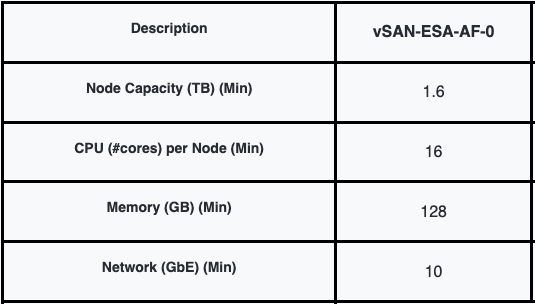
I got this question the other day, and it was around the amount of memory the AF-4 ReadyNode configuration needs to have in order for it to be supported. I can understand where the question comes from, but what most people don’t seem to understand is that there’s a set of minimal requirements, and that the ReadyNode profiles are as the KB states a “guidance”. The listed configurations are a guidance. This guidance is based on the anticipated resource consumption for a given set of VMs. Of course, this could be very different for your workload. That is why this article that describes the hardware guidance now clearly states the following:
To maintain a configuration supported by VMware Global Services (GS), all ReadyNodes certified for vSAN ESA must meet or exceed the resources of the smallest configuration (vSAN-ESA-AF-0 for vSAN HCI or vSAN-Max-XS for vSAN Max).
This not only applies to memory, but also to other components, as long as you meet the minimum specified below.
Can I disable the vSAN service if the cluster is running production workloads?
I just had a discussion with someone who had to disable the vSAN service, while the cluster was running a production workload. They had all their VMs running on 3rd party storage, so vSAN was empty, but when they went to the vSAN Configuration UI the “Turn Off” option was grayed out. The reason this option is grayed out is that vSphere HA was enabled. This is usually the case for most customers. (Probably 99.9%.) If you need to turn off vSAN, make sure to temporarily disable vSphere HA first, and of course enable it again after you turned off vSAN! This ensures that HA is reconfigured to use the Management Network instead of the vSAN Network.
Another thing to consider, it could be that you manually configured the “HA Isolation Address” for the vSAN Network, make sure to also change that to an IP address on the Management Network again. Lastly, if there’s still anything stored on vSAN, this will be inaccessible when you disable the vSAN service. Of course, if nothing is running on vSAN, then there will be no impact to the workload.

Unexplored Territory Episode 089 – Discussing the VCP-VVF and VCP-VCF certification with Bart Peeters!
I’ve seen many folks asking about how difficult the VCP-VCF and VCF-VVF exams are on X and Reddit, so I figured I would invite someone who has actually taken both exams and was even involved in the creation of various VMware exams in the past, and working on the development of an upcoming exam! The podcast is available on all platforms, and of course can be listened to below as well via the embedded player. You can also find the links of the discussed topics here:
Doing site maintenance in a vSAN Stretched Cluster configuration
I thought I wrote an article about this years ago, but it appears I wrote an article about doing maintenance mode with a 2-node configuration instead. As I’ve received some questions on this topic, I figured I would write a quick article that describes the concept of site maintenance. Note that in a future version of vSAN, we will have an option in the UI that helps with this, as described here.
First and foremost, you will need to validate if all data is replicated. In some cases, we see customers pinning data (VMs) to a single location without replication, and those VMs will be directly impacted if a whole site is placed in maintenance mode. Those VMs will need to be powered off, or you will need to make sure those VMs are moved to the location that remains running if they need to stay running. Do note, if you flip “Preferred / Secondary” and there are many VMs that are site local, this could lead to a huge amount of resync traffic. If those VMs need to stay running, you may also want to reconsider your decision to replicate those VMs though!
These are the steps I would take when placing a site into maintenance mode:
- Verify the vSAN Witness is up and running and healthy (see health checks)
- Check compliance of VMs that are replicated
- Configure DRS to “partially automated” or “Manual” instead of “Fully automated”
- Manually vMotion all VMs from Site X to Site Y
- Place each ESXi host in Site X into maintenance mode with the option “no data migration”
- Power Off all the ESXi hosts in Site X
- Enable DRS again in “fully automated” mode so that within Site Y the environment stays balanced
- Do whatever needs to be done in terms of maintenance
- Power On all the ESXi hosts in Site X
- Exit maintenance mode for each host
Do note, that VMs will not automatically migrate back until the resync for that given VM has been fully completed. DRS and vSAN are aware of the replication state! Additionally, if VMs are actively doing IO when hosts in Site X are going into maintenance mode, the state of data stored on hosts within Site X will differ. This concern will be resolved in the future by providing a “site maintenance” feature as discussed at the start of this article.