• Skip to primary navigation
  • Skip to main content
  • Skip to primary sidebar

Yellow Bricks

by Duncan Epping

  • Home
  • Unexplored Territory Podcast
  • HA Deepdive
  • ESXTOP
  • Stickers/Shirts
  • Privacy Policy
  • About
  • Show Search
Hide Search

Server

Startup update: Runecast 2.0

Duncan Epping · Aug 21, 2018 ·

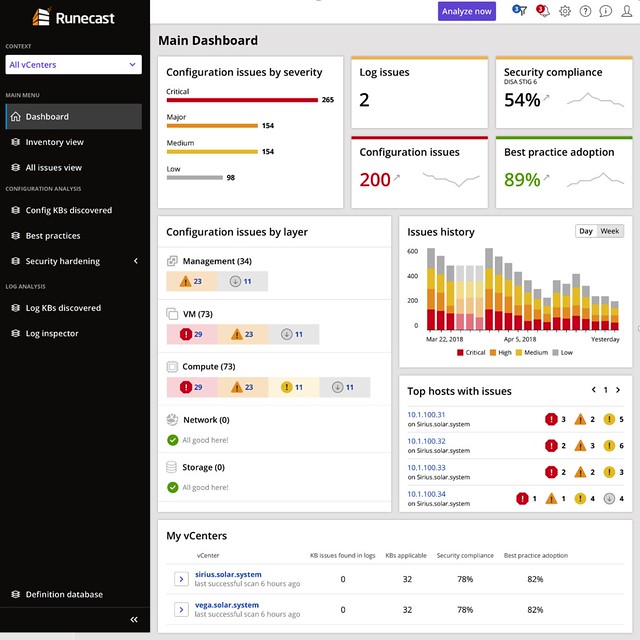
Last week I was briefed by Runecast (together with Cormac) on the new version, Runecast 2.0, which was released/announced today. I always enjoy talking to Stan as every time we talk they have something new which surprises me, or he tells me about something cool on the roadmap. For those who did not read my previous articles, Runecast is a company which focusses on analyzing VMware environments and assess the environment on potential issues. These issues could be anything ranging from configuration issues, driver/firmware issue, to security issues. It reminds me very much of what we have with vSAN which is the health check. The big difference though is that this solution includes many more checks and doesn’t just focus on vSAN but on many different parts of the stack. Just to give you an idea, today Runecast can analyze your vSphere environment up to vSphere 6.7 and can also analyze vSAN and NSX-V. The cool thing is that it also does this “offline”, they have an appliance and regular updates (rules and features) and this means that even in a dark site this would work.
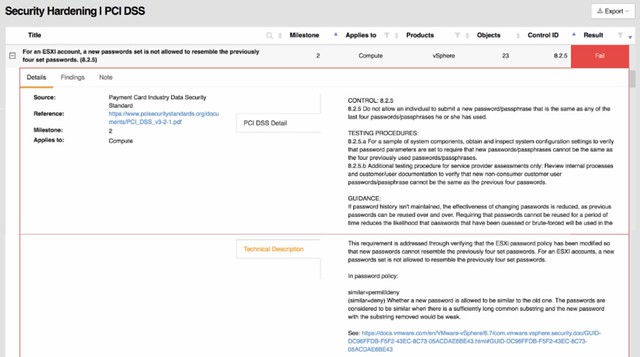
A lot of Runecast’s customers are either in the financial space or government space. I guess this is also why their focus for the 2.0 version was primarily on PCI-DSS. With over 200 technical checks, which map against PCI-DSS requirements, they (as Runecast told me) have by far the largest collection of requirements in an automated analyzer (for VMware) in the industry. Definitely, a smart enhancement, if you are not interested in PCI-DSS, you can simply disable the whole check and it will never show up in your interface. You can also, if only a limited number of clusters should be validated, filter out certain results.
The 20 version of Runecast also comes with a lot of updates around the appliance, now I consider these “internals” as for most customers it is not relevant in terms of the value it offers, but it is important to know from a security perspective I guess.

This version also introduces a historical perspective. Meaning that starting with Runecast 2.0 the historical information of checks is stored. This will allow you to see some form of trending when it comes to the different checks/validations. You could for instance now track if you do updates and maintenance if the number of potential issues is going down. You could also task someone with validating the reported issues and fixing those when or where possible. This should over time improve the availability, reliability, and security of your environment.
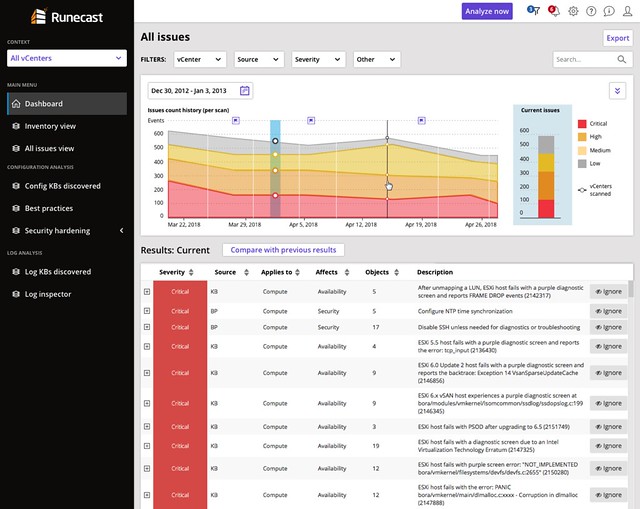
Last but not least the UI has been fully overhauled. They redesigned it just to make it easier to read and understand. Also, a couple of dashboards were added, which makes sense… a new release means new dashboards!

If you happen to go to VMworld, make sure to stop by their booth and have a look, I think you will find it interesting. Or simply read the Runecast blog, and download the appliance and try it out.
All-Flash Stretched vSAN Cluster and VM/Host Rules

Duncan Epping · Aug 20, 2018 ·

I had a question last week about the need for DRS Rules or also known as VM/Host Rules in an All-Flash Stretched vSAN Infrastructure. In a vSAN Stretched Cluster, there is read locality implemented. The read locality functionality, in this case, ensures that: reads will always come from the local fault domain.

This means that in the case of a stretched environment, the reads will not have to traverse the network. As the maximum latency is 5ms, this avoids a potential performance hit of 5ms for reads. The additional benefit is also that in a hybrid configuration we avoid needing to re-warm the cache. For the (read) cache re-warming issue we recommend our customers to implement VM/Host Rules. These rules ensure that VMs always run on the same set of hosts, in a normal healthy situation. (This is explained on storagehub here.)

What about an All-Flash cluster, do you still need to implement these rules? The answer to that is: it depends. You don’t need to implement it for “read cache” issues, as in an all-flash cluster there is no read cache. Could you run without those rules? Yes, you can, but if you have DRS enabled this also means that DRS freely moves VMs around, potentially every 5 minutes. This also means that you will have vMotion traffic consuming the inter-site links, and considering how resource hungry vMotion can be, you need to ask yourself if cross-site load balancing adds anything, what the risk is, what the reward is? Personally, I would prefer to load balance within a site, and only go across the link when doing site maintenance, but you may have a different view or set of requirements. If so, then it is good to know that vSAN and vSphere support this.

What happens if all hosts in a vSphere HA cluster are isolated?

Duncan Epping · Aug 15, 2018 ·

I received this question through twitter today from Markus who was going through the vSphere 6.7 Clustering Deep Dive. And it is fairly straightforward: what happens when all hosts are isolated in a cluster, will the isolation response be triggered?

https://twitter.com/RealRockaut/status/1029652167735631874

I wrote about this a long long time ago, but it doesn’t hurt to re-iterate this. Before triggering the isolation response HA will actually verify the state of the rest of the cluster. Does anyone own the datastore on which the VMs that are impacted by this isolation run? If the answer is no, the ownership of a datastore is dropped during the election, then HA will not trigger the isolation response. I will try to update the book when I have time to include that, hopefully, that means a new version of the ebook will be pushed out to all owners automatically.

Must read white paper: Persistent Memory performance with vSphere 6.7

Duncan Epping · Aug 14, 2018 ·

Today I noticed this whitepaper titled: Persistent Memory Performance on vSphere 6.7. An intriguing topic for sure as it is something “relatively new and something I haven’t encountered too much in the field. Yes, I talk about Persistent Memory, aka NVDIMMs, in my talks usually but then it typically relates to vSAN. I have not seen too many publications from VMware on this topic, so I figured I would share this publication with you:

  • Persistent Memory Performance in vSphere 6.7 – https://www.vmware.com/content/dam/digitalmarketing/vmware/en/pdf/techpaper/performance/pmem-vsphere67-perf.pdf
    Persistent memory (PMEM) is a new technology that has the characteristics of memory but retains data through power cycles. PMEM bridges the gap between DRAM and flash storage. PMEM offers several advantages over current technologies like:

    • DRAM-like latency and bandwidth
    • CPU can use regular load/store byte-addressable instructions
    • Persistence of data across reboots and crashes

The paper starts with a brief intro and then explains the different modes in which PMEM can be used, either as a “disk” (vPMEMDisk) or surfaced up to the guest OS as an NVDIMM (vPMEM). With the latter option, there’s also the ability to have some form of application awareness, which is referred to as the 3rd mode (vPMEM-aware).

I am not going to copy and paste the findings, as the paper has a lot of interesting data and you should go through it. One thing I found most interesting is the huge decrease in latency. Anyway, read the paper and get familiar with persistent memory / NVDIMMs, as this technology will start changing the way we design HCI platforms in the future and cater for low latency / high throughput applications in traditional environments.

You asked for it: vSphere 6.7 Clustering Deep Dive ebook, now available!

Duncan Epping · Aug 10, 2018 ·

We knew when we released the paper version of the book that many would yell: What about an e-book? Although sales numbers of the Host Deep Dive and previous Clustering Deep Dive books have shown that by far most people prefer a printed copy, we decided to go ahead and create an ebook as well. It is not as simple unfortunately as simply uploading a PDF or an MS Word file. We had to spend evenings reformatting the book in an e-book authoring tool, compile it, review it, fix issues, compile again etc. Nevertheless, it is done!

So what we did is we just uploaded it to Amazon, and we made it available for 14,95 USD, or whatever that roughly converts to in your local currency in your local store. We also noticed there was a bundling option, so as soon as the ebook and the paper copy are linked you can buy the ebook alongside the paper copy for only 2,99 USD. (Linking the book may still take a couple of days, we’ve initiated the process with Amazon and are waiting for them to complete it.)

You wanted it, so go out and pick it up, right before the weekend! Also, note that we have both the ebook and the paper version available right now, we are working on linking the books, so you can get a nice deal for both versions. Also, I would highly recommend picking up the Host Deep Dive books as well, and while you are at it pick up the VDI guide, it is an excellent read! Amazon links are on the right side for your convenience.

  • « Go to Previous Page
  • Page 1
  • Interim pages omitted …
  • Page 44
  • Page 45
  • Page 46
  • Page 47
  • Page 48
  • Interim pages omitted …
  • Page 336
  • Go to Next Page »

Primary Sidebar

About the Author

Duncan Epping is a Chief Technologist and Distinguished Engineering Architect at Broadcom. Besides writing on Yellow-Bricks, Duncan is the co-author of the vSAN Deep Dive and the vSphere Clustering Deep Dive book series. Duncan is also the host of the Unexplored Territory Podcast.

Follow Us

  • X
  • Spotify
  • RSS Feed
  • LinkedIn

Recommended Book(s)

Also visit!

For the Dutch-speaking audience, make sure to visit RunNerd.nl to follow my running adventure, read shoe/gear/race reviews, and more!

Do you like Hardcore-Punk music? Follow my Spotify Playlist!

Do you like 80s music? I got you covered!

Copyright Yellow-Bricks.com © 2026 · Log in