• Skip to primary navigation
  • Skip to main content
  • Skip to primary sidebar

Yellow Bricks

by Duncan Epping

  • Home
  • Unexplored Territory Podcast
  • HA Deepdive
  • ESXTOP
  • Stickers/Shirts
  • Privacy Policy
  • About
  • Show Search
Hide Search

Server

Show VMware Tools version with BGInfo

Duncan Epping · Apr 29, 2008 ·

Arne blogged about a cool feature of BGInfo yesterday, but his post is in dutch so it’s not on the Planet V12 RSS feed which is  a shame cause it’s definitely usefull info.

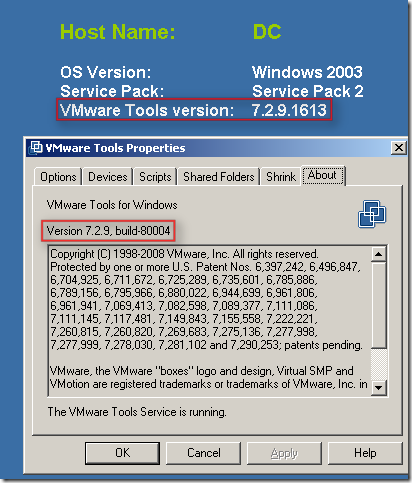
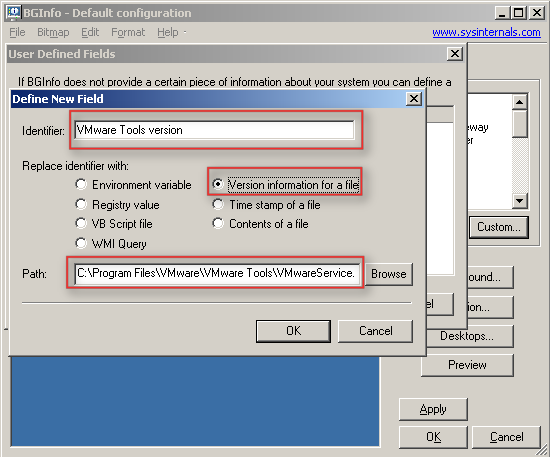
In short: BGInfo is a handy little SysInternals tool which sets a desktop wallpaper with pre-defined info like total memory, disk info, ip info etc. With BGInfo it’s also possible to define a specific field with for instance the version information of a file. Arne discovered that it’s possible to point towards the VMware tools executable and display the VMware tools version on your server desktop aka wallpaper.

I guess a picture says more than words:
Pegasus error after installing ESX 3.5 update 1

Duncan Epping · Apr 28, 2008 ·

After installing ESX 3.5 update 1 an error occurs during the boot proces:

Parsing error: parse error: Error adding class VMware_IdentityMemberOfCollection to the repository: CIM_ERR_NOT_FOUND: The requested object could not be found: “VMware_Identity”
Compiling omc-smash-interop-schema.mof into root/PG_Interop

A quick search on the VMTN forum revealed that I wasn’t the only one experiencing these problems. Luckily Mike Laspina already discovered how to fix this problem:

Here is what you will need to do.

Edit the roleauth-schema compiler directive to include the VMware_Identity class definition using nano /var/pegasus/vmware/install_queue/3_files/mofs/root/PG_Interop/roleauth-schema.mof

Add the bolded line above the pre-existing member directive.

#pragma include (“VMware_Identity.mof”)
#pragma include (“VMware_IdentityMemberOfCollection.mof”)

It also needs to be added in the standard cimv2 path.

nano /var/pegasus/vmware/install_queue/3_files/mofs/root/cimv2/roleauth-schema.mof

#pragma include (“VMware_Identity.mof”)
#pragma include (“VMware_IdentityMemberOfCollection.mof”)

Copy the missing file from the stardard cimv2 path to the shared path.

cp /var/pegasus/vmware/install_queue/3_files/mofs/root/cimv2/VMware_Identity.mof /var/pegasus/vmware/install_queue/3_files/mofs/root/PG_Interop/

Stop and start the service with these commands.

/etc/init.d/pegasus stop
/etc/init.d/pegasus start
Once the scripts completes the install_queues will be empty and the service will start much more quickly.

And according to the user mjilin VMware support is also aware and this issue will be addressed soon:

Dear ESX users,

Thanks for your timely feedback regarding upgrading to ESX/ESXi 3.5 Update 1.

As one user correctly pointed out, we use Pegasus to provide system management information, which third-party vendors can incorporate into their management applications.

We have identified the root cause of the issue and will provide fixes in an upcoming patch release. More information can be found in the Knowledge Base article 1004257.

Thanks for your information sharing in the community forum and keeping the discussion lively. We appreciate your support and feedback.

Best regards,

VMware ESX Product Tea

VM’s automatically renamed

Duncan Epping · Apr 24, 2008 ·

Yesterday evening I witnessed a weird phenomenon. We had to bring down a complete environment to move a 19″ rack to a different location. We switched the SAN on, waited a couple of minutes and switched the ESX hosts on. When the ESX hosts finished booting we booted the VirtualCenter. Everything looked normal in the VI Client. I had all connections to the SAN and all ESX Hosts were up and running. So I decided to power up the first VM, it was a VM named LNX01. Within a second the VM got renamed to LNX05(1). I though I was going nuts. I checked the settings of the renamed VM and indeed it was pointing out to the LNX05 diskfiles/vmx.

Maybe it was just me, or this one VM so I decided to give another one a try, I powered up LNX02. Same happening here, within a second the VM was renamed to PS01(1) and booted fine. The settings were pointing out to PS01. I checked a couple of VM’s but could not find anything weird. I restarted the VirtualCenter service just to be sure. I started the VM LNX03 and again it was renamed… Than I decided to restart the “mgmt-vmware” services on all of the ESX hosts and the problem never returned again. It seems like VirtualCenter had a different view than the ESX hosts had. But I can’t think of a logical reason what could cause this. I searched the knowledge base but could not find any related problems, well besides an old article based on VirtualCenter 1.2.

Clean SP1 junk, VSP1CLN

Duncan Epping · Apr 18, 2008 ·

My colleague Edwin pointed me out to this tool to remove the junk Vista’s SP1 leaves behind.

The Windows Vista Service Pack 1 (SP1) Files Removal Tool (VSP1CLN.exe) can be used to remove the files that are archived after Windows Vista SP1 is applied. Running this tool is optional.

Installing Windows Vista SP1 increases the amount of disk space that is used by the operating system. This space is used to archive files so that SP1 can be uninstalled. Typically, you should run VSP1CLN.exe if you want to reclaim this disk space after applying SP1 and if you will not need to uninstall SP1.

Nice read…

Duncan Epping · Apr 17, 2008 ·

A colleague(thanks Ivo) pointed me out to this great PDF by Cisco. As expected, it deals mainly about networking. Things like VST, EST, Channels, Trunking, Portfast and more are covered.

One thing that stands out the most is that Cisco recommends to use load balancing based on Virtual Port ID instead of creating an ether channel with load balancing on IP-Hash. Just check out the PDF for more recommendations.

  • « Go to Previous Page
  • Page 1
  • Interim pages omitted …
  • Page 314
  • Page 315
  • Page 316
  • Page 317
  • Page 318
  • Interim pages omitted …
  • Page 336
  • Go to Next Page »

Primary Sidebar

About the Author

Duncan Epping is a Chief Technologist and Distinguished Engineering Architect at Broadcom. Besides writing on Yellow-Bricks, Duncan is the co-author of the vSAN Deep Dive and the vSphere Clustering Deep Dive book series. Duncan is also the host of the Unexplored Territory Podcast.

Follow Us

  • X
  • Spotify
  • RSS Feed
  • LinkedIn

Recommended Book(s)

Also visit!

For the Dutch-speaking audience, make sure to visit RunNerd.nl to follow my running adventure, read shoe/gear/race reviews, and more!

Do you like Hardcore-Punk music? Follow my Spotify Playlist!

Do you like 80s music? I got you covered!

Copyright Yellow-Bricks.com © 2026 · Log in