After the 3.0.X updates the 3.5 updates couldn’t be far away, and here you go… And if you have a close look at the KB article of the patch you can see that VirtualCenter 2.5 Update 3 is also coming soon.
Server
Scripted installs
Everyone installing more than 2 or 3 ESX hosts at a time should start with scripting their installation in my opinion, why?:
- it will save time
- consistent installations
- no need anymore for doing backups of the ESX host
These three should be enough reasons to start scripting. A good place to start is this topic on the VMTN Forums and my Blog post.
One of the dangers most of you will face is the fact that the SAN is attached during installation. So what’s the danger? Well if you’re unlucky the installation will be done on a SAN LUN. This is very hard to prevent in the installation scripts. Because of that Bouke of Jume created a script which removes the HBA drivers from the setup. So if you’re doing scripted installs, and don’t want to unplug your fiber when you do an installation be sure to use this excellent script on your installation media!
Let’s hope Bouke can find some more time and keeps on blogging!
VMware Quick Migration
How cool is this Powershell script! Mike D. wrote a powershell script that does exactly what Hyper-V’s quick migration does. It should be possible to integrate it with the VC Client, and if they open up the ESXi SDK as Mike suggest than you have the functionality for the free hypervisor from VMware. By the way talking about a free hypervisor, Hyper-V is also available as of today.
patches for 3.0.x released
VMware just released a whole bunch of patches for 3.0.x, so if you’re still using 3.0.x than you should take a look here. At least three of them are related to Linux Guests! There are 6 patches for 3.0.2 and 4 for 3.0.3. Have fun, 😉
Bluebear’s Kodiak, what’s all the fuss about…
Kodiak is a cross platform application(Windows, Linux, Mac) with which you can manage your virtual environment. Why would one want to use this instead of the VIC? Well you can run it from your Linux box without having to run a VM. What do you need? Well I tested it with Ubuntu and Windows and you should start with installing Adobe Air. For Windows it’s pretty straighton, but I couldn’t even find a download link for Ubuntu. After a couple of seconds on Google I found this Howto. It gave me a link and provided me with the info needed to install, although chmod and running the executable is pretty straight forward.
After the installation there was still the AIR package left to install that Bluebear provided. So I started Adobe Air, pointed towards the air package and that’s about it. It installed within a few minutes and I was ready to go.
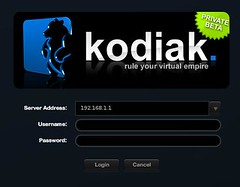
So I wanted to do some extensive testing with Bluebear’s Kodiak and started out with Windows. Well after a couple of minutes all the “certificate” related messages started to irritate me so I quit with the Windows version and went straight on to Ubuntu. Luckily Ubuntu gave me the option to select “Always” when the same certificate message was dropped. (There’s a workaround for the certificate problem by the way, check this article)
So the next screen was sort of an inventory, the ESX host with it’s vSwitch and the VM attached to it. Reminds me a lot of the VMware maps functionality. But the cool thing about the map is that you can drag, drop and rotate in 3D. So as you can see in the screen below there’s a VM running…
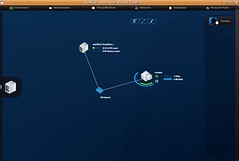
So now what, what can we do with Kodiak? Well to be honest, not that much at this moment. Power Off and Power On a VM works fine, but that’s about it for now. I can’t edit any config settings, I can’t do vmotion, I can’t add or remove a VM, I can open a console to the VM but there’s no response or whatsoever. The interface looks cool, but like Carlo said in his article, what will it look like when you’ve got over a dozen VM’s. The arcs around the VM represent the current CPU / MEM resource usage by the way. I opened up a couple more windows and this is what it looked like:
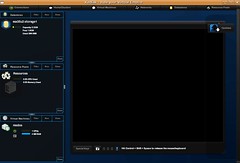
Is this tool worth checking out? I do think so, there’s not much you can do with it at this point but it’s got a nice “look and feel” that seems to be promissing for the future. Let’s hope these guys can incorporate some new functionality a.s.a.p. I think it will be really useful for the SMB’s out there that do not have a VirtualCenter server but do have more than 1 ESX(i) host. And the Linux/Mac users, although with the new VMware Workstation it’s possible to run the VirtualCenter client as a seamless app.
So for the bluebear people reading this, I would like to be able to edit VM config’s for starters and a couple of power on / power off / restart buttons at the top of the console would be handy.
Release notes:
Manual Installation for Windows
Download and install Adobe Air for Windows if you don’t already have it on your computer
Download the Kodiak Air Package
Locate the downloaded Air file and run it, the Air installer should automatically begin
Release Notes
Kodiak Beta 0.0.1 Release Notes:Thanks for downloading Kodiak! Kodiak is beta software, and no functionality is guaranteed, and is all subject to change.
We’ve really only validated functionality on Mac platforms. Our testing on Windows & Linux has been limited, but we haven’t encountered any problems. Your mileage may vary.
We’re completely interested in your feedback.
Here’s a quick idea of Kodiak usage, subject to change.
By default, Kodiak will open to a login screen. Enter your server address, your username/password, and off you go.
Kodiak will come up to a network map display, with a small server tab on the left-hand side of the screen. Double-clicking this tab will expand it into a list where you can view your VMs/Virtual switches/Resource Pools/Datastores, and for VMs, you’ll be able to power a VM on/off, and get to a console.
We added (today) a console dock on the right hand side where you can dock your consoles.
Kodiak’s map (in the background) is completely interactive, and will display resource usage information that’s updated on the fly. Click it, drag it, select it, poke it, launch consoles from it!
To use the map: Left click will select an individual VM. Left click + drag selects a group of VMs/hosts/networks Right Click + drag will pan the map around. Right Click + shift + drag will rotate the map in 3D.
To connect to a new server with kodiak, click the top-level “Connections” button that you see up in the upper-left hand corner, then click the “new” button you see there.
This will bring you to a new login screen. (FYI, Kodiak will keep track of your server names so you don’t have to type them in all the time.) Log in, and Kodiak will return your server into a new tab.
Currently, Kodiak WILL connect to a Virtual Center server, but we cannot guarantee that it will find all available hosts/VMs/resources.
If anyone wants an invite to the beta program than just drop your email here, or send me your email on duncan[@]yellow-bricks.com and I will hook you up. It’s still limited so be quick!
I’m all out. So you guys should help each other… over 60 invites within 24 hours. Bluebear is hot!