• Skip to primary navigation
  • Skip to main content
  • Skip to primary sidebar

Yellow Bricks

by Duncan Epping

  • Home
  • Unexplored Territory Podcast
  • HA Deepdive
  • ESXTOP
  • Stickers/Shirts
  • Privacy Policy
  • About
  • Show Search
Hide Search

Server

PXE Manager Fling blog series

Duncan Epping · Jul 11, 2011 ·

One of the upcoming blogs which I really enjoy reading is Arent Consulting by Tom Arentsen. I know Tom for a while as I have been involved with some of his projects and he really knows what he is talking about and is a nice guy. I just noticed his series of articles on the PXE Manager fling and felt that it deserved more attention than it has been getting so far.

PXE Manager is a great fling which enables enables ESXi host state (firmware) management and provisioning. It is probably my favorite fling and I most definitely recommend reading the following articles to get a better understanding of how it works and how it can help you migrating to ESXi or simplifying your ESXi environment!

  • PXE Manager Part 0 – Introduction
  • PXE Manager Part I – PXE Manager Installation
  • PXE Manager Part II – PXE Agent Installation
  • PXE Manager Part III – Configuration of PXE Manager
  • PXE Manager Part IV – Add a driver into the ESXi image (oem.tgz)
  • PXE Manager Part V – Add a Stateful ESXi Host
  • PXE Manager Part VI – How does it work

If you have some spare time on your hands, read the article and play around with the Fling.
Migrating your 32-bit vCenter Server to 64-bit

Duncan Epping · Jul 4, 2011 ·

I am working on a whitepaper about vCenter Server migrations and stumbled upon this great tool which is hidden away on the vCenter install media called “datamigration”. The data migration tool allows you to backup a vCenter Server configuration which is hosted by the MS SQL Express databases that is packaged with vCenter. Now this might seem like a limited scenario but I bet many people start out using the Express database that comes with vCenter using a 32-bit OS and found themselves more or less locked in. If you are still using 4.0 with a 32-bit platform, this is your way out. It is fairly straight forward if I may say so. The beauty of it all is that you can keep your current vCenter config, be it disabled… but you always have a roll back option might it be needed.

  • Build a new 64-bit vCenter Server
  • Download the vCenter zip or ISO
  • Go to the “datamigration” folder and copy/extract the datamigration.zip.
  • Copy the extracted content to your “source” vCenter Server
  • Stop the vCenter Service, Update Management Service and the vCenter Web Service
  • Run  “backup.bat” under the datamigration folder from a Command Prompt
    • One decision that you need to make is if you want to backup all Host patches as well, I prefer to just download them again
  • When the process has completed copy the full “datamigration” folder to your new vCenter server
  • Run  “install.bat” under the datamigration folder from a Command Prompt
    • It will display the name of the vCenter Server you are about to “restore”, validate it and type Y
    • Provide the path to the vCenter install files
    • Provide the path to the VUM install files (probably same as previous step)
    • Now just follow the normal installation process
    • You will see an installer popping up, note that in the Command Prompt window the databases will be restored etc.
    • Takes roughly 15 minutes depending on the amount of data
  • Start the vSphere Client… done,

Is that simple or what? I was kind of amazed by this to be honest, very simple and effective tool to migrate to a new 64-bit vCenter Server while keeping your Events, Tasks, Resource Pools etc… it is all there. Use it to your advantage,

vCenter Operations Enterprise 1.0.1

Duncan Epping · Jul 2, 2011 ·

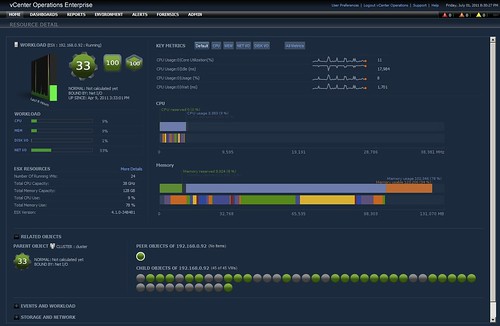
I just noticed  VC Ops Enterprise had an update, version 1.0.1 was just released. Although it is just a minor release and I more or less promised myself not to do articles about minor release or upgrades I do feel it is worth checking out. VC Ops is one of those tools that can make your life a lot easier when it comes to monitoring and pinpointing bottlenecks. Especially the new resource detail page (see screenshot below) is very useful. You can find the release notes here and you can download it here.

  • A new widget to display relationship and performance of objects in vSphere environment.
  • Introduction of resource detail page to show vSphere performance characteristics, Key Metrics, and Events.
  • Introduction of Analysis page to view performance of vSphere objects for a given metric via Heat map widget.
  • Enforcement of unique remote collector names.

Dell Firmware updates

Duncan Epping · Jun 27, 2011 ·

I was experiencing some issues with one of my Dell R610 servers. (Fans never spin down.) After doing some research I noticed people suggested it was due to bad firmware of iDRAC Express. So I figured why not update it, should be a simple process and something I should be able to do in a couple of minutes. After scavenging the Dell website for hours I literally found nothing useful. Yes I found a Windows update package but it won’t run, it craps out with an “this update package is not compatible…” error. So I figured why not try to download a bootable ISO that contains all the firmware for a Dell R610…. I was astonished that I couldn’t find it.

After another hour I figured out I needed to download the Dell Server Update Utility. I downloaded that and figured I could just boot it and update the firmware, well not quite yet. It appears you need to also download a Repository Manager. A what? I don’t want to manage a repository, I expect my hardware vendor to manage it and just offer an ISO which contains all firmware I could possibly need. But anyway, I decided to download the repository manager and just see what I could get done. So I created a repository for the R610 and figured it would be nice to have the Server Update Utility combined with the Patches. So I clicked export and figured it would start exporting, well not quite yet… Dell Repository Manager told me I needed to have a plugin, what the heck give me the plugin… 190MB for a plugin to create an ISO? Are you serious?? I needed to upgrade the system so I downloaded it. After waiting for a couple of minutes I finally managed to start exporting the ISO.

While I was waiting I figured I would boot up my second R610 and try to use the Unified Server Configurator that someone pointed out on twitter. This server was experiencing no issues so update would be fairly simple. I needed to enable System Services through iDRAC before I could use USC though, funny as USC doesn’t seem to use the iDrac network configuration etc. Why not make it part of the normal Bios? But anyway, I booted into USC by pressing F10 when the Dell logo popped up and configured the network. (Click Settings on the left and Network Settings on the right) Next go to “Platform Update” and click “Launch Platform Update”, select the FTP option and you are good to go… After a couple of minutes it asks you if you want to apply the updates, so you click “apply” and wait for a while… (progress bar anyone?) after waiting and waiting it came back with a nice error that my selected repository was corrupt. Yes indeed corrupt, but wasn’t I using the Dell ftp server? Same player shoot again, reboot, same procedure, apply, and waiting… waiting… waiting… I don’t know what I am waiting for, no progress bar or status updates it seems to have just frozen up. After 1.5hrs I gave up and pulled the power cable.

Lets get back to the server that had the issues… It didn’t allow me to use USC as iDRAC fails during boot and I need to enter the iDRAC bios to enable it. So as said I exported the ISO and burned it. It took a while but I finally succeeded. Now for some weird reason this DVD is not bootable, no you need to run it within Linux/Windows first. So I decided to install Windows, but only to find out that the iDRAC firmware update was not included. Weird as I did make sure to select every single component out there, but that is not enough apparently or is it because iDRAC is disabled and if that is the case, why not just tell me that?

Anyway, I had enough for today… after some random tweets about upgrading Dell firmware a Dell representative contacted me. Lets hope he can figure out what is happening and why, I will keep you up to date. If not, well then I will need to buy a couple of HP Servers instead I guess, or just use a whitebox as I don’t need all those components like iDRAC anyway. Before anyone asks, yes I was slightly frustrated when I wrote this.

5 is the magic number

Duncan Epping · Jun 22, 2011 ·

It is time to register for the event of the year and something I have personally been working on…

Raising the Bar, Part V

Date: Tuesday, July 12, 2011
Time: 9:00 AM (PT) | 12:00 PM (ET)

Please join VMware executives Paul Maritz, CEO and Steve Herrod, CTO for the unveiling of the next major step forward in Cloud infrastructure.  Paul & Steve’s 45 minute live webcast will be followed by additional online sessions where you can learn more about the industry’s most trusted virtualization and cloud infrastructure products and services. Join us and experience how the virtualization journey is helping transform IT and ushering in the era of Cloud Computing.

click here

There is not much I can reveal about it at the moment unfortunately. I do have a whole bunch of blog articles ready to be published around this time frame and it might just happen to be the day that Frank and I will publish our next book, but you will hear more about that soon as we are working against extremely aggressive timelines.

  • « Go to Previous Page
  • Page 1
  • Interim pages omitted …
  • Page 184
  • Page 185
  • Page 186
  • Page 187
  • Page 188
  • Interim pages omitted …
  • Page 336
  • Go to Next Page »

Primary Sidebar

About the Author

Duncan Epping is a Chief Technologist and Distinguished Engineering Architect at Broadcom. Besides writing on Yellow-Bricks, Duncan is the co-author of the vSAN Deep Dive and the vSphere Clustering Deep Dive book series. Duncan is also the host of the Unexplored Territory Podcast.

Follow Us

  • X
  • Spotify
  • RSS Feed
  • LinkedIn

Recommended Book(s)

Also visit!

For the Dutch-speaking audience, make sure to visit RunNerd.nl to follow my running adventure, read shoe/gear/race reviews, and more!

Do you like Hardcore-Punk music? Follow my Spotify Playlist!

Do you like 80s music? I got you covered!

Copyright Yellow-Bricks.com © 2026 · Log in