• Skip to primary navigation
  • Skip to main content
  • Skip to primary sidebar

Yellow Bricks

by Duncan Epping

  • Home
  • Unexplored Territory Podcast
  • HA Deepdive
  • ESXTOP
  • Stickers/Shirts
  • Privacy Policy
  • About
  • Show Search
Hide Search

Management & Automation

VI:OPS – Automating Network Setting Changes and DNS Updates on Recovery Site Using SRM

Duncan Epping · Apr 29, 2009 ·

I just received an email about an excellent article on VI:OPS. The article is titled “Automating Network Setting Changes and DNS Updates on Recovery Site Using VMware vCenter Site Recovery Manager“. It includes a PDF file which contains a description for configuring automatic IP-Changes but also includes batch files for DNS updates.

When performing site failover, IT administrators are often faced with challenges to deal with disparate networks on the recovery site:

  • Network properties of virtual machines need to be customized according to the network specification of the recovery site.
  • Domain Name Server (DNS) records pertaining to these virtual machines need to be updated.

VMware® vCenter Site Recovery Manager (SRM) enables customers to design automated recovery plans that incorporate all these necessary network property changes, relieving them of the repetitive and error-prone manual tasks.

This paper shows the mechanisms that SRM customers can use in order to automate these tasks related to network related changes.


Export and import DRS affinity rules

Duncan Epping · Apr 23, 2009 ·

I just noticed this awesome work by LucD. He developed two scripts which can import and export DRS affinity rules. Especially in large environments or environments that have multiple affinity rules this is an excellent solution. Take a look at the link above for more details. Luc posted the script half way down the topic in text but also added a modified version at the bottom. The VI Toolkit at it’s best… or should we call it PowerCLI these days?

Bluebear Kodiak, what’s up?

Duncan Epping · Apr 22, 2009 ·

I still receive a lot of beta invitation requests while it has been really quiet around Bluebear Kodiak over the last couple of months. (I did a (p)review a while back) I just received an email that a brand new version of the Kodiak beta is about to be released. I already received the Air file but haven’t been able to test it yet. But Matt Miller of Bluebear uploaded a demo video just which shows some of the new features and I must say it really looks slick.

If you are still looking for an invite, I received another 50 and it’s on a first come first serves base. Just click here for an invitation.

(update: the invites don’t seem to be working, I will ask Bluebear to fix it asap.)

VMware vSphere Health Check Report v1.0

Duncan Epping · Apr 22, 2009 ·

I already blogged about this awesome healthcheck script by William Lam a couple of times and it just has been updated to version 1.0. The following details have been added to the already extensive list:

  • New New licensing format/summary
  • New EVC Enabled information
  • New Cluster VM monitoring
  • New Cluster Host monitoring
  • New # of VMotions within a cluster
  • New Datastore uncommitted info
  • New CPU power management info
  • New VM info (FT, Record/Replay, Clean Poweroff)
  • New Host IPv6, FT, SSL Thumbprint
  • New Host Profiles
  • New vApp information
  • New Distributed vSwitch information

Check the detailed output example William uploaded recently.

Storage views, exploring the next version of ….

Duncan Epping · Apr 20, 2009 ·

I was playing around with vSphere this weekend while replying to topics on the VMTN Community. One of the things often asked is storage reporting… (Snapshot info / Disk utilization etc) With ESX 3.5 / vCenter 2.5 it needs to be scripted and can be integrated into vCenter by using custom fields, but as you can imagine not everyone would like to add custom functionality to vCenter.

As of the next version of ESX/vCenter aka vSphere you can just click the storage tab on a host or VM. The following is the storage tab of a VM, click the pic for a large version:

And of course the storage view on a host:

And of course the storage view on a host:

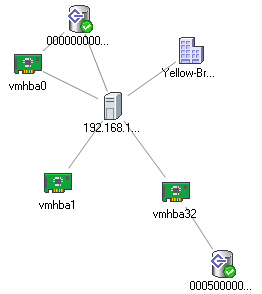
And what about the new map functionality, drilling down to HBA level

  • « Go to Previous Page
  • Page 1
  • Interim pages omitted …
  • Page 23
  • Page 24
  • Page 25
  • Page 26
  • Page 27
  • Interim pages omitted …
  • Page 44
  • Go to Next Page »

Primary Sidebar

About the Author

Duncan Epping is a Chief Technologist and Distinguished Engineering Architect at Broadcom. Besides writing on Yellow-Bricks, Duncan is the co-author of the vSAN Deep Dive and the vSphere Clustering Deep Dive book series. Duncan is also the host of the Unexplored Territory Podcast.

Follow Us

  • X
  • Spotify
  • RSS Feed
  • LinkedIn

Recommended Book(s)

Also visit!

For the Dutch-speaking audience, make sure to visit RunNerd.nl to follow my running adventure, read shoe/gear/race reviews, and more!

Do you like Hardcore-Punk music? Follow my Spotify Playlist!

Do you like 80s music? I got you covered!

Copyright Yellow-Bricks.com © 2026 · Log in