• Skip to primary navigation
  • Skip to main content
  • Skip to primary sidebar

Yellow Bricks

by Duncan Epping

  • Home
  • Unexplored Territory Podcast
  • HA Deepdive
  • ESXTOP
  • Stickers/Shirts
  • Privacy Policy
  • About
  • Show Search
Hide Search

Archives for 2009

HA admission control, the answers…

Duncan Epping · Nov 9, 2009 ·

I received a whole bunch of questions around my two latest posts on HA admission control. I added all the info to my HA Deepdive page but just in case you don’t regularly read that section I will post them here as well:

  1. The default of 256Mhz when no reservations are set is too conservative in my environment. What happens if you set a 100Mhz reservation?
    Nothing. The minimum value VMware HA uses to calculate with is 256Mhz. Keep in mind that this goes for slots and when using a percentage based admission control policy. Of course this can be overruled with an advanced setting (das.slotCpuInMHz) but I don’t recommend doing this.
  2. What happens if you have an unbalanced cluster and the largest host fails?
    If your admission control policy is based on amount of host failures VMware HA will take this into account. However, when you select a percentage this is not the case. You will need to make sure that you specify a percentage which is equal or preferably larger than the percentage of resources provided by the largest host in this cluster. Otherwise there’s a chance that VMware HA can’t restart all virtual machines.
  3. What would your recommendation be, reserve a specific percentage or set the amount of host failures VMware HA can tolerate?
    It depends. Yes I know, that is the obvious answer but it actually does. There are three options and each have it’s own advantages and disadvantages. Here you go:

    • Amount of host failures
      Pros: Fully automated, when a host is added to a cluster HA calculates how many slots are available.
      Cons: Can be very conservative and
      inflexible when reservations are used as the largest reservation dictates slot sizes.
    • Percentage reserved
      Pros: Flexible. Although reservations have its effect on the amount of available resources it impacts the environment less.
      Cons: Manual calculations need to  be done when adding additional hosts in a cluster. Unbalanced clusters can be a problem when chosen percentage is too low.
    • Designated failover host
      Pros: What you see is what you get.
      Cons: What you see is what you get.

How to avoid HA slot sizing issues with reservations?

Duncan Epping · Nov 6, 2009 ·

Can I avoid large HA slot sizes due to reservations without resorting to advanced settings? That’s the question I get almost daily. The answer used to be NO. HA uses reservations to calculate the slot size and there’s no way to tell HA to ignore them without using advanced settings pre-vSphere. So there is your answer: pre-vSphere.

With vSphere VMware introduced a percentage next to an amount of host failures. The percentage avoids the slot size issue as it does not use slots for admission control. So what does it use?

When you select a specific percentage that percentage of the total amount of resources will stay unused for HA purposes. First of all VMware HA will add up all available resources to see how much it has available. Then VMware HA will calculate how much resources are currently consumed by adding up all reservations of both memory and cpu for powered on virtual machines. For those virtual machines that do not have a reservation a default of 256Mhz will be used for CPU and a default of 0MB+memory overhead will be used for Memory. (Amount of overhead per config type can be found on page 28 of the resource management guide.)

In other words:

((total amount of available resources – total reserved VM resources)/total amount of available resources)
Where total reserved VM resources include the default reservation of 256Mhz and the memory overhead of the VM.

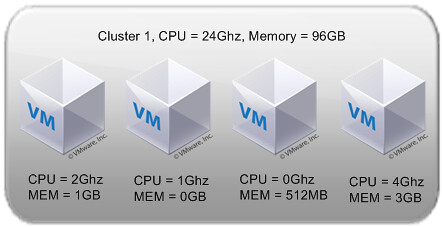
Let’s use a diagram to make it a bit more clear:

Total cluster resources are 24Ghz(CPU) and 96GB(MEM). This would lead to the following calculations:

((24Ghz-(2Gz+1Ghz+256Mhz+4Ghz))/24Ghz) = 69 % available
((96GB-(1,1GB+114MB+626MB+3,2GB)/96GB= 85 % available

As you can see the amount of memory differs from the diagram. Even if a reservation has been set the amount of memory overhead is added to the reservation. For both metrics HA admission control will constantly check if the policy has been violated or not. When one of either two thresholds are reached, memory or CPU, admission control will disallow powering on any additional virtual machines. Pretty simple huh?!

The uncrowned king of PowerCLI is Alan Renouf

Duncan Epping · Nov 5, 2009 ·

No, I am not exaggerating. Alan Renouf truly is the uncrowned king of PowerCLI. Although I’ve seen some amazing scripts from other people as well Alan always seems to bring that little extra to make him stand out. No this is not an Alan Renouf appreciation blog article, although he deserves one, this article is about his two latest additions.

The first one is the Virtu-Al VESI & PowerGui Powerpack. If you are like me, not a powercli hero, this is what you were looking for all along. Alan has bundled all his script into a Powerpack which enables you to import all his scripts at once and run them with a single click. All scripts are placed into categories which makes them easy to find. Not only can you use them you can also modify them to your needs. Of course if you do improve these scripts give some feedback to Alan so that he might be able to incorporate it into the Powerpack.

The second one is Version 3 of the daily report or vCheck as it is called as of v3. I wrote about version 1 and many people have downloaded it and are using it in their environment. The script just got better and a whole set of new features have been added. Alan was smart enough to ask around in the community what his report was lacking and incorporated all these tips in Version 3 of vCheck(previously known as the Daily Report). Again, if you feel there is anything missing don’t hesitate to leave a comment and ask Alan if he can add it… Here’s the list of new features:

  • Status report to screen whilst running interactively
  • At the top of the script you can now turn off any areas you do not want to report on (this makes it faster to run)
  • VMs on Local storage has been changed to report VMs stored on datastores attached to only one host
  • VM active alerts
  • Cluster Active Alerts
  • If HA Cluster is set to use host datastore for swapfile, check the host has a swapfile location set
  • Host active Alerts
  • Dead SCSI Luns
  • VMs with over x amount of vCPUs
  • vSphere check: Slot Sizes
  • vSphere check: Outdated VM Hardware (Less than V7)
  • VMs in Inconsistent folders (the name of the folder is not the same as the name)
  • Added the number of issues to each title line

Carter can you please hand over your crown to Alan?! Thanks,

VMTN Podcast number 71, vStorage API

Duncan Epping · Nov 4, 2009 ·

This weeks topic of the VMware Communities Roundtable was the vStorage API. It was most likely one of the most technical roundtables in months. Especially the part about the Virtual Disk Development Kit (aka VDDK) was educational! If you missed the episode you can download it here or subscribe to the podcast with iTunes here!

Here are the links that were dropped in the chat window for those who are interested:

  • VMware – vStorage API for dataprotection
  • Anton Gostev – What is VMware vStorage API?
  • Chad Sakac – So, what does vStorage really mean?
  • VMware – Virtual Disk Development Kit Documentation
  • VMware – VDDK FAQ
  • VMTN – Install VDDK on vMA
  • SNIA.org – Hypervisor Storage Interfaces for Storage Optimization White Paper DRAFT rev 0.5a

Document it…

Duncan Epping · Nov 4, 2009 ·

Something that I noticed over the last months while doing design reviews is that hardly anyone documents decisions in a design. Most designs I review are physical designs, which is understandable as most IT people are technical people who could not care less about logical designs. I am perfectly fine with that, although I do recommend taking a different approach, as long as you document why you are going down a specific path.

There can be specific constraints or requirements (both technical and business related) which justify your decision, but if you don’t document these constraints or requirements chances are someone will change the design based on a false assumption and who knows what it will lead to…

  • « Go to Previous Page
  • Page 1
  • Interim pages omitted …
  • Page 9
  • Page 10
  • Page 11
  • Page 12
  • Page 13
  • Interim pages omitted …
  • Page 85
  • Go to Next Page »

Primary Sidebar

About the Author

Duncan Epping is a Chief Technologist and Distinguished Engineering Architect at Broadcom. Besides writing on Yellow-Bricks, Duncan is the co-author of the vSAN Deep Dive and the vSphere Clustering Deep Dive book series. Duncan is also the host of the Unexplored Territory Podcast.

Follow Us

  • X
  • Spotify
  • RSS Feed
  • LinkedIn

Recommended Book(s)

Also visit!

For the Dutch-speaking audience, make sure to visit RunNerd.nl to follow my running adventure, read shoe/gear/race reviews, and more!

Do you like Hardcore-Punk music? Follow my Spotify Playlist!

Do you like 80s music? I got you covered!

Copyright Yellow-Bricks.com © 2026 · Log in