I had this question this week, what if I am using vSphere Data Protection (VDP) and my vCenter Server appliance (VCVA) crashes… well lets just test it.
I just killed my vCenter Server appliance and deleted if from disk. Next step is to get a brand new vCenter Server appliance up and running. So I deploy a brand new VCVA first. As I have pointed my vSphere Client directly to a host I will need to login to the commandline to configure my networking, you can use vami_config_net but also Yast.
/opt/vmware/share/vami/vami_config_net
Next I go through the regular setup and configuration steps. Create a Datacenter and a Cluster and add some hosts. Now I see my VDP appliance again in my inventory… but I don’t see those nice shiny VDP icons. So how do I get those back? Well that is simple, just register the appliance to the new vCenter Server:
- Point your browser to the VDP configuration web page
https://<ip address or name of vdp appliance>:8543/vdp-configure/ - Click on the “configuration” tab
- Click on the lock to unlock the config
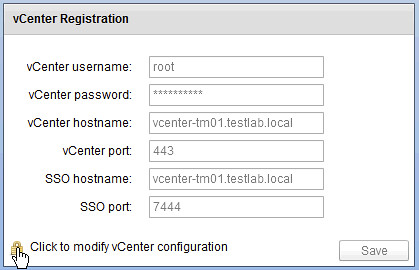
- Now enter your appliance password
- Provide the new vCenter Server details (in my case they are the same as the old so I just provide the password of the vCenter Server appliance)
- Reboot the VDP appliance
- Reboot the vCenter Server appliance
Now open up the Web Client and …
- Click the “vSphere Data Protection” option in the left pane of your Web Client
- If you see the “Not Connected” status, click “Connect”
- That is it… now you can restore VMs again
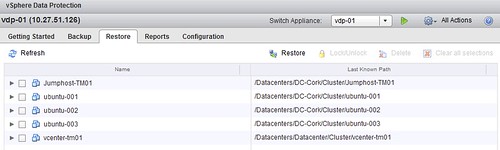
That is amazingly simple!
Duncan, what if it is the VCVA that crash, can VDP or the old VDR help. I had a crash on the old 5.0 with the old DB2 /storage/db database 20GB partition became full. I tried to rescue it by booting with gparted and increase the partition but the vpxd really won’t start. I started with a fresh one and the only trouble I had was the distributed switch, so I revert them all to standard. My question is what would you have done? Could VDR or VDP offer any help on that scenario?
Hello Dincan!
What i can do if my vcenter working… or better to say worked ;))))) on Windows 2008 Server R2 VM?
Could you give any advice?
Thank you
Kris
One more time… my pure english, sory.
Of coure Duncan… and of course “What can i do…”
Not sure I understand the question to be honest…
The question is.. what if the VM you need to restore is your vCenter VM. Specifically in my case, not a vCenter appliance but a Windows Server 2008 R2 VM running vCenter.
This VM has been protected with VDP backups but how do I restore the backup if I cannot get into my vCenter web interface?
Regards,
Matthew
Found the following:
You should be able to recover the vSphere backup from the VDP appliance even if your vSphere server is down:
Boot the VDP appliance on a new host
Wait for it to complete booting
Login in via SSH
Go to the /mnt/axion//VirtualMachines folder
You’ll find folders containing the backups for each machine, including the VDP appliance; enable SSH access on your new host and scp the files over to the correct datastore.
Browse the datastore on the new host and import the VM from there
source: http://communities.vmware.com/message/2117716
Just wondering. I have a MultiSite SSO and Linked Mode for multiple vCenters. In that situation, if one of the vCenters crashes, then I’m thinking that I might just need to re-register the vDP with one of the other vCenters. Has anyone tried that?
Hi Duncan
I have the same requirement,a slightly different is that my vcenter is install on a windows 2008 r2. My new vcenter has the same IP/name. after reinstall the windows 2008 and the vcenter . I login into vdp-configure page. and change the password. it shows.”Your VDP Appliance does not appear to reside in the vCenter you have selected. Please address this discrepancy before attempting to switch vCenters.”
Could you give me some advice? thenak you very much.
Contact VMware support. I have seen this in the past, not sure what caused it to be honest.
Hi Duncan
Thanks.anyway.
I actually had done this 2 or 3 times in the past and though vDP 5.5 connected to a new vCenter successfully each time, all the backup jobs started in new threads. And although I can see all these threads in the vSphere Web Client>vDP Restore tab, I can’t see any restore points before the last crash in the FLR URL to mount or restore any individual files. Has anyone come across this or know the solution please?